

<!DOCTYPE html>
<html>

<head>
    <meta charset="utf-8" />
    <title></title>
    <style type="text/css">
        #f {
            font-size: 50px;
            font-family: 幼圆;
        }

        #btn {
            width: 50px;
            height: 30px;
            opacity: 0.5;
            background-color: palegoldenrod;
        }

        #btn:hover {
            background-color: burlywood;
            opacity: 1;
        }

        .fonts {
            line-height: 200px;
            float: right;
            font-family: 幼圆;
            font-size: 20px;
        }

        .fontss {
            line-height: 200px;
            font-size: 30px;
            text-align: center;
            font-family: 幼圆;
        }

        .fontsss {
            line-height: 200px;
            font-size: 30px;
            font-family: 幼圆;
        }

        .trs:hover {
            background-color: steelblue;
        }

        .a {
            float: left;
            text-align: center;
            line-height: 20px;
        }

        #wind {
            width: 100px;
            height: 50px;
        }

        #last-delete {
            width: 60px;
            height: 40px;
        }

        #num {
            color: red;
        }

        #main-num {
            color: red;
        }

        .delete-btn:hover {
            background-color: brown;
        }

        .divbtn {
            width: 25px;
            height: 17px;
            background-color: lightsteelblue;
        }

        .minus {
            font-weight: bold;
            font-size: 12px;
            text-align: center;
        }

        .add {
            font-weight: bold;
            font-size: 12px;
            text-align: cente
        }

        #wind:hover {
            background-color: seagreen;
        }

        .delete-btn {
            height: 100px;
            width: 90px;
            opacity: 1;
        }

        .td {
            position: relative;
        }

        .foodsbtn {
            background-color: lightsteelblue;
        }

        #aaa {
            font-size: 60px;
            font-family: 幼圆;
            text-align: center;
        }
    </style>
</head>

<body bgcolor="#B0C4DE">

    <button id="btn">返回</button>
    <center>
        <div id="as">
            <p id="aaa">◾购物车◾</p>

        </div>


        <div id="fater">
            <table border="1">

                <tr bgcolor="steelblue">
                    <th><input type="checkbox" class="checkall">全选</th>
                    <th width="600 px" height="30px">商品</th>
                    <th width="200px" height="30px">单价</th>
                    <th width="250px" height="30px">数量</th>
                    <th width="100px" height="30px">小计</th>
                    <th width="100px" height="30px">操作</th>


                    <tr class="trs">
                        <td><input type="checkbox" class=" foodsbtn"></td>
                        <td width="600px" height="260px" valign="center "><img src="img/伍六七.png" width="400px" height=100%>
                            <p class="fonts">特价伍六七</p>
                        </td>
                        <td width="200px" height="260px">
                            <p class="fontss">99</p>
                        </td>
                        <td width="250px" height="260px">
                            <center><span class="minus" style="cursor:pointer">➖</span><input type="text" class="divbtn" value="1" /><span class="add" style="cursor:pointer" value="1">➕</span></center>
                        </td>
                        <td width="100px" height="260px">
                            <p class="fontsss">0</p>
                        </td>
                        <td width="100px" height="260px">
                            <p class="fontsss"><button class="delete-btn">删除</button></p>
                        </td>
                    </tr>


                    <tr class="trs">
                        <td><input type="checkbox" class="foodsbtn"></td>
                        <td width="600px" height="260px"><img src="img/姜主任.png" width="400px" height=100%>
                            <p class="fonts">新品姜主任</p>
                        </td>
                        <td width="200px" height="260px">
                            <p class="fontss">599</p>
                        </td>
                        <td width="250px" height="260px">
                            <center><span class="minus" style="cursor:pointer">➖</span><input type="text" class="divbtn" value="1" /><span class="add" style="cursor:pointer">➕</span></center>

                        </td>
                        <td width="100px" height="260px">
                            <p class="fontsss">0</p>
                        </td>
                        <td width="100px" height="260px">
                            <p class="fontsss"><button class="delete-btn">删除</button></p>
                        </td>
                    </tr>


                    <tr class="trs">
                        <td><input type="checkbox" class="foodsbtn"></td>
                        <td width="600px" height="260px"><img src="img/梅花十三1.png" width="400px" height=100%>
                            <p class="fonts">特价梅花十三</p>
                        </td>
                        <td width="200px" height="260px">
                            <p class="fontss">199</p>
                        </td>
                        <td width="250px" height="260px">

                            <center><span class="minus" style="cursor:pointer">➖</span><input type="text" class="divbtn" value="1" /><span class="add" style="cursor:pointer">➕</span></center>
                        </td>
                        <td width="100px" height="260px">
                            <p class="fontsss">0</p>
                        </td>
                        <td width="100px" height="260px">
                            <p class="fontsss"><button class="delete-btn">删除</button></p>
                        </td>
                    </tr>


                    <tr class="trs">
                        <td><input type="checkbox" class="foodsbtn"></td>
                        <td width="600px" height="260px"><img src="img/梅花十三2.png" width="400px" height=100%>
                            <p class="fonts">正品梅花十三</p>
                        </td>
                        <td width="200px" height="260px">
                            <p class="fontss">699</p>
                        </td>
                        <td width="250px" height="260px">

                            <center><span class="minus" style="cursor:pointer">➖</span><input type="text" class="divbtn" value="1" /><span class="add" style="cursor:pointer"> ➕</span></center>
                        </td>
                        <td width="100px" height="260px">
                            <p class="fontsss">0</p>
                        </td>
                        <td width="100px" height="260px">
                            <p class="fontsss"><button class="delete-btn">删除</button></p>
                        </td>
                    </tr>


                    <table>
                        <tr bgcolor="steelblue">
                            <th width="10px" height="50px">
                                <input type="checkbox" class="checkall">
                            </th>
                            <th width="50x" height="50px">
                                <p id="a">全选</p>
                            </th>
                            <th width="850px" height="20px">
                                <button id="last-delete4">删除</button>
                            </th>
                            <th width="200px" height="50px">
                                已选商品<span id="num">0</span>件<button id="other"></button>
                            </th>
                            <th width="100px" height="50px">
                                合计:<span id="main-num">0</span>元
                            </th>
                            <th width="100px" height="50px">
                                <button id="wind">结算</button>
                            </th>
                        </tr>
                    </table>


            </table>
        </div>

    </center>


    <script type="text/javascript">
        //全选
        var checkall = document.querySelectorAll(".checkall");
        var foodsbtn = document.querySelectorAll(".foodsbtn");
        //首先历遍两次for循环,第一次i=1是对各全选第二次i=2是第二个全选,然后判断input的状态(onchange函数的意思是改变input是所触发大的函数。点击input也是改变input)
        //如果点击input执行函数,经历第一次历遍foodsbtn长度的函数,定义每一个单选按钮,让他们的的单击状态跟这个按钮一样,就是定义onchange的按钮(也就是最外层的函数)
        //在经历第二次历遍,历遍的是两个全选按钮,让这两个按钮的点击状态跟最外层函数的点击状态一样
        //判断点击状态,开始经历两次for函数的历遍第一次是全部单选按钮跟最外层的函数点击状态一样,第一次历遍是历遍两个全选按钮,让他跟这个按钮的点击状态一样
        for (var i = 0; i < checkall.length; i++) {
            checkall[i].onchange = //this指的是这个
                function() {
                    for (var i = 0; i < foodsbtn.length; i++) {
                        foodsbtn[i].checked = this.checked;
                    }
                    for (var i = 0; i < checkall.length; i++) {
                        checkall[i].checked = this.checked; //this指的是
                    }
                    totalprice(); //?????????????????????
                }

        }
        //设置每个按钮的事件,上面的是设置全选按钮的事件
        //设置每个单选按钮是否全部选中,全部选中触发全选按钮
        for (var i = 0; i < foodsbtn.length; i++) {
            foodsbtn[i].onchange = function() { //给每个按钮分发点击事件,点击每个按钮的时候都要判断一下sum是否等于foodbtn。length
                var sum = 0;
                for (var i = 0; i < foodsbtn.length; i++) { //判断单选按钮的点击次数
                    if (foodsbtn[i].checked) {
                        sum++;
                    }

                }
                for (var i = 0; i < checkall.length; i++) {
                    checkall[i].checked = sum == foodsbtn.length; //判断单选按钮的点击个数是否等于foodbtn。length
                }
                totalprice() //当每个单选按钮点击的时候计算总价和总件数
            }
        }


        //计算总价的函数。这里会多次运用这个函数,随意把他封装起来
        var num = document.querySelector("#num")
        var divbtn = document.querySelectorAll(".divbtn");
        var fontss = document.querySelectorAll(".fontss");
        var main = document.querySelector("#main-num");

        function totalprice() {
            var sum = 0;
            var piece = 0;
            for (var i = 0; i < foodsbtn.length; i++) {
                if (foodsbtn[i].checked) {
                    piece = piece + Number(divbtn[i].value);
                    sum = sum + Number(fontss[i].innerHTML);
                }
            }
            num.innerHTML = piece;
            main.innerHTML = sum;

        }
        //设置高级按钮

        var add = document.querySelectorAll(".add");
        var minus = document.querySelectorAll(".minus");
        for (var i = 0; i < add.length; i++) {
            add[i].value = i;

            add[i].onclick = function() {
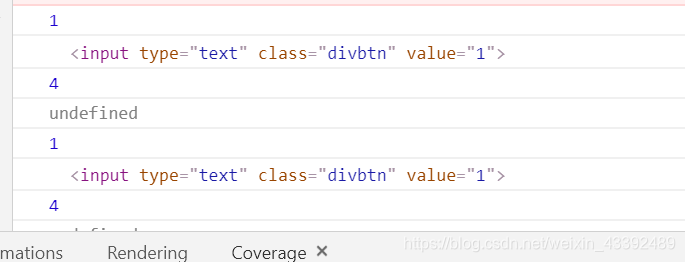
                console.log(this.value);
                console.log(divbtn[this.value]);
                console.log(i);
                console.log(divbtn[i]);
                var x = divbtn[this.value].value;
                x++;
                divbtn[this.value].value = x;
                totalprice()

            }

        }
        for (var i = 0; i < minus.length; i++) {
            minus[i].value = i;
            minus[i].onclick = function() {
                var x = divbtn[this.value].value;
                if (x < 1) {
                    x = 0
                } else {
                    x--;
                    divbtn[this.value].value = x;
                    totalprice()
                }
            }

        }
    </script>
</body>

</html>
运行结果

 浙公网安备 33010602011771号