

vue3: tmap (腾讯地图)using typescript
项目结构:
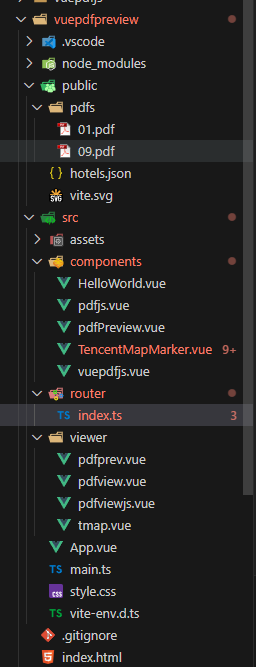
<!--
 *                   ___====-_  _-====___
 *             _--^^^#####//      \\#####^^^--_
 *          _-^##########// (    ) \\##########^-_
 *         -############//  |\^^/|  \\############-
 *       _/############//   (@::@)   \############\_
 *      /#############((     \\//     ))#############\
 *     -###############\\    (oo)    //###############-
 *    -#################\\  / VV \  //#################-
 *   -###################\\/      \//###################-
 *  _#/|##########/\######(   /\   )######/\##########|\#_
 *  |/ |#/\#/\#/\/  \#/\##\  |  |  /##/\#/  \/\#/\#/\#| \|
 *  `  |/  V  V  `   V  \#\| |  | |/#/  V   '  V  V  \|  '
 *     `   `  `      `   / | |  | | \   '      '  '   '
 *                      (  | |  | |  )
 *                     __\ | |  | | /__
 *                    (vvv(VVV)(VVV)vvv)
 *
 *      ~~~~~~~~~~~~~~~~~~~~~~~~~~~~~~~~~~~~~~~~~~~
 *
 *                神兽保佑            永无BUG
 *
 * @Author: geovindu
 * @Date: 2025-05-26 14:23:15
 * @LastEditors: geovindu
 * @LastEditTime: 2025-05-26 14:29:48
 * @FilePath: \vue\vuepdfpreview\src\viewer\tmap.vue
 * @Description: geovindu
 * @lib,packpage:
 *
 * @IDE: vscode
 * @jslib: node 20 vue.js 3.0
 * @OS: windows10
 * @database: mysql 8.0  sql server 2019 postgreSQL 16
 * Copyright (c) geovindu 2025 by geovindu@163.com, All Rights Reserved.
 -->

<template>
    <div id="app">
      <h1>深圳酒店地图(腾讯版)</h1>
      <div v-if="loading" class="loading-message">加载中...</div>
      <div v-else-if="error" class="error-message">
        加载失败: {{ error.message }}
      </div>
      <TencentMapMarker v-else :hotels="hotels" :ak="tencentMapAK" />
    </div>
  </template>

  <script lang="ts" setup>
  import { ref, onMounted } from 'vue';
  import TencentMapMarker from '../components/TencentMapMarker.vue';

  // 腾讯地图API密钥(需要替换为你自己的)
  const tencentMapAK = ref('your key');
  const hotels = ref<any[]>([]);
  const loading = ref(true);
  const error = ref<Error | null>(null);

  // 从JSON文件加载酒店数据
  const loadHotelData = async () => {
    try {
      const response = await fetch('hotels.json');
      if (!response.ok) {
        throw new Error(`HTTP错误! 状态码: ${response.status}`);
      }
      const data = await response.json();
      hotels.value = data;
      console.log('酒店数据加载成功:', data);
    } catch (err: any) {
      console.error('加载酒店数据失败:', err);
      error.value = err;
    } finally {
      loading.value = false;
    }
  };

  onMounted(() => {
    loadHotelData();
  });
  </script>

  <style>
  #app {
    font-family: Avenir, Helvetica, Arial, sans-serif;
    -webkit-font-smoothing: antialiased;
    -moz-osx-font-smoothing: grayscale;
    text-align: center;
    color: #2c3e50;
    margin-top: 60px;
    padding: 0 20px;
  }

  h1 {
    color: #333;
  }

  .loading-message, .error-message {
    padding: 20px;
    margin: 20px;
    background-color: #f5f5f5;
    border-radius: 8px;
  }

  .error-message {
    color: #f56c6c;
  }
  </style>
<!--
 *                   ___====-_  _-====___
 *             _--^^^#####//      \\#####^^^--_
 *          _-^##########// (    ) \\##########^-_
 *         -############//  |\^^/|  \\############-
 *       _/############//   (@::@)   \############\_
 *      /#############((     \\//     ))#############\
 *     -###############\\    (oo)    //###############-
 *    -#################\\  / VV \  //#################-
 *   -###################\\/      \//###################-
 *  _#/|##########/\######(   /\   )######/\##########|\#_
 *  |/ |#/\#/\#/\/  \#/\##\  |  |  /##/\#/  \/\#/\#/\#| \|
 *  `  |/  V  V  `   V  \#\| |  | |/#/  V   '  V  V  \|  '
 *     `   `  `      `   / | |  | | \   '      '  '   '
 *                      (  | |  | |  )
 *                     __\ | |  | | /__
 *                    (vvv(VVV)(VVV)vvv)
 *
 *      ~~~~~~~~~~~~~~~~~~~~~~~~~~~~~~~~~~~~~~~~~~~
 *
 *                神兽保佑            永无BUG
 *
 * @Author: geovindu
 * @Date: 2025-05-26 14:23:15
 * @LastEditors: geovindu
 * @LastEditTime: 2025-05-29 17:38:46
 * @FilePath: \vue\vuepdfpreview\src\components\TencentMapMarker.vue
 * @Description: geovindu
 * @lib,packpage:
 *
 * @IDE: vscode
 * @jslib: node 20 vue.js 3.0
 * @OS: windows10
 * @database: mysql 8.0  sql server 2019 postgreSQL 16
 * Copyright (c) geovindu 2025 by geovindu@163.com, All Rights Reserved.
 -->
<template>
  <div class="map-container" ref="mapContainer" style="height: 600px;"></div>
</template>

<script lang="ts" setup>
import { ref, onMounted, onUnmounted, watch, defineComponent } from 'vue';

interface Hotel {
  name: string;
  content: string;
  center: string;
  type: number;
  icon: string;
}

const props = defineProps<{
  hotels: Hotel[];
  ak: string;
}>();

const mapContainer = ref<HTMLElement | null>(null);
let map: TMap.Map | null = null;
let markerLayer: TMap.MultiMarker | null = null;
let infoWindow: TMap.InfoWindow | null = null;
let currentHotel = ref<Hotel | null>(null);

// 加载腾讯地图API
const loadTMapScript = (ak: string) => {
  return new Promise<void>((resolve, reject) => {
    if (window.TMap) {
      resolve();
      return;
    }

    const script = document.createElement('script');
    script.src = `https://map.qq.com/api/gljs?v=1.0&key=${ak}`;
    script.async = true;
    script.onload = () => {
      if (window.TMap) {
        resolve();
      } else {
        reject(new Error('腾讯地图API加载失败,但脚本已加载'));
      }
    };
    script.onerror = (err) => reject(new Error('加载腾讯地图API失败,请检查网络连接或API密钥'));
    document.head.appendChild(script);
  });
};

// 初始化地图
const initMap = async () => {
  if (!mapContainer.value || !props.ak) {
    console.error('地图容器或API密钥未设置');
    return;
  }

  try {
    await loadTMapScript(props.ak);

    map = new TMap.Map(mapContainer.value, {
      center: new TMap.LatLng(22.543099, 114.057868),
      zoom: 12
    });

    // 创建信息窗口(不关联map,在显示时动态关联)
    infoWindow = new TMap.InfoWindow({
      enableCustom: true,
      map: map,
      position: new TMap.LatLng(39.984104, 116.307503),
      offset: { y: -70, x: -5 }
    });

    initMarkerLayer();
    console.log('腾讯地图初始化完成');
  } catch (error: any) {
    console.error('地图初始化失败:', error.message);
  }
};

// 初始化标记图层
const initMarkerLayer = () => {
  if (!map) return;

  markerLayer = new TMap.MultiMarker({
    id: 'hotel-markers',
    map: map,
    styles: {
      'hotel-marker': new TMap.MarkerStyle({
        width: 32,
        height: 32,
        anchor: { x: 16, y: 32 },
        src: 'https://mapapi.qq.com/web/lbs/javascriptGL/demo/img/markerDefault.png'
      })
    },
    geometries: []
  });

  // 标记点击事件
  markerLayer.on('click', (event) => {
    const geometry = event.geometry;
    if (!geometry || !geometry.position || !(geometry.position instanceof TMap.LatLng)) {
      console.error('无效的标记位置:', geometry);
      return;
    }

    if (infoWindow) {
      //console.log('信息窗口是否打开:', infoWindow.isOpen());
      //infoWindow.open();
      // 更新当前酒店数据
      currentHotel.value = {
        name: geometry.properties?.name || '酒店信息',
        content: geometry.properties?.content || '暂无描述',
        center: '',
        type: 0,
        icon: ''
      };

      // 创建唯一ID的DOM容器
      const containerId = 'info-window-content-' + Date.now();
      const container = document.createElement('div');
      container.id = containerId;
      document.body.appendChild(container);

      // 设置信息窗口内容
      infoWindow.setContent(`
        <div class="info_card">
          <div class="title">
            <span class="title_name">${currentHotel.value.name}</span>
            <button class="close_btn" id="close-btn-${containerId}">×</button>
          </div>
          <div class="content">${currentHotel.value.content}</div>
        </div>
      `);

      // 使用 setTimeout 确保DOM已渲染
      /* */
      setTimeout(() => {
        // 添加关闭按钮事件监听
        const closeBtn = document.getElementById(`close-btn-${containerId}`);
        if (closeBtn) {
          closeBtn.addEventListener('click', () => {
            if (infoWindow) infoWindow.close();
          });
        }

        // 关联地图并显示
        infoWindow.setMap(map);
        infoWindow.setPosition(geometry.position);
        infoWindow.open();
      }, 0);
    }
  });

  updateMarkers();
};

// 更新标记
const updateMarkers = () => {
  if (!markerLayer || !props.hotels || props.hotels.length === 0) return;

  const geometries = props.hotels.map((hotel, index) => {
    try {
      const [lng, lat] = hotel.center.split(',').map(Number);
      return {
        id: `hotel-${index}`,
        styleId: 'hotel-marker',
        position: new TMap.LatLng(lat, lng),
        properties: {
          name: hotel.name,
          content: hotel.content,
          type: hotel.type
        }
      };
    } catch (e) {
      console.error(`酒店数据解析错误 (${hotel.name}):`, e);
      return null;
    }
  }).filter(Boolean) as TMap.MultiMarkerGeometry[];

  markerLayer.setGeometries(geometries);
};

onMounted(() => {
  initMap();
});

watch(() => props.hotels, () => {
  if (markerLayer) updateMarkers();
});

onUnmounted(() => {
  if (infoWindow) {
    infoWindow.close();
    infoWindow.setMap(null);
  }
  if (markerLayer) markerLayer.setMap(null);
  if (map) {
    map.destroy();
    map = null;
  }
  markerLayer = null;
  infoWindow = null;
});
</script>

<style scoped>
.map-container {
  width: 100%;
  height: 100%;
}

/* 信息窗口样式 */
.info_card {
  width: 240px;
  background-color: white;
  border-radius: 8px;
  box-shadow: 0 2px 10px rgba(0, 0, 0, 0.15);
  overflow: hidden;
  font-family: Arial, sans-serif;
}

.title {
  height: 36px;
  line-height: 36px;
  background-color: #f5f5f5;
  padding: 0 12px;
  position: relative;
}

.title_name {
  font-weight: bold;
  color: #333;
  font-size: 15px;
}

.close_btn {
  position: absolute;
  right: 10px;
  top: 8px;
  width: 20px;
  height: 20px;
  background: none;
  border: none;
  font-size: 18px;
  color: #999;
  cursor: pointer;
  padding: 0;
}

.close_btn:hover {
  color: #333;
}

.content {
  padding: 12px;
  font-size: 14px;
  color: #666;
  line-height: 1.5;
}
</style>
/*
 *
 *    ┏┓   ┏┓
 *  ┏┛┻━━━┛┻┓
 *  ┃       ┃
 *  ┃   ━   ┃
 *  ┃ >   < ┃
 *  ┃       ┃
 *  ┃... ⌒ ... ┃
 *  ┃       ┃
 *  ┗━┓   ┏━┛
 *      ┃   ┃
 *      ┃   ┃
 *      ┃   ┃
 *      ┃   ┃  神兽保佑
 *      ┃   ┃  代码无bug
 *      ┃   ┃
 *      ┃   ┗━━━┓
 *      ┃       ┣┓
 *      ┃       ┏┛
 *      ┗┓┓┏━┳┓┏┛
 *        ┃┫┫ ┃┫┫
 *        ┗┻┛ ┗┻┛
 *
 * @Author: geovindu
 * @Date: 2025-05-26 12:03:18
 * @LastEditors: geovindu
 * @LastEditTime: 2025-05-29 17:44:28
 * @FilePath: \vue\vuepdfpreview\src\router\index.ts
 * @Description: geovindu
 * @lib,packpage:
 *
 * @IDE: vscode
 * @jslib: node 20 vue.js 3.0
 * @OS: windows10
 * @database: mysql 8.0  sql server 2019 postgreSQL 16
 * Copyright (c) geovindu 2025 by geovindu@163.com, All Rights Reserved.
 */


import { createRouter, createWebHistory} from 'vue-router';
import App from '../App.vue';
// 正确导入路由类型
import type { RouteRecordRaw } from 'vue-router';
import pdfview from '../viewer/pdfview.vue';
import pdfviewjs from '../viewer/pdfviewjs.vue';
import pdfviewprev from '../viewer/pdfprev.vue';
import tmap from '../viewer/tmap.vue';

const routes: RouteRecordRaw[] = [
  {
    path: '/',
    name: 'Home',
    component: App
  },
  {
    path: '/pdf',
    name: 'pdf',
    component: pdfview
  },
  {
    path: '/pdfjs',
    name: 'pdfjs',
    component: pdfviewjs
  }
  ,
  {
    path: '/pdfprev',
    name: 'pdfprev',
    component: pdfviewprev
  },
  {
    path: '/tmap',
    name: 'tmap',
    component: tmap
  }
  // 添加其他路由
];

const router = createRouter({
  history: createWebHistory(),
  routes
});

export default router;
<!--
 *                   江城子 . 程序员之歌
 *
 *               十年生死两茫茫,写程序,到天亮。
 *                   千行代码,Bug何处藏。
 *               纵使上线又怎样,朝令改,夕断肠。
 *
 *               领导每天新想法,天天改,日日忙。
 *                   相顾无言,惟有泪千行。
 *               每晚灯火阑珊处,夜难寐,加班狂。
 *
 *
 * @Author: geovindu
 * @Date: 2025-05-09 10:54:24
 * @LastEditors: geovindu
 * @LastEditTime: 2025-05-26 14:20:41
 * @FilePath: \vue\vuepdfpreview\src\App.vue
 * @Description: geovindu
 * @lib,packpage:
 *
 * @IDE: vscode
 * @jslib: node 20 vue.js 3.0
 * @OS: windows10
 * @database: mysql 8.0  sql server 2019 postgreSQL 16
 * Copyright (c) geovindu 2025 by geovindu@163.com, All Rights Reserved.
 -->

<!--
 *                                |~~~~~~~|
 *                                |       |
 *                                |       |
 *                                |       |
 *                                |       |
 *                                |       |
 *     |~.\\\_\~~~~~~~~~~~~~~xx~~~         ~~~~~~~~~~~~~~~~~~~~~/_//;~|
 *     |  \  o \_         ,XXXXX),                         _..-~ o /  |
 *     |    ~~\  ~-.     XXXXX`)))),                 _.--~~   .-~~~   |
 *      ~~~~~~~`\   ~\~~~XXX' _/ ';))     |~~~~~~..-~     _.-~ ~~~~~~~
 *               `\   ~~--`_\~\, ;;;\)__.---.~~~      _.-~
 *                 ~-.       `:;;/;; \          _..-~~
 *                    ~-._      `''        /-~-~
 *                        `\              /  /
 *                          |         ,   | |
 *                           |  '        /  |
 *                            \/;          |
 *                             ;;          |
 *                             `;   .       |
 *                             |~~~-----.....|
 *                            | \             \
 *                           | /\~~--...__    |
 *                           (|  `\       __-\|
 *                           ||    \_   /~    |
 *                           |)     \~-'      |
 *                            |      | \      '
 *                            |      |  \    :
 *                             \     |  |    |
 *                              |    )  (    )
 *                               \  /;  /\  |
 *                               |    |/   |
 *                               |    |   |
 *                                \  .'  ||
 *                                |  |  | |
 *                                (  | |  |
 *                                |   \ \ |
 *                                || o `.)|
 *                                |`\\) |
 *                                |       |
 *                                |       |
 *
 * @Author: geovindu
 * @Date: 2025-05-09 10:54:24
 * @LastEditors: geovindu
 * @LastEditTime: 2025-05-09 14:55:13
 * @FilePath: \vue\vuepdfpreview\src\App.vue
 * @Description: geovindu
 * @lib,packpage:
 * npm install vue-pdf-embed
 * npm install vue3-pdfjs
 *  npm install pdfjs-dist@2.16.105
 * @IDE: vscode
 * @jslib: node 20 vue.js 3.0
 * @OS: windows10
 * @database: mysql 8.0  sql server 2019 postgreSQL 16
 * Copyright (c) geovindu 2025 by geovindu@163.com, All Rights Reserved.
 -->


<template>
   <header>
    <div class="wrapper">
<div class="pdf-container">
<nav>
  <RouterLink to="/">home</RouterLink>
  <RouterLink to="/pdf">pdf</RouterLink>
  <RouterLink to="/pdfjs">pdfjs</RouterLink>
  <RouterLink to="/pdfprev">pdfprev</RouterLink>
  <RouterLink to="/tmap">tmap</RouterLink>
</nav>

<RouterView />
 </div>
</div>
</header>
 </template>
 <script setup lang="ts">

 import { RouterLink, RouterView } from 'vue-router'

 //import HelloWorld from './components/HelloWorld.vue'

 //import PDFView from './components/vuepdfjs.vue' // 可以
 //import PDFView from './components/pdfPreview.vue' // 可以
 //import PDFView from "./components/pdfjs.vue"   //可以
 //import pdfUrl from "./pdfs/01.pdf"
 //const pdfUrl = "./pdfs/09.pdf"
 </script>

<style scoped>
.logo {
  height: 6em;
  padding: 1.5em;
  will-change: filter;
  transition: filter 300ms;
}
.logo:hover {
  filter: drop-shadow(0 0 2em #646cffaa);
}
.logo.vue:hover {
  filter: drop-shadow(0 0 2em #42b883aa);
}
</style>
/*
 *  ┌───┐   ┌───┬───┬───┬───┐ ┌───┬───┬───┬───┐ ┌───┬───┬───┬───┐ ┌───┬───┬───┐
 *  │Esc│   │ F1│ F2│ F3│ F4│ │ F5│ F6│ F7│ F8│ │ F9│F10│F11│F12│ │P/S│S L│P/B│  ┌┐    ┌┐    ┌┐
 *  └───┘   └───┴───┴───┴───┘ └───┴───┴───┴───┘ └───┴───┴───┴───┘ └───┴───┴───┘  └┘    └┘    └┘
 *  ┌───┬───┬───┬───┬───┬───┬───┬───┬───┬───┬───┬───┬───┬───────┐ ┌───┬───┬───┐ ┌───┬───┬───┬───┐
 *  │~ `│! 1│@ 2│# 3│$ 4│% 5│^ 6│& 7│* 8│( 9│) 0│_ -│+ =│ BacSp │ │Ins│Hom│PUp│ │N L│ / │ * │ - │
 *  ├───┴─┬─┴─┬─┴─┬─┴─┬─┴─┬─┴─┬─┴─┬─┴─┬─┴─┬─┴─┬─┴─┬─┴─┬─┴─┬─────┤ ├───┼───┼───┤ ├───┼───┼───┼───┤
 *  │ Tab │ Q │ W │ E │ R │ T │ Y │ U │ I │ O │ P │{ [│} ]│ | \ │ │Del│End│PDn│ │ 7 │ 8 │ 9 │   │
 *  ├─────┴┬──┴┬──┴┬──┴┬──┴┬──┴┬──┴┬──┴┬──┴┬──┴┬──┴┬──┴┬──┴─────┤ └───┴───┴───┘ ├───┼───┼───┤ + │
 *  │ Caps │ A │ S │ D │ F │ G │ H │ J │ K │ L │: ;│" '│ Enter  │               │ 4 │ 5 │ 6 │   │
 *  ├──────┴─┬─┴─┬─┴─┬─┴─┬─┴─┬─┴─┬─┴─┬─┴─┬─┴─┬─┴─┬─┴─┬─┴────────┤     ┌───┐     ├───┼───┼───┼───┤
 *  │ Shift  │ Z │ X │ C │ V │ B │ N │ M │< ,│> .│? /│  Shift   │     │ ↑ │     │ 1 │ 2 │ 3 │   │
 *  ├─────┬──┴─┬─┴──┬┴───┴───┴───┴───┴───┴──┬┴───┼───┴┬────┬────┤ ┌───┼───┼───┐ ├───┴───┼───┤ E││
 *  │ Ctrl│    │Alt │         Space         │ Alt│    │    │Ctrl│ │ ← │ ↓ │ → │ │   0   │ . │←─┘│
 *  └─────┴────┴────┴───────────────────────┴────┴────┴────┴────┘ └───┴───┴───┘ └───────┴───┴───┘
 *
 * @Author: geovindu
 * @Date: 2025-05-12 09:52:10
 * @LastEditors: geovindu
 * @LastEditTime: 2025-05-12 17:12:18
 * @FilePath: \vue\vuepdfpreview\src\main.ts
 * @Description: geovindu
 * @lib,packpage:
 *
 * @IDE: vscode
 * @jslib: node 20 vue.js 3.0
 * @OS: windows10
 * @database: mysql 8.0  sql server 2019 postgreSQL 16
 * Copyright (c) geovindu 2025 by geovindu@163.com, All Rights Reserved.
*/

import { createApp } from 'vue'
import router from './router'; // 导入路由配置
import VuePdfEmbed from "vue-pdf-embed"
import { createLoadingTask } from "vue3-pdfjs"
import './style.css'
import App from './App.vue'

createApp(App)
.use(router) // 使用路由
.mount('#app')

https://lbs.qq.com/webDemoCenter/glAPI/glMarker/markerAdd
https://lbs.qq.com/webDemoCenter/glAPI/glServiceLib/ipLocation
地图api地址:
v1:
https://wemap.qq.com/Vis/JavascriptAPI/APIDoc/map
v2:
https://lbs.qq.com/webApi/javascriptV2/jsGuide/jsOverview
同样是v2的:
https://lbs.qq.com/javascript_v2/doc/map.html
哲学管理(学)人生, 文学艺术生活, 自动(计算机学)物理(学)工作, 生物(学)化学逆境, 历史(学)测绘(学)时间, 经济(学)数学金钱(理财), 心理(学)医学情绪, 诗词美容情感, 美学建筑(学)家园, 解构建构(分析)整合学习, 智商情商(IQ、EQ)运筹(学)生存.---Geovin Du(涂聚文)

 浙公网安备 33010602011771号