

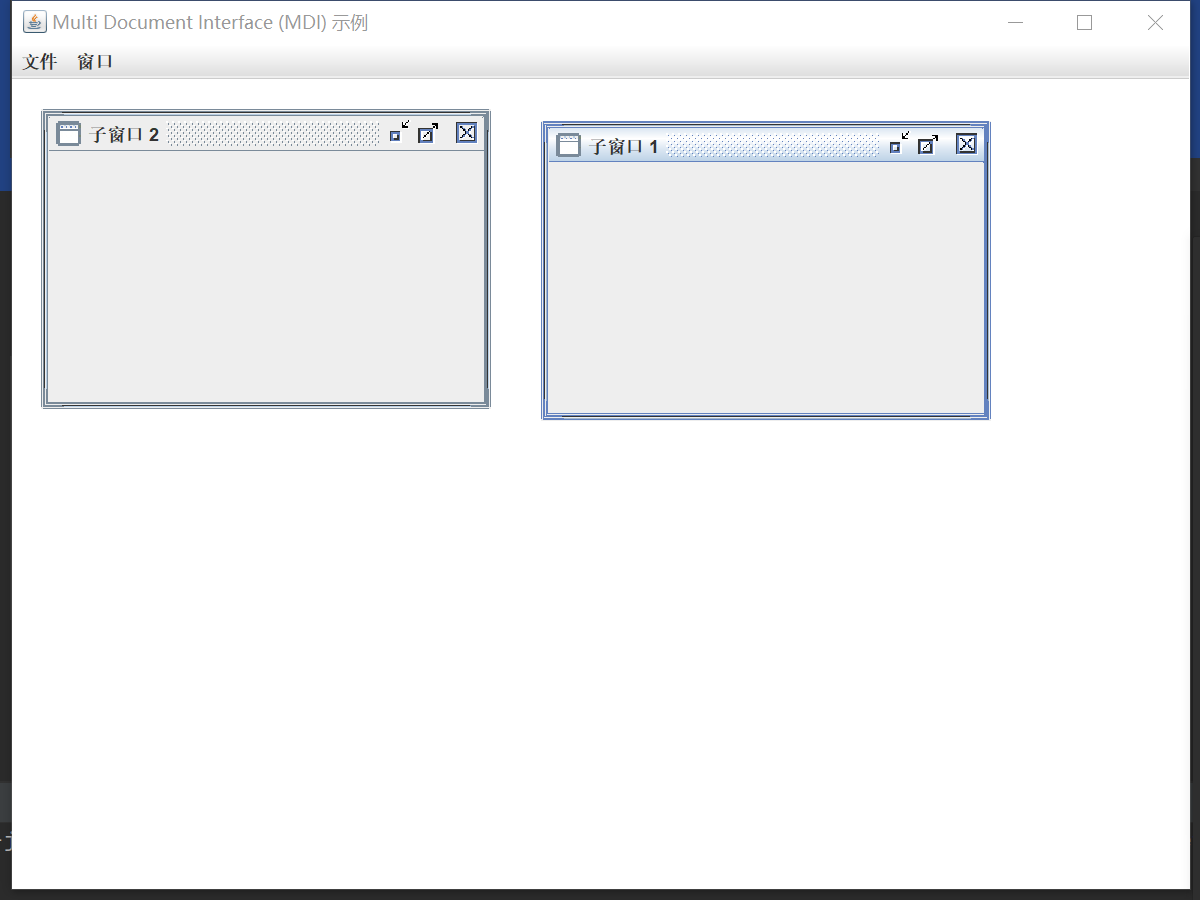
java: swing 写一个简单的Multi Document Interface (MDI)
/**
 * encoding: utf-8
 * 版权所有 2025 涂聚文有限公司
 * 许可信息查看:言語成了邀功盡責的功臣,還需要行爲每日來值班嗎
 * 描述:
 * # Author    : geovindu,Geovin Du 涂聚文.
 * # IDE       : IntelliJ IDEA 2023.1 Java 17
 * # Datetime  : 2025 - 2025/2/8 - 22:36
 * # User      : geovindu
 * # Product   : IntelliJ IDEA
 * # Project   : javaWeather
 * # File      : MDIApplication.java  类
 * # explain   : 学习
 **/

package UI;
import javax.swing.*;
import java.awt.event.ActionEvent;
import java.awt.event.ActionListener;

/**
 *主窗口:
 */
public class MDIApplication extends JFrame {

    /**
     * 用于承载子窗口的桌面面板
     */
    private JDesktopPane desktopPane; //

    /**
     * 设置窗口
     */
    public MDIApplication() {

        // 设置窗口标题
        setTitle("Multi Document Interface (MDI) 示例");
        setSize(800, 600); // 设置窗口大小
        setDefaultCloseOperation(JFrame.EXIT_ON_CLOSE); // 关闭窗口时退出程序
        setLocationRelativeTo(null); // 窗口居中

        // 创建桌面面板
        desktopPane = new JDesktopPane();
        setContentPane(desktopPane);

        // 创建菜单栏
        createMenuBar();

        // 显示窗口
        setVisible(true);
    }

    /**
     * 创建菜单栏
     */
    private void createMenuBar() {
        JMenuBar menuBar = new JMenuBar();

        // 文件菜单
        JMenu fileMenu = new JMenu("文件");
        JMenuItem newWindowItem = new JMenuItem("新建子窗口");
        JMenuItem exitItem = new JMenuItem("退出");

        // 新建子窗口菜单项的事件监听器
        newWindowItem.addActionListener(new ActionListener() {
            @Override
            public void actionPerformed(ActionEvent e) {
                createInternalFrame();
            }
        });

        // 退出菜单项的事件监听器
        exitItem.addActionListener(new ActionListener() {
            @Override
            public void actionPerformed(ActionEvent e) {
                System.exit(0);
            }
        });

        fileMenu.add(newWindowItem);
        fileMenu.addSeparator(); // 添加分隔线
        fileMenu.add(exitItem);

        // 窗口菜单
        JMenu windowMenu = new JMenu("窗口");
        JMenuItem cascadeItem = new JMenuItem("层叠");
        JMenuItem tileItem = new JMenuItem("平铺");

        // 层叠子窗口菜单项的事件监听器
        cascadeItem.addActionListener(new ActionListener() {
            @Override
            public void actionPerformed(ActionEvent e) {
                cascadeInternalFrames();
            }
        });

        // 平铺子窗口菜单项的事件监听器
        tileItem.addActionListener(new ActionListener() {
            @Override
            public void actionPerformed(ActionEvent e) {
                tileInternalFrames();
            }
        });

        windowMenu.add(cascadeItem);
        windowMenu.add(tileItem);

        // 将菜单添加到菜单栏
        menuBar.add(fileMenu);
        menuBar.add(windowMenu);

        // 设置菜单栏
        setJMenuBar(menuBar);
    }

    /**
     * 创建子窗口
     */
    private void createInternalFrame() {
        JInternalFrame internalFrame = new JInternalFrame("子窗口 " + (desktopPane.getAllFrames().length + 1),
                true, true, true, true);
        internalFrame.setSize(300, 200);
        internalFrame.setLocation(desktopPane.getAllFrames().length * 20, desktopPane.getAllFrames().length * 20);
        internalFrame.setVisible(true);

        // 将子窗口添加到桌面面板
        desktopPane.add(internalFrame);
    }

    /**
     * 层叠子窗口
     */
    private void cascadeInternalFrames() {
        JInternalFrame[] frames = desktopPane.getAllFrames();
        int x = 0;
        int y = 0;
        for (JInternalFrame frame : frames) {
            frame.setLocation(x, y);
            x += 20;
            y += 20;
        }
    }

    /**
     * 平铺子窗口
     */
    private void tileInternalFrames() {
        JInternalFrame[] frames = desktopPane.getAllFrames();
        if (frames.length == 0) return;

        int rows = (int) Math.sqrt(frames.length);
        int cols = (int) Math.ceil((double) frames.length / rows);
        int width = desktopPane.getWidth() / cols;
        int height = desktopPane.getHeight() / rows;

        int x = 0;
        int y = 0;
        for (JInternalFrame frame : frames) {
            frame.setSize(width, height);
            frame.setLocation(x, y);
            x += width;
            if (x >= desktopPane.getWidth()) {
                x = 0;
                y += height;
            }
        }
    }

}
调用:
import UI.MDIApplication;;
import java.awt.*;
import javax.swing.*;


public class Main {
    public static void main(String[] args) {


        // 在事件调度线程中创建和显示 GUI
        SwingUtilities.invokeLater(new Runnable() {
            @Override
            public void run() {
                //new TextSaverGUI();
                new MDIApplication();
            }
        });
}
}
哲学管理(学)人生, 文学艺术生活, 自动(计算机学)物理(学)工作, 生物(学)化学逆境, 历史(学)测绘(学)时间, 经济(学)数学金钱(理财), 心理(学)医学情绪, 诗词美容情感, 美学建筑(学)家园, 解构建构(分析)整合学习, 智商情商(IQ、EQ)运筹(学)生存.---Geovin Du(涂聚文)

 浙公网安备 33010602011771号