


asp.net每天积累一点点(10)
这里说一下GridView里面如何应用超链接。
有两个页面用于这个操作,一个用于显示超链接,一个用于显示链接到的页面。
下面的代码是显示链接按钮的页面:
 链接在GridView里的应用

<form id="form1" runat="server">
<div>
<asp:SqlDataSource ID="ds" runat="server" ConnectionString="server=.;database=students;trusted_connection=true"
SelectCommandType="Text" SelectCommand="select * from student"></asp:SqlDataSource>
<asp:GridView ID="gv" runat="server" DataSourceID="ds" AutoGenerateColumns="false">
<Columns>
<asp:HyperLinkField DataTextField="studentno" DataTextFormatString="[{0}]"
DataNavigateUrlFields="studentno,chinese"
DataNavigateUrlFormatString="~/Default8.aspx?studentno={0}&chinese={1}" Target="_top"
/>
<asp:BoundField HeaderText="语文" DataField="chinese" />
<asp:BoundField HeaderText="数学" DataField="mathematics" />
<asp:BoundField HeaderText="英语" DataField="english" />
</Columns>
</asp:GridView>
</div>
</form>
<div>
<asp:SqlDataSource ID="ds" runat="server" ConnectionString="server=.;database=students;trusted_connection=true"
SelectCommandType="Text" SelectCommand="select * from student"></asp:SqlDataSource>
<asp:GridView ID="gv" runat="server" DataSourceID="ds" AutoGenerateColumns="false">
<Columns>
<asp:HyperLinkField DataTextField="studentno" DataTextFormatString="[{0}]"
DataNavigateUrlFields="studentno,chinese"
DataNavigateUrlFormatString="~/Default8.aspx?studentno={0}&chinese={1}" Target="_top"
/>
<asp:BoundField HeaderText="语文" DataField="chinese" />
<asp:BoundField HeaderText="数学" DataField="mathematics" />
<asp:BoundField HeaderText="英语" DataField="english" />
</Columns>
</asp:GridView>
</div>
</form>
---------------------------
重点在于:
设置链接按钮显示的内容:DataTextField="studentno"
设置链接按钮显示的内容的样式DataTextFormatString="[{0}]"
设置链接按钮超链接字符串的参数列表DataNavigateUrlFields="studentno,chinese"
设置链接按钮超链接字符串
DataNavigateUrlFormatString="~/Default8.aspx?studentno={0}&chinese={1}" Target="_top"
---------------------------
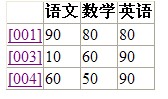
效果如图:
---------------------------
下面介绍链接打开的页面:
链接打开的页面
<body>
<script runat="server">
Sub Page_Load(ByVal obj As Object, ByVal e As EventArgs) Handles Me.Load
Response.Write("学号:" & Request.QueryString("studentno") & "<br/>")
Response.Write("语文成绩:" & Request.QueryString("chinese") & "<br/>")
End Sub
</script>
<form id="form1" runat="server">
<div>
<asp:SqlDataSource ID="ds" runat="server" ConnectionString="server=.;database=students;trusted_connection=true"
SelectCommandType="Text" SelectCommand="select * from student where studentno=@studentno">
<SelectParameters>
<asp:QueryStringParameter Name="studentno" QueryStringField="studentno" />
</SelectParameters>
</asp:SqlDataSource>
<asp:GridView ID="gv" runat="server" DataSourceID="ds" AutoGenerateColumns="true"></asp:GridView>
</div>
</form>
</body>
<script runat="server">
Sub Page_Load(ByVal obj As Object, ByVal e As EventArgs) Handles Me.Load
Response.Write("学号:" & Request.QueryString("studentno") & "<br/>")
Response.Write("语文成绩:" & Request.QueryString("chinese") & "<br/>")
End Sub
</script>
<form id="form1" runat="server">
<div>
<asp:SqlDataSource ID="ds" runat="server" ConnectionString="server=.;database=students;trusted_connection=true"
SelectCommandType="Text" SelectCommand="select * from student where studentno=@studentno">
<SelectParameters>
<asp:QueryStringParameter Name="studentno" QueryStringField="studentno" />
</SelectParameters>
</asp:SqlDataSource>
<asp:GridView ID="gv" runat="server" DataSourceID="ds" AutoGenerateColumns="true"></asp:GridView>
</div>
</form>
</body>
-------------------------
重点在于:
设置这个页面的数据源为传入的参数
------------------------
下面是效果图:


 浙公网安备 33010602011771号