


asp.net每天积累一点点(3)
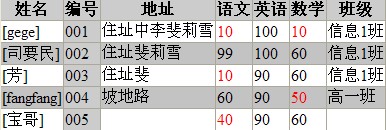
在前面的页面有可以看到有些分数是不及格的
为了提升用户体验,可以高亮显示出这些不及格的科目
------------------------------------------
下面是如何高亮显示出不及格科目的代码:
 高亮显示出不及格的科目

<script runat="server">
Sub CheckPass(ByVal obj As Object, ByVal e As GridViewRowEventArgs)
If e.Row.RowIndex >= 0 Then
Dim index As Integer = 3
For index = 3 To e.Row.Cells.Count - 2
If CInt(e.Row.Cells(index).Text.ToString()) < 60 Then
e.Row.Cells(index).Text = "<font color='red'>" + e.Row.Cells(index).Text + "</font>"
End If
Next
End If
End Sub
</script>
<asp:SqlDataSource ID="source1" runat="server" ConnectionString="server=.;database=Students;trusted_connection=true"
SelectCommand="select * from Student" SelectCommandType="Text" ></asp:SqlDataSource>
<asp:GridView ID="gv2" runat="server" DataSourceID="source1" AlternatingRowStyle-BackColor="#c3c3c3"
AutoGenerateColumns="false" HeaderStyle-BackColor="#cccccc" OnRowDataBound="CheckPass" Visible="false">
<Columns>
<asp:BoundField HeaderText="姓名" DataField="name" DataFormatString="[{0}]" />
<asp:BoundField HeaderText="编号" DataField="studentno" ItemStyle-BackColor="#cccccc" />
<asp:BoundField HeaderText="地址" DataField="addrass" />
<asp:BoundField HeaderText="语文" DataField="chinese" />
<asp:BoundField HeaderText="英语" DataField="english" />
<asp:BoundField HeaderText="数学" DataField="mathematics" />
<asp:BoundField HeaderText="班级" DataField="class" />
</Columns>
Sub CheckPass(ByVal obj As Object, ByVal e As GridViewRowEventArgs)
If e.Row.RowIndex >= 0 Then
Dim index As Integer = 3
For index = 3 To e.Row.Cells.Count - 2
If CInt(e.Row.Cells(index).Text.ToString()) < 60 Then
e.Row.Cells(index).Text = "<font color='red'>" + e.Row.Cells(index).Text + "</font>"
End If
Next
End If
End Sub
</script>
<asp:SqlDataSource ID="source1" runat="server" ConnectionString="server=.;database=Students;trusted_connection=true"
SelectCommand="select * from Student" SelectCommandType="Text" ></asp:SqlDataSource>
<asp:GridView ID="gv2" runat="server" DataSourceID="source1" AlternatingRowStyle-BackColor="#c3c3c3"
AutoGenerateColumns="false" HeaderStyle-BackColor="#cccccc" OnRowDataBound="CheckPass" Visible="false">
<Columns>
<asp:BoundField HeaderText="姓名" DataField="name" DataFormatString="[{0}]" />
<asp:BoundField HeaderText="编号" DataField="studentno" ItemStyle-BackColor="#cccccc" />
<asp:BoundField HeaderText="地址" DataField="addrass" />
<asp:BoundField HeaderText="语文" DataField="chinese" />
<asp:BoundField HeaderText="英语" DataField="english" />
<asp:BoundField HeaderText="数学" DataField="mathematics" />
<asp:BoundField HeaderText="班级" DataField="class" />
</Columns>
---------------------------------------
重点在于:
为GridView添加数据行绑定处理过程OnRowDataBound="CheckPass"对每一个行绑定后都用这个过程来检查
在处理过程中针对每一个数据行的三个表示分数的列的值进行判断 如果小于60就把它的内容替换成
"<font color='red'>" + e.Row.Cells(index).Text + "</font>"
这样到数据绑定完毕就完成了对加载数据的格式处理操作
------------------------------------------
结果如图所示:

 浙公网安备 33010602011771号