
MyBatis框架(自定义接口)
Mybatis使用流程(自定义接口)
1. 引入mybatis.jar和mysql-connector.jar包
先创建项目,然后引入jar包,方便接下来的操作
2. XML 配置文件书写
XML位置:在src目录下,与其他包平齐
XML配置文件作用:包含MyBatis 系统的核心设置,包括获取数据库连接实例的数据源(DataSource)以及决定事务作用域和控制方式的事务管理器(TransactionManager)
<?xml version="1.0" encoding="UTF-8" ?>
<!DOCTYPE configuration
  PUBLIC "-//mybatis.org//DTD Config 3.0//EN"
  "https://mybatis.org/dtd/mybatis-3-config.dtd">
<configuration>
	<!-- 配置MyBatis运行环境-->
  <environments default="development">
    <environment id="development">
		<!-- 配置JDBC事务管理-->
      <transactionManager type="JDBC"/>
      <!-- 用POOLED配置JDBC数据源连接池-->
      <dataSource type="POOLED">
		  <!-- 取到JDBC的连接-->
        <property name="driver" value="com.mysql.cj.jdbc.Driver"/>
    	<!-- 连接数据库,geek是我的数据库名称-->
        <property name="url" value="jdbc:mysql://localhost:3306/geek"/>
    	<!-- 连接数据库,root是我的数据库服务账号-->
        <property name="username" value="root"/>
        <property name="password" value="数据库密码"/>
      </dataSource>
    </environment>
  </environments>

    <!-- 配置mapper映射文件,用'/'的目的是因为最有一个文件有xml后缀,方便区分文件和目录-->
  <mappers>
    <mapper resource="com/geek/mapper/AccountMapper.xml"/>
  </mappers>

</configuration>
3. 创建数据库表
information

4. 创建数据类
Account
import java.util.Objects;

public class Account {
	private int id;
	private String username;
	private String password;
	private int age;

	public Account() {
	}

	public Account(int id, String username, String password, int age) {
		this.id = id;
		this.username = username;
		this.password = password;
		this.age = age;
	}

	public int getId() {
		return id;
	}

	public void setId(int id) {
		this.id = id;
	}

	public String getUsername() {
		return username;
	}

	public void setUsername(String username) {
		this.username = username;
	}

	public String getPassword() {
		return password;
	}

	public void setPassword(String password) {
		this.password = password;
	}

	public int getAge() {
		return age;
	}

	public void setAge(int age) {
		this.age = age;
	}

	@Override
	public String toString() {
		return "Account [id=" + id + ", username=" + username + ", password=" + password + ", age=" + age + "]";
	}

	@Override
	public int hashCode() {
		return Objects.hash(age, id, password, username);
	}

	@Override
	public boolean equals(Object obj) {
		if (this == obj)
			return true;
		if (obj == null)
			return false;
		if (getClass() != obj.getClass())
			return false;
		Account other = (Account) obj;
		return age == other.age && id == other.id && Objects.equals(password, other.password)
				&& Objects.equals(username, other.username);
	}

}
5. 创建映射关系
AccountMapper.xml
<?xml version="1.0" encoding="UTF-8" ?>
<!DOCTYPE mapper
  PUBLIC "-//mybatis.org//DTD Mapper 3.0//EN"
  "https://mybatis.org/dtd/mybatis-3-mapper.dtd">
<!-- namespace是自定义接口的全名称-->
<mapper namespace="com.geek.custom.IAccountMapper">

    <!-- id是下面接口里面对应的方法名-->
  <insert id="save">
    insert into information(username,password,age) values(#{username},#{password},#{age})
  </insert>

  <select id="findAll">
	  select * from information
  </select>

  <select id="findById">
	  select * from information where id = #{id}
  </select>

</mapper>
6.创建对应的接口
import java.util.List;

import com.geek.mybatis.Account;

public interface IAccountMapper {
	public int save(Account account);
	public Account findById(int id);
	public List<Account> findAll();
}
7. 写测试函数
import java.io.InputStream;
import java.util.List;


import org.apache.ibatis.session.SqlSession;
import org.apache.ibatis.session.SqlSessionFactory;
import org.apache.ibatis.session.SqlSessionFactoryBuilder;

import com.geek.custom.IAccountMapper;
import com.geek.mybatis.Account;

public class Test {

	public static void main(String[] args) {
			//固定模式获取sqlSession
			InputStream inputStream = Test.class.getClassLoader().getResourceAsStream("config.xml");
			SqlSessionFactory sqlSessionFactory = new SqlSessionFactoryBuilder().build(inputStream);
			SqlSession sqlSession = sqlSessionFactory.openSession();

			//获取接口的代理对象
			IAccountMapper iAccountMapper = sqlSession.getMapper(IAccountMapper.class);
        	//执行接口里面的方法
			List<Account> list = iAccountMapper.findAll();
        	//关闭sqlSession
			sqlSession.close();
        	//输出结果
			for(Account i : list) {
				System.out.println(i);
			}

	}

}
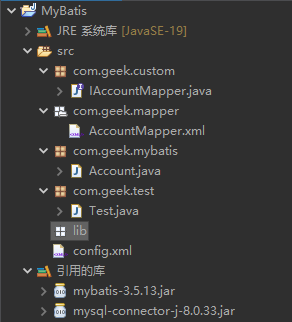
8. 结构图

 浙公网安备 33010602011771号