关于Dom的resize监听
MutationObserver兼容性比ResizeObserver要好,考虑兼容性,选择了MutationObserver
1. MutationObserver
兼容性:
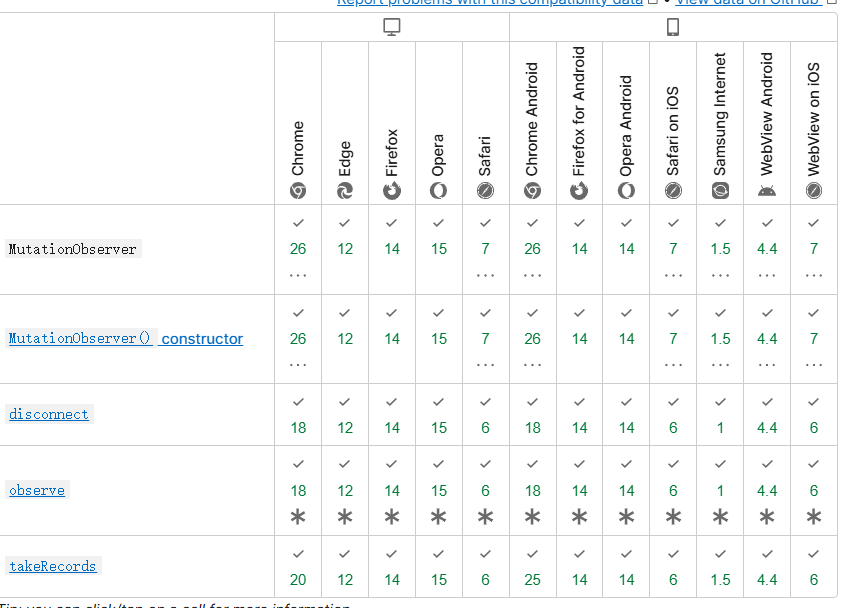
查看Api文档网址: https://developer.mozilla.org/zh-CN/docs/Web/API/MutationObserver
示例代码:
// 选择需要观察变动的节点
const targetNode = document.getElementById("some-id");

// 观察器的配置(需要观察什么变动)
const config = { attributes: true, childList: true, subtree: true };

// 当观察到变动时执行的回调函数
const callback = function (mutationsList, observer) {
  // Use traditional 'for loops' for IE 11
  for (let mutation of mutationsList) {
    if (mutation.type === "childList") {
      console.log("A child node has been added or removed.");
    } else if (mutation.type === "attributes") {
      console.log("The " + mutation.attributeName + " attribute was modified.");
    }
  }
};

// 创建一个观察器实例并传入回调函数
const observer = new MutationObserver(callback);

// 以上述配置开始观察目标节点
observer.observe(targetNode, config);

// 之后,可停止观察
observer.disconnect();
代码演示: https://codepen.io/webgeeker/full/YjrZgg/
2.ResizeObserver
兼容性:
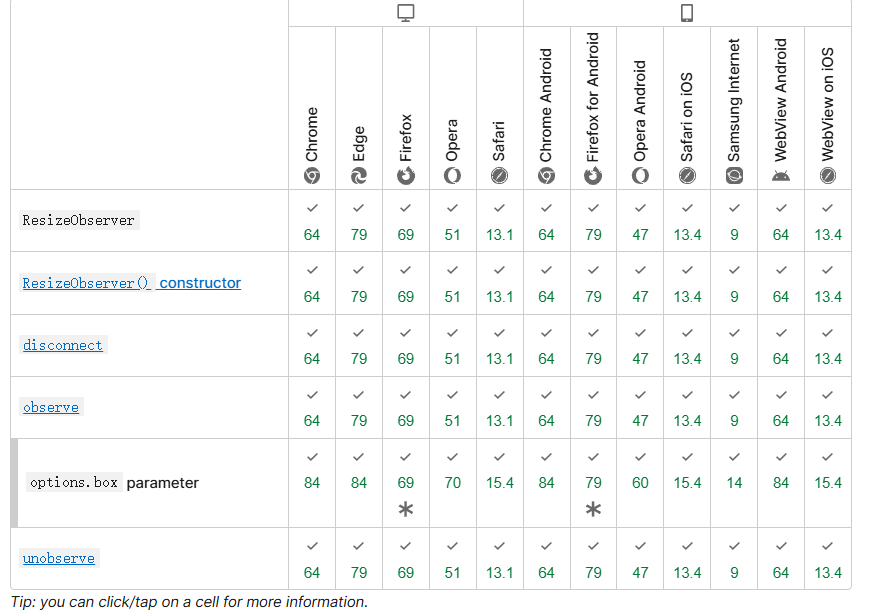
查看Api文档网址: https://developer.mozilla.org/zh-CN/docs/Web/API/ResizeObserver
示例:https://mdn.github.io/dom-examples/resize-observer/resize-observer-text.html
html示例代码:
    <meta charset="utf-8">
    <title>Resize observer text test</title>
    <style>
      html {
        height: 100%;
        font-family: 'helvetica neue', arial, sans-serif;
      }

      body {
        height: inherit;
        margin: 0;
        display: flex;
        justify-content: center;
        align-items: center;
      }

      body > div {
        background-color: #eee;
        border: 1px solid #ccc;
        padding: 20px;
        width: 50%;
        min-width: 320px;
      }

      h1 {
        margin: 0;
      }

      p {
        line-height: 1.5;
      }

      form {
        width: 100%;
      }

      form > div {
        display: flex;
      }

      form label {
        flex: 2;
      }

      form input {
        flex: 3;
      }

      input[type="checkbox"] {
        height: 2rem;
      }
    </style>
  </head>
  <body>
    <div style="width: 775px;">
      <h1 style="font-size: 3.875rem;">So what happened?</h1>
      <p style="font-size: 1.29167rem;">And remember, don't do anything that affects anything, unless it turns out you were supposed to, in which case, for the love of God, don't not do it! Ow, my spirit! I don't want to be rescued. You guys aren't Santa! You're not even robots. I've got to find a way to escape the horrible ravages of youth. Suddenly, I'm going to the bathroom like clockwork, every three hours. And those jerks at Social Security stopped sending me checks. Now 'I' have to pay 'them'!</p>
      <form>
        <div><label>Observer enabled:</label><input type="checkbox" checked=""></div>
        <div><label>Adjust width:</label><input type="range" value="600" min="300" max="1300"></div>
      </form>
    </div>
    <script>
      if(window.ResizeObserver) {
        const h1Elem = document.querySelector('h1');
        const pElem = document.querySelector('p');
        const divElem = document.querySelector('body > div');
        const slider = document.querySelector('input[type="range"]');
        const checkbox = document.querySelector('input[type="checkbox"]');

        divElem.style.width = '600px';

        slider.addEventListener('input', () => {
          divElem.style.width = slider.value + 'px';
        })

        const resizeObserver = new ResizeObserver(entries => {
          for (let entry of entries) {
            if(entry.contentBoxSize) {
              // The standard makes contentBoxSize an array...
              if (entry.contentBoxSize[0]) {
                h1Elem.style.fontSize = Math.max(1.5, entry.contentBoxSize[0].inlineSize/200) + 'rem';
                pElem.style.fontSize = Math.max(1, entry.contentBoxSize[0].inlineSize/600) + 'rem';
              } else {
                // ...but old versions of Firefox treat it as a single item
                h1Elem.style.fontSize = Math.max(1.5, entry.contentBoxSize.inlineSize/200) + 'rem';
                pElem.style.fontSize = Math.max(1, entry.contentBoxSize.inlineSize/600) + 'rem';
              }

            } else {
              h1Elem.style.fontSize = Math.max(1.5, entry.contentRect.width/200) + 'rem';
              pElem.style.fontSize = Math.max(1, entry.contentRect.width/600) + 'rem';
            }
          }
          console.log('Size changed');
        });

        resizeObserver.observe(divElem);

        checkbox.addEventListener('change', () => {
          if(checkbox.checked) {
            resizeObserver.observe(divElem);
          } else {
            resizeObserver.unobserve(divElem);
          }
        });
      } else {
        console.log('Resize observer not supported!');
      }
    </script>


</body></html>

 浙公网安备 33010602011771号