
MHA配置测试ssh连接报错Permission denied (publickey,gssapi-keyex,gssapi-with-mic,password).
在 manager 节点上测试 ssh 无密码认证出现报错
|
1
2
3
4
5
6
7
8
9
10
11
12
13
14
15
16
17
18
19
20
|
[root@mysql2 .ssh]# masterha_check_ssh -conf=/etc/masterha/app1.cnfWed Sep 22 19:33:33 2021 - [warning] Global configuration file /etc/masterha_default.cnf not found. Skipping.Wed Sep 22 19:33:33 2021 - [info] Reading application default configuration from /etc/masterha/app1.cnf..Wed Sep 22 19:33:33 2021 - [info] Reading server configuration from /etc/masterha/app1.cnf..Wed Sep 22 19:33:33 2021 - [info] Starting SSH connection tests..Wed Sep 22 19:33:34 2021 - [error][/usr/local/share/perl5/MHA/SSHCheck.pm, ln63]Wed Sep 22 19:33:34 2021 - [debug] Connecting via SSH from root@192.168.229.80(192.168.229.80:22) to root@192.168.229.90(192.168.229.90:22)..Permission denied (publickey,gssapi-keyex,gssapi-with-mic,password).Wed Sep 22 19:33:34 2021 - [error][/usr/local/share/perl5/MHA/SSHCheck.pm, ln111] SSH connection from root@192.168.229.80(192.168.229.80:22) to root@192.168.229.90(192.168.229.90:22) failed!Wed Sep 22 19:33:34 2021 - [debug]Wed Sep 22 19:33:33 2021 - [debug] Connecting via SSH from root@192.168.229.90(192.168.229.90:22) to root@192.168.229.80(192.168.229.80:22)..Wed Sep 22 19:33:34 2021 - [debug] ok.Wed Sep 22 19:33:34 2021 - [debug] Connecting via SSH from root@192.168.229.90(192.168.229.90:22) to root@192.168.229.70(192.168.229.70:22)..Wed Sep 22 19:33:34 2021 - [debug] ok.Wed Sep 22 19:33:36 2021 - [debug]Wed Sep 22 19:33:34 2021 - [debug] Connecting via SSH from root@192.168.229.70(192.168.229.70:22) to root@192.168.229.90(192.168.229.90:22)..Wed Sep 22 19:33:35 2021 - [debug] ok.Wed Sep 22 19:33:35 2021 - [debug] Connecting via SSH from root@192.168.229.70(192.168.229.70:22) to root@192.168.229.80(192.168.229.80:22)..Wed Sep 22 19:33:35 2021 - [debug] ok.Bizarre copy of ARRAY in scalar assignment at /usr/share/perl5/vendor_perl/Carp.pm line 182. |

查找问题并解决
查看配置文件:
|
1
2
3
4
5
6
7
8
9
10
11
12
13
14
15
16
17
18
19
20
21
22
23
24
25
26
27
28
29
30
31
|
[root@mysql2 .ssh]# vim /etc/masterha/app1.cnf[server default]manager_log=/var/log/masterha/app1/manager.logmanager_workdir=/var/log/masterha/app1master_binlog_dir=/usr/local/mysql/datamaster_ip_failover_script=/usr/local/bin/master_ip_failovermaster_ip_online_change_script=/usr/local/bin/master_ip_online_changepassword=managerping_interval=1remote_workdir=/tmprepl_password=12345repl_user=myslavesecondary_check_script=/usr/local/bin/masterha_secondary_check -s 192.168.229.80 -s 192.168.229.70shutdown_script=""ssh_user=rootuser=mha[server1]hostname=192.168.229.90port=3306[server2]candidate_master=1check_repl_delay=0hostname=192.168.229.80port=3306[server3]hostname=192.168.229.70port=3306 |
配置文件应该没什么问题
再查找ssh连接的问题
|
1
2
|
[root@mysql2 .ssh]# lsauthorized_keys id_rsa id_rsa.pub known_hosts |
重新连接ssh,将./ssh目录下的文件全部删除,重新设置无密连接
|
1
2
3
4
5
6
7
8
9
10
11
12
13
14
15
16
17
18
19
20
21
22
23
24
25
26
27
28
29
30
31
32
33
34
35
36
37
38
39
40
41
|
[root@mysql1 ~]# cd ./.ssh/[root@mysql1 .ssh]# lsauthorized_keys id_rsa id_rsa.pub known_hosts[root@mysql1 .ssh]# rm -rf *[root@mysql1 .ssh]# ls[root@mysql1 .ssh]# ssh-keygen -t rsaGenerating public/private rsa key pair.Enter file in which to save the key (/root/.ssh/id_rsa):Enter passphrase (empty for no passphrase):Enter same passphrase again:Your identification has been saved in /root/.ssh/id_rsa.Your public key has been saved in /root/.ssh/id_rsa.pub.The key fingerprint is:SHA256:YH0mtNnSodwDmK3IQIwuM8gBKaDd9fKC4RWezuREx3A root@mysql1The key's randomart image is:+---[RSA 2048]----+|==. =*E . ||=oo. +oXoO . ||* ooo.X.X B ||=o .o@.+ = . ||.o o = S || . || || || |+----[SHA256]-----+[root@mysql1 .ssh]# ssh-copy-id 192.168.229.80/usr/bin/ssh-copy-id: INFO: Source of key(s) to be installed: "/root/.ssh/id_rsa.pub"The authenticity of host '192.168.229.80 (192.168.229.80)' can't be established.ECDSA key fingerprint is SHA256:kfiiDqRfaaR8s8E8VRXk+ZrgUEqUZaa1lW40fN0MgVw.ECDSA key fingerprint is MD5:87:6a:4a:bf:58:17:5b:f1:10:4f:a8:af:96:06:62:3b.Are you sure you want to continue connecting (yes/no)? yPlease type 'yes' or 'no': yes/usr/bin/ssh-copy-id: INFO: attempting to log in with the new key(s), to filter out any that are already installed/usr/bin/ssh-copy-id: INFO: 1 key(s) remain to be installed -- if you are prompted now it is to install the new keysroot@192.168.229.80's password:Number of key(s) added: 1Now try logging into the machine, with: "ssh '192.168.229.80'"and check to make sure that only the key(s) you wanted were added. |
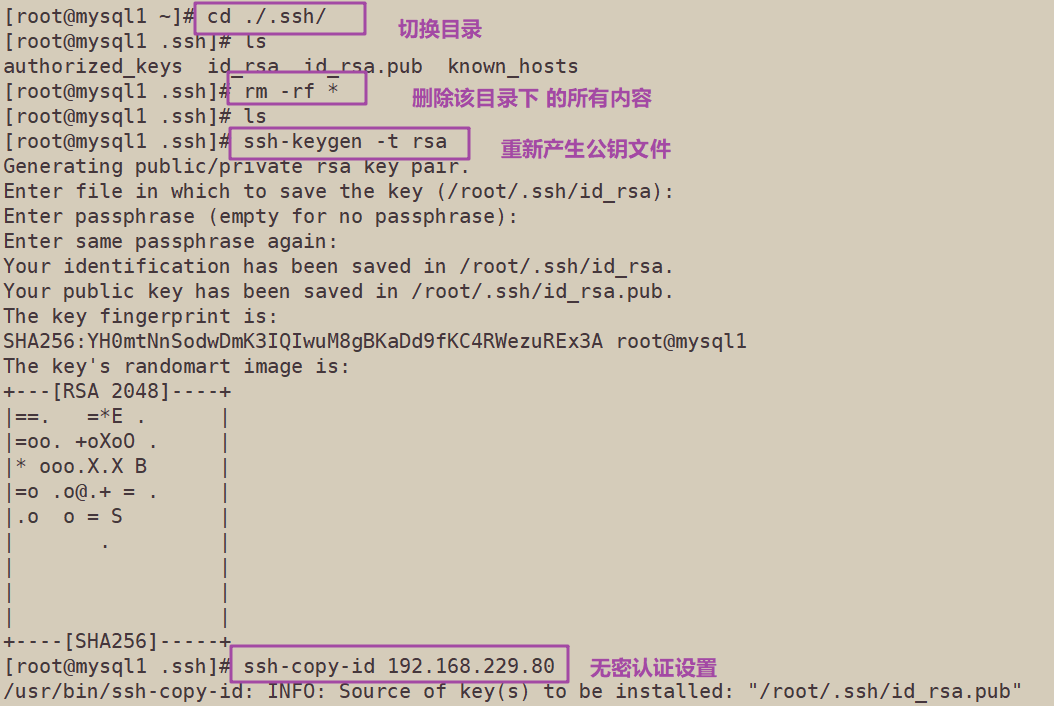
再次进行无密认证检测
|
1
2
3
4
5
6
7
8
9
10
11
12
13
14
15
16
17
18
19
20
21
22
|
[root@mysql2 .ssh]# masterha_check_ssh -conf=/etc/masterha/app1.cnfWed Sep 22 20:03:21 2021 - [warning] Global configuration file /etc/masterha_default.cnf not found. Skipping.Wed Sep 22 20:03:21 2021 - [info] Reading application default configuration from /etc/masterha/app1.cnf..Wed Sep 22 20:03:21 2021 - [info] Reading server configuration from /etc/masterha/app1.cnf..Wed Sep 22 20:03:21 2021 - [info] Starting SSH connection tests..Wed Sep 22 20:03:22 2021 - [debug]Wed Sep 22 20:03:21 2021 - [debug] Connecting via SSH from root@192.168.229.90(192.168.229.90:22) to root@192.168.229.80(192.168.229.80:22)..Wed Sep 22 20:03:21 2021 - [debug] ok.Wed Sep 22 20:03:21 2021 - [debug] Connecting via SSH from root@192.168.229.90(192.168.229.90:22) to root@192.168.229.70(192.168.229.70:22)..Wed Sep 22 20:03:21 2021 - [debug] ok.Wed Sep 22 20:03:22 2021 - [debug]Wed Sep 22 20:03:21 2021 - [debug] Connecting via SSH from root@192.168.229.80(192.168.229.80:22) to root@192.168.229.90(192.168.229.90:22)..Warning: Permanently added '192.168.229.80' (ECDSA) to the list of known hosts.Wed Sep 22 20:03:21 2021 - [debug] ok.Wed Sep 22 20:03:21 2021 - [debug] Connecting via SSH from root@192.168.229.80(192.168.229.80:22) to root@192.168.229.70(192.168.229.70:22)..Wed Sep 22 20:03:22 2021 - [debug] ok.Wed Sep 22 20:03:23 2021 - [debug]Wed Sep 22 20:03:22 2021 - [debug] Connecting via SSH from root@192.168.229.70(192.168.229.70:22) to root@192.168.229.90(192.168.229.90:22)..Wed Sep 22 20:03:22 2021 - [debug] ok.Wed Sep 22 20:03:22 2021 - [debug] Connecting via SSH from root@192.168.229.70(192.168.229.70:22) to root@192.168.229.80(192.168.229.80:22)..Wed Sep 22 20:03:22 2021 - [debug] ok.Wed Sep 22 20:03:23 2021 - [info] All SSH connection tests passed successfully. |
检测成功,故障排除


 浙公网安备 33010602011771号