


《uni-app跨便捷的平台开发完全指南》- 13 -获取设备信息
前言
大家好,今天我们聊一个看似简单、实则至关重要的技术话题——如何获取和利用设备信息。在移动应用开发中,许多令人头疼的适配问题,其根源往往就在设备信息的处理上。今天,我们就来一起聊聊这个话题。
一、系统信息
1.1 同步vs异步
很多人都知道用uni.getSystemInfo(),但其实这里有个性能坑:
// 不推荐:每次都调异步API
async function getDeviceInfo() {

const info = await uni.getSystemInfo()
return info
}
// 推荐:同步获取+缓存
let cachedInfo = null
function getSystemInfo() {

if (!cachedInfo) {

// 首次使用同步API,避免Promise开销
cachedInfo = uni.getSystemInfoSync()
}
return cachedInfo
}
为什么同步更好?
- 无Promise开销,避免微任务队列调度
- 不用await
- 应用启动时就应该获取
但同步API有个坑:在极少数情况下可能会阻塞UI。建议:
- 应用启动时用同步
- 运行时变化用异步监听
1.2 专业术语解释
const systemInfo = uni.getSystemInfoSync()
// 一下6个字段比较重要:
const essentialFields = {

// 1. 设备识别
platform: systemInfo.platform,    // "android" | "ios" | "web"
model: systemInfo.model,          // 具体型号,如"iPhone 13 Pro"
// 2. 屏幕信息
pixelRatio: systemInfo.pixelRatio,   // 设备像素比
screenWidth: systemInfo.screenWidth, // 物理像素宽度
windowWidth: systemInfo.windowWidth, // 可用宽度
// 3. 刘海屏-安全区域
safeArea: systemInfo.safeArea,              // 安全区域坐标
statusBarHeight: systemInfo.statusBarHeight // 状态栏高度
}特别说明一下pixelRatio这个字段,很多新手会忽略它: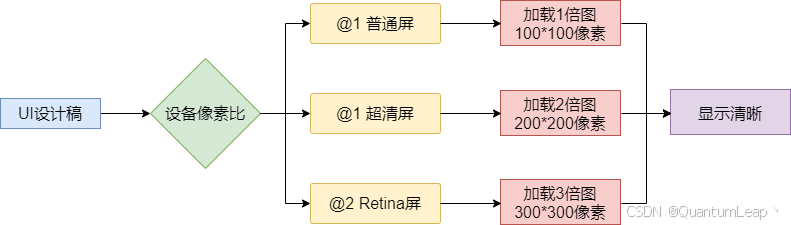
像素比的意义:
// 根据像素比加载合适图片
function getImageUrl(baseUrl, pixelRatio) {

if (pixelRatio >= 3) return `${
baseUrl}@3x.png`
if (pixelRatio >= 2) return `${
baseUrl}@2x.png`
return `${
baseUrl}.png`
}
// 计算Canvas绘制尺寸
function getCanvasSize(designSize, pixelRatio) {

return {

width: designSize.width * pixelRatio,
height: designSize.height * pixelRatio,
styleWidth: designSize.width,
styleHeight: designSize.height
}
}
1.3 平台差异处理
uni-app号称"一套代码,多端运行",但现实是不同平台确实存在差异:
// Platform适配工具类
class PlatformAdapter {

static getStatusBarHeight() {

const info = uni.getSystemInfoSync()
// iOS和Android的状态栏高度
if (info.platform === 'ios') {

// iOS:iPhone X以上有刘海
const isNotchScreen = this.isNotchScreen(info)
return isNotchScreen ? 44 : 20
} else if (info.platform === 'android') {

// Android:通常比iOS高,且版本差异大
const version = parseFloat(info.system.split(' ')[1]) || 0
return version >= 10 ? 28 : 25
}
return 20 // Web端默认
}
static isNotchScreen(info) {

// 判断是否为刘海屏
const notchModels = [
'iPhone X', 'iPhone 11', 'iPhone 12', 'iPhone 13',
'iPhone 14', 'iPhone 15'
]
return notchModels.some(model => info.model.includes(model))
}
}
二、屏幕适配
2.1 rpx单位
rpx是uni-app的核心创新,让我们深入了解一下rpx吧。
// rpx转换原理
function rpx2px(rpx, windowWidth = 375) {

// 1rpx = windowWidth / 750
return (rpx * windowWidth) / 750
}
// 注意事项
const designWidth = 750
const deviceWidth = uni.getSystemInfoSync().windowWidth
// 按钮宽度是200rpx
const buttonDesignWidth = 200
// 在任何设备上,实际宽度都是:
const actualWidth = (buttonDesignWidth / designWidth) * deviceWidth
rpx的好处在于:
- 750rpx对应设计稿750px
- 所有元素按屏幕宽度等比缩放
- 框架自动处理转换
rpx局限性:
- 不适合需要固定尺寸的场景(如1px边框)
- 在大屏设备上可能过度拉伸
- 图片使用rpx需要配合
mode="widthFix"
2.2 适配安全区域
随着全面屏普及,安全区域适配成了必修课:

 浙公网安备 33010602011771号