


实用指南:深入解析.NET MediatR事件机制:从基础到DDD实战
在.NET开发中,模块间的耦合问题一直是架构设计的痛点。MediatR作为轻量级的中介者模式实现库,凭借其简洁的API和强大的解耦能力,成为了.NET生态中实现发布/订阅、领域事件的首选工具。其中事件(Notification)机制更是MediatR的核心亮点——它让我们能优雅地处理“一个动作触发多个响应”的场景,比如用户注册后发送邮件、记录日志、同步数据等。
本文将从基础概念到实战落地,结合真实项目案例,全面拆解MediatR事件机制,带你吃透这一利器!
一、MediatR事件的核心:发布-订阅模式
MediatR的事件机制本质是发布-订阅模式的实现,核心逻辑是:发布者只负责发布事件,不关心谁处理;订阅者只负责处理事件,不关心谁发布。这种“解耦”特性让代码更易维护和扩展。
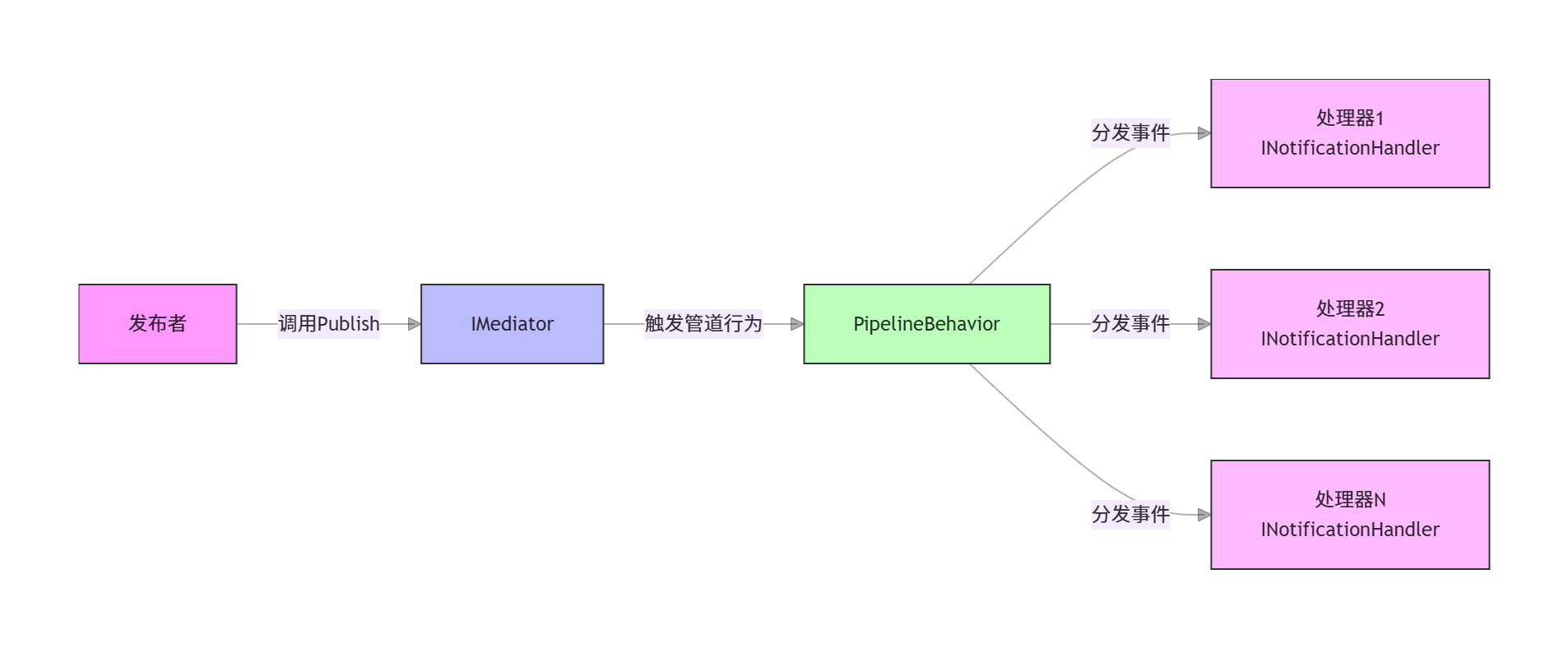
核心组件关系图
关键组件速览
| 组件接口 | 作用 |
|---|---|
INotification | 事件标记接口,定义事件类型(仅标记,无方法) |
INotificationHandler<T> | 事件处理器接口(同步/异步),T为具体事件类型 |
IMediator | 中介者核心接口,提供Publish方法发布事件 |
IPipelineBehavior | 事件管道行为,用于全局拦截(日志、验证、异常处理等) |
二、快速上手:5分钟实现一个事件流程
我们以“用户注册后触发多任务”为例,从零实现MediatR事件。
1. 环境准备
安装必要NuGet包:
# 核心包
Install-Package MediatR
# ASP.NET Core依赖注入扩展
Install-Package MediatR.Extensions.Microsoft.DependencyInjection
2. 定义事件(INotification)
事件本质是“数据载体”,需实现INotification接口:
///
/// 用户注册事件(事件数据)
///
public class UserRegisteredEvent : INotification
{
    public Guid UserId { get; init; } // 不可变,保证事件数据安全
    public string Username { get; init; }
    public string Email { get; init; }
    public DateTime RegisteredTime { get; init; } = DateTime.UtcNow;
}
3. 编写事件处理器(多处理器支持)
一个事件可绑定多个处理器,每个处理器负责单一职责:
///
/// 处理器1:发送欢迎邮件
///
public class SendWelcomeEmailHandler : IAsyncNotificationHandler
{
    private readonly IEmailService _emailService;
    public SendWelcomeEmailHandler(IEmailService emailService)
    {
        _emailService = emailService;
    }
    public async Task Handle(UserRegisteredEvent notification, CancellationToken cancellationToken)
    {
        await _emailService.SendAsync(
            to: notification.Email,
            subject: "欢迎加入我们!",
            content: $"尊敬的{notification.Username},恭喜您注册成功!",
            cancellationToken: cancellationToken);
        Console.WriteLine($"向{notification.Email}发送欢迎邮件!");
    }
}
///
/// 处理器2:记录注册日志
///
public class LogUserRegisterHandler : INotificationHandler
{
    private readonly ILogger _logger;
    public LogUserRegisterHandler(ILogger logger)
    {
        _logger = logger;
    }
    public void Handle(UserRegisteredEvent notification, CancellationToken cancellationToken)
    {
        _logger.LogInformation($"用户{notification.Username}(ID:{notification.UserId})注册成功,时间:{notification.RegisteredTime}");
    }
}
///
/// 处理器3:初始化用户默认角色
///
public class InitUserRoleHandler : IAsyncNotificationHandler
{
    private readonly IUserRoleService _userRoleService;
    public InitUserRoleHandler(IUserRoleService userRoleService)
    {
        _userRoleService = userRoleService;
    }
    public async Task Handle(UserRegisteredEvent notification, CancellationToken cancellationToken)
    {
        await _userRoleService.AssignDefaultRoleAsync(notification.UserId, cancellationToken);
        Console.WriteLine($"为用户{notification.UserId}分配默认角色!");
    }
}
4. 注册MediatR服务
在Program.cs中注册MediatR(扫描当前程序集的事件/处理器):
var builder = WebApplication.CreateBuilder(args);
// 注册MediatR
builder.Services.AddMediatR(cfg => cfg.RegisterServicesFromAssembly(typeof(Program).Assembly));
// 注册业务服务
builder.Services.AddScoped();
builder.Services.AddScoped();
5. 发布事件
在业务逻辑中通过IMediator发布事件:
[ApiController]
[Route("users")]
public class UserController : ControllerBase
{
    private readonly IMediator _mediator;
    private readonly IUserRepository _userRepository;
    public UserController(IMediator mediator, IUserRepository userRepository)
    {
        _mediator = mediator;
        _userRepository = userRepository;
    }
    [HttpPost("register")]
    public async Task Register([FromBody] RegisterRequest request, CancellationToken cancellationToken)
    {
        // 1. 业务逻辑:创建用户
        var user = new User
        {
            Id = Guid.NewGuid(),
            Username = request.Username,
            Email = request.Email,
            PasswordHash = BCrypt.Net.BCrypt.HashPassword(request.Password)
        };
        await _userRepository.AddAsync(user, cancellationToken);
        // 2. 发布用户注册事件
        await _mediator.Publish(new UserRegisteredEvent
        {
            UserId = user.Id,
            Username = user.Username,
            Email = user.Email
        }, cancellationToken);
        return Ok(new { UserId = user.Id, Message = "注册成功" });
    }
}
运行效果
调用接口后,控制台会输出:
用户张三(ID:xxx-xxx-xxx)注册成功,时间:2025-11-28 15:30:00
向zhangsan@example.com发送欢迎邮件!
为用户xxx-xxx-xxx分配默认角色!
一个事件触发了三个独立的处理器,且发布者完全不感知处理器的存在——这就是解耦的魅力!
三、高级特性:让事件机制更强大
1. 管道行为:全局拦截事件流程
通过IPipelineBehavior,我们可以在事件处理的“前置/后置”插入通用逻辑(如日志、验证),实现AOP思想。
示例:事件日志管道
///
/// 全局事件日志管道
///
public class NotificationLoggingBehavior : IPipelineBehavior
    where TNotification : INotification
{
    private readonly ILogger> _logger;
    public NotificationLoggingBehavior(ILogger> logger)
    {
        _logger = logger;
    }
    public async Task Handle(TNotification notification, RequestHandlerDelegate next, CancellationToken cancellationToken)
    {
        // 事件处理前:记录日志
        var eventType = notification.GetType().Name;
        _logger.LogInformation($"开始处理事件:{eventType},数据:{JsonSerializer.Serialize(notification)}");
        try
        {
            // 执行后续处理器
            await next();
            _logger.LogInformation($"事件{eventType}处理完成");
        }
        catch (Exception ex)
        {
            _logger.LogError(ex, $"事件{eventType}处理失败");
            throw;
        }
        return Unit.Value;
    }
}
注册管道(DI中添加):
builder.Services.AddScoped(typeof(IPipelineBehavior<,>), typeof(NotificationLoggingBehavior<>));2. 泛型处理器:处理一类事件
如果有多个事件需要统一处理(如所有领域事件记录日志),可以用泛型处理器:
///
/// 领域事件基类
///
public abstract class BaseDomainEvent : INotification
{
    public Guid EventId { get; } = Guid.NewGuid();
    public DateTime OccurredOn { get; } = DateTime.UtcNow;
    public string AggregateId { get; init; } // 聚合根ID
}
///
/// 泛型处理器:处理所有领域事件
///
public class DomainEventLogger : INotificationHandler
    where TEvent : BaseDomainEvent
{
    private readonly ILogger> _logger;
    public DomainEventLogger(ILogger> logger) => _logger = logger;
    public Task Handle(TEvent notification, CancellationToken cancellationToken)
    {
        _logger.LogInformation($"领域事件[{typeof(TEvent).Name}]:ID={notification.EventId},聚合根ID={notification.AggregateId},发生时间={notification.OccurredOn}");
        return Task.CompletedTask;
    }
}
四、实战DDD:领域事件的落地
在DDD(领域驱动设计)中,领域事件是捕获领域内状态变化的关键。MediatR是实现领域事件的最佳搭档,我们来看完整的集成流程。
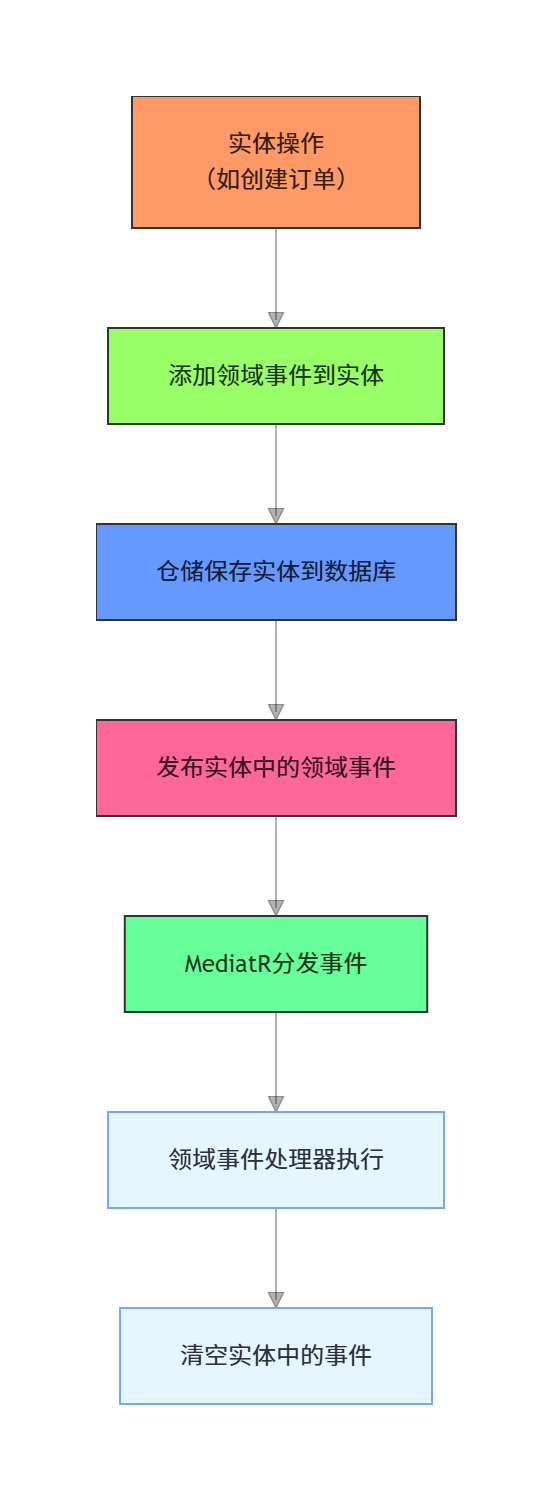
领域事件生命周期流程图
1. 实体中存储领域事件
///
/// 聚合根基类(包含领域事件)
///
public abstract class AggregateRoot
{
    private readonly List _domainEvents = new();
    public IReadOnlyCollection DomainEvents => _domainEvents.AsReadOnly();
    protected void AddDomainEvent(INotification eventItem) => _domainEvents.Add(eventItem);
    public void ClearDomainEvents() => _domainEvents.Clear();
}
///
/// 订单聚合根
///
public class Order : AggregateRoot
{
    public Guid Id { get; private set; }
    public decimal Amount { get; private set; }
    public OrderStatus Status { get; private set; }
    public Guid CustomerId { get; private set; }
    ///
    /// 创建订单(工厂方法)
    ///
    public static Order Create(Guid customerId, decimal amount, List items)
    {
        if (amount <= 0) throw new ArgumentException("订单金额必须大于0");
        if (!items.Any()) throw new ArgumentException("订单商品不能为空");
        var order = new Order
        {
            Id = Guid.NewGuid(),
            CustomerId = customerId,
            Amount = amount,
            Status = OrderStatus.Created,
        };
        // 添加领域事件:订单创建事件
        order.AddDomainEvent(new OrderCreatedEvent
        {
            AggregateId = order.Id.ToString(),
            OrderId = order.Id,
            CustomerId = customerId,
            Amount = amount,
            ItemCount = items.Count
        });
        return order;
    }
    ///
    /// 支付订单
    ///
    public void Pay(DateTime paidTime)
    {
        if (Status != OrderStatus.Created) throw new InvalidOperationException("只有待支付订单可支付");
        Status = OrderStatus.Paid;
        // 添加领域事件:订单支付事件
        AddDomainEvent(new OrderPaidEvent
        {
            AggregateId = Id.ToString(),
            OrderId = Id,
            PaidTime = paidTime
        });
    }
}
///
/// 订单创建事件
///
public class OrderCreatedEvent : BaseDomainEvent
{
    public Guid OrderId { get; init; }
    public Guid CustomerId { get; init; }
    public decimal Amount { get; init; }
    public int ItemCount { get; init; }
}
///
/// 订单支付事件
///
public class OrderPaidEvent : BaseDomainEvent
{
    public Guid OrderId { get; init; }
    public DateTime PaidTime { get; init; }
}
2. 仓储中发布领域事件
public class OrderRepository : IOrderRepository
{
    private readonly AppDbContext _dbContext;
    private readonly IMediator _mediator;
    public OrderRepository(AppDbContext dbContext, IMediator mediator)
    {
        _dbContext = dbContext;
        _mediator = mediator;
    }
    public async Task AddAsync(Order order, CancellationToken cancellationToken)
    {
        await _dbContext.Orders.AddAsync(order, cancellationToken);
        await _dbContext.SaveChangesAsync(cancellationToken);
        // 发布所有领域事件
        foreach (var domainEvent in order.DomainEvents)
        {
            await _mediator.Publish(domainEvent, cancellationToken);
        }
        // 清空事件,避免重复发布
        order.ClearDomainEvents();
    }
    public async Task UpdateAsync(Order order, CancellationToken cancellationToken)
    {
        _dbContext.Orders.Update(order);
        await _dbContext.SaveChangesAsync(cancellationToken);
        // 发布领域事件
        foreach (var domainEvent in order.DomainEvents)
        {
            await _mediator.Publish(domainEvent, cancellationToken);
        }
        order.ClearDomainEvents();
    }
}
五、实际项目中的经典案例
案例1:电商订单创建后的连锁操作
场景:用户下单后,需要扣减商品库存、生成物流单、发送订单确认短信、添加积分。
事件定义
public class OrderCreatedEvent : BaseDomainEvent
{
    public Guid OrderId { get; init; }
    public List Items { get; init; } = new();
    public Guid CustomerId { get; init; }
    public decimal TotalAmount { get; init; }
}
处理器实现
///
/// 处理器1:扣减商品库存
///
public class DeductStockHandler : IAsyncNotificationHandler
{
    private readonly IStockService _stockService;
    public DeductStockHandler(IStockService stockService) => _stockService = stockService;
    public async Task Handle(OrderCreatedEvent notification, CancellationToken cancellationToken)
    {
        foreach (var item in notification.Items)
        {
            await _stockService.DeductAsync(item.ProductId, item.Quantity, cancellationToken);
        }
        Console.WriteLine($"订单{notification.OrderId}库存扣减完成!");
    }
}
///
/// 处理器2:生成物流单
///
public class CreateLogisticsHandler : IAsyncNotificationHandler
{
    private readonly ILogisticsService _logisticsService;
    public CreateLogisticsHandler(ILogisticsService logisticsService) => _logisticsService = logisticsService;
    public async Task Handle(OrderCreatedEvent notification, CancellationToken cancellationToken)
    {
        var logistics = await _logisticsService.CreateAsync(
            orderId: notification.OrderId,
            customerId: notification.CustomerId,
            cancellationToken: cancellationToken);
        Console.WriteLine($"订单{notification.OrderId}物流单生成:{logistics.LogisticsNo}");
    }
}
///
/// 处理器3:发送订单确认短信
///
public class SendOrderSmsHandler : IAsyncNotificationHandler
{
    private readonly ISmsService _smsService;
    private readonly ICustomerRepository _customerRepository;
    public SendOrderSmsHandler(ISmsService smsService, ICustomerRepository customerRepository)
    {
        _smsService = smsService;
        _customerRepository = customerRepository;
    }
    public async Task Handle(OrderCreatedEvent notification, CancellationToken cancellationToken)
    {
        var customer = await _customerRepository.GetByIdAsync(notification.CustomerId, cancellationToken);
        await _smsService.SendAsync(
            phone: customer.Phone,
            content: $"您的订单{notification.OrderId}已创建,金额{notification.TotalAmount}元,我们将尽快发货!",
            cancellationToken: cancellationToken);
        Console.WriteLine($"向{customer.Phone}发送订单确认短信!");
    }
}
///
/// 处理器4:添加用户积分
///
public class AddCustomerPointsHandler : IAsyncNotificationHandler
{
    private readonly ICustomerService _customerService;
    public AddCustomerPointsHandler(ICustomerService customerService) => _customerService = customerService;
    public async Task Handle(OrderCreatedEvent notification, CancellationToken cancellationToken)
    {
        var points = (int)notification.TotalAmount; // 1元=1积分
        await _customerService.AddPointsAsync(notification.CustomerId, points, cancellationToken);
        Console.WriteLine($"为用户{notification.CustomerId}添加{points}积分!");
    }
}
案例2:用户修改密码后的安全处理
场景:用户修改密码后,需要强制登出所有设备、记录安全日志、发送密码修改提醒邮件。
事件定义
public class PasswordChangedEvent : INotification
{
    public Guid UserId { get; init; }
    public string Email { get; init; }
    public DateTime ChangedTime { get; init; } = DateTime.UtcNow;
    public string IpAddress { get; init; } // 修改密码的IP地址
}
处理器实现
///
/// 处理器1:强制登出所有设备
///
public class LogoutAllDevicesHandler : IAsyncNotificationHandler
{
    private readonly ITokenService _tokenService;
    public LogoutAllDevicesHandler(ITokenService tokenService) => _tokenService = tokenService;
    public async Task Handle(PasswordChangedEvent notification, CancellationToken cancellationToken)
    {
        await _tokenService.RevokeAllTokensAsync(notification.UserId, cancellationToken);
        Console.WriteLine($"用户{notification.UserId}所有设备已登出!");
    }
}
///
/// 处理器2:记录安全日志
///
public class LogPasswordChangeHandler : INotificationHandler
{
    private readonly ISecurityLogService _logService;
    public LogPasswordChangeHandler(ISecurityLogService logService) => _logService = logService;
    public void Handle(PasswordChangedEvent notification, CancellationToken cancellationToken)
    {
        _logService.AddLog(new SecurityLog
        {
            UserId = notification.UserId,
            Operation = "PasswordChanged",
            IpAddress = notification.IpAddress,
            OperationTime = notification.ChangedTime
        });
        Console.WriteLine($"记录用户{notification.UserId}密码修改日志(IP:{notification.IpAddress})!");
    }
}
///
/// 处理器3:发送密码修改提醒邮件
///
public class SendPasswordChangeEmailHandler : IAsyncNotificationHandler
{
    private readonly IEmailService _emailService;
    public SendPasswordChangeEmailHandler(IEmailService emailService) => _emailService = emailService;
    public async Task Handle(PasswordChangedEvent notification, CancellationToken cancellationToken)
    {
        await _emailService.SendAsync(
            to: notification.Email,
            subject: "您的密码已修改",
            content: $"您的账号于{notification.ChangedTime:yyyy-MM-dd HH:mm:ss}修改了密码,若非本人操作请及时联系客服!",
            cancellationToken: cancellationToken);
        Console.WriteLine($"向{notification.Email}发送密码修改提醒邮件!");
    }
}
案例3:文章发布后的SEO处理
场景:文章发布后,需要生成搜索引擎索引、推送链接到百度/谷歌、更新站点地图、通知订阅用户。
事件定义
public class ArticlePublishedEvent : BaseDomainEvent
{
    public Guid ArticleId { get; init; }
    public string Title { get; init; }
    public string Slug { get; init; } // SEO友好URL
    public string Content { get; init; }
    public Guid AuthorId { get; init; }
    public DateTime PublishedTime { get; init; } = DateTime.UtcNow;
}
处理器实现
///
/// 处理器1:生成搜索引擎索引
///
public class BuildSearchIndexHandler : IAsyncNotificationHandler
{
    private readonly ISearchIndexService _searchIndexService;
    public BuildSearchIndexHandler(ISearchIndexService searchIndexService) => _searchIndexService = searchIndexService;
    public async Task Handle(ArticlePublishedEvent notification, CancellationToken cancellationToken)
    {
        await _searchIndexService.AddIndexAsync(new SearchIndex
        {
            Id = notification.ArticleId,
            Title = notification.Title,
            Content = notification.Content,
            Type = "Article"
        }, cancellationToken);
        Console.WriteLine($"文章{notification.ArticleId}搜索索引生成完成!");
    }
}
///
/// 处理器2:推送链接到搜索引擎
///
public class PushToSearchEngineHandler : IAsyncNotificationHandler
{
    private readonly ISearchEngineService _searchEngineService;
    public PushToSearchEngineHandler(ISearchEngineService searchEngineService) => _searchEngineService = searchEngineService;
    public async Task Handle(ArticlePublishedEvent notification, CancellationToken cancellationToken)
    {
        var articleUrl = $"https://example.com/articles/{notification.Slug}";
        await _searchEngineService.PushToBaiduAsync(articleUrl, cancellationToken);
        await _searchEngineService.PushToGoogleAsync(articleUrl, cancellationToken);
        Console.WriteLine($"文章链接{articleUrl}已推送到百度/谷歌!");
    }
}
///
/// 处理器3:更新站点地图
///
public class UpdateSitemapHandler : INotificationHandler
{
    private readonly ISitemapService _sitemapService;
    public UpdateSitemapHandler(ISitemapService sitemapService) => _sitemapService = sitemapService;
    public void Handle(ArticlePublishedEvent notification, CancellationToken cancellationToken)
    {
        _sitemapService.AddUrl(
            url: $"https://example.com/articles/{notification.Slug}",
            lastModified: notification.PublishedTime,
            changeFrequency: "weekly",
            priority: 0.8);
        Console.WriteLine($"站点地图已更新,添加文章{notification.Title}!");
    }
}
///
/// 处理器4:通知订阅用户
///
public class NotifySubscribersHandler : IAsyncNotificationHandler
{
    private readonly ISubscriptionService _subscriptionService;
    private readonly IEmailService _emailService;
    public NotifySubscribersHandler(ISubscriptionService subscriptionService, IEmailService emailService)
    {
        _subscriptionService = subscriptionService;
        _emailService = emailService;
    }
    public async Task Handle(ArticlePublishedEvent notification, CancellationToken cancellationToken)
    {
        var subscribers = await _subscriptionService.GetArticleSubscribersAsync(notification.AuthorId, cancellationToken);
        foreach (var subscriber in subscribers)
        {
            await _emailService.SendAsync(
                to: subscriber.Email,
                subject: $"新文章发布:{notification.Title}",
                content: $"您关注的作者发布了新文章《{notification.Title}》,点击查看:https://example.com/articles/{notification.Slug}",
                cancellationToken: cancellationToken);
        }
        Console.WriteLine($" 已通知{subscribers.Count}位订阅用户新文章发布!");
    }
}
六、最佳实践:避坑指南
1. 事件命名规范
用过去式命名(如
UserRegisteredEvent、OrderPaidEvent),体现事件“已发生”;前缀+动作(如
OrderCreatedEvent、ProductStockChangedEvent),一眼看懂业务含义。
2. 处理器单一职责
每个处理器只做一件事(如“发邮件”和“记日志”拆分为两个处理器),避免臃肿。
3. 避免耗时操作
事件处理器默认同步阻塞,耗时操作(如调用第三方API)应改用后台任务(如IHostedService、Hangfire):
///
/// 耗时操作处理器(使用后台任务)
///
public class SyncToThirdPartyHandler : IAsyncNotificationHandler
{
    private readonly IBackgroundTaskQueue _taskQueue;
    public SyncToThirdPartyHandler(IBackgroundTaskQueue taskQueue) => _taskQueue = taskQueue;
    public Task Handle(OrderCreatedEvent notification, CancellationToken cancellationToken)
    {
        // 将耗时操作加入后台队列
        _taskQueue.QueueBackgroundWorkItem(async token =>
        {
            // 模拟耗时操作
            await Task.Delay(5000, token);
            Console.WriteLine($"订单{notification.OrderId}已同步到第三方系统!");
        });
        return Task.CompletedTask;
    }
}
4. 事件数据不可变
事件发布后数据不应被修改,建议用init或只读字段(如public Guid UserId { get; init; })。
5. 异常隔离
单个处理器异常不应影响其他处理器,可在管道行为中捕获异常并记录,而非抛出:
// 改进的管道行为:隔离处理器异常
public async Task Handle(TNotification notification, RequestHandlerDelegate next, CancellationToken cancellationToken)
{
    var eventType = notification.GetType().Name;
    _logger.LogInformation($" 开始处理事件:{eventType}");
    try
    {
        await next();
    }
    catch (Exception ex)
    {
        _logger.LogError(ex, $"❌ 事件{eventType}部分处理器执行失败");
        // 不抛出异常,避免影响其他处理器
    }
    _logger.LogInformation($"✅ 事件{eventType}处理完成(部分处理器可能失败)");
    return Unit.Value;
}
七、常见问题解答
Q1:事件处理器不执行怎么办?
检查MediatR是否注册了处理器所在的程序集;
确认处理器实现的是
INotificationHandler<T>(而非IRequestHandler<T>);事件类型与处理器泛型参数是否匹配(如
UserRegisteredEvent对应INotificationHandler<UserRegisteredEvent>)。
Q2:如何让处理器按顺序执行?
MediatR默认并行执行多处理器,若需顺序执行,可自定义管道行为控制执行顺序:
// 顺序执行处理器的管道行为
public class SequentialExecutionBehavior : IPipelineBehavior
    where TNotification : INotification
{
    private readonly IEnumerable> _handlers;
    public SequentialExecutionBehavior(IEnumerable> handlers)
    {
        _handlers = handlers;
    }
    public async Task Handle(TNotification notification, RequestHandlerDelegate next, CancellationToken cancellationToken)
    {
        foreach (var handler in _handlers)
        {
            await handler.Handle(notification, cancellationToken);
        }
        return Unit.Value;
    }
}
Q3:跨服务事件怎么处理?
MediatR仅支持进程内事件,跨服务需结合消息队列(如RabbitMQ、Kafka):
///
/// 跨服务事件处理器(发布到RabbitMQ)
///
public class PublishToRabbitMQHandler : IAsyncNotificationHandler
{
    private readonly IMessagePublisher _messagePublisher;
    public PublishToRabbitMQHandler(IMessagePublisher messagePublisher) => _messagePublisher = messagePublisher;
    public async Task Handle(OrderCreatedEvent notification, CancellationToken cancellationToken)
    {
        await _messagePublisher.PublishAsync(
            exchange: "order.events",
            routingKey: "order.created",
            message: notification,
            cancellationToken: cancellationToken);
        Console.WriteLine($" 订单创建事件已发布到RabbitMQ!");
    }
}
总结:MediatR事件的价值
MediatR事件机制的核心价值在于解耦——它让“发布者”和“订阅者”彻底分离,让代码从“硬编码调用”走向“事件驱动”。无论是电商订单的连锁操作、用户安全的多维度处理,还是内容发布的SEO联动,MediatR都能让复杂的业务逻辑变得清晰、可扩展。
掌握它,你将告别模块间的“紧耦合噩梦”,写出更干净、更易维护的.NET代码!
附录
10年.NET开发者,多年收集整理的.NET学习知识库,现免费分享给各位开发者朋友 .NET知识库,涵盖了.NET Web开发、桌面开发、微服务等视频教程,必读书籍推荐,教程源码,面试题库等全面学习资料
最后:如果觉得本文有用,欢迎点赞收藏~ 关注我,后续分享更多.NET架构实战技巧!

 浙公网安备 33010602011771号