


Rust Slint实现滑动页面(SwipView)源码分享 - 实践
Rust Slint实现滑动页面(SwipView)源码分享
一、效果展示
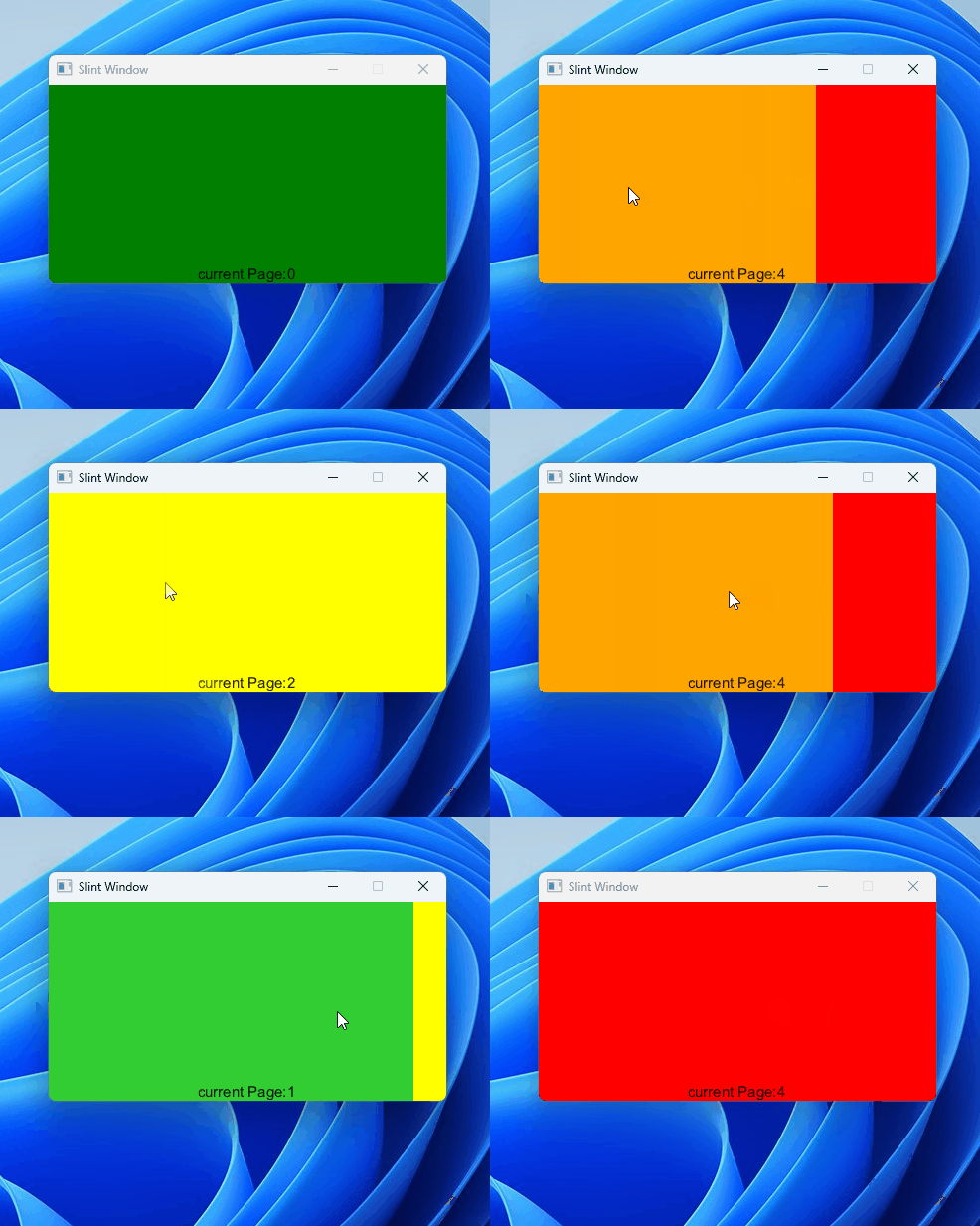
二、源码分享
1、工程搭建
参考我这篇博文:Rust 使用Slint库开发UI界面工程搭建详细教程
2、工程结构
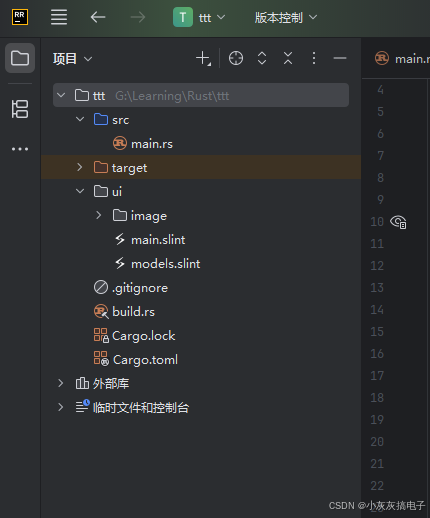
3、Cargo.toml
[dependencies]
slint = "1.14.1"
[build-dependencies]
slint-build = "1.14.1"
4、main.slint
import { AboutSlint, VerticalBox, LineEdit, HorizontalBox, Button, GroupBox, GridBox,
ComboBox, Spinner, Slider, ListView, Palette, ProgressIndicator, CheckBox, Switch } from "std-widgets.slint";
import { DataAdapter} from "models.slint";
export { DataAdapter}
export component MainWindow inherits Window {
width: 400px;
height: 200px;
background: #020414;
property <int> current-page: 0;
  swipeGes := SwipeGestureHandler {
  handle-swipe-right: current-page > 0;
  handle-swipe-left: current-page < 5;
  swiped => {
  if self.current-position.x > self.pressed-position.x + self.width / 4 {
  current-page -= 1;
  } else if self.current-position.x < self.pressed-position.x - self.width / 4 {
  current-page += 1;
  }
  }
  HorizontalLayout {
  property <length> position: - current-page * root.width;
    animate position { duration: 200ms; easing: ease-in-out; }
    property <length> swipe-offset;
      x: position + swipe-offset;
      states [
      swiping when swipeGes.swiping : {
      swipe-offset: swipeGes.current-position.x - swipeGes.pressed-position.x;
      out { animate swipe-offset { duration: 200ms; easing: ease-in-out; }  }
      }
      ]
      Rectangle { width: root.width; background: green; }
      Rectangle { width: root.width; background: limegreen; }
      Rectangle { width: root.width; background: yellow; }
      Rectangle { width: root.width; background: orange; }
      Rectangle { width: root.width; background: red; }
      Rectangle { width: root.width; background: violet; }
      }
      }
      Text {
      y:root.height - self.height;
      text: "current Page:"+current-page;
      font-size: 15px;
      }
      }
三、Slint库介绍
Slint(原名SixtyFPS)是一个轻量级、高性能的用户界面(UI)工具包,专为嵌入式系统、桌面应用和跨平台开发设计。它采用声明式UI编程模型,支持Rust、C++和JavaScript等语言,强调资源高效、低延迟和易用性。Slint的核心目标是简化UI开发,尤其适合资源受限环境(如微控制器)或需要高性能渲染的场景。
1、Slint的核心特性
- 声明式UI设计:使用类似QML的语法定义UI元素,代码简洁易读。UI逻辑与业务逻辑分离,提高开发效率。
- 跨平台支持:原生支持Linux、Windows、macOS,以及嵌入式平台(如Raspberry Pi、微控制器),无需额外适配。
- 高性能优化:渲染引擎针对低功耗设备优化,帧率可达 60 f p s 60fps 60fps以上,内存占用极小(通常低于几MB)。
- 响应式编程:内置数据绑定机制,UI自动更新响应状态变化,减少手动事件处理。
- 工具链完善:提供Slint语言编译器(slintc)和IDE插件,支持实时预览和热重载。
2、在Rust中使用Slint
在Rust项目中集成Slint简单高效:
- 安装依赖:通过Cargo添加
slintcrate。在Cargo.toml中添加:[dependencies] slint = "1.13.1" # 使用最新稳定版本 - 基本工作流:
- 定义UI:使用
slint!宏编写声明式UI代码。 - 编译UI:Slint编译器(slintc)将
.slint文件编译为Rust代码。 - 集成逻辑:在Rust中绑定数据和事件处理。
- 定义UI:使用
- 优势:Rust的内存安全和并发特性与Slint结合,提升UI可靠性和性能,避免常见错误如空指针或数据竞争。
3、简单示例:创建一个窗口
以下是一个基础的“Hello World”示例,展示如何在Rust中定义并运行一个Slint UI。代码结构清晰:
use slint::slint;
slint! {
// 定义UI组件
export component MainWindow inherits Window {
// 添加文本元素
Text {
text: "Hello, Slint!";
color: blue;
font-size: 24px;
}
}
}
fn main() {
// 创建并运行窗口
let window = MainWindow::new().unwrap();
window.run().unwrap();
}- 解释:
slint!宏内嵌UI定义,使用类似HTML的语法。export component定义可重用的UI组件,继承自Window。Text元素显示文本,属性如color和font-size可动态绑定。main函数初始化并运行UI,错误处理简单(unwrap用于演示,实际应更健壮)。
4、适用场景和优势
- 嵌入式系统:低内存占用(可优化至几百KB),适合IoT设备或车载系统。
- 桌面应用:跨平台一致性,无需Web技术栈,性能优于Electron等框架。
- 开发效率:声明式语法减少样板代码,调试工具(如Slint Viewer)加速迭代。
- 与其他库对比:相比GTK或Qt,Slint更轻量;相比Web框架,它提供原生性能和更少依赖。
- 社区支持:开源项目(Apache 2.0许可证),活跃社区提供文档和示例。
5、学习资源
- 官方文档:Slint Book 提供详细教程和API参考。
- 示例项目:GitHub仓库有丰富案例,如计算器或仪表盘应用。
- 最佳实践:建议从简单UI开始,逐步集成复杂逻辑,利用数据绑定优化性能。


 浙公网安备 33010602011771号