


深入解析:[cpprestsdk] 构建HTTP消息 | http_headers.h
第2章:HTTP消息(http_request,http_response,http_headers)
欢迎回来
在第1章:URI与URI构建器(uri,uri_builder)中,我们学习了如何使用uri和uri_builder精确定位互联网上的资源
可以将URI想象成信封上写的邮政地址。但信封里的信件或包裹是什么?如何告诉邮局(Web服务器)想发送什么或期望什么样的回复?
这正是HTTP消息的作用
在cpprestsdk中,http_request、http_response和http_headers类代表了这些网络通信的基本组成部分。本章将介绍这些关键组件,展示如何构建发送的请求以及如何解析收到的响应。
相关前文传送:
[APItest-Karate] HttpRequestBuilder | HttpClient发送请求
[项目][boost搜索引擎#4] cpp-httplib使用 | log.hpp | 前端 | 测试及总结
问题:封装网络通信
再次想象我们的天气应用。我们知道获取伦敦天气预报的URI:https://api.weather.com/forecast?city=London&days=3。这是我们的目标地址。但仅仅有地址是不够的。我们需要告诉天气服务器:
- 我们想做什么:是获取数据?发送新数据?删除某些内容?(这是HTTP方法)。对于天气数据,我们通常使用GET。
- 任何特殊指令:我们是否偏好特定语言的响应?接受什么格式?(这些是HTTP头部)
- 我们发送的数据:如果我们要向数据库添加新城市,会在消息主体(HTTP正文)中包含该城市的详细信息。
当天气服务器回复时,它也会发送一个HTTP消息。我们需要能够:
- 检查是否成功:请求是否成功,或者是否有错误?(这是HTTP状态码)。
- 理解回复:服务器返回了什么?例如天气预报数据本身(这是HTTP正文)。
- 读取额外信息:天气预报是什么格式的?何时生成的?(更多HTTP头部)。
cpprestsdk提供了http_request、http_response和http_headers类来优雅地管理所有这些细节
http_request:发送消息
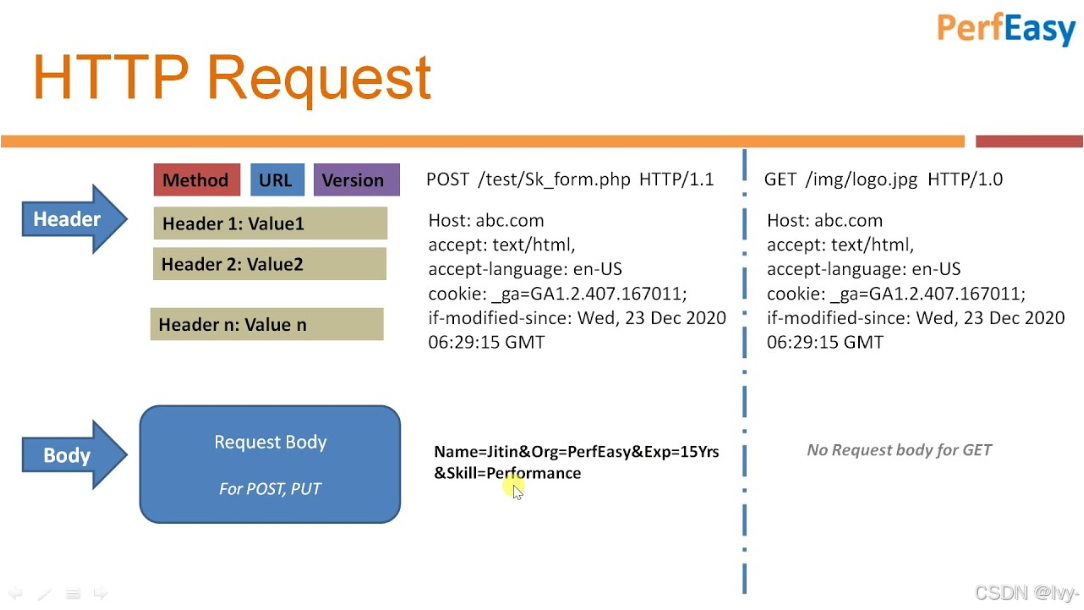
web::http::http_request类表示从你的应用程序发送到Web服务器的消息。它包含了服务器理解你需求所需的一切。
http_request的关键部分
- 方法:想执行的操作(例如
GET、POST、PUT、DELETE)。cpprestsdk在web::http::methods中提供了这些常量。 - URI:目标资源的地址(我们在第1章学过!)。
- 头部:关于请求的元数据,如内容类型、接受的语言等。
- 正文:你发送的实际数据负载(例如JSON数据、文件)。
让我们为天气示例创建一个简单的GET请求:
#include "cpprest/http_msg.h" // 包含http_request, http_response, http_headers
#include "cpprest/uri.h"      // 来自第1章
#include <iostream>
  int main() {
  // 1. 为天气预报创建URI
  web::uri weather_uri(U("https://api.weather.com/forecast?city=London&days=3"));
  // 2. 用GET方法创建HTTP请求对象
  // cpprestsdk提供了预定义方法如methods::GET, methods::POST等
  web::http::http_request request(web::http::methods::GET);
  // 3. 为请求设置URI
  request.set_request_uri(weather_uri);
  // 现在,看看我们的请求是什么样子的(用于调试)
  std::wcout << L"我们的请求:\n" << request.to_string() << std::endl;
  return 0;
  }
输出:
我们的请求:
GET https://api.weather.com/forecast?city=London&days=3 HTTP/1.1
在这段代码中:
web::http::methods::GET是表示GET HTTP方法的常量request.set_request_uri(weather_uri)将目标地址分配给我们的请求request.to_string()是获取请求字符串表示的便捷方式,非常适合调试
为http_request添加正文
并非所有请求都有正文。GET请求通常没有。但用于发送新数据(如提交表单)的POST请求几乎总是有正文。
以下是一个创建带有简单字符串正文的POST请求的示例:
#include "cpprest/http_msg.h"
#include "cpprest/uri.h"
#include <iostream>
  int main() {
  web::uri api_uri(U("https://api.example.com/users"));
  // 创建POST请求
  web::http::http_request post_request(web::http::methods::POST);
  post_request.set_request_uri(api_uri);
  // 设置简单的字符串正文。cpprestsdk自动将Content-Type设置为text/plain
  post_request.set_body(U("username=Alice&email=alice@example.com"));
  std::wcout << L"我们的POST请求:\n" << post_request.to_string() << std::endl;
  return 0;
  }
输出:
我们的POST请求:
POST https://api.example.com/users HTTP/1.1
Content-Type: text/plain; charset=utf-8
Content-Length: 35
username=Alice&email=alice@example.com注意cpprestsdk在我们调用set_body时自动添加了Content-Type头部和Content-Length头部
这是cpprestsdk提供的众多便利之一。接下来我们将更详细地了解这些头部。
http_headers:消息的信封备注
http_request和http_response对象都有一个http_headers成员。这个类充当HTTP头部字段的键值存储。头部提供了关于消息的重要元数据,例如:
Content-Type:正文中数据的类型(例如application/json、text/html)。Authorization:访问受保护资源的凭据。User-Agent:关于发起请求的客户端的信息。Accept:客户端在响应中偏好的数据格式。Content-Length:消息正文的大小(以字节为单位)。
http_headers类处理大小写(Content-Type和content-type在内部被视为相同),并允许你添加、删除和检索头部值
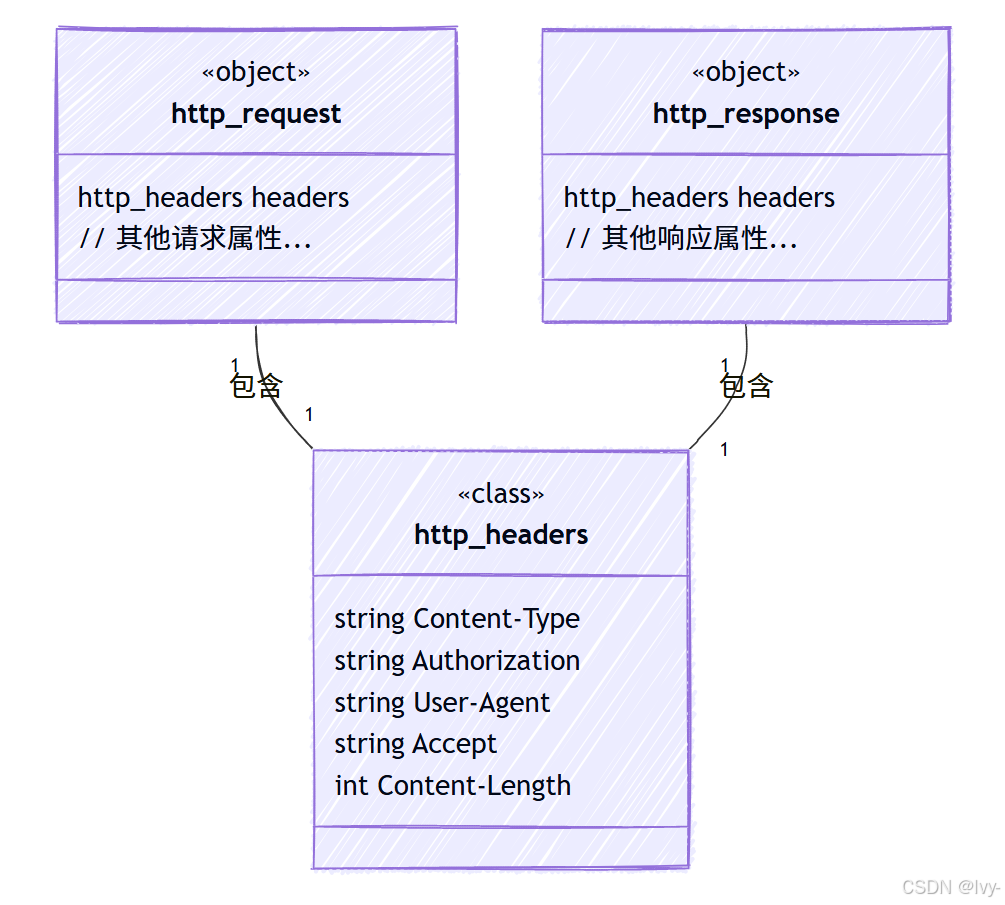
实际应用中,http_request和http_response不会共享同一个http_headers实例;每个都会有自己独立的http_headers实例
操作头部
让我们为天气请求添加一些自定义头部:
#include "cpprest/http_msg.h"
#include "cpprest/uri.h"
#include <iostream>
  int main() {
  web::uri weather_uri(U("https://api.weather.com/forecast?city=London&days=3"));
  web::http::http_request request(web::http::methods::GET);
  request.set_request_uri(weather_uri);
  // 获取请求头部的引用
  web::http::http_headers& headers = request.headers();
  // 添加一些头部
  headers.add(U("Accept"), U("application/json")); // 我们偏好JSON数据
  headers.add(U("X-Custom-App-Id"), U("myWeatherApp123")); // 自定义头部
  // 也可以用[]操作符设置,但'add'对多值头部更安全
  headers[web::http::header_names::accept_language] = U("en-US,en;q=0.9");
  // ^ header_names提供了常见头部的常量
  std::wcout << L"带自定义头部的请求:\n" << request.to_string() << std::endl;
  // 检索头部值
  utility::string_t accept_header;
  if (headers.match(U("Accept"), accept_header)) { // match()是安全的检索方式
  std::wcout << L"请求的Accept类型: " << accept_header << std::endl;
  }
  return 0;
  }
输出:
带自定义头部的请求:
GET https://api.weather.com/forecast?city=London&days=3 HTTP/1.1
Accept: application/json
Accept-Language: en-US,en;q=0.9
X-Custom-App-Id: myWeatherApp123
请求的Accept类型: application/jsonhttp_headers的关键点:
request.headers()给你一个可变的头部引用。headers.add(key, value)添加一个头部。如果头部已存在,通常会追加新值并用逗号分隔(例如Accept头部)。headers[key] = value设置一个头部,覆盖任何先前的值。headers.match(key, output_value)是检索头部值的首选方式,安全地检查是否存在。web::http::header_names提供了常见HTTP头部名称的常量,避免拼写错误。
http_response:你的接收回复
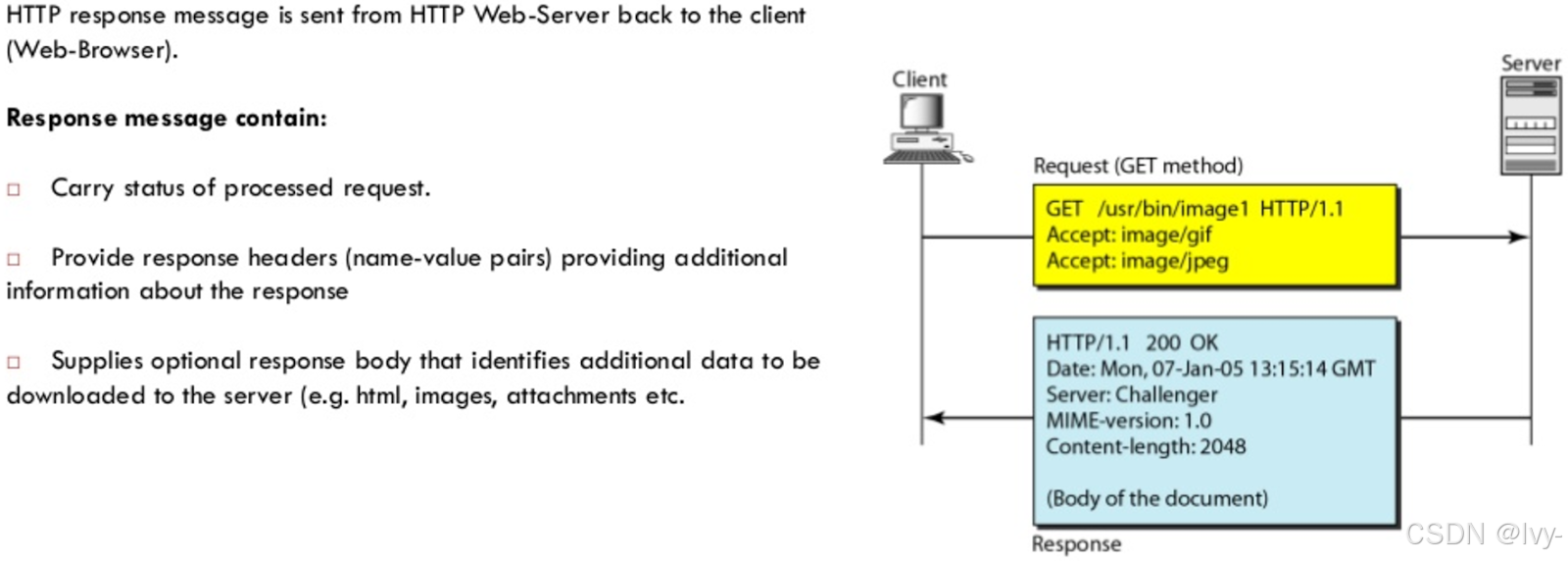
web::http::http_response类表示你从Web服务器收到的回复消息。它告诉你发生了什么,并提供请求的数据。
http_response的关键部分
- 状态码:表示结果的数字代码(例如
200表示OK,404表示未找到)。cpprestsdk在web::http::status_codes中提供了这些常量。 - 原因短语:状态码的简短、人类可读描述(例如"OK"对应200)。
- 头部:关于响应的元数据(例如
Content-Type、Date、Server)。 - 正文:服务器返回的实际数据负载(例如天气预报JSON)。
由于我们尚未介绍发送请求(这是第3章:HTTP客户端(http_client)的内容!),我们将创建一个模拟的http_response来演示如何检查其部分内容。
#include "cpprest/http_msg.h"
#include <iostream>
  #include <vector>
    int main() {
    // 1. 模拟天气服务器的响应
    // 创建一个状态码为200 OK的响应
    web::http::http_response response(web::http::status_codes::OK);
    // 2. 为模拟响应设置一些头部
    response.headers().add(U("Content-Type"), U("application/json"));
    response.headers().add(U("Server"), U("WeatherAPI/1.0"));
    // 3. 为模拟响应设置JSON正文
    utility::string_t json_body_str = U(R"({"city": "London", "temperature": "15C", "conditions": "Cloudy"})");
    response.set_body(json_body_str, U("application/json")); // 显式指定内容类型
    // 现在,检查响应
    std::wcout << L"模拟响应:\n" << response.to_string() << std::endl;
    // 访问状态码和原因短语
    std::wcout << L"状态码: " << response.status_code() << std::endl;
    std::wcout << L"原因短语: " << response.reason_phrase() << std::endl; // 默认为"OK"对应200
    // 访问头部
    utility::string_t content_type_header;
    if (response.headers().match(U("Content-Type"), content_type_header)) {
    std::wcout << L"响应Content-Type: " << content_type_header << std::endl;
    }
    // 访问正文(返回一个任务,将在第4章介绍)
    // 现在,我们阻塞以立即获取结果用于演示
    utility::string_t body_content = response.extract_string().get();
    std::wcout << L"响应正文:\n" << body_content << std::endl;
    return 0;
    }
输出:
模拟响应:
HTTP/1.1 200 OK
Content-Type: application/json
Content-Length: 68
Server: WeatherAPI/1.0
{"city": "London", "temperature": "15C", "conditions": "Cloudy"}
状态码: 200
原因短语: OK
响应Content-Type: application/json
响应正文:
{"city": "London", "temperature": "15C", "conditions": "Cloudy"}
这里我们看到:
web::http::status_codes::OK是200状态码的常量。response.status_code()和response.reason_phrase()给你基本结果。response.headers().match()与http_request中的用法相同。response.extract_string().get()是你将正文作为字符串检索的方式。.get()部分同步等待正文完全可用(更多关于任务的内容在第4章:PPLX任务(异步编程模型))。cpprestsdk还提供了extract_json()和extract_vector()用于不同的正文类型。
幕后:HTTP消息的工作原理
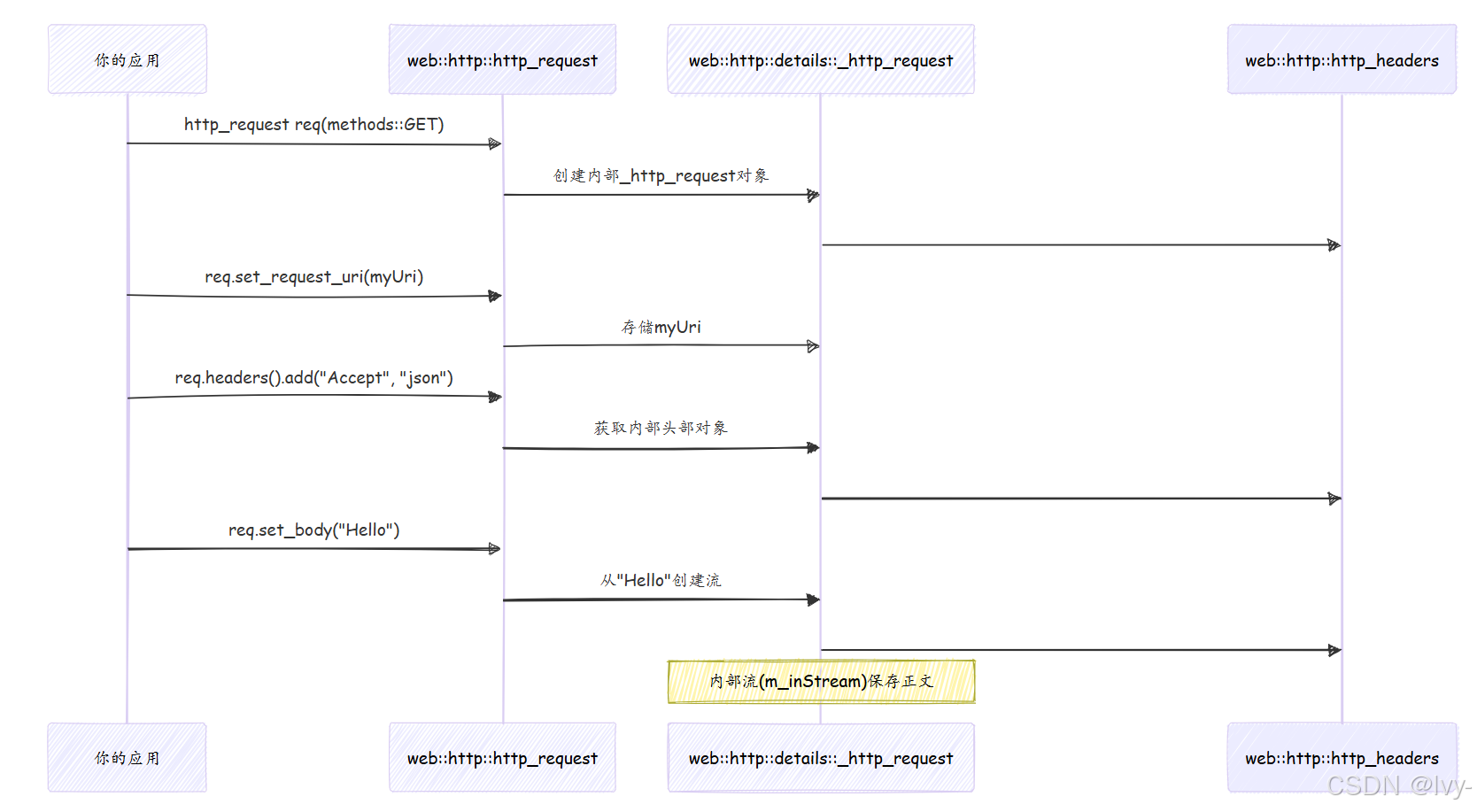
http_request和http_response的核心是围绕内部实现类(如_http_request和_http_response)的轻量级包装器。这些内部类保存URI、方法、状态码、原因短语的实际数据成员,以及重要的http_headers对象和消息正文流。
创建http_request
当你创建http_request对象时:
- 对象创建:
web::http::http_request request(web::http::methods::GET);- 这个构造函数实际上在堆上分配了一个内部的
details::_http_request对象,使用std::shared_ptr。所有核心数据(方法、URI、头部、正文流)都存储在这个内部对象中。 - HTTP方法(
GET)直接存储。 - 创建一个空的
http_headers对象并与请求关联。
- 这个构造函数实际上在堆上分配了一个内部的
- 设置URI:
request.set_request_uri(weather_uri);uri对象(来自第1章)简单地存储在内部的_http_request结构中。
- 添加头部:
request.headers().add(U("Accept"), U("application/json"));headers()方法返回内部http_headers对象的引用。- 当调用
add()时,头部名称和值存储在http_headers对象内部的std::map中。这个映射使用特殊的比较器来处理头部名称的大小写不敏感(例如"Content-Type"和"content-type"被视为相同头部)。
- 设置正文:
request.set_body(U("..."));- 字符串数据被转换为异步流(
concurrency::streams::istream)。 - 然后将这个流设置为
_http_request对象的内部正文流(m_inStream)。 - 关键的是,
Content-Type和Content-Length头部会根据正文内容自动添加/更新到http_headers对象中。
- 字符串数据被转换为异步流(
以下是事件的简化序列:
简化的http_headers::add
add方法是一个模板函数,可以接受各种类型的值。它将值转换为字符串并存储,如果头部已存在则处理连接。
// 简化自Release/include/cpprest/http_headers.h
class http_headers
{
private:
// 头部存储在键不区分大小写的映射中
typedef std::map<utility::string_t, utility::string_t, _case_insensitive_cmp> inner_container;
  inner_container m_headers;
  public:
  template<typename _t1>
    void add(const key_type& name, const _t1& value)
    {
    // 将值(如int, string)转换为string_t
    auto printedValue = utility::conversions::details::print_string(value);
    auto& mapVal = m_headers[name]; // 访问或创建映射中的条目
    if (mapVal.empty())
    {
    mapVal = std::move(printedValue); // 如果是新的,直接存储
    }
    else
    {
    // 如果已存在,用逗号追加(某些头部的标准)
    mapVal.append(_XPLATSTR(", ")).append(std::move(printedValue));
    }
    }
    // ... 其他方法
};这段代码展示了http_headers如何在内部使用std::map。_case_insensitive_cmp结构确保"Accept"和"accept"被视为相同的键,使头部处理更加健壮。
简化的http_request::to_string
to_string方法是调试的便捷方式。它组装请求行,然后调用基类http_msg_base::to_string()添加头部和正文。
// 简化自Release/src/http/client/http_client_msg.cpp
utility::string_t details::_http_request::to_string() const
{
utility::string_t result(m_method); // 以HTTP方法开始(如"GET")
result += _XPLATSTR(' ');           // 添加空格
// 追加URI
if (this->m_uri.is_empty())
{
result += _XPLATSTR('/'); // 如果URI为空,默认为"/"
}
else
{
result += this->m_uri.to_string(); // 追加URI字符串
}
result += _XPLATSTR(" HTTP/1.1\r\n"); // 添加HTTP版本和换行
result += http_msg_base::to_string(); // 追加扁平化的头部和正文
return result;
}这说明了to_string如何简单地将HTTP消息的各个部分连接成标准字符串格式。
总结
在本章中,我们通过探索cpprestsdk中的核心消息类型,为HTTP通信奠定了基础:
| 特性 | web::http::http_request | web::http::http_response | web::http::http_headers |
|---|---|---|---|
| 目的 | 发送到服务器的消息 | 从服务器接收的消息 | 任一消息的元数据(键值对) |
| 关键内容 | 方法、URI、头部、正文 | 状态码、原因短语、头部、正文 | std::string_t键值对的集合 |
| 创建方式 | http_request(method) | http_response(status_code) | 通过request.headers()或response.headers()访问 |
| 常见操作 | set_request_uri(), set_body(), headers() | status_code(), reason_phrase(), extract_string(), headers() | add(key, value), match(key, &value), operator[] |
| 类比 | 你发送的带有指令的信件/包裹 | 你收到的回复信件/包裹 | 信封或运输标签上的备注 |
现在知道如何构建准备发送的http_request以及如何准备解析http_response。可以指定方法、目标URI、正文内容,并为请求和响应自定义头部。
理解如何构建HTTP消息至关重要,但这些消息不会自己神奇地在互联网上传输!在下一章中,我们将介绍http_client类,这是你实际发送这些http_request对象并从Web服务接收http_response对象的主要工具。准备好发起你的第一个网络调用吧~

 浙公网安备 33010602011771号