
prometheus 监控文档
Prometheus 安装部署
Prometheus 安装部署
- 安装版本:prometheus-2.6.1
- 百度云下载:https://pan.baidu.com/s/1w16lQZKw8PCHqlRuSK2i7A
- 提取码:lw1q
二进制安装部署
1、下载二进制包:prometheus-2.6.1.linux-amd64.tar.gz
2、解压包:tar xvzf prometheus-2.6.1.linux-amd64.tar.gz
3、移动到安装目录:mv prometheus-2.6.1.linux-amd64 /usr/local/prometheus
4、进入目录:cd /usr/local/prometheus
5、修改配置文件底部监控本机:vim prometheus.yml
scrape_configs:
  - job_name: 'prometheus'
    static_configs:
    # 监控本地及端口
    - targets: ['xiangsikai:9090']
注:Prometheus从目标机上通过http方式拉取采样点数据, 它也可以拉取自身服务数据并监控自身的健康状况。
注:当然Prometheus服务拉取自身服务采样数据,并没有多大的用处,但是它是一个好的DEMO。
 配置文件注解
6、启动服务
./prometheus --config.file=prometheus.yml
启动选项了解:./prometheus --help7、测试访问:http://localhost:9090

8、查看暴露指标:http://localhost.com:9090/metrics
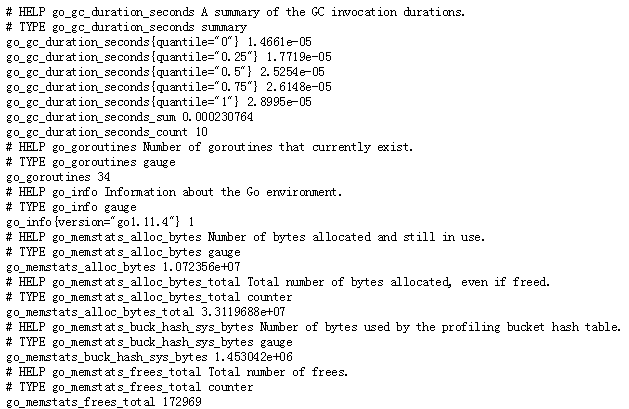
9、将Prometheus配置为系统服务
1、进入systemd目录下:cd /usr/lib/systemd/system
2、创建文件:vim prometheus.service

  [Unit]
  Description=https://prometheus.io

  [Service]
  Restart=on-failure
  ExecStart=/usr/local/prometheus/prometheus --config.file=/usr/local/prometheus/prometheus.yml

  [Install]
  WantedBy=multi-user.target
4、生效系统system文件
systemctl daemon-reload
5、启动服务
systemctl stop prometheus.service
systemctl start prometheus.service
node_exporter安装和配置
1.二进制包安装
#创建目录
mkdir -p /opt/exporter
cd /opt/exporter
#下载安装包
wget https://github.com/prometheus/node_exporter/releases/download/v0.14.0/node_exporter-0.14.0.linux-amd64.tar.gz
wget https://github.com/prometheus/node_exporter/releases/download/v0.18.1/node_exporter-0.18.1.linux-arm64.tar.gz
#解压
tar -xvzf  node_exporter-0.14.0.linux-amd64.tar.gz
#修改名称
mv node_exporter-0.14.0.linux-amd64 node_exportercd /opt/exporter/node_exporter
#修改权限
chmod 777 node_exporter
#启动服务
nohup /opt/exporter/node_exporter/node_exporter &
#访问
curl http://IP:9100/metrics
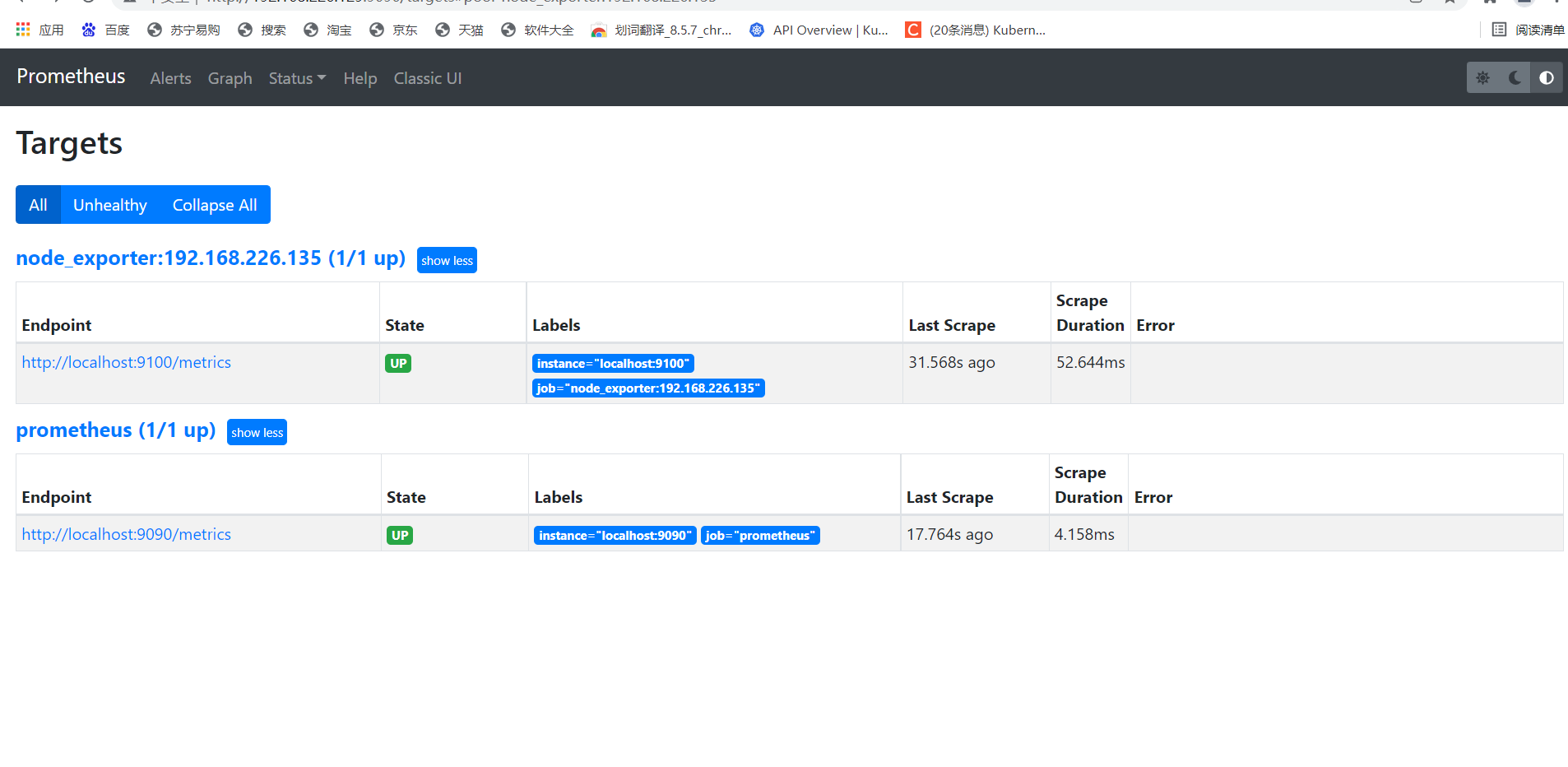
2.prometheus 集成node_exporter
编辑 /usr/local/prometheus 的配置文件
- job_name: "node_exporter:192.168.226.135"
static_configs:
- targets: ["localhost:9100"]
一、mysqld_exporter的安装
1、mysql库创建相应用户并赋权:
create user 'exporter'@'%' identified by 'MONty_00';
GRANT PROCESS, REPLICATION CLIENT, SELECT ON *.* TO 'exporter'@'%' WITH MAX_USER_CONNECTIONS 3;
flush privileges;
2、配置.my.cnf
.my.cnf默认放置在启动用户的家目录,启动时无需指定;也可以随意放置在任意目录,在启动时通过 --config.my-cnf={conf_dir}/.my.cnf指定配置文件。
.my.cnf内容
[client]
host=127.0.0.1
port=3306
user=exporter
password=123456
3、启动mysqld_exporter
mysqld_exporter默认监听9104端口,启动命令如下:
./mysqld_exporter --config.my-cnf=/opt/mysqld_exporter-0.10.0.linux-amd64/.my.cnf
4、使用环境变量运行(不推荐)
使用环境变量运行时无需指定配置文件。
export DATA_SOURCE_NAME='user:password@(hostname:3306)/'
./mysqld_exporter <flags>
Docker 容器安装部署
- 官方地址:https://prometheus.io/docs/prometheus/latest/installation/
一、prometheus.yml通过运行以下命令将您从主机绑定:
docker run -p 9090:9090 -v /tmp/prometheus.yml:/etc/prometheus/prometheus.yml \
       prom/prometheus
二、或者为配置使用额外的卷:
docker run -p 9090:9090 -v /prometheus-data \
       prom/prometheus --config.file=/prometheus-data/prometheus.yml

 浙公网安备 33010602011771号