

图书管理增删改查&父子调用&前后端
1.图书管理系统后端接口
1.1 books/models.py 中设置表


from django.db import models


class Books(models.Model):
    btitle = models.CharField(max_length=20)
    bpub_date = models.DateField()
    bread = models.IntegerField()
    bcomment = models.IntegerField()
    is_delete = models.BooleanField(default=False)
1.2 urls.py 中设置路由
from django.urls import path
from . import views
urlpatterns = [
    path('book/',views.BooksView.as_view()),
]
1.3 book/views.py 视图函数
from django.http import JsonResponse
from django.shortcuts import render
import json
from .models import *
# Create your views here.
from django.views import View


class BooksView(View):
    def get(self, request):
        books = Books.objects.filter(is_delete=False)
        book_list = books.values('id','btitle','bpub_date','bread','bcomment')
        book_list = list(book_list)
        data = {
        "code": 0,
        "msg": "success",
        "books": book_list
        }
        return JsonResponse(data)

    def post(self, request):
        body_json = request.body.decode()
        body_dict = json.loads(body_json)
        btitle = body_dict.get('btitle')
        bpub_date = body_dict.get('bpub_date')
        bread = body_dict.get('bread')
        bcomment = body_dict.get('bcomment')
        book = Books(btitle=btitle, bpub_date=bpub_date, bread=bread,
        bcomment=bcomment)
        book.save()
        return JsonResponse({"code": 0, "msg": "success"})

    def put(self, request):
        body_json = request.body.decode()
        body_dict = json.loads(body_json)
        id = body_dict.get('id')
        btitle = body_dict.get('btitle')
        bpub_date = body_dict.get('bpub_date')
        bread = body_dict.get('bread')
        bcomment = body_dict.get('bcomment')
        book = Books.objects.get(id=id)
        book.btitle = btitle
        book.bpub_date = bpub_date
        book.bread = bread
        book.bcomment = bcomment
        book.save()
        return JsonResponse({"code": 0, "msg": "success"})

    def delete(self, request):
        body_json = request.body.decode()
        body_dict = json.loads(body_json)
        id = body_dict.get('id')
        book = Books.objects.get(id=id)
        book.is_delete = True
        book.save()
        return JsonResponse({"code": 0, "msg": "success"})
2.测试接口
2.1 测试获取所有图书接口
http://127.0.0.1:8000/books/book/
返回结果
{
"code": 0,
"msg": "success",
"books": [
{
"id": 4,
"btitle": "抗日神剧",
"bpub_date": "2020-08-11",
"bread": 1234,
"bcomment": 779
},
{
"id": 5,
"btitle": "qwe",
"bpub_date": "2020-09-09",
"bread": 123,
"bcomment": 5555
},
{
"id": 11,
"btitle": "三重门",
"bpub_date": "2020-02-12",
"bread": 100,
"bcomment": 0
}
]
}
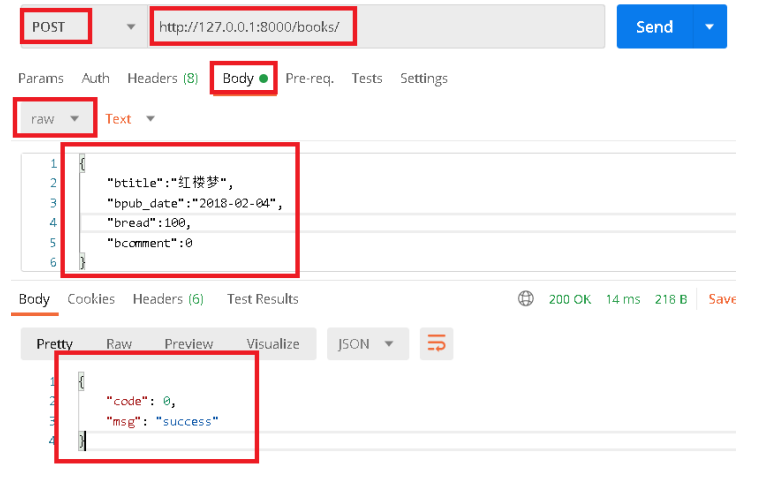
2.2 测试创建图书接口
http://127.0.0.1:8000/books/book/
postman测试提交数据
{ "btitle":"红楼梦",
"bpub_date":"2018-02-04",
"bread":100,
"bcomment":0 }
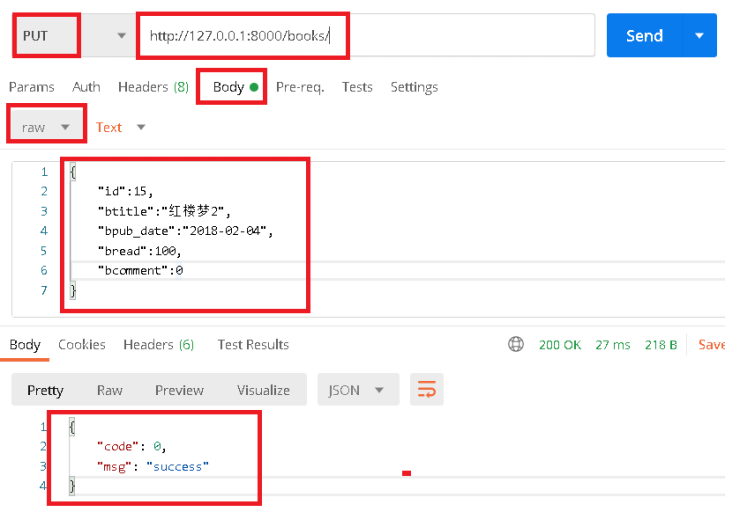
2.3 测试修改图书接口
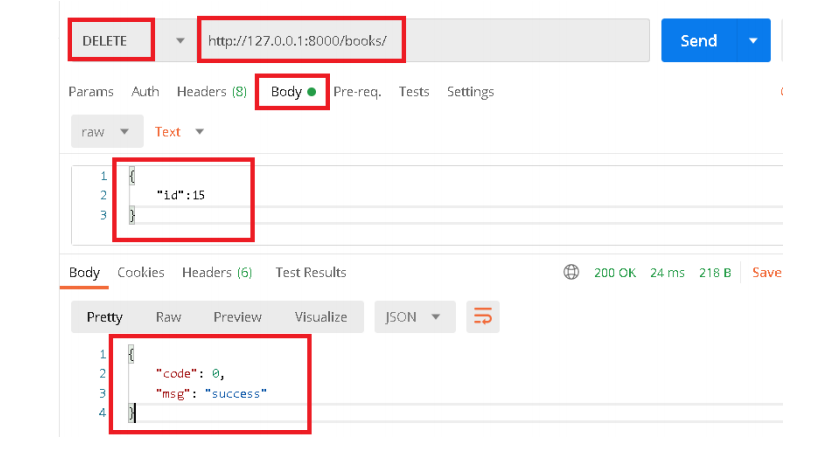
2.4 测试删除数据接口
1.图书管理页面
1.1 http/apis.js 添加后端请求路由
import { get, post, put, del } from './index'
// 书籍管理接口
export const getBookList = (params, headers) => get("/books/book/", params,
headers)
export const addBook = (params, headers) => post("/books/book/", params, headers)
export const editBook = (params, headers) => put("/books/book/", params, headers)
export const delBook = (params, headers) => del("/books/book/", params, headers)
1.2 router/index.js 添加路由
import Books from '@/views/books/Books'
export default new Router({
routes: [
{ path: '/', name: 'Books', component: Books }, // 图书增删改查
案例
]
})
1.3 src\views\books\Books.vue 父组件
<template>
    <div>
        <h1>图书管理系统</h1>
        <div style="margin: 30px;">
            <button @click="addNew">新增图书</button>
            <BookEdit
                v-show='dialogVisible'
                :visible.sync='dialogVisible'
                :data='editData'
                @save='save'
            ></BookEdit>
    </div>

    <div>
        <table style='margin: auto; border: solid 1px black;'>
            <tr>
                <th>图书编号</th>
                <th>图书名字</th>
                <th>出版时间</th>
                <th>阅读数</th>
                <th>评论数</th>
                <th>操作</th>
            </tr>
            <tr
                v-for="(book, index) in books"
                :key="book.id"
            >
                <td>{{book.id}}</td>
                <td>{{book.btitle}}</td>
                <td>{{book.bpub_date}}</td>
                <td>{{book.bread}}</td>
                <td>{{book.bcomment}}</td>
                <td>
                    <button @click="edit(index)">修改</button>
                    <button @click="del(index)">删除</button>
                </td>
            </tr>
        </table>
    </div>
</div>
</template>

<script>
import { getBookList, addBook, editBook, delBook } from '@/http/apis'
import BookEdit from '@/components/BookEdit'
export default {
    components: {
        BookEdit
    },
    data() {
        return {
            dialogVisible: false,
            books: [
                { id: 3, btitle: "...", bpub_date: "2020-08-11", bread: 100, bcomment: 50
}
            ],
            editData: { // 编辑的内容
                btitle: "",
                bpub_date: "",
                bread: 0,
                bcomment: 0
        }
    }
},

methods: {
    // 1.点击新增图书时初始化数据
    addNew() {
        this.editData = { // 初始化 编辑内容
            btitle: "",
            bpub_date: "",
            bread: 100,
            bcomment: 0
        }
        this.dialogVisible = true // 显示弹框
    },
    // 2.获取图书列表
    get() {
        getBookList().then((data) => {
            // console.log(data)
            // books: [{btitle: "西游记", bpub_date: "2020-08-11", bread: 100,bcomment: 50}]
            this.books = data.books
        })
    },
    // 3.修改或者添加图书
    save() {
        // 根据editData中的id判断是更新还是新增
        debugger
        console.log(this.editData)
        if (this.editData.id) {
                // 如果有id, 修改图书
            // 修改请求
            let params = this.editData
            editBook(params).then((res)=>{
                console.log(res)
                this.get()
            })
        } else {
        // 增加图书
            addBook(this.editData).then((res) => {
                this.get()
            })
        }
    },
        // 点击修改弹出修改页面
        edit(index) {
            this.editData = JSON.parse(JSON.stringify(this.books[index])) // 复制this.books[index] 的数据
            // this.editData = this.books[index] //
            this.dialogVisible = true
        },

        // 删除
        del(index) {
            let params = {
                id: this.books[index].id
            }
            delBook(params).then((res)=>{
                console.log(res)
                this.get()
            })
        }
    },
    created() {
        this.get()
    }
}
</script>
<style>
table tr td {
    width: 150px;
    border: solid 1px black;
}
</style>
1.4 src\components\BookEdit.vue 子组件
<template>
    <div>
        <el-dialog
            title="新增图书"
            :visible="visible"
        >
            <div><span>图书名称:</span>
                <el-input
                    class='elinput'
                    v-model="data.btitle"
                >
                </el-input>
            </div>
            <div><span>发布日期:</span>
                <el-input
                    class='elinput'
                    v-model="data.bpub_date"
                ></el-input>
            </div>
            <div><span>阅读量:</span>
                <el-input
                    class='elinput'
                    v-model="data.bread"
                ></el-input>
            </div>
            <div><span>评论量:</span>
                <el-input
                class='elinput'
                v-model="data.bcomment"
            ></el-input>
        </div>

        <el-button @click="cancel">取 消</el-button>
        <el-button
            type="primary"
                @click="addBook"
            >确 定</el-button>
        </el-dialog>
    </div>
</template>
<script>
// import { addbook } from '@/http/apis'
export default {
    props: ['data', 'visible'],
    data() {
        return {
        }
    },
    methods: {
        addBook() {
            this.$emit('update:visible', false)
            this.$emit('save')
        },
        cancel() {
            this.$emit('update:visible', false)
        }
    },
    mounted() {
    }
}
</script>
<style>
.elinput {
    width: 220px;
    height: 40px;
}
</style>
1.5 src/mian.js 引入ElementUI
// The Vue build version to load with the `import` command
// (runtime-only or standalone) has been set in webpack.base.conf with an alias.
import Vue from 'vue'
import App from './App'
import router from './router'

Vue.config.productionTip = false


// 使用 elementui
// npm i element-ui -S 安装到当前项目
import ElementUI from 'element-ui'
import 'element-ui/lib/theme-chalk/index.css'
Vue.use(ElementUI)


/* eslint-disable no-new */
new Vue({
  el: '#app',
  router,
  components: { App },
  template: '<App/>'
})

 浙公网安备 33010602011771号