编译安装http2.4,实现可以正常访问
1、前置准备工作
防火墙和SELinux前期已关闭,获取软件包、解压及编译软件安装
[root@centos8 ~]# yum -y install make gcc                           #安装make gcc软件包
[root@centos8 ~]# wget https://dlcdn.apache.org//httpd/httpd-2.4.52.tar.bz2               #获取httpd2.4软件包
[root@centos8 ~]#  tar xvf httpd-2.4.52.tar.bz2 -C /usr/local/src                         #解压软件包至指定目录
[root@centos8 ~]# cd /usr/local/src/httpd-2.4.52
2、生成配置文件
[root@centos8 httpd-2.4.52]# ./configure --prefix=/apps/httpd --sysconfdir=/etc/httpd --enable-ssl    #配置文件第一次生成
......
configure:
checking for APR... no
configure: error: APR not found.  Please read the documentation.
[root@centos8 httpd-2.4.52]# yum -y install apr-devel                  #报错后安装apr-devel包,进行第二次配置文件生成
......
configure:
checking for APR-util... no
configure: error: APR-util not found.  Please read the documentation.
[root@centos8 httpd-2.4.52]# yum -y install apr-util-devel             #第二次报错,安装apr-util-devel包,进行第三次配置文件生成
.......
checking for pcre-config... false
configure: error: pcre-config for libpcre not found. PCRE is required and available from http://pcre.org/
[root@centos8 httpd-2.4.52]# yum -y install pcre-devel                 #第三次报错,安装pcre-devel包,进行第四次配置文件生成
......
checking for OpenSSL version >= 0.9.8a... FAILED
configure: WARNING: OpenSSL version is too old
no
checking whether to enable mod_ssl... configure: error: mod_ssl has been requested but can not be built due to prerequisite failures
[root@centos8 httpd-2.4.52]# yum -y install openssl-devel               #第四次报错,安装openssl-devel包
[root@centos8 httpd-2.4.52]# ./configure --prefix=/apps/httpd --sysconfdir=/etc/httpd --enable-ssl   #第五次配置文件生成,成功
......
3、安装文件编译
[root@centos8 httpd-2.4.52]#make -j 2                             #文件编译
......
gcc: error: /usr/lib/rpm/redhat/redhat-hardened-ld: No such file or directory
make[4]: *** [/usr/local/src/httpd-2.4.52/modules/aaa/modules.mk:2: mod_authn_file.la] Error 1
make[4]: *** Waiting for unfinished jobs....
make[4]: Leaving directory '/usr/local/src/httpd-2.4.52/modules/aaa'
make[3]: *** [/usr/local/src/httpd-2.4.52/build/rules.mk:117: shared-build-recursive] Error 1
make[3]: Leaving directory '/usr/local/src/httpd-2.4.52/modules/aaa'
make[2]: *** [/usr/local/src/httpd-2.4.52/build/rules.mk:117: shared-build-recursive] Error 1
make[2]: Leaving directory '/usr/local/src/httpd-2.4.52/modules'
make[1]: *** [/usr/local/src/httpd-2.4.52/build/rules.mk:117: shared-build-recursive] Error 1
make[1]: Leaving directory '/usr/local/src/httpd-2.4.52'
[root@centos8 httpd-2.4.52]# yum -y install redhat-rpm-config-125-1.el8.noarch               #编译报错,缺失软件包安装
[root@centos8 httpd-2.4.52]#make -j 2                                                        #第二次文件编译 成功
......
4、软件安装、环境配置
[root@centos8 httpd-2.4.52]# make install                              #安装
......
[root@centos8 httpd-2.4.52]# echo 'PATH=/apps/httpd/bin:$PATH' > /etc/profile.d/httpd.sh        #环境配置
[root@centos8 httpd-2.4.52]# . /etc/profile.d/httpd.sh
[root@centos8 httpd-2.4.52]# apachectl start                                                   #软件运行
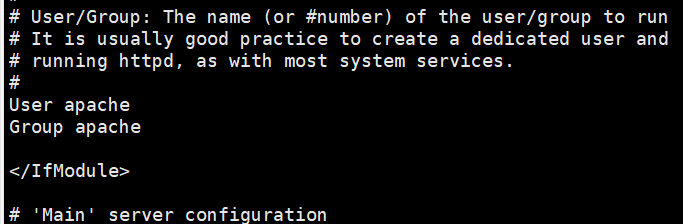
5、指定软件运行账户
[root@centos8 httpd-2.4.52]# groupadd -r -g 88 apache                                               #建立组
[root@centos8 httpd-2.4.52]# useradd -r -g apache -s /sbin/nologin -d /var/www/ apache              #建立用户并设置属性
[root@centos8 httpd-2.4.52]# sed -r -i -e 's#^User.*#User apache#' -e 's#^Group.*#Group apache#' /etc/httpd/httpd.conf  #修改执行用户及组
6、配置生效验证
[root@centos8 httpd-2.4.52]#apachectl restart                             #apache服务重启
[root@centos8 httpd-2.4.52]# ps -ef | grep apache                         #进程查看
apache      3137    3135  0 11:41 ?        00:00:00 /apps/httpd/bin/httpd -k start
apache      3138    3135  0 11:41 ?        00:00:00 /apps/httpd/bin/httpd -k start
apache      3139    3135  0 11:41 ?        00:00:00 /apps/httpd/bin/httpd -k start
root        3230    1719  0 11:41 pts/0    00:00:00 grep --color=auto apache
页面验证
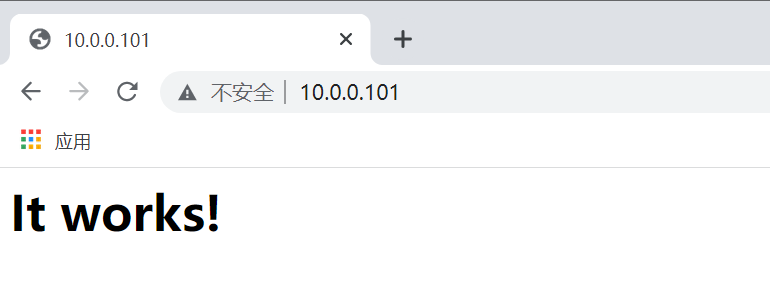
总结:第一次安装系统相关联软件包缺失,再次安装时可先安装make gcc apr-devel apr-util-devel pcre-devel openssl-devel这些软件包,加快安装速度。

 浙公网安备 33010602011771号