
HBase学习记录
一、HBase简介
1.1 HBase定义
HBase是一种分布式、可扩展、支持海量数据存储的NoSQL数据库。
1.2 HBase数据模型
逻辑上,HBase的数据模型同关系型数据库很类似,数据存储在一张表中,有行有列。但从HBase的底层物理存储结构(K-V)来看,HBase更像是一个multi-dimensional map。
1.2.1数据模型
1)Name Space
命名空间,类似于关系型数据库的DatabBase概念,每个命名空间下有多个表。HBase有两个自带的命名空间,分别是hbase和default,hbase中存放的是HBase内置的表,default表是用户默认使用的命名空间。
2)Region
类似于关系型数据库的表概念。不同的是,HBase定义表时只需要声明列族即可,不需要声明具体的列。这意味着,往HBase写入数据时,字段可以动态、按需指定。因此,和关系型数据库相比,HBase能够轻松应对字段变更的场景。
3)Row
HBase表中的每行数据都由一个RowKey和多个Column(列)组成,数据是按照RowKey的字典顺序存储的,并且查询数据时只能根据RowKey进行检索,所以RowKey的设计十分重要。
4)Column
HBase中的每个列都由Column Family(列族)和Column Qualifier(列限定符)进行限定,例如info:name,info:age。建表时,只需指明列族
,而列限定符无需预先定义。
5)Time Stamp
用于标识数据的不同版本(version),每条数据写入时,如果不指定时间戳,系统会自动为其加上该字段,其值为写入HBase的时间。
6)Cell
由{rowkey, column Family:column Qualifier, time Stamp} 唯一确定的单元。cell中的数据是没有类型的,全部是字节码形式存贮。
1.3 HBase基本架构
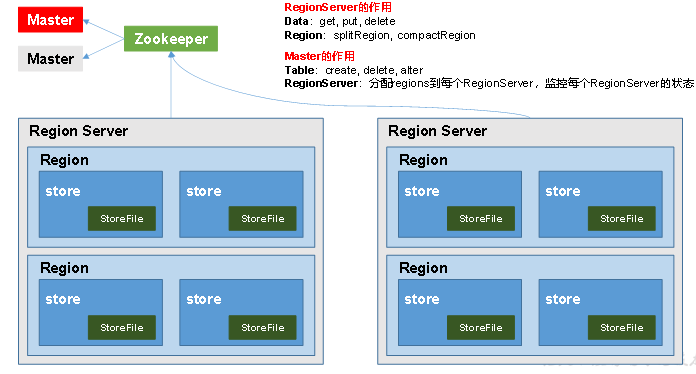
架构角色:
1)Region Server
Region Server为 Region的管理者,其实现类为HRegionServer,主要作用如下:
对于数据的操作:get, put, delete;
对于Region的操作:splitRegion、compactRegion。
2)Master
Master是所有Region Server的管理者,其实现类为HMaster,主要作用如下:
对于表的操作:create, delete, alter
对于RegionServer的操作:分配regions到每个RegionServer,监控每个RegionServer的状态,负载均衡和故障转移。
3)Zookeeper
HBase通过Zookeeper来做Master的高可用、RegionServer的监控、元数据的入口以及集群配置的维护等工作。
4)HDFS
HDFS为HBase提供最终的底层数据存储服务,同时为HBase提供高可用的支持。
二、HBase Shell操作
2.1 HBase Shell操作
2.1.1 基本操作
1.进入HBase客户端命令行
Hbase的shell操作bug太多,比如无法修改字符,还有下图中的死循环,不建议使用,了解即可
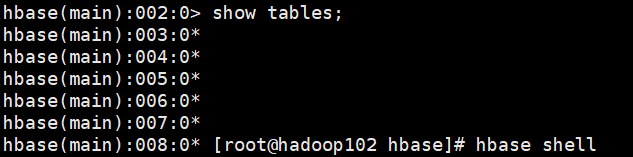
首先需要在/etc/profile.d/ 文件夹下创建好
[root@hadoop102 hbase]# hbase shell
2.查看帮助命令
hbase(main):001:0> help
HBase Shell, version 1.3.1, r930b9a55528fe45d8edce7af42fef2d35e77677a, Thu Apr  6 19:36:54 PDT 2017
Type 'help "COMMAND"', (e.g. 'help "get"' -- the quotes are necessary) for help on a specific command.
Commands are grouped. Type 'help "COMMAND_GROUP"', (e.g. 'help "general"') for help on a command group.

COMMAND GROUPS:
  Group name: general
  Commands: status, table_help, version, whoami

  Group name: ddl
  Commands: alter, alter_async, alter_status, create, describe, disable, disable_all, drop, drop_all, enable, enable_all, exists, get_table, is_disabled, is_enabled, list, locate_region, show_filters

  Group name: namespace
  Commands: alter_namespace, create_namespace, describe_namespace, drop_namespace, list_namespace, list_namespace_tables

  Group name: dml
  Commands: append, count, delete, deleteall, get, get_counter, get_splits, incr, put, scan, truncate, truncate_preserve

  Group name: tools
  Commands: assign, balance_switch, balancer, balancer_enabled, catalogjanitor_enabled, catalogjanitor_run, catalogjanitor_switch, close_region, compact, compact_rs, flush, major_compact, merge_region, move, normalize, normalizer_enabled, normalizer_switch, split, splitormerge_enabled, splitormerge_switch, trace, unassign, wal_roll, zk_dump

  Group name: replication
  Commands: add_peer, append_peer_tableCFs, disable_peer, disable_table_replication, enable_peer, enable_table_replication, get_peer_config, list_peer_configs, list_peers, list_replicated_tables, remove_peer, remove_peer_tableCFs, set_peer_tableCFs, show_peer_tableCFs

  Group name: snapshots
  Commands: clone_snapshot, delete_all_snapshot, delete_snapshot, delete_table_snapshots, list_snapshots, list_table_snapshots, restore_snapshot, snapshot

  Group name: configuration
  Commands: update_all_config, update_config

  Group name: quotas
  Commands: list_quotas, set_quota

  Group name: security
  Commands: grant, list_security_capabilities, revoke, user_permission

  Group name: procedures
  Commands: abort_procedure, list_procedures

  Group name: visibility labels
  Commands: add_labels, clear_auths, get_auths, list_labels, set_auths, set_visibility

SHELL USAGE:
Quote all names in HBase Shell such as table and column names.  Commas delimit
command parameters.  Type <RETURN> after entering a command to run it.
Dictionaries of configuration used in the creation and alteration of tables are
Ruby Hashes. They look like this:

  {'key1' => 'value1', 'key2' => 'value2', ...}

and are opened and closed with curley-braces.  Key/values are delimited by the
'=>' character combination.  Usually keys are predefined constants such as
NAME, VERSIONS, COMPRESSION, etc.  Constants do not need to be quoted.  Type
'Object.constants' to see a (messy) list of all constants in the environment.

If you are using binary keys or values and need to enter them in the shell, use
double-quote'd hexadecimal representation. For example:

  hbase> get 't1', "key\x03\x3f\xcd"
  hbase> get 't1', "key\003\023\011"
  hbase> put 't1', "test\xef\xff", 'f1:', "\x01\x33\x40"

The HBase shell is the (J)Ruby IRB with the above HBase-specific commands added.
For more on the HBase Shell, see http://hbase.apache.org/book.html
3.查看当前数据库中有哪些表
hbase(main):002:0> list
2.1.2 表的操作
1.创建表
hbase(main):002:0> create 'student','info'
2.插入数据到表
hbase(main):003:0> put 'student','1001','info:sex','male'
hbase(main):004:0> put 'student','1001','info:age','18'
hbase(main):005:0> put 'student','1002','info:name','Janna'
hbase(main):006:0> put 'student','1002','info:sex','female'
hbase(main):007:0> put 'student','1002','info:age','20'
3.扫描查看表数据
hbase(main):008:0> scan 'student'
hbase(main):009:0> scan 'student',{STARTROW => '1001', STOPROW  => '1001'}
hbase(main):010:0> scan 'student',{STARTROW => '1001'}
4.查看表结构
hbase(main):011:0> describe 'student'
5.更新指定字段的数据
hbase(main):012:0> put 'student','1001','info:name','Nick'
hbase(main):013:0> put 'student','1001','info:age','100'
6.查看“指定行”或“指定列族:列”的数据
hbase(main):014:0> get 'student','1001'
hbase(main):015:0> get 'student','1001','info:name'
7.统计表数据行数
hbase(main):021:0> count 'student'
8.删除数据
删除某rowkey的全部数据:
hbase(main):016:0> deleteall 'student','1001'
删除某rowkey的某一列数据:
hbase(main):017:0> delete 'student','1002','info:sex'
9.清空表数据
hbase(main):018:0> truncate 'student'
提示:清空表的操作顺序为先disable,然后再truncate。
10.删除表
首先需要先让该表为disable状态:
hbase(main):019:0> disable 'student'
然后才能drop这个表:
hbase(main):020:0> drop 'student'
提示:如果直接drop表,会报错:ERROR: Table student is enabled. Disable it first.
11.变更表信息
将info列族中的数据存放3个版本:
hbase(main):022:0> alter 'student',{NAME=>'info',VERSIONS=>3}
hbase(main):022:0> get 'student','1001',{COLUMN=>'info:name',VERSIONS=>3}
三、HBase API
项目实例
新建项目后在pom.xml中添加依赖:
<dependency>
    <groupId>org.apache.hbase</groupId>
    <artifactId>hbase-server</artifactId>
    <version>1.3.1</version>
</dependency>

<dependency>
    <groupId>org.apache.hbase</groupId>
    <artifactId>hbase-client</artifactId>
    <version>1.3.1</version>
</dependency>
在resources中添加log4j.properties
# Set root category priority to INFO and its only appender to CONSOLE.
#log4j.rootCategory=INFO, CONSOLE            debug   info   warn error fatal
log4j.rootCategory=info, CONSOLE, LOGFILE

# Set the enterprise logger category to FATAL and its only appender to CONSOLE.
log4j.logger.org.apache.axis.enterprise=FATAL, CONSOLE

# CONSOLE is set to be a ConsoleAppender using a PatternLayout.
log4j.appender.CONSOLE=org.apache.log4j.ConsoleAppender
log4j.appender.CONSOLE.layout=org.apache.log4j.PatternLayout
log4j.appender.CONSOLE.layout.ConversionPattern=%d{ISO8601} %-6r [%15.15t] %-5p %30.30c %x - %m\n

# LOGFILE is set to be a File appender using a PatternLayout.
log4j.appender.LOGFILE=org.apache.log4j.FileAppender
log4j.appender.LOGFILE.File=d:\axis.log
log4j.appender.LOGFILE.Append=true
log4j.appender.LOGFILE.layout=org.apache.log4j.PatternLayout
log4j.appender.LOGFILE.layout.ConversionPattern=%d{ISO8601} %-6r [%15.15t] %-5p %30.30c %x - %m\n
实现增删查方法
package com.gcl.hbase;

        import org.apache.hadoop.conf.Configuration;
        import org.apache.hadoop.hbase.*;
        import org.apache.hadoop.hbase.client.*;
        import org.apache.hadoop.hbase.util.Bytes;
        import org.junit.After;
        import org.junit.Before;
        import org.junit.Test;
        import sun.net.www.ParseUtil;

        import java.io.IOException;
        import java.util.ArrayList;
        import java.util.List;

public class HbaseClient {

    Connection connection;

    @Before
    public void before() throws IOException {
        Configuration configuration = HBaseConfiguration.create();
        configuration.set("hbase.zookeeper.quorum", "hadoop102,hadoop103,hadoop104");
        configuration.set("hbase.zookeeper.property.clientPort","2181");

        //获取Connection
        connection = ConnectionFactory.createConnection(configuration);
    }


    @After
    public void after() throws IOException {
        //关闭
        connection.close();
    }

    /**
     * 建表
     * @throws IOException
     */
    @Test
    public void createTable() throws IOException {

        //用Connection
        //找Master
        Admin admin = connection.getAdmin();

        //建表
        TableName name = TableName.valueOf("student");

        if(!admin.tableExists(name)){
            //建立表的描述器对象
            HTableDescriptor descriptor = new HTableDescriptor(name);
            //列族描述对象
            HColumnDescriptor colum = new HColumnDescriptor("info");
            descriptor.addFamily(colum);
            admin.createTable(descriptor);
        }

        admin.close();

    }

    /**
     * 删除某表
     * @throws IOException
     */
    @Test
    public void deleteTable() throws IOException {
        //找Master
        Admin admin = connection.getAdmin();

        //删表
        TableName name = TableName.valueOf("student");

        if(admin.tableExists(name)) {
            //表删除之前首要Disable
            admin.disableTable(name);
            admin.deleteTable(name);
        } else {
            System.out.println("表不存在");
        }
        admin.close();
    }

    /**
     * 添加数据
     * @throws IOException
     */
    @Test
    public void addCell() throws IOException {
        //获取表
        Table student = connection.getTable(TableName.valueOf("student"));
//
//        //描述插入动作的对象
//        Put put = new Put("1001".getBytes());
//        put.add(new KeyValue("1001".getBytes(), //rowkey
//                "info".getBytes(),  //列族
//                "name".getBytes(),  //列限定名
//                "male".getBytes()   //值
//                ));
//
//        put.add(new KeyValue("1001".getBytes(), //rowkey
//                "info".getBytes(),  //列族
//                "sex".getBytes(),  //列限定名
//                "male".getBytes()   //值
//        ));

//        put.add(new KeyValue("1001".getBytes(), //rowkey
//                "info2".getBytes(),  //列族
//                "age".getBytes(),  //列限定名
//                "12".getBytes()   //值
//        ));

        //王表里插入数据
//        student.put(put);
        addData(student, "1001","info","name","zhangsan");
        addData(student, "1002","info","name","lisi");
        addData(student, "1003","info","name","wangwu");
        addData(student, "1001","info","age","12");
        addData(student, "1002","info","age","13");
        addData(student, "1003","info","age","15");

        //关闭表
        student.close();
    }

    private void addData(Table table, String rowkey, String cf, String cq, String value) throws IOException {
        Put put = new Put(rowkey.getBytes());
        put.add(new KeyValue(rowkey.getBytes(), //rowkey
                cf.getBytes(),  //列族
                cq.getBytes(),  //列限定名
                value.getBytes()   //值
        ));
        table.put(put);
    }

    /**
     * 删除某行数据
     * @throws IOException
     */
    @Test
    public void deleteCell() throws IOException {
        Table student = connection.getTable(TableName.valueOf("student"));

        //删除
        //描述删除动作的对象
        Delete delete = new Delete("1001".getBytes());

        //删除的时候,如果不指定列族和列限定名,可以一次删除一行
        delete.addColumn("info".getBytes(), "name".getBytes());

        student.delete(delete);

        student.close();
    }

    /**
     * 得到某行数据
     * @throws IOException
     */
    @Test
    public void getCell() throws IOException {
        Table student = connection.getTable(TableName.valueOf("student"));

        //查数据
        Get get = new Get("1001".getBytes());

        get.addColumn("info".getBytes(), "sex".getBytes());

        Result result = student.get(get);

        Cell[] cells = result.rawCells();

        System.out.println("rowkey\tcf\tcq\tvalue");
        for (Cell cell: cells
        ) {
            String rowkey = Bytes.toString(CellUtil.cloneRow(cell));
            String cf = Bytes.toString(CellUtil.cloneFamily(cell));
            String cq = Bytes.toString(CellUtil.cloneQualifier(cell));
            String value = Bytes.toString(CellUtil.cloneValue(cell));

            System.out.println(rowkey + "\t" + cf + "\t" + cq + "\t" + value);
        }

        student.close();
    }

    /**
     * 扫描数据
     * @throws IOException
     */
    @Test
    public void scan() throws IOException {
        Table student = connection.getTable(TableName.valueOf("student"));

        //描述Scan动作的对象
        Scan scan = new Scan("1001".getBytes(), "1003".getBytes());

        ResultScanner scanner = student.getScanner(scan);

        //遍历结果
        for (Result result : scanner) {
            System.out.println("rowkey\tcf\tcq\tvalue");
            for (Cell cell: result.rawCells()
            ) {
                String rowkey = Bytes.toString(CellUtil.cloneRow(cell));
                String cf = Bytes.toString(CellUtil.cloneFamily(cell));
                String cq = Bytes.toString(CellUtil.cloneQualifier(cell));
                String value = Bytes.toString(CellUtil.cloneValue(cell));

                System.out.println(rowkey + "\t" + cf + "\t" + cq + "\t" + value);
            }
        }
        student.close();
    }

    /**
     * 删除多行数据
     * @throws IOException
     */
    @Test
    public void deleteMultipleRow() throws IOException {
        Table student = connection.getTable(TableName.valueOf("student"));

        deleteMulti(student, "1002", "1003");
        student.close();
    }


    private void deleteMulti(Table student, String ... rows) throws IOException {
        //建立delete集合
        List<Delete> deletes = new ArrayList<Delete>();

        //将要删除的行添加进集合
        for (String row : rows) {
            deletes.add(new Delete(row.getBytes()));
        }
        //删除
        student.delete(deletes);
    }

}
四、与Hive的集成
4.4.1 HBase与Hive的对比
1.Hive
(1) 数据仓库
Hive的本质其实就相当于将HDFS中已经存储的文件在Mysql中做了一个双射关系,以方便使用HQL去管理查询。
(2) 用于数据分析、清洗
Hive适用于离线的数据分析和清洗,延迟较高。
(3) 基于HDFS、MapReduce
Hive存储的数据依旧在DataNode上,编写的HQL语句终将是转换为MapReduce代码执行。
2.HBase
(1) 数据库
是一种面向列族存储的非关系型数据库。
(2) 用于存储结构化和非结构化的数据
适用于单表非关系型数据的存储,不适合做关联查询,类似JOIN等操作。
(3) 基于HDFS
数据持久化存储的体现形式是HFile,存放于DataNode中,被ResionServer以region的形式进行管理。
(4) 延迟较低,接入在线业务使用
面对大量的企业数据,HBase可以直线单表大量数据的存储,同时提供了高效的数据访问速度。
4.4.2 HBase与Hive集成使用
HBase与Hive的集成在最新的两个版本中无法兼容。
需要用以下的hibe-hbase-handler-1.2.2.jar
链接:https://pan.baidu.com/s/1gbJ_E6re65IJPdvg1jf59Q 提取码:rood
环境准备
因为我们后续可能会在操作Hive的同时对HBase也会产生影响,所以Hive需要持有操作HBase的Jar,那么接下来拷贝Hive所依赖的Jar包(或者使用软连接的形式)。
export HBASE_HOME=/opt/module/hbase
export HIVE_HOME=/opt/module/hive

ln -s $HBASE_HOME/lib/hbase-common-1.3.1.jar  $HIVE_HOME/lib/hbase-common-1.3.1.jar
ln -s $HBASE_HOME/lib/hbase-server-1.3.1.jar $HIVE_HOME/lib/hbase-server-1.3.1.jar
ln -s $HBASE_HOME/lib/hbase-client-1.3.1.jar $HIVE_HOME/lib/hbase-client-1.3.1.jar
ln -s $HBASE_HOME/lib/hbase-protocol-1.3.1.jar $HIVE_HOME/lib/hbase-protocol-1.3.1.jar
ln -s $HBASE_HOME/lib/hbase-it-1.3.1.jar $HIVE_HOME/lib/hbase-it-1.3.1.jar
ln -s $HBASE_HOME/lib/htrace-core-3.1.0-incubating.jar $HIVE_HOME/lib/htrace-core-3.1.0-incubating.jar
ln -s $HBASE_HOME/lib/hbase-hadoop2-compat-1.3.1.jar $HIVE_HOME/lib/hbase-hadoop2-compat-1.3.1.jar
ln -s $HBASE_HOME/lib/hbase-hadoop-compat-1.3.1.jar $HIVE_HOME/lib/hbase-hadoop-compat-1.3.1.jar
同时在hive-site.xml中修改zookeeper的属性,如下:
<property>
  <name>hive.zookeeper.quorum</name>
  <value>hadoop102,hadoop103,hadoop104</value>
  <description>The list of ZooKeeper servers to talk to. This is only needed for read/write locks.</description>
</property>
<property>
  <name>hive.zookeeper.client.port</name>
  <value>2181</value>
  <description>The port of ZooKeeper servers to talk to. This is only needed for read/write locks.</description>
</property>
1.案例一
目标:建立Hive表,关联HBase表,插入数据到Hive表的同时能够影响HBase表。
分步实现:
(1) 在Hive中创建表同时关联HBase
CREATE TABLE hive_hbase_emp_table(
empno int,
ename string,
job string,
mgr int,
hiredate string,
sal double,
comm double,
deptno int)
STORED BY 'org.apache.hadoop.hive.hbase.HBaseStorageHandler'
WITH SERDEPROPERTIES ("hbase.columns.mapping" = ":key,info:ename,info:job,info:mgr,info:hiredate,info:sal,info:comm,info:deptno")
TBLPROPERTIES ("hbase.table.name" = "hbase_emp_table");
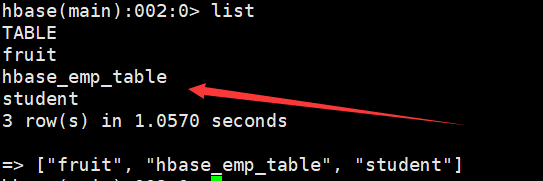
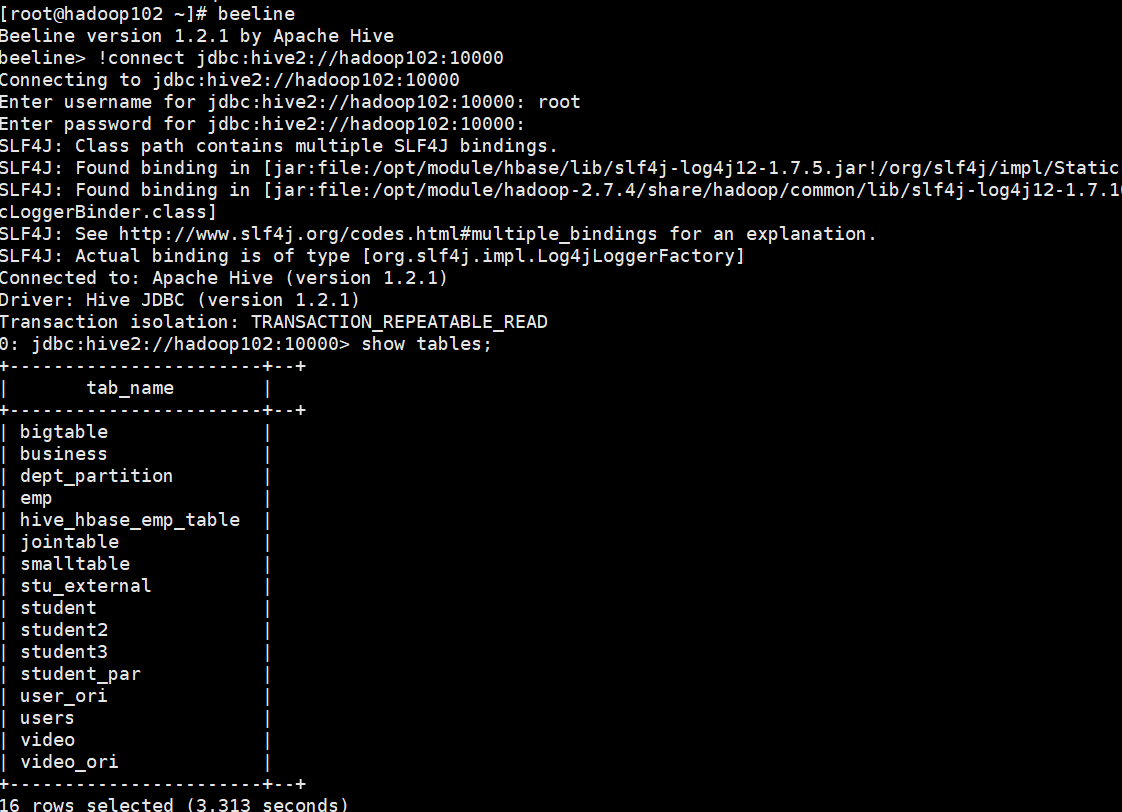
提示:完成之后,可以分别进入Hive和HBase查看,都生成了对应的表
(2) 在Hive中创建临时中间表,用于load文件中的数据
提示:不能将数据直接load进Hive所关联HBase的那张表中
CREATE TABLE emp(
empno int,
ename string,
job string,
mgr int,
hiredate string,
sal double,
comm double,
deptno int)
row format delimited fields terminated by '\t';
插入数据到emp表
0: jdbc:hive2://hadoop102:10000> insert into emp values(01,'zhansan','test',02,'2020-04-01','12.0','1200.0',001);
插入数据到hive_hbase_emp_table表
0: jdbc:hive2://hadoop102:10000> insert into table hive_hbase_emp_table select * from emp;
INFO  : Number of reduce tasks is set to 0 since there's no reduce operator
INFO  : number of splits:1
INFO  : Submitting tokens for job: job_1585707674958_0004
INFO  : The url to track the job: http://hadoop103:8088/proxy/application_1585707674958_0004/
INFO  : Starting Job = job_1585707674958_0004, Tracking URL = http://hadoop103:8088/proxy/application_1585707674958_0004/
INFO  : Kill Command = /opt/module/hadoop-2.7.4/bin/hadoop job  -kill job_1585707674958_0004
INFO  : Hadoop job information for Stage-0: number of mappers: 1; number of reducers: 0
INFO  : 2020-04-01 10:47:16,896 Stage-0 map = 0%,  reduce = 0%
INFO  : 2020-04-01 10:47:34,253 Stage-0 map = 100%,  reduce = 0%, Cumulative CPU 6.64 sec
INFO  : MapReduce Total cumulative CPU time: 6 seconds 640 msec
INFO  : Ended Job = job_1585707674958_0004
No rows affected (56.331 seconds)
就可以在Hbase中查看数据了
hbase(main):002:0> scan 'hbase_emp_table'
ROW                                      COLUMN+CELL
 1                                       column=info:comm, timestamp=1585709253833, value=1200.0
 1                                       column=info:deptno, timestamp=1585709253833, value=1
 1                                       column=info:ename, timestamp=1585709253833, value=zhansan
 1                                       column=info:hiredate, timestamp=1585709253833, value=2020-04-01
 1                                       column=info:job, timestamp=1585709253833, value=test
 1                                       column=info:mgr, timestamp=1585709253833, value=2
 1                                       column=info:sal, timestamp=1585709253833, value=12.0
1 row(s) in 0.1400 seconds
over~

 浙公网安备 33010602011771号