

2020面向对象寒假作业(二)
| 这个作业属于哪里 | https://edu.cnblogs.com/campus/fzu/2020OOP |
|---|---|
| 这个作业在哪里 | https://edu.cnblogs.com/campus/fzu/2020OOP/homework/10231 |
| - | 1.继续完成编程题 |
| 这个作业目标 | 2.新建一个github仓库,并把作业推送到该仓库 |
| - | 3.发布博客 |
| 作业正文 | 2020面向对象寒假作业(二) |
| 参考文献 | 2020面向对象程序设计寒假作业2 题解 |
实践题
新建一个github仓库,使用git,或者github desktop把接下去的编程题的代码及测试脚本传到这个仓库。请使用.gitignore文件忽略不要上传的文件。用法自行百度。
(一)下载并安装登录github desktop
(二)新建名为source的仓库
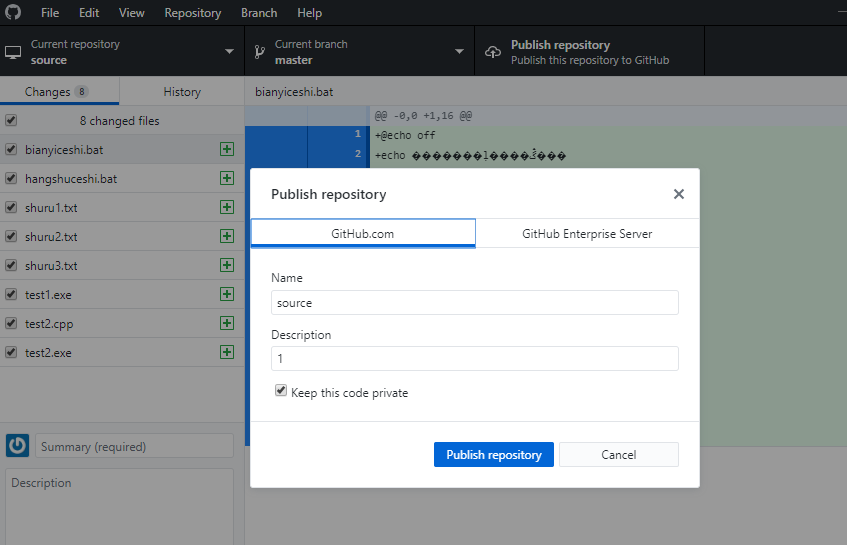
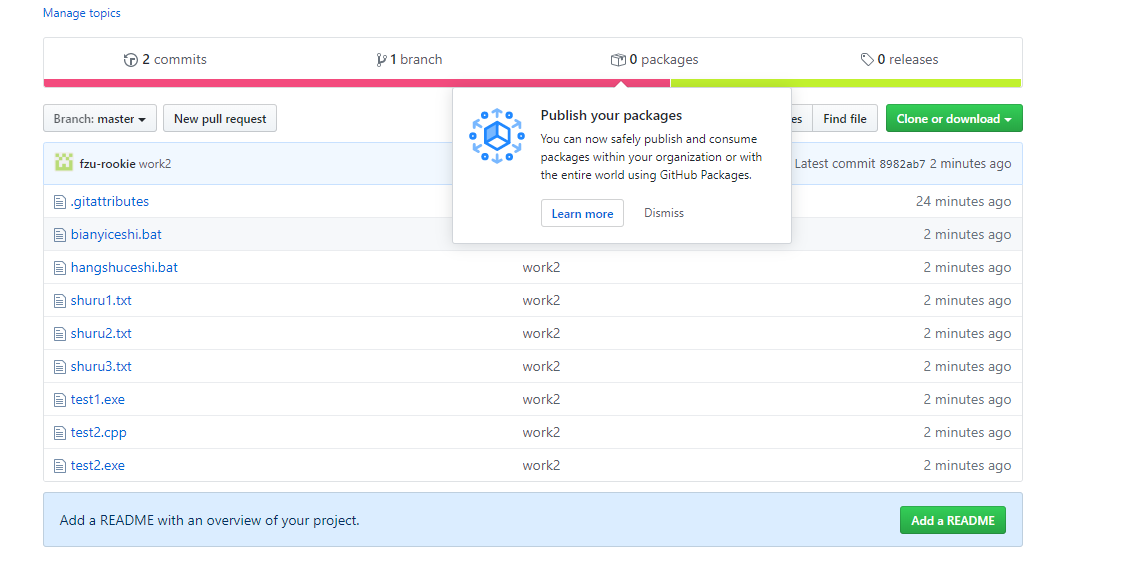
(三)将文件复制值本地source文件夹并上传
编程题
(一)使用下划线命名法修改函数
(i)输入转换函数conv_input
int conv_input(char s[]){
	if (!strcmp(s, "零"))	return 0;
	if (!strcmp(s, "一"))	return 1;
	if (!strcmp(s, "二"))	return 2;
	if (!strcmp(s, "三"))	return 3;
	if (!strcmp(s, "四"))	return 4;
	if (!strcmp(s, "五"))	return 5;
	if (!strcmp(s, "六"))	return 6;
	if (!strcmp(s, "七"))	return 7;
	if (!strcmp(s, "八"))	return 8;
	if (!strcmp(s, "九"))	return 9;
	if (!strcmp(s, "十"))	return 10;
}
(ii)输出转换函数conv_output
void conv_output(int n)
{
	if(n==0) printf("零");
	if(n==1) printf("一");
	if(n==2) printf("二");
	if(n==3) printf("三");
	if(n==4) printf("四");
	if(n==5) printf("五");
	if(n==6) printf("六");
	if(n==7) printf("=七");
	if(n==8) printf("八");
	if(n==9) printf("九");
	if(n==10) printf("十");
}
(iii)主函数
int main(){
	char s1[10], s2[10], s3[10], s4[10],qian[10],cal[10],shu[10];
	int n=0,m=0;
	scanf("%s %s %s %s", s1, s2, s3, s4);
	if(strcmp(s1,"整数")||strcmp(s2,"钱包")||strcmp(s3,"等于")){
		printf("Input Error!\n");
		return 0;
	}
	else{
		n=conv_input(s4);
		while(1){
			scanf("%s ",qian);
			if(!strcmp(qian,"看看"))	break;
			else{
				scanf("%s %s",cal,shu);
				m=conv_input(shu);
				if(!strcmp(cal,"增加"))	n+=m;
				if(!strcmp(cal,"减少"))	n-=m;
			}
		}
		if(n<=10)
    		conv_output(n);
 		else if(n%10==0){
		 		conv_output(n/10);
     			printf("十");
    		 }
 		else{
		 	conv_output(n/10);
     		printf("十");
     		conv_output(n%10);
    		}
	}
	return 0;

}
(一)制作编译脚本
@echo off
echo 请输入文件所在磁盘
set /p a=
echo 正在转移到该磁盘
cd "%a%"
echo 请输入文件所在路径
set /p b=
echo 转移到文件路径
cd "%b%"
echo 请输入文件名
set /p c=
echo 编译开始
gcc "%c%" -o test1.exe
if exist "test.exe" echo 编译成功
if not exist "test.exe" echo 编译失败
Pause
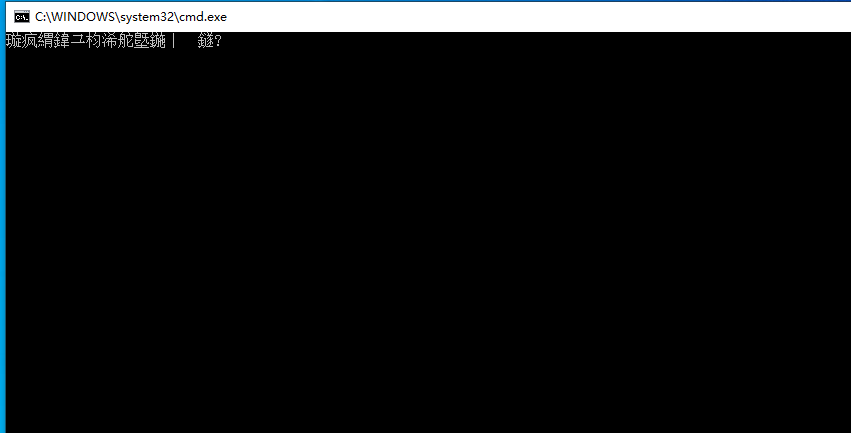
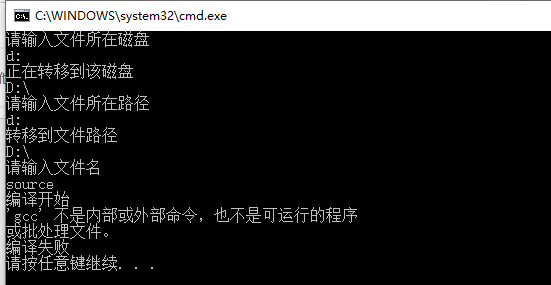
出现问题:
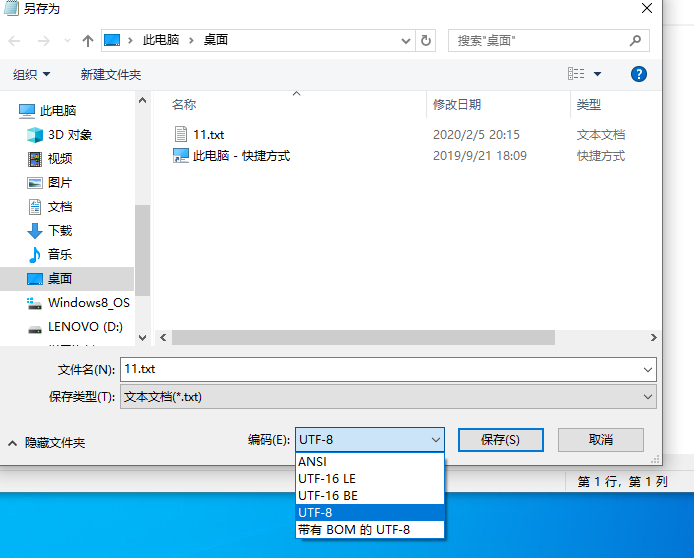
1.运行后出现乱码
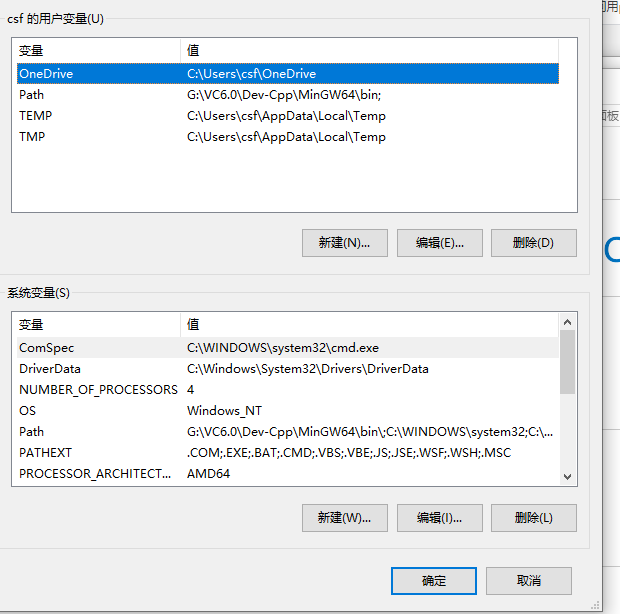
2.未设置环境变量path
解决方法:
1.将文件编码改为ANSI
2.设置环境变量(控制面板>系统和安全>系统>高级系统设置>环境变量)
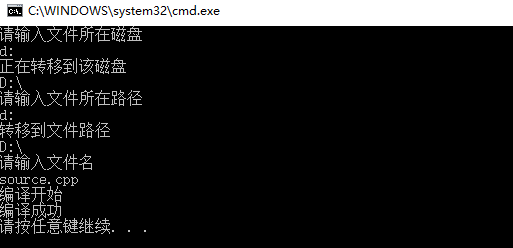
3.结果:
(二)制作测试脚本
(i)针对conv_input函数写测试程序:
#include<stdio.h>
#include<string.h>
int conv_input(char s[]){
	if (!strcmp(s, "零"))	return 0;
	if (!strcmp(s, "一"))	return 1;
	if (!strcmp(s, "二"))	return 2;
	if (!strcmp(s, "三"))	return 3;
	if (!strcmp(s, "四"))	return 4;
	if (!strcmp(s, "五"))	return 5;
	if (!strcmp(s, "六"))	return 6;
	if (!strcmp(s, "七"))	return 7;
	if (!strcmp(s, "八"))	return 8;
	if (!strcmp(s, "九"))	return 9;
	if (!strcmp(s, "十"))	return 10;
}
int main(){
	int i,n,m;
	printf("请有序输入11次:\n");
	for(i=0;i<11;i++){
		char s[10];
		scanf("%s",s);
		printf("%s ",s);
		n=conv_input(s);
		if(n==i)	printf("正确\n");
		else	printf("错误\n");
	}
	return 0;

}
(ii)编写脚本:
@echo off
cd d:
echo 开始测试
test2.exe
echo 测试结束
pause
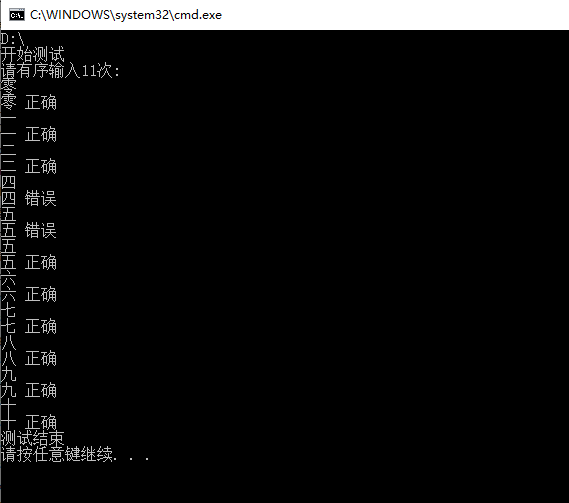
(iii)结果:
(三)通过命令行读取一个文件
(i)编写几个输入文件
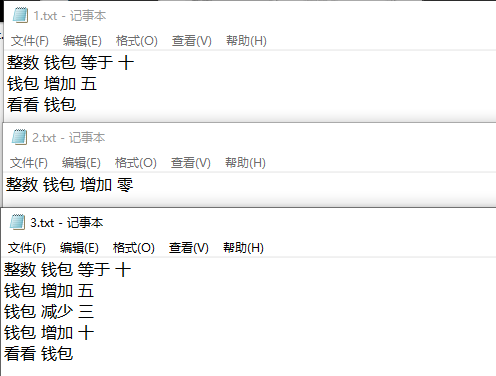
(ii)在原代码基础上加入freopen函数的完整代码
#include<stdio.h>
#include<string.h>
int conv_input(char s[]){
	if (!strcmp(s, "零"))	return 0;
	if (!strcmp(s, "一"))	return 1;
	if (!strcmp(s, "二"))	return 2;
	if (!strcmp(s, "三"))	return 3;
	if (!strcmp(s, "四"))	return 4;
	if (!strcmp(s, "五"))	return 5;
	if (!strcmp(s, "六"))	return 6;
	if (!strcmp(s, "七"))	return 7;
	if (!strcmp(s, "八"))	return 8;
	if (!strcmp(s, "九"))	return 9;
	if (!strcmp(s, "十"))	return 10;
}
void conv_output(int n)
{
	if(n==0) printf("零");
	if(n==1) printf("一");
	if(n==2) printf("二");
	if(n==3) printf("三");
	if(n==4) printf("四");
	if(n==5) printf("五");
	if(n==6) printf("六");
	if(n==7) printf("=七");
	if(n==8) printf("八");
	if(n==9) printf("九");
	if(n==10) printf("十");
}
int main(){
	char file[120];
    printf("请输入文件地址\n");
    scanf("%s",file);
    freopen(file,"r",stdin);
	char s1[10], s2[10], s3[10], s4[10],qian[10],cal[10],shu[10];
	int n=0,m=0;
	scanf("%s %s %s %s", s1, s2, s3, s4);
	if(strcmp(s1,"整数")||strcmp(s2,"钱包")||strcmp(s3,"等于")){
		printf("Input Error!\n");
		return 0;
	}
	else{
		n=conv_input(s4);
		while(1){
			scanf("%s ",qian);
			if(!strcmp(qian,"看看"))	break;
			else{
				scanf("%s %s",cal,shu);
				m=conv_input(shu);
				if(!strcmp(cal,"增加"))	n+=m;
				if(!strcmp(cal,"减少"))	n-=m;
			}
		}
		if(n<=10)
    		conv_output(n);
 		else if(n%10==0){
		 		conv_output(n/10);
     			printf("十");
    		 }
 		else{
		 	conv_output(n/10);
     		printf("十");
     		conv_output(n%10);
    		}
	}
	return 0;

}
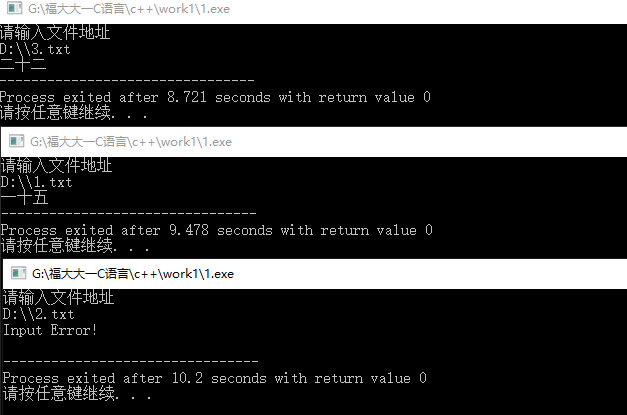
(iii)结果:

 浙公网安备 33010602011771号