
win10上安装nacos容器报端口被占用
错误如下图

排查过程
1、检查8848端口是否被占用
netstat -ano | findstr 9091
结论:没有
2、经过google搜索Hyper-V会保留部分TCP端口,而windows上想要运行docker desktop,必须开启Hyper-V服务
netsh interface ipv4 show excludedportrange protocol=tcp
命令查询结果,8848在排除范围内
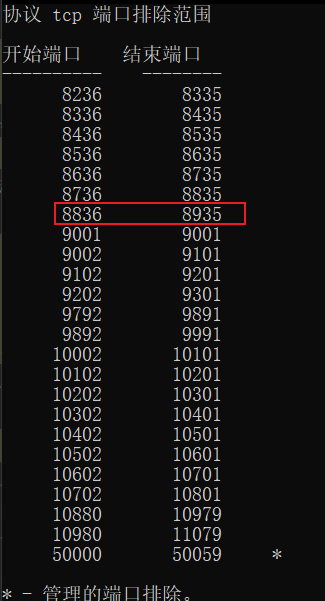
3、在standalone-derby.yml文件里面修改nacos、grafana、Prometheus的端口,修改后的配置文件如下
version: "2"
services:
  nacos:
    image: nacos/nacos-server:${NACOS_VERSION}
    container_name: nacos-standalone
    environment:
      - PREFER_HOST_MODE=hostname
      - MODE=standalone
      - NACOS_AUTH_IDENTITY_KEY=serverIdentity
      - NACOS_AUTH_IDENTITY_VALUE=security
      - NACOS_AUTH_TOKEN=SecretKey012345678901234567890123456789012345678901234567890123456789
    volumes:
      - ./standalone-logs/:/home/nacos/logs
    ports:
      - "8948:8848"
      - "10848:9848"
  prometheus:
    container_name: prometheus
    image: prom/prometheus:latest
    volumes:
      - ./prometheus/prometheus-standalone.yaml:/etc/prometheus/prometheus.yml
    ports:
      - "9390:9090"
    depends_on:
      - nacos
    restart: on-failure
  grafana:
    container_name: grafana
    image: grafana/grafana:latest
    ports:
      - 3000:3000
    restart: on-failure
4、启动nacos、grafana、Prometheus
docker-compose -f example/standalone-derby.yaml up

 浙公网安备 33010602011771号