
Dockerfile与docker-compose搭建php环境
目录结构
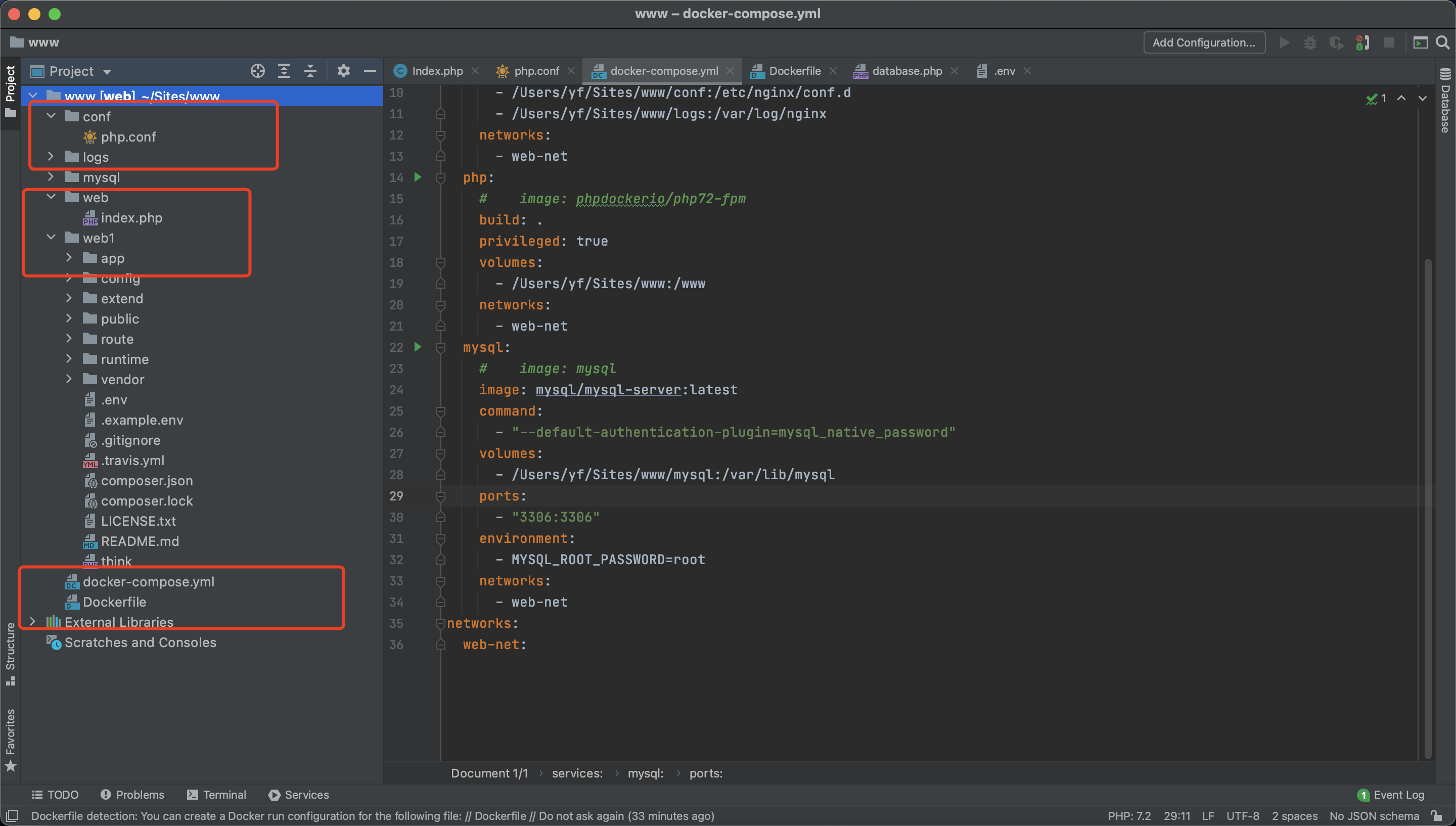
php.conf文件内容
server {
	listen	80;
	server_name	localhost;

	location / {
		root	/usr/share/nginx/html/web;
		index	index.php index.html index.htm;
	}

	error_page	500 502 503 504	/50x.html;
	location = /50x.html {
		root	/usr/share/nginx/html/web;
	}

	location ~ .php$ {
		fastcgi_pass	php:9000;
		fastcgi_index	index.php;
		fastcgi_param	SCRIPT_FILENAME	/www/web/$fastcgi_script_name;
		include		fastcgi_params;
	}
}

server {
	listen	80;
	server_name	docker.web1.com;

	location / {
		root	/usr/share/nginx/html/web1/public;
		index	index.php index.html index.htm;

		if (!-f $request_filename) {
            rewrite  ^(.*)$  /index.php?s=/$1  last;
        }
	}

	error_page	500 502 503 504	/50x.html;
	location = /50x.html {
		root	/usr/share/nginx/html/web1/public;
	}

	location ~ .php$ {
		fastcgi_pass	php:9000;
		fastcgi_index	index.php;
		fastcgi_param	SCRIPT_FILENAME	/www/web1/public/$fastcgi_script_name;
		include		fastcgi_params;
	}
}
docker-compose.yml配置内容
version: "3.9"
services:
  nginx:
    image: nginx
    privileged: true
    ports:
      - "80:80"
    volumes:
      - /Users/yf/Sites/www:/usr/share/nginx/html
      - /Users/yf/Sites/www/conf:/etc/nginx/conf.d
      - /Users/yf/Sites/www/logs:/var/log/nginx
    networks:
      - web-net
  php:
    #    image: phpdockerio/php72-fpm
    build: .
    privileged: true
    volumes:
      - /Users/yf/Sites/www:/www
    networks:
      - web-net
  mysql:
    #    image: mysql
    image: mysql/mysql-server:latest
    command:
      - "--default-authentication-plugin=mysql_native_password"
    volumes:
      - /Users/yf/Sites/www/mysql:/var/lib/mysql
    ports:
      - "3306:3306"
    environment:
      - MYSQL_ROOT_PASSWORD=root
    networks:
      - web-net
networks:
  web-net:
Dockerfile文件配置内容
FROM php:7.2-fpm

RUN docker-php-ext-install pdo_mysql \

&& docker-php-ext-install mysqli \

&& docker-php-ext-install exif \

&& docker-php-ext-install bcmath \

&& pecl install -o -f redis \

&& docker-php-ext-enable redis

# 镜像作者
MAINTAINER fy

# 设置 python 环境变量
ENV PYTHONUNBUFFERED 1

# 设置容器内项目路径
ENV PROJECTPATH=/www

# 在容器内创建django文件夹
RUN mkdir -p $PROJECTPATH

# 设置容器内工作目录
WORKDIR $PROJECTPATH

# 将当前目录文件加入到容器工作目录中(. 表示当前宿主机目录)
ADD . $PROJECTPATH

 浙公网安备 33010602011771号