
通过Spire库对Excel单元格的读写操作。如需使用NPOI库,可跳转飞哥博客了解
https://www.cnblogs.com/nxopen2018/p/13513883.html
先引用Spire.XLS库
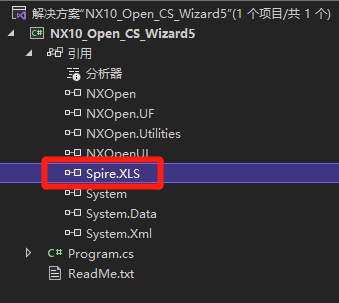
代码:
  1 using System;
  2 using System.IO;
  3 using NXOpen;
  4 using NXOpen.UF;
  5 using Spire.Xls;
  6
  7 public class Program
  8 {
  9     // class members
 10     private static Session theSession;
 11     private static UI theUI;
 12     private static UFSession theUfSession;
 13     public static Program theProgram;
 14     public static bool isDisposeCalled;
 15
 16     //------------------------------------------------------------------------------
 17     // Constructor
 18     //------------------------------------------------------------------------------
 19     public Program()
 20     {
 21         try
 22         {
 23             theSession = Session.GetSession();
 24             theUI = UI.GetUI();
 25             theUfSession = UFSession.GetUFSession();
 26             isDisposeCalled = false;
 27         }
 28         catch (NXOpen.NXException ex)
 29         {
 30             // ---- Enter your exception handling code here -----
 31             // UI.GetUI().NXMessageBox.Show("Message", NXMessageBox.DialogType.Error, ex.Message);
 32         }
 33     }
 34
 35     //------------------------------------------------------------------------------
 36     //  Explicit Activation
 37     //      This entry point is used to activate the application explicitly
 38     //------------------------------------------------------------------------------
 39     public static int Main(string[] args)
 40     {
 41         int retValue = 0;
 42         try
 43         {
 44             theProgram = new Program();
 45
 46
 47             Workbook wb = new Workbook();
 48             wb.LoadFromFile(@"C: \Users\Administrator\Desktop\1\MyWorkBook.xls"); //通过绝对路径来加载excel工作簿
 49             Worksheet ws = wb.Worksheets[0];  //获取wb的第一个工作表
 50
 51             //获取单元格 (两种方式)
 52             string a1Value = ws.Range["A1"].Value;
 53             string b2Value = ws.Range[2, 2].Value;
 54
 55             theUfSession.Ui.IsListingWindowOpen(out bool res);
 56             if (!res)
 57             {
 58                 theUfSession.Ui.OpenListingWindow();
 59             }
 60             theUfSession.Ui.WriteListingWindow("A1单元格的值是:" + a1Value + "\r\n");
 61             theUfSession.Ui.WriteListingWindow("B2单元格的值是:" + b2Value + "\r\n");
 62
 63             //设置单元格
 64             try
 65             {
 66                 string cell = "C1";
 67                 ws.Range[cell].Value = "今天天气真不错";
 68                 ws.Range[cell].Style.Color = System.Drawing.Color.Cyan;//设置单元格颜色
 69                 ws.Range[cell].Style.Font.FontName = "微软雅黑"; //设置单元格字体
 70                 wb.Save();  //保存
 71                 theUfSession.Ui.WriteListingWindow("单元格 [" + cell + "] 写入成功" + "\r\n");
 72             }
 73             catch (Exception exWrite)
 74             {
 75                 theUfSession.Ui.WriteListingWindow("写入异常\t原因:" + exWrite.ToString() + "\r\n");
 76             }
 77
 78
 79             //TODO: Add your application code here
 80
 81             theProgram.Dispose();
 82         }
 83         catch (NXOpen.NXException ex)
 84         {
 85             // ---- Enter your exception handling code here -----
 86
 87         }
 88         return retValue;
 89     }
 90
 91     //------------------------------------------------------------------------------
 92     // Following method disposes all the class members
 93     //------------------------------------------------------------------------------
 94     public void Dispose()
 95     {
 96         try
 97         {
 98             if (isDisposeCalled == false)
 99             {
100                 //TODO: Add your application code here
101             }
102             isDisposeCalled = true;
103         }
104         catch (NXOpen.NXException ex)
105         {
106             // ---- Enter your exception handling code here -----
107
108         }
109     }
110
111     public static int GetUnloadOption(string arg)
112     {
113         //Unloads the image explicitly, via an unload dialog
114         //return System.Convert.ToInt32(Session.LibraryUnloadOption.Explicitly);
115
116         //Unloads the image immediately after execution within NX
117         return System.Convert.ToInt32(Session.LibraryUnloadOption.Immediately);
118
119         //Unloads the image when the NX session terminates
120         // return System.Convert.ToInt32(Session.LibraryUnloadOption.AtTermination);
121     }
122
123 }
演示:


 浙公网安备 33010602011771号