
Python-将数据写入excel【2023-05-09更新】
将数据写入excel(以前只放在一个列表里通过DataFrame写入csv)
使用pandas直接写入(现在使用多个列表直接写入,写入的excel更加简洁易看)
 1 """
 2 coding:utf-8
 3 @Software:PyCharm
 4 @Time:2022/11/22 14:16
 5 @author:panda
 6 """
 7
 8
 9 import os
10 import pandas as pd
11
12
13 def write_to_excel():
14     """
15     将数据写入excel
16     """
17     name = []
18     age = []
19     sex = []
20
21     for i in range(10):
22         name.append(i)
23         age.append(i+1)
24         sex.append(i+2)
25
26     data = pd.DataFrame()
27     data['name'] = name
28     data['age'] = age
29     data['sex'] = sex
30
31     data.to_excel(os.path.join(os.getcwd(), 'test_excel.xlsx'), index=False)
32
33
34 if __name__ == '__main__':
35     write_to_excel()
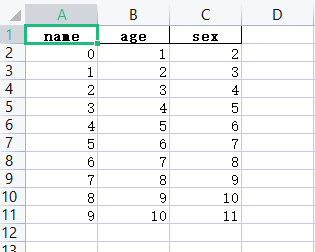
2023-05-09【更新】
2.在通过多个列表直接写入的时候,如果是不定的需求一个列表添加DataFrame可以使用上面的方法,如果说,同时生成了多个列表,需要将列表同时转化为DataFrame可以使用如下方法:
【注意】:各个列表的长度需要一致
    list1 = []
    list2 = []
    list3 = []
    list4 = []
    lists = [label, list1, list2, list3, list4, ]
    lists = itertools.zip_longest(*lists, fillvalue=None)
    data_total = pd.DataFrame(lists, columns=['xx_label', "list1", "list2", "list3", "list4", ])
本文来自博客园,作者:许个未来—,转载请注明原文链接:https://www.cnblogs.com/future-panda/p/16915073.html

 浙公网安备 33010602011771号