
《窗体篇》窗体生命周期
窗体生命周期
参考链接:https://www.cnblogs.com/animal/articles/3506113.html
在整个窗体生命周期中,有以下6个重要的事件:
1.Load:窗体加载时触发,主要用于加载初始数据
2.Shown:窗体显示时触发
3.Activated:窗体获取焦点时触发
4.Deactivate:窗体失去焦点时触发
5.FormClosing:窗体关闭过程中触发
6.FormClosed:窗体关闭完成触发
我们打开上一章的解决方案,在MainForm.cs里面键入如下代码:
using System;
using System.Collections.Generic;
using System.IO;
using System.Linq;
using System.Text;
using System.Threading.Tasks;
using System.Windows.Forms;
namespace WinFrom
{
public class MainForm : Form//继承Form
{
private int index = 0;//判断执行顺序
private string msg = string.Empty;//用于记录事件触发顺序
public MainForm()
{
#region 加载事件
this.Activated += new System.EventHandler(this.MainForm_Activated);
this.Deactivate += new System.EventHandler(this.MainForm_Deactivate);
this.FormClosing += new System.Windows.Forms.FormClosingEventHandler(this.MainForm_FormClosing);
this.FormClosed += new System.Windows.Forms.FormClosedEventHandler(this.MainForm_FormClosed);
this.Load += new System.EventHandler(this.MainForm_Load);
this.Shown += new System.EventHandler(this.MainForm_Shown);
#endregion
}
///
/// 窗体加载时事件,主要用于加载初始化数据
///
///
///
private void MainForm_Load(object sender, EventArgs e)
{
msg = msg + "Load事件,执行顺序" + (++index) + "\r\n";
}
///
/// 窗体显示时事件
///
///
///
private void MainForm_Shown(object sender, EventArgs e)
{
msg = msg + "Shown事件,执行顺序" + (++index) + "\r\n";
}
///
/// 窗体获得焦点事件
///
///
///
private void MainForm_Activated(object sender, EventArgs e)
{
msg = msg + "Activated事件,执行顺序" + (++index) + "\r\n";
}
///
/// 窗体失去焦点事件
///
///
///
private void MainForm_Deactivate(object sender, EventArgs e)
{
msg = msg + "Deactivate事件,执行顺序" + (++index) + "\r\n";
}
///
/// 窗体关闭完成事件
///
///
///
private void MainForm_FormClosed(object sender, FormClosedEventArgs e)
{
msg = msg + "Closed事件,执行顺序" + (++index) + "\r\n";
File.WriteAllText(@"d:\1.txt", msg);
}
///
/// 窗体关闭进行中事件
///
///
///
private void MainForm_FormClosing(object sender, FormClosingEventArgs e)
{
msg = msg + "Closing事件,执行顺序" + (++index) + "\r\n";
}
}
}
执行,单击桌面,在单击窗体,实现窗体的“失去/获得”焦点的过程,打开D:\1.txt
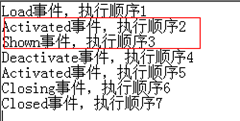
注意各个事件的执行顺序

 浙公网安备 33010602011771号