ATLAS元数据管理搭建笔记
0. 环境准备
| 大数据版本 | ATLAS版本 | 主机 |
|---|---|---|
| CDH 6.3.1 | 2.1.0:https://atlas.apache.org/#/Downloads | cdh172 |
| CDH 6.3.1 | 2.1.0:https://atlas.apache.org/#/Downloads | cdh173 |
| CDH 6.3.1 | 2.1.0:https://atlas.apache.org/#/Downloads | cdh174 |
1. 编译源码
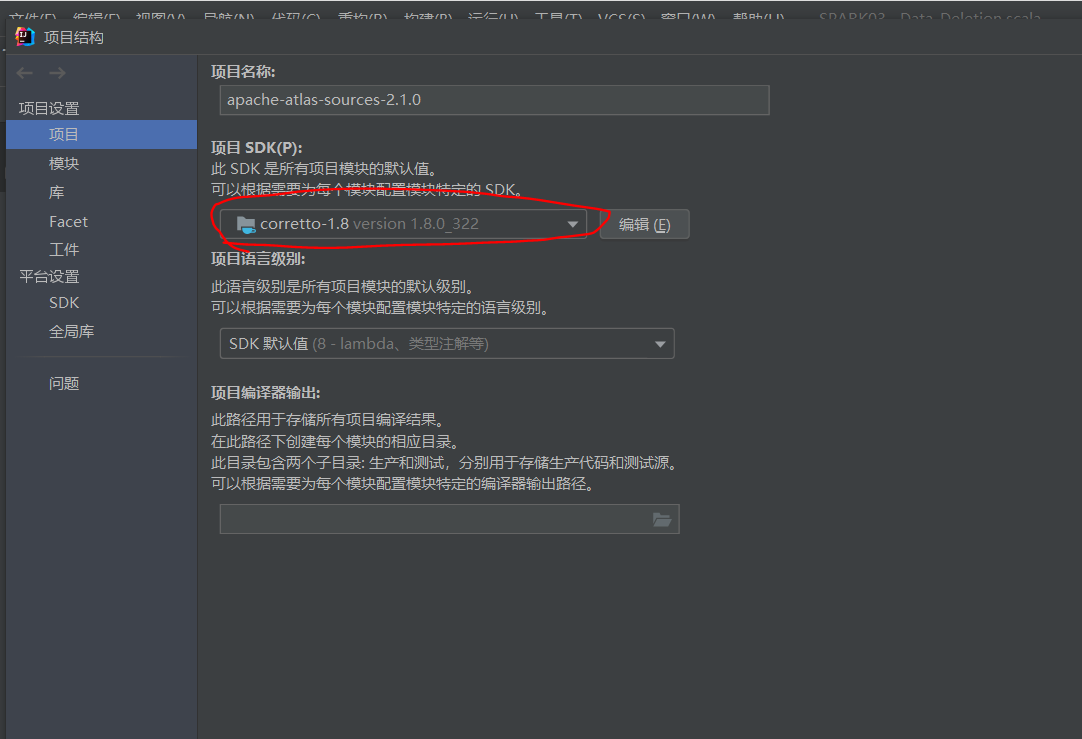
1.1 设置项目结构
文件\项目设置中SDJ为1.8版本的JDK
1.2 maven设置下载地址
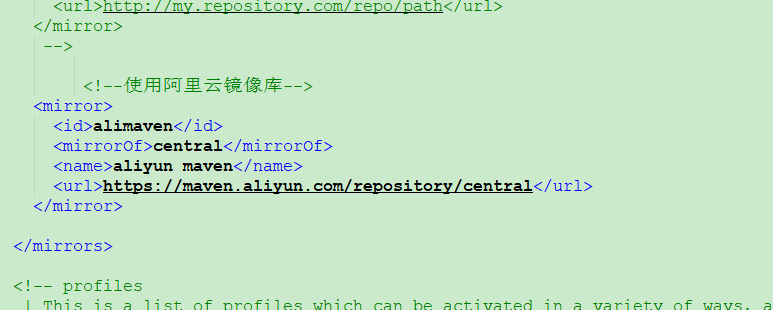
D:\Apache-maven\apache-maven-3.8.4\conf\settings.xml

## mirrors删除原有mirror,修改为阿里云mirro

    <mirror>
      <id>alimaven</id>
      <mirrorOf>central</mirrorOf>
      <name>aliyun maven</name>
      <url>https://maven.aliyun.com/repository/central</url>
    </mirror>
1.3 修改POM文件
## 因与CDH6.3.1集成,在repositories中新增以下部分:

       <repository>
            <id>cloudera</id>
            <url>https://repository.cloudera.com/artifactory/cloudera-repos</url>
            <releases>
                <enabled>true</enabled>
            </releases>
            <snapshots>
                <enabled>false</enabled>
            </snapshots>
        </repos
## 修改对应版本号
## solr和hbase集成,后缀不带cdh版本,否则源地址无法下载

<lucene-solr.version>7.4.0-cdh6.3.1</lucene-solr.version>
<hadoop.version>3.0.0-cdh6.3.1</hadoop.version>
<hbase.version>2.1.0</hbase.version>
<solr.version>7.4.0</solr.version>
<hive.version>2.1.1-cdh6.3.1</hive.version>
<kafka.version>2.2.1-cdh6.3.1</kafka.version>
<kafka.scala.binary.version>2.11</kafka.scala.binary.version>
<zookeeper.version>3.4.5-cdh6.3.1</zookeeper.version>
<sqoop.version>1.4.7-cdh6.3.1</sqoop.version>
1.4 修改ATLAS源码
## 位置:atlas-release-2.1.0-rc3/addons/hive-bridge

## .org/apache/atlas/hive/bridge/HiveMetaStoreBridge.java 577行
String catalogName = hiveDB.getCatalogName() != null ? hiveDB.getCatalogName().toLowerCase() : null;
改为:
String catalogName = null;

## .org/apache/atlas/hive/hook/AtlasHiveHookContext.java 81行
this.metastoreHandler = (listenerEvent != null) ? metastoreEvent.getIHMSHandler() : null;
改为:
this.metastoreHandler = null;
1.5 编译
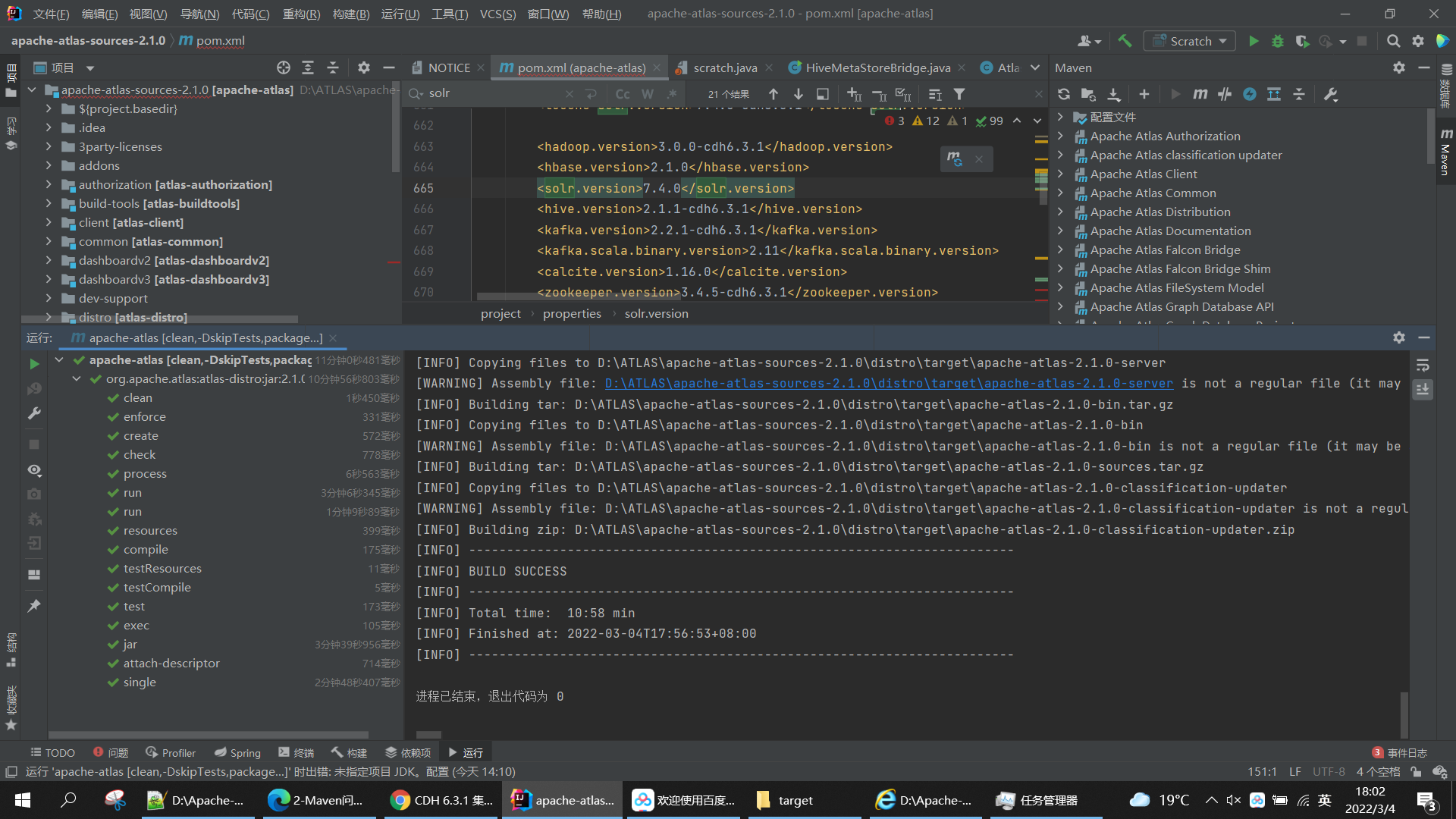
## mvn clean -DskipTests package -Pdist -X

mvn clean -DskipTests package -Pdist,embedded-hbase-solr  -- 因为使用hbase和solr的集成,所以使用这条语句

## 根据提示解决问题

## 编译包存放在D:\ATLAS\apache-atlas-sources-2.1.0\distro\target
2.ATLAS安装
2.1 解压到安装目录
tar -zxvf apache-atlas-2.1.0-bin.tar.gz -C /opt/;
2.2 修改配置文件atlas-env.sh
export JAVA_HOME=/usr/java/jdk1.8.0_181-cloudera

export MANAGE_LOCAL_HBASE=true      -- 因为是集成,所以改为true

export MANAGE_LOCAL_SOLR=true      -- 因为是集成,所以改为true

export MANAGE_EMBEDDED_CASSANDRA=false

export MANAGE_LOCAL_ELASTICSEARCH=false
2.3 修改配置文件atlas-application.properties
## 1)将原来的存为副本
## 2)修改对应的zookeeper/solr/hbase/kafka对应的参数
## 3)因为是使用的内置hbase,zookeeper分配的端口号2182,而不是2181
## 4)这个配置文件是关键,一定不能配置错误

#
# Licensed to the Apache Software Foundation (ASF) under one
# or more contributor license agreements.  See the NOTICE file
# distributed with this work for additional information
# regarding copyright ownership.  The ASF licenses this file
# to you under the Apache License, Version 2.0 (the
# "License"); you may not use this file except in compliance
# with the License.  You may obtain a copy of the License at
#
#     http://www.apache.org/licenses/LICENSE-2.0
#
# Unless required by applicable law or agreed to in writing, software
# distributed under the License is distributed on an "AS IS" BASIS,
# WITHOUT WARRANTIES OR CONDITIONS OF ANY KIND, either express or implied.
# See the License for the specific language governing permissions and
# limitations under the License.
#

#########  Graph Database Configs  #########

# Graph Database

#Configures the graph database to use.  Defaults to JanusGraph
#atlas.graphdb.backend=org.apache.atlas.repository.graphdb.janus.AtlasJanusGraphDatabase

# Graph Storage
# Set atlas.graph.storage.backend to the correct value for your desired storage
# backend. Possible values:
#
# hbase
# cassandra
# embeddedcassandra - Should only be set by building Atlas with  -Pdist,embedded-cassandra-solr
# berkeleyje
#
# See the configuration documentation for more information about configuring the various  storage backends.
#
atlas.graph.storage.backend=hbase
atlas.graph.storage.hbase.table=apache_atlas_janus

${graph.storage.properties}

# Gremlin Query Optimizer
#
# Enables rewriting gremlin queries to maximize performance. This flag is provided as
# a possible way to work around any defects that are found in the optimizer until they
# are resolved.
#atlas.query.gremlinOptimizerEnabled=true

# Delete handler
#
# This allows the default behavior of doing "soft" deletes to be changed.
#
# Allowed Values:
# org.apache.atlas.repository.store.graph.v1.SoftDeleteHandlerV1 - all deletes are "soft" deletes
# org.apache.atlas.repository.store.graph.v1.HardDeleteHandlerV1 - all deletes are "hard" deletes
#
#atlas.DeleteHandlerV1.impl=org.apache.atlas.repository.store.graph.v1.SoftDeleteHandlerV1

# Entity audit repository
#
# This allows the default behavior of logging entity changes to hbase to be changed.
#
# Allowed Values:
# org.apache.atlas.repository.audit.HBaseBasedAuditRepository - log entity changes to hbase
# org.apache.atlas.repository.audit.CassandraBasedAuditRepository - log entity changes to cassandra
# org.apache.atlas.repository.audit.NoopEntityAuditRepository - disable the audit repository
#
${entity.repository.properties}

# if Cassandra is used as a backend for audit from the above property, uncomment and set the following
# properties appropriately. If using the embedded cassandra profile, these properties can remain
# commented out.
# atlas.EntityAuditRepository.keyspace=atlas_audit
# atlas.EntityAuditRepository.replicationFactor=1


# Graph Search Index

${graph.index.properties}

atlas.graph.index.search.backend=solr
atlas.graph.index.search.solr.mode=cloud
atlas.graph.index.search.solr.zookeeper-url=hp1:2181/solr,hp2:2181/solr,hp3:2181/solr,hp4:2181/solr
atlas.graph.index.search.solr.zookeeper-connect-timeout=60000
atlas.graph.index.search.solr.zookeeper-session-timeout=60000


# Solr-specific configuration property
atlas.graph.index.search.max-result-set-size=150

#########  Import Configs  #########
#atlas.import.temp.directory=/temp/import

#########  Notification Configs  #########
atlas.notification.embedded=false
atlas.kafka.data=${sys:atlas.home}/data/kafka
atlas.kafka.zookeeper.connect=hp1:2181,hp2:2181,hp3:2181
atlas.kafka.bootstrap.servers=hp1:9092,hp2:9092,hp3:9092
atlas.kafka.zookeeper.session.timeout.ms=60000
atlas.kafka.zookeeper.connection.timeout.ms=30000
atlas.kafka.zookeeper.sync.time.ms=20
atlas.kafka.auto.commit.interval.ms=1000
atlas.kafka.hook.group.id=atlas

atlas.kafka.enable.auto.commit=false
atlas.kafka.auto.offset.reset=earliest
atlas.kafka.session.timeout.ms=30000
atlas.kafka.offsets.topic.replication.factor=1
atlas.kafka.poll.timeout.ms=1000

atlas.notification.create.topics=true
atlas.notification.replicas=1
atlas.notification.topics=ATLAS_HOOK,ATLAS_ENTITIES
atlas.notification.log.failed.messages=true
atlas.notification.consumer.retry.interval=500
atlas.notification.hook.retry.interval=1000
# Enable for Kerberized Kafka clusters
#atlas.notification.kafka.service.principal=kafka/_HOST@EXAMPLE.COM
#atlas.notification.kafka.keytab.location=/etc/security/keytabs/kafka.service.keytab

## Server port configuration
#atlas.server.http.port=21000
#atlas.server.https.port=21443

#########  Security Properties  #########

# SSL config
atlas.enableTLS=false

#truststore.file=/path/to/truststore.jks
#cert.stores.credential.provider.path=jceks://file/path/to/credentialstore.jceks

#following only required for 2-way SSL
#keystore.file=/path/to/keystore.jks

# Authentication config

atlas.authentication.method.kerberos=false
atlas.authentication.method.file=true

#### ldap.type= LDAP or AD
atlas.authentication.method.ldap.type=none

#### user credentials file
atlas.authentication.method.file.filename=${sys:atlas.home}/conf/users-credentials.properties

### groups from UGI
#atlas.authentication.method.ldap.ugi-groups=true

######## LDAP properties #########
#atlas.authentication.method.ldap.url=ldap://<ldap server url>:389
#atlas.authentication.method.ldap.userDNpattern=uid={0},ou=People,dc=example,dc=com
#atlas.authentication.method.ldap.groupSearchBase=dc=example,dc=com
#atlas.authentication.method.ldap.groupSearchFilter=(member=uid={0},ou=Users,dc=example,dc=com)
#atlas.authentication.method.ldap.groupRoleAttribute=cn
#atlas.authentication.method.ldap.base.dn=dc=example,dc=com
#atlas.authentication.method.ldap.bind.dn=cn=Manager,dc=example,dc=com
#atlas.authentication.method.ldap.bind.password=<password>
#atlas.authentication.method.ldap.referral=ignore
#atlas.authentication.method.ldap.user.searchfilter=(uid={0})
#atlas.authentication.method.ldap.default.role=<default role>


######### Active directory properties #######
#atlas.authentication.method.ldap.ad.domain=example.com
#atlas.authentication.method.ldap.ad.url=ldap://<AD server url>:389
#atlas.authentication.method.ldap.ad.base.dn=(sAMAccountName={0})
#atlas.authentication.method.ldap.ad.bind.dn=CN=team,CN=Users,DC=example,DC=com
#atlas.authentication.method.ldap.ad.bind.password=<password>
#atlas.authentication.method.ldap.ad.referral=ignore
#atlas.authentication.method.ldap.ad.user.searchfilter=(sAMAccountName={0})
#atlas.authentication.method.ldap.ad.default.role=<default role>

#########  JAAS Configuration ########

#atlas.jaas.KafkaClient.loginModuleName = com.sun.security.auth.module.Krb5LoginModule
#atlas.jaas.KafkaClient.loginModuleControlFlag = required
#atlas.jaas.KafkaClient.option.useKeyTab = true
#atlas.jaas.KafkaClient.option.storeKey = true
#atlas.jaas.KafkaClient.option.serviceName = kafka
#atlas.jaas.KafkaClient.option.keyTab = /etc/security/keytabs/atlas.service.keytab
#atlas.jaas.KafkaClient.option.principal = atlas/_HOST@EXAMPLE.COM

#########  Server Properties  #########
atlas.rest.address=http://localhost:21000
# If enabled and set to true, this will run setup steps when the server starts
atlas.server.run.setup.on.start=false

#########  Entity Audit Configs  #########
atlas.audit.hbase.tablename=apache_atlas_entity_audit
atlas.audit.zookeeper.session.timeout.ms=1000
atlas.audit.hbase.zookeeper.quorum=hp1:2181,hp2:2181,hp3:2181

#Hive
atlas.hook.hive.synchronous=false
atlas.hook.hive.numRetries=3
atlas.hook.hive.queueSize=10000
atlas.cluster.name=primary

#########  High Availability Configuration ########
atlas.server.ha.enabled=false
#### Enabled the configs below as per need if HA is enabled #####
#atlas.server.ids=id1
#atlas.server.address.id1=localhost:21000
#atlas.server.ha.zookeeper.connect=localhost:2181
#atlas.server.ha.zookeeper.retry.sleeptime.ms=1000
#atlas.server.ha.zookeeper.num.retries=3
#atlas.server.ha.zookeeper.session.timeout.ms=20000
## if ACLs need to be set on the created nodes, uncomment these lines and set the values ##
#atlas.server.ha.zookeeper.acl=<scheme>:<id>
#atlas.server.ha.zookeeper.auth=<scheme>:<authinfo>


######### Atlas Authorization #########
atlas.authorizer.impl=simple
atlas.authorizer.simple.authz.policy.file=atlas-simple-authz-policy.json

#########  Type Cache Implementation ########
# A type cache class which implements
# org.apache.atlas.typesystem.types.cache.TypeCache.
# The default implementation is org.apache.atlas.typesystem.types.cache.DefaultTypeCache which is a local in-memory type cache.
#atlas.TypeCache.impl=

#########  Performance Configs  #########
#atlas.graph.storage.lock.retries=10
#atlas.graph.storage.cache.db-cache-time=120000

#########  CSRF Configs  #########
atlas.rest-csrf.enabled=true
atlas.rest-csrf.browser-useragents-regex=^Mozilla.*,^Opera.*,^Chrome.*
atlas.rest-csrf.methods-to-ignore=GET,OPTIONS,HEAD,TRACE
atlas.rest-csrf.custom-header=X-XSRF-HEADER

############ KNOX Configs ################
#atlas.sso.knox.browser.useragent=Mozilla,Chrome,Opera
#atlas.sso.knox.enabled=true
#atlas.sso.knox.providerurl=https://<knox gateway ip>:8443/gateway/knoxsso/api/v1/websso
#atlas.sso.knox.publicKey=

############ Atlas Metric/Stats configs ################
# Format: atlas.metric.query.<key>.<name>
atlas.metric.query.cache.ttlInSecs=900
#atlas.metric.query.general.typeCount=
#atlas.metric.query.general.typeUnusedCount=
#atlas.metric.query.general.entityCount=
#atlas.metric.query.general.tagCount=
#atlas.metric.query.general.entityDeleted=
#
#atlas.metric.query.entity.typeEntities=
#atlas.metric.query.entity.entityTagged=
#
#atlas.metric.query.tags.entityTags=

#########  Compiled Query Cache Configuration  #########

# The size of the compiled query cache.  Older queries will be evicted from the cache
# when we reach the capacity.

#atlas.CompiledQueryCache.capacity=1000

# Allows notifications when items are evicted from the compiled query
# cache because it has become full.  A warning will be issued when
# the specified number of evictions have occurred.  If the eviction
# warning threshold <= 0, no eviction warnings will be issued.

#atlas.CompiledQueryCache.evictionWarningThrottle=0


#########  Full Text Search Configuration  #########

#Set to false to disable full text search.
#atlas.search.fulltext.enable=true

#########  Gremlin Search Configuration  #########

#Set to false to disable gremlin search.
atlas.search.gremlin.enable=false


########## Add http headers ###########

#atlas.headers.Access-Control-Allow-Origin=*
#atlas.headers.Access-Control-Allow-Methods=GET,OPTIONS,HEAD,PUT,POST
#atlas.headers.<headerName>=<headerValue>


#########  UI Configuration ########

atlas.ui.default.version=v1

# whether to run the hook synchronously. false recommended to avoid delays in Sqoop operation completion. Default: false
atlas.hook.sqoop.synchronous=false
# number of retries for notification failure. Default: 3
atlas.hook.sqoop.numRetries=3
# queue size for the threadpool. Default: 10000
atlas.hook.sqoop.queueSize=10000

atlas.kafka.metric.reporters=org.apache.kafka.common.metrics.JmxReporter
atlas.kafka.client.id=sqoop-atlas
2.4 修改atlas-log4j.xml文件
## 去掉如下代码的注释

<appender name="perf_appender" class="org.apache.log4j.DailyRollingFileAppender">
   <param name="file" value="${atlas.log.dir}/atlas_perf.log" />
    <param name="datePattern" value="'.'yyyy-MM-dd" />
    <param name="append" value="true" />
    <layout class="org.apache.log4j.PatternLayout">
        <param name="ConversionPattern" value="%d|%t|%m%n" />
    </layout>
</appender>

<logger name="org.apache.atlas.perf" additivity="false">
    <level value="debug" />
    <appender-ref ref="perf_appender" />
</logger>
2.5 建立HBASE的软链接
ln -s /etc/hbase/conf/ /opt/apache-atlas-2.1.0/conf/hbase
2.6 solr建立collectioni(待完善)
/opt/cloudera/parcels/CDH-6.3.1-1.cdh6.3.1.p0.1470567/lib/solr/bin/solr create -c  vertex_index -d /opt/cloudera/parcels/CDH-6.3.1-1.cdh6.3.1.p0.1470567/lib/solr/atlas-solr -shards 3 -replicationFactor 2 -force

/opt/cloudera/parcels/CDH-6.3.1-1.cdh6.3.1.p0.1470567/lib/solr/bin/solr create -c  edge_index -d /opt/cloudera/parcels/CDH-6.3.1-1.cdh6.3.1.p0.1470567/lib/solr/atlas-solr -shards 3 -replicationFactor 2 -force

/opt/cloudera/parcels/CDH-6.3.1-1.cdh6.3.1.p0.1470567/lib/solr/bin/solr create -c  fulltext_index -d /opt/cloudera/parcels/CDH-6.3.1-1.cdh6.3.1.p0.1470567/lib/solr/atlas-solr -shards 3 -replicationFactor 2 -force


## 另外的版本
bin/solr create -c  vertex_index -d atlas-solr/ -shards 1 -replicationFactor 1
bin/solr create -c  edge_index  -d atlas-solr/ -shards 1 -replicationFactor 1
bin/solr create -c  fulltext_index  -d atlas-solr/ -shards 1 -replicationFactor 1

##登录cdh172:8983,查看是否成功
如下图(待拍照)
2.7 关联kafka
## 1)创建Kafka Topic

kafka-topics --zookeeper hp1:2181,hp2:2181,hp3:2181 --create --replication-factor 3 --partitions 3 --topic _HOATLASOK
kafka-topics --zookeeper hp1:2181,hp2:2181,hp3:2181 --create --replication-factor 3 --partitions 3 --topic ATLAS_ENTITIES
kafka-topics --zookeeper hp1:2181,hp2:2181,hp3:2181 --create --replication-factor 3 --partitions 3 --topic ATLAS_HOOK

## 另外的版本
kafka-topics --zookeeper hadoop01:2181,hadoop02:2181,hadoop03:2181 --create --replication-factor 1 --partitions 1 --topic _HOATLASOK
kafka-topics --zookeeper hadoop01:2181,hadoop02:2181,hadoop03:2181 --create --replication-factor 1 --partitions 1 --topic ATLAS_ENTITIES
kafka-topics --zookeeper hadoop01:2181,hadoop02:2181,hadoop03:2181 --create --replication-factor 1--partitions 1 --topic ATLAS_HOOK

## 查看topic

kafka-topics --list --zookeeper hp1:2181,hp2:2181,hp3:2181
如下图(待拍照)
3. 启动ATLAS
3.1 启动atlas
/opt/apache-atlas-2.1.0/bin/atlas_start.py
如下图:(待拍照)
3.2 实时查看日志
tail -f apache-atlas-2.1.0/logs/application.log

## 根据报错信息,解决问题
如下图(待拍照)
3.3 验证是否成功
cdh:21000
账号/密码:ADMIN/ADMIN
如下图(待拍照)
4. 关联HIVE
4.1 修改HIVE设置
## 登录cloudera manager hive修改配置

1)搜索 hive-site.xml
修改【hive-site.xml的Hive服务高级代码段(安全阀)】
名称:hive.exec.post.hooks
值:org.apache.atlas.hive.hook.HiveHook

修改【hive-site.xml的Hive客户端高级代码段(安全阀)】
名称:hive.exec.post.hooks
值:org.apache.atlas.hive.hook.HiveHook

2)搜索 hive-env
修改 【hive-env.sh 的 Gateway 客户端环境高级配置代码段(安全阀)】
HADOOP_HOME=/opt/cloudera/parcels/CDH/lib/hadoop
JAVA_HOME-/usr/java/jdk1.8.0_181-cloudera

3)搜索HiveServer2
## 先把apache-atlas-2.1.0/hook/hive里面的jar包复制到/usr/share/java里
cp atlas-plugin-classloader-2.1.0.jar hive-bridge-shim-2.1.0.jar /usr/share/java

修改 【hive-site.xml 的 HiveServer2 高级配置代码段(安全阀)】
名称:hive.exec.post.hooks
值:org.apache.atlas.hive.hook.HiveHook
名称:hive.reloadable.aux.jars.path
值:/usr/share/java

修改 【HiveServer2 环境高级配置代码段(安全阀)】
HIVE_AUX_JARS_PATH=/usr/share/java
如下图(待拍照)
4.2 导入元数据
/opt/apache-atlas-2.1.0/bin/import-hive.sh
Enter username for atlas :- admin
Enter password for atlas :-
## 提示root用户未设置HIVE_HOME环境变量

export HIVE_HOME=/opt/cloudera/parcels/CDH-6.3.1-1.cdh6.3.1.p0.1470567/lib/hive

## 读取不到atlas-application.properties配置文件,看了源码发现是在classpath读取的这个配置文件,所以将它压到jar里面

cd /opt/apache-atlas-2.1.0/conf
zip -u /opt/apache-atlas-2.1.0/hook/hive/atlas-hive-plugin-impl/atlas-intg-2.1.0.jar /opt atlas-application.properties
成功如下图(待拍照)
4.3 关联后的测试
CREATE TABLE atlas_test_01  (
  id int ,
  pice decimal(2, 1)
) ;

insert into atlas_test_01 values (1,2.2);

CREATE TABLE atlas_test_02  (
  id int ,
  pice decimal(2, 1)
) ;

insert overwrite table atlas_test_02 select id,pice from atlas_test_01;

CREATE VIEW  IF NOT EXISTS atlas_test_view AS SELECT id,pice FROM atlas_test_02;
ATLAS如下图(待拍照)

 浙公网安备 33010602011771号