
redhat7在VMware环境下扩展根目录
VM添加磁盘
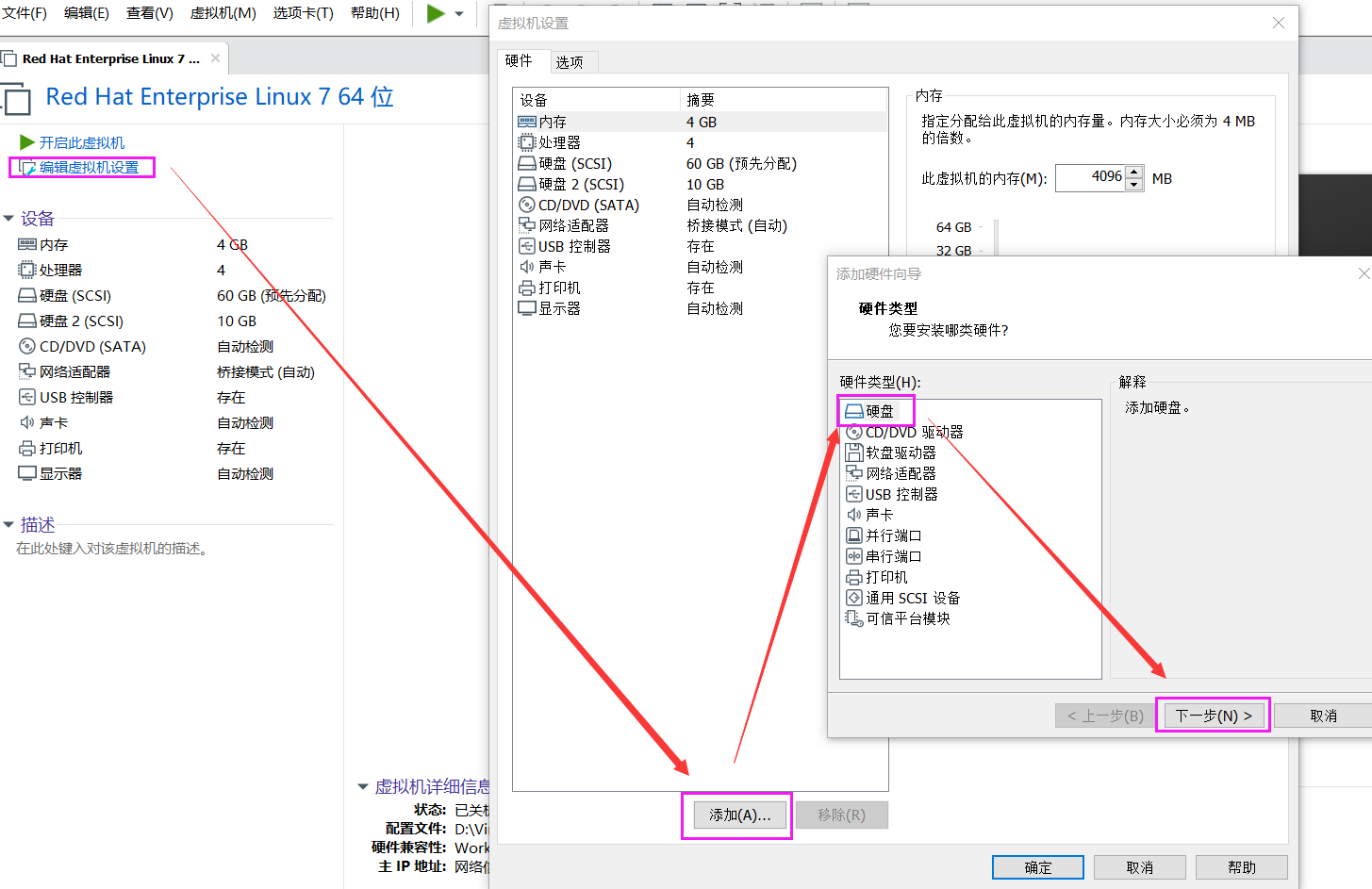
后续下一步即可,完成磁盘添加。
fdisk -l
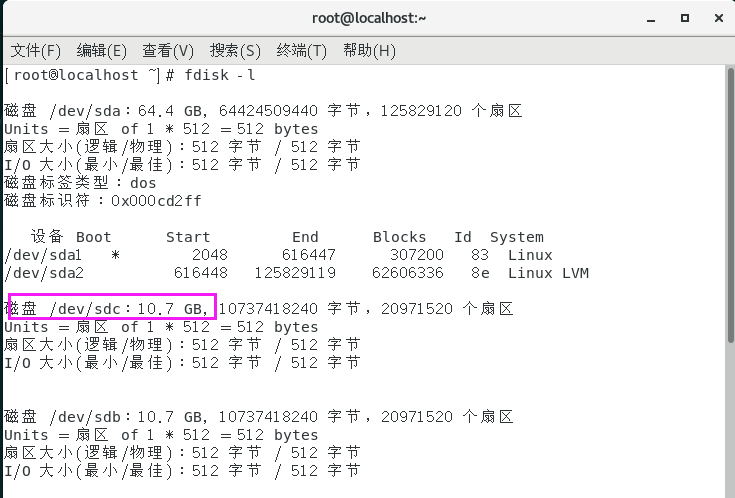
确认新磁盘为/dev/sdc
磁盘分区
[root@localhost ~]# fdisk /dev/sdc
欢迎使用 fdisk (util-linux 2.23.2)。

更改将停留在内存中,直到您决定将更改写入磁盘。
使用写入命令前请三思。

Device does not contain a recognized partition table
使用磁盘标识符 0xdbcdef98 创建新的 DOS 磁盘标签。

命令(输入 m 获取帮助):n
Partition type:
   p   primary (0 primary, 0 extended, 4 free)
   e   extended
Select (default p):
Using default response p
分区号 (1-4,默认 1):
起始 扇区 (2048-20971519,默认为 2048):
将使用默认值 2048
Last 扇区, +扇区 or +size{K,M,G} (2048-20971519,默认为 20971519):
将使用默认值 20971519
分区 1 已设置为 Linux 类型,大小设为 10 GiB

命令(输入 m 获取帮助):t
已选择分区 1
Hex 代码(输入 L 列出所有代码):8e
已将分区“Linux”的类型更改为“Linux LVM”

命令(输入 m 获取帮助):w
The partition table has been altered!

Calling ioctl() to re-read partition table.
正在同步磁盘。
[root@localhost ~]# partprobe
扩展分区
[root@localhost ~]# lvdisplay#查看卷组名称
  --- Logical volume ---
  LV Path                /dev/rhel/swap
  LV Name                swap
  VG Name                rhel
  LV UUID                sX6bx0-jd7S-lL01-iXOm-pF1k-BGSG-dhzCPV
  LV Write Access        read/write
  LV Creation host, time localhost.localdomain, 2020-06-22 23:42:49 +0800
  LV Status              available
  # open                 2
  LV Size                <3.88 GiB
  Current LE             992
  Segments               1
  Allocation             inherit
  Read ahead sectors     auto
  - currently set to     8192
  Block device           253:1

  --- Logical volume ---
  LV Path                /dev/rhel/root
  LV Name                root
  VG Name                rhel  #卷组名称为rhel
  LV UUID                lp1lKC-y1G6-QyDR-MF5d-q7at-9VHl-cGOMwW
  LV Write Access        read/write
  LV Creation host, time localhost.localdomain, 2020-06-22 23:42:49 +0800
  LV Status              available
  # open                 1
  LV Size                <65.63 GiB
  Current LE             16801
  Segments               2
  Allocation             inherit
  Read ahead sectors     auto
  - currently set to     8192
  Block device           253:0

[root@localhost ~]# pvcreate /dev/sdc
  Device /dev/sdc excluded by a filter.#报错原因为不能识别磁盘的分区表,需要重做分区表
[root@localhost ~]# parted /dev/sdc#重做分区表
GNU Parted 3.1
使用 /dev/sdc
Welcome to GNU Parted! Type 'help' to view a list of commands.
(parted) mklabel msdos
警告: The existing disk label on /dev/sdc will be destroyed and all data on this
disk will be lost. Do you want to continue?
是/Yes/否/No? yes
(parted) quit
信息: You may need to update /etc/fstab.

[root@localhost ~]# pvcreate /dev/sdc
WARNING: dos signature detected on /dev/sdc at offset 510. Wipe it? [y/n]: y
  Wiping dos signature on /dev/sdc.
  Physical volume "/dev/sdc" successfully created.
[root@localhost ~]# vgextend rhel /dev/sdc
  Volume group "rhel" successfully extended
[root@localhost ~]# vgdisplay#确认下vg扩容情况
  --- Volume group ---
  VG Name               rhel
  System ID
  Format                lvm2
  Metadata Areas        3
  Metadata Sequence No  6
  VG Access             read/write
  VG Status             resizable
  MAX LV                0
  Cur LV                2
  Open LV               2
  Max PV                0
  Cur PV                3
  Act PV                3
  VG Size               <79.70 GiB
  PE Size               4.00 MiB
  Total PE              20402
  Alloc PE / Size       17793 / 69.50 GiB
  Free  PE / Size       2609 / 10.19 GiB
  VG UUID               EpEUEL-kEol-owtS-0hey-5DYT-OmZf-21L5YG
[root@localhost ~]# cat /etc/fstab #确认下文件格式

#
# /etc/fstab
# Created by anaconda on Mon Jun 22 23:42:51 2020
#
# Accessible filesystems, by reference, are maintained under '/dev/disk'
# See man pages fstab(5), findfs(8), mount(8) and/or blkid(8) for more info
#
/dev/mapper/rhel-root   /                       xfs     defaults        0 0
UUID=d20b1ad4-0d60-4ef3-9872-1a62c5dc1001 /boot                   xfs     defaults        0 0
/dev/mapper/rhel-swap   swap                    swap    defaults        0 0
[root@localhost ~]# lvextend -L +10G /dev/rhel/root /dev/sdc
  Insufficient free space: 2560 extents needed, but only 2559 available
[root@localhost ~]# lvextend -L +9.8G /dev/rhel/root /dev/sdc
  Rounding size to boundary between physical extents: 9.80 GiB.
  Size of logical volume rhel/root changed from <65.63 GiB (16801 extents) to <75.43 GiB (19310 extents).
  Logical volume rhel/root successfully resized.
[root@localhost ~]# xfs_growfs /dev/rhel/root#扩展文件系统
meta-data=/dev/mapper/rhel-root  isize=512    agcount=5, agsize=3658752 blks
         =                       sectsz=512   attr=2, projid32bit=1
         =                       crc=1        finobt=0 spinodes=0
data     =                       bsize=4096   blocks=17204224, imaxpct=25
         =                       sunit=0      swidth=0 blks
naming   =version 2              bsize=4096   ascii-ci=0 ftype=1
log      =internal               bsize=4096   blocks=7146, version=2
         =                       sectsz=512   sunit=0 blks, lazy-count=1
realtime =none                   extsz=4096   blocks=0, rtextents=0
data blocks changed from 17204224 to 19773440

补充
#ext2/ext3格式使用
resize2fs /dev/rhel/root
确认结果
[root@localhost ~]# df -Th
文件系统              类型      容量     已用   可用  已用% 挂载点
/dev/mapper/rhel-root xfs        76G  3.7G   72G    5% /
devtmpfs              devtmpfs  1.9G     0  1.9G    0% /dev
tmpfs                 tmpfs     1.9G     0  1.9G    0% /dev/shm
tmpfs                 tmpfs     1.9G   13M  1.9G    1% /run
tmpfs                 tmpfs     1.9G     0  1.9G    0% /sys/fs/cgroup
/dev/sda1             xfs       297M  161M  137M   54% /boot
tmpfs                 tmpfs     378M  4.0K  378M    1% /run/user/42
tmpfs                 tmpfs     378M   32K  378M    1% /run/user/0
到此扩展目录完成

 浙公网安备 33010602011771号