
最轻量的图片处理工具:一个可以方便地添加文字和裁剪图片的.html
点击Chrome工具栏上的截图—区域截图—编辑,就能写字,画箭头、框、线,缩放。
它不能改文字大小和字体。我这个很可以。多一个width: 1em,文字就竖着写了:玩法很多。添加后的文字可用鼠标拖拽,双击则隐藏。
还能裁剪图片。
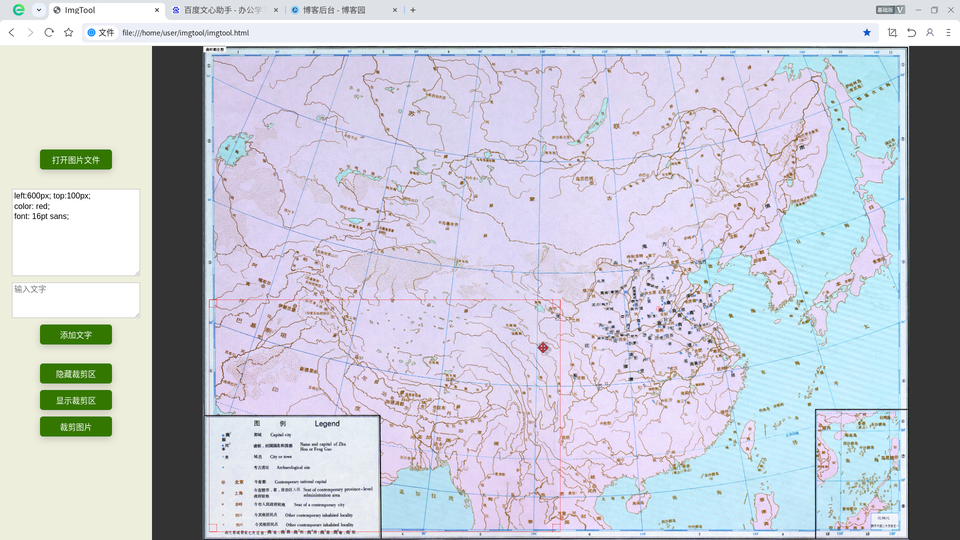
HTML+JavaScript:


<html><head><meta charset="UTF-8"> <meta name="viewport" content="width=device-width, initial-scale=1.0, maximum-scale=1.0, user-scalable=no"> <title>ImgTool</title><style> * { margin: 0; padding: 0; border: none; box-sizing: border-box; /* 设置 后,元素的 width和 height包含border和padding */ font: 12pt sans-serif; } body { display: flex; /* 设置为弹性布局容器 */ justify-content: flex-start; /* 主轴从起始位置排列 */ align-items: stretch; /* 交叉轴拉伸填满整个容器高度 */ overflow: hidden; background: #333; } .left-panel { width: 19em; padding: 1em; display: flex; flex-direction: column; align-items: center; justify-content: center; gap: 0.8em; background: #eed; } button { width: 9em; padding: 0.5em 1em; background: #370; color: white; border-radius: 6px; box-shadow: 0 4px 15px rgba(0,0,0,0.2); transition: all 0.3s ease; } button:hover { font-weight: bold; transform: translateY(-1px); box-shadow: 0 6px 20px rgba(0,0,0,0.3); } #file { display: none; } textarea { line-height: 130%; padding:0.2em; border: solid silver 1px; } .right-panel { flex: 1; /* 自动填满剩余空间 */ display: flex; flex-direction: column; align-items: center; justify-content: center; } img { max-width: 100%; max-height: 100%; border: none; user-select: none; } /* p和div都是独占一行的块元素。p的margin-top/bottom默认不为0 */ .draggable-text { position: absolute; cursor: move; user-select: none; } .draggable-text:active { cursor: none; } #crop { display: none; position: absolute; border: 1px dotted red; background: transparent; cursor: move; } .resize-handle { position: absolute; width: 1em; height: 1em; background: transparent; border: 1px dotted red; } .resize-nw { top: -1px; left: -1px; cursor: nw-resize; } .resize-ne { top: -1px; right: -1px; cursor: ne-resize; } .resize-sw { bottom: -1px; left: -1px; cursor: sw-resize; } .resize-se { bottom: -1px; right: -1px; cursor: se-resize; } </style></head><body> <div class="left-panel"> <input type="file" id="file" accept="image/*"> <button onclick="file.click()">打开图片文件</button> <hr/><hr/> <textarea id="ta_css" spellcheck="false" rows=8 cols=25>left:600px; top:100px; color: red; font: 16pt sans; </textarea> <textarea id="ta_str" spellcheck="false" rows=3 cols=25 placeholder="输入文字"></textarea> <button onclick="addText()">添加文字</button> <hr/><hr/> <button onclick="crop.style.display = 'none'">隐藏裁剪区</button> <button onclick="crop.style.display = 'block'">显示裁剪区</button> <button onclick="cropImg()">裁剪图片</button> </div> <div class="right-panel"><img id="img"></div> <div id="crop"> <div class="resize-handle resize-nw"></div> <div class="resize-handle resize-ne"></div> <div class="resize-handle resize-sw"></div> <div class="resize-handle resize-se"></div> </div> <script> file.addEventListener('change', f=>{ let reader = new FileReader() reader.onload = e=>{ img.onload = initCrop; img.src = e.target.result } if ((f = f.target.files).length) reader.readAsDataURL(f[0]) }) let PX = 'px' let d = document let draggingEle, mouseX, mouseY let resizing, resizeDir, cropX, cropY, cropR, cropB function setCropPosition () { let s = crop.style s.left = cropX + PX; s.top = cropY + PX // 设置.right和.bottom不行 s.width = (cropR - cropX) + PX; s.height = (cropB - cropY) + PX } function initCrop () { let w = img.width / 2, h = img.height / 2 let rc = img.getBoundingClientRect() cropR = (cropX = rc.x + w / 2) + w; cropB = (cropY = rc.y + h / 2) + h setCropPosition() crop.style.display = 'block' } function mouseDown (e) { mouseX = e.clientX; mouseY = e.clientY draggingEle = e.target let cl = e.target.classList if (cl[0] === 'resize-handle') { resizing = true; resizeDir = cl[1].replace('resize-', '') } e.preventDefault() } crop.addEventListener('mousedown', mouseDown) d.addEventListener('mouseup', ()=>{ draggingEle = undefined; resizing = false; resizeDir = '' }) d.addEventListener('mousemove', e=>{ if (!draggingEle) return let dx = e.clientX - mouseX, dy = e.clientY - mouseY mouseX = e.clientX; mouseY = e.clientY if (e.target.tagName === 'P') { let rc = draggingEle.getBoundingClientRect() draggingEle.style.left = rc.x + dx + PX draggingEle.style.top = rc.y + dy + PX return } switch(resizeDir) { case 'nw': cropX += dx; cropY += dy; break; case 'ne': cropR += dx; cropY += dy; break; case 'sw': cropX += dx; cropB += dy; break; case 'se': cropR += dx; cropB += dy; break; default: cropX += dx; cropY += dy; cropR += dx; cropB += dy; } let rc = img.getBoundingClientRect() if (cropX < rc.x) cropX = rc.x if (cropY < rc.y) cropY = rc.y if (cropR > rc.right) cropR = rc.right if (cropB > rc.bottom) cropB = rc.bottom setCropPosition() }) function addText () { let e = d.createElement('p') e.style.cssText = ta_css.value e.textContent = ta_str.value ? ta_str.value : '双击鼠标左键隐藏' e.classList.add('draggable-text') e.addEventListener('mousedown', mouseDown) e.addEventListener('dblclick', ev=>{ ev.target.style.display = 'none' }) d.body.appendChild(e) } // 防止拖拽时选中文本 d.addEventListener('selectstart', e=>{ if (draggingEle) e.preventDefault() }) function cropImg () { let rc = img.getBoundingClientRect() let x = cropX - rc.x, y = cropY - rc.y, w = cropR - cropX, h = cropB - cropY let s = img.naturalWidth / rc.width x *= s; y *= s; w *= s; h *= s; let canvas = d.createElement('canvas') canvas.width = w; canvas.height = h let ctx = canvas.getContext('2d') ctx.drawImage(img, x, y, w, h, 0, 0, w, h) img.src = canvas.toDataURL('image/png') canvas = null } </script></body></html>
Python PIL缩放旋转:
from PIL import Image as Img
from os import path
import sys

if len(sys.argv) < 3: exit()
name = sys.argv[1]
try: img = Img.open(name)
except FileNotFoundError as e: print(e); exit()
for a in sys.argv[2:]:
  i = a.find('%')
  if i != -1:
    w,h = img.size
    scale = float(sys.argv[2][:i]) / 100
    size = (int(w * scale), int(h * scale))
    img = img.resize(size, Img.LANCZOS)
    w,h = img.size
  else: img = img.rotate(int(a))

root,ext = path.splitext(name)
img.save(root + '-'.join(sys.argv[2:]) + ext, compress_level=9)
反正要装Python和PIL,所以我这可能是最轻量的图片处理工具。

 浙公网安备 33010602011771号