
游戏里的小人如何走路?百行HTML5+JS能搜索出路径吗?
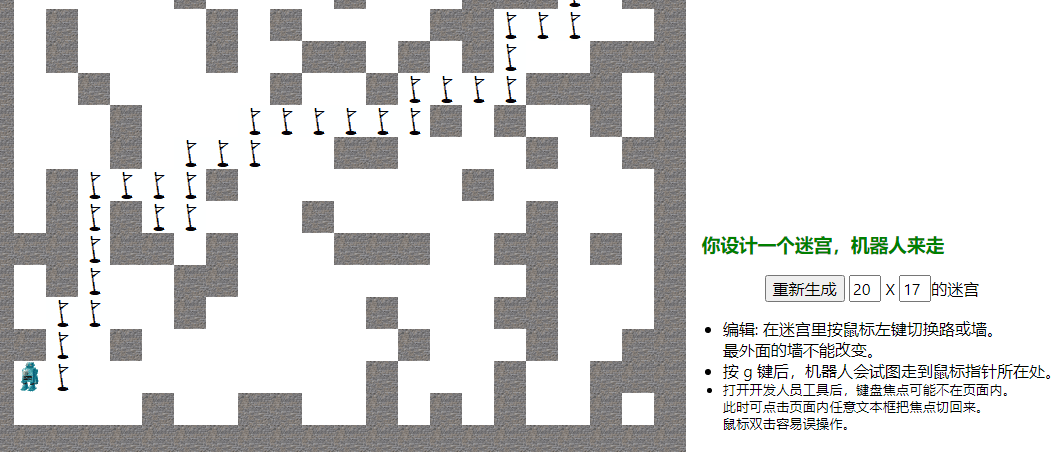
用了HTML5里的canvas. 这个"游戏"的”玩法“是:
- 改迷宫折腾电脑
- 改程序折腾自己:-)。我自以为程序挺简明,注释挺多,比如:
-
- // 全局变量坑死人,这里曾经少个var
- // 虽然直接drawImage有时能出来,但这么做绝对必要。坑了我好长时间。
单.HTML文件146行,包括数张嵌入式.gif图片和JS。下面是全部JS(112行):
ctx = gmaze.getContext('2d')

function reset_maze(){
    X = Xin.value; if(X > 32 || X < 6) X = 20
    Y = Yin.value; if(Y > 20 || Y < 6) Y = 13
    Xin.value = X; Yin.value = Y
    maze = new Array(); for(y = 0; y < Y; y++){
        var    row = new Array() // new Array(3)不是创建长度为3的数组
        for(x = 0; x < X; x++) row.push(Math.random() < 0.7 ? ' ' : 'w')
        maze.push(row)
    }
    maze[cx = 0][cy = 0] = 'r'    // cx,cy记录当前机器人位置
    gmaze.width = X * 32; gmaze.height = Y * 32; draw_maze()
}; reset_maze()

function clear_path() {
    for(y = 0; y < Y; y++) for(x = 0; x < X; x++){
        var    c = maze[y][x]
        if(c == 'x' || c == 'p' || c == 'r') maze[y][x] = ' '
    }
    stepcnt = 0
}

function draw_maze(){
    for(y = 0; y < Y; y++) for(x = 0; x < X; x++){
        var    c = maze[y][x]
        if(c == 'r') draw_img(img_robot, x, y)
        else if(c == 'w') draw_img(img_wall, x, y)
        else if(c == 'p') draw_img(img_flag, x, y)
        else if(c == ' ') draw_blk('#fff', x, y)
        else draw_blk('#f00', x, y)
    }
}

// 虽然直接drawImage有时能出来,但这么做绝对必要。坑了我好长时间。
function draw_img(img, x, y){
    var i = new Image(); i.src = img.src
    i.onload = function(){ ctx.drawImage(i, x * 32, y * 32) }
}

function draw_blk(color, x, y){    ctx.fillStyle = color; ctx.fillRect(x * 32, y * 32, 32, 32) }

// mx, my记录鼠标指针位置
d = document; d.addEventListener('mousemove', function(e){ mx = e.x; my = e.y })

// 像素坐标到块坐标转换。border+wall=8+32. round() is bad, round() is wrong.
function get_x() { //
    var x = Math.floor((mx - 40) / 32)
    if(x < 0 || x >= X) throw 'X超出范围。'
    return x
}
function get_y() {
    var y = Math.floor((my - 40) / 32)
    if(y < 0 || y >= Y) throw 'Y超出范围。'
    return y
}

d.addEventListener('mousedown', function(e){ // 可以忽略exception
    if(e.which != 1) return; // Not left button
    var    x = get_x(), y = get_y()
    var    c = maze[y][x]
    if(c == 'w') maze[y][x] = ' ', draw_blk('#fff', x, y)
    else if (c == ' ') maze[y][x] = 'w', draw_img(img_wall, x, y)
})

d.addEventListener('keydown', function(e){
    if (e.keyCode != 71) return    // Not 'g'
    try{
        tx = get_x(), ty = get_y()    // target x, y, 全局变量
        clear_path()
        //alert('Searching for ' + cx + ',' + cy + ' to ' + tx + ',' + ty)
        ok = search(cx, cy)
        if(ok) maze[cy = ty][cx = tx] = 'r'
        else {
            maze[cy][cx] = 'r'
            alert('Please try a nearer target.')
        }
        draw_maze()
    }
    catch(e){}
})

function search(x, y){
    if(x == tx && y == ty) return true
    if(++stepcnt > 1000000) return false
    if(x<0 || x>=X || y<0 || y>=Y) {
        console.log(x, y)
        return false
    }
    if(maze[y][x] != ' ') {
        console.log(x, y, maze[y][x])
        return false
    }
    maze[y][x] = 'p'
    var    dxdy = [[0,-1],[0,1],[-1,0],[1,0]]
    var    e_i = [1,2,3,4] // evaluation_index
    var    i, j
    for(i = 0; i < 4; i++) {
        var    a = x + dxdy[i][1], b = y + dxdy[i][0]
        var    c = tx - a, d = ty - b
        var    t = c * c + d * d    // 距离的平方
        e_i[i] = (t << 2) | i
    }
    // 默认情况下,sort方法按字母顺序对元素排序。https://www.codenong.com/1063007/
    e_i.sort((a, b) => a - b)
    for(j = 0; j < 4; j++) {
        i = e_i[j] & 0x3    // 全局变量坑死人,这里曾经少个var
        if(search(x + dxdy[i][1], y + dxdy[i][0])) return true
    }
    maze[y][x] = 'x'; return false
}
// 写完了才知道let和const是JavaScript里相对较新的变量声明方式。let在很多方面与var相似。
点这里下载HTML+JS。下面是HTML的不包含嵌入图片的部分:
<html><meta charset="gbk"><title>走迷宫</title><style>
/* https://www.w3school.com.cn/cssref/css_selectors.asp */
* { font:12pt 'Segoe UI' }
#wall { position:absolute; left:8px; top:8px; padding:32px;
background-image:url(data:image/gif;base64,...);
}
#gmaze { cursor:hand }
#panel { float:right; top:32px }
    h6 { font:bold 14pt 'Segoe UI'; color:green; margin:1em }
    input { width:2em }
pre { display:none }
</style>
<body>
<div id="wall"><canvas id="gmaze"/></div>
<div id="panel">
    <h6>你设计一个迷宫,机器人来走</h6>
    <p style="text-align:center">
        <button onclick="reset_maze()">重新生成</button>
        <input type="text" id="Xin" value="20"/> X
        <input type="text" id="Yin" value="17"/>的迷宫
    </p>
    <ul>
    <li>编辑: 在迷宫里按鼠标左键切换路或墙。<br>最外面的墙不能改变。</li>
    <li>按 g 键后,机器人会试图走到鼠标指针所在处。</li>
    <li style='font-size:10pt'>打开开发人员工具后,键盘焦点可能不在页面内。<br>此时可点击页面内任意文本框把焦点切回来。<br>鼠标双击容易误操作。</li>
    </ul>
</div>
想起扫地机器人的笑话: 把droppings摊了薄薄一层; 展屎官的迷思……

 浙公网安备 33010602011771号