
C# 发送电子邮件案例
先了解一下,常用SMTP地址
1、QQ邮箱(mail.qq.com)
POP3服务器地址:pop.qq.com(端口:110)
SMTP服务器地址:smtp.qq.com(端口:25)
2、搜狐邮箱(sohu.com):
POP3服务器地址:pop3.sohu.com(端口:110)
SMTP服务器地址:smtp.sohu.com(端口:25)
3、HotMail邮箱(hotmail.com):
POP3服务器地址:pop.live.com(端口:995)
SMTP服务器地址:smtp.live.com(端口:587)
4、移动139邮箱:
POP3服务器地址:POP.139.com(端口:110)
SMTP服务器地址:SMTP.139.com(端口:25)
5、景安网络邮箱:
POP3服务器地址:POP.zzidc.com(端口:110)
SMTP服务器地址:SMTP.zzidc.com(端口:25)
如果是163邮箱,很简单
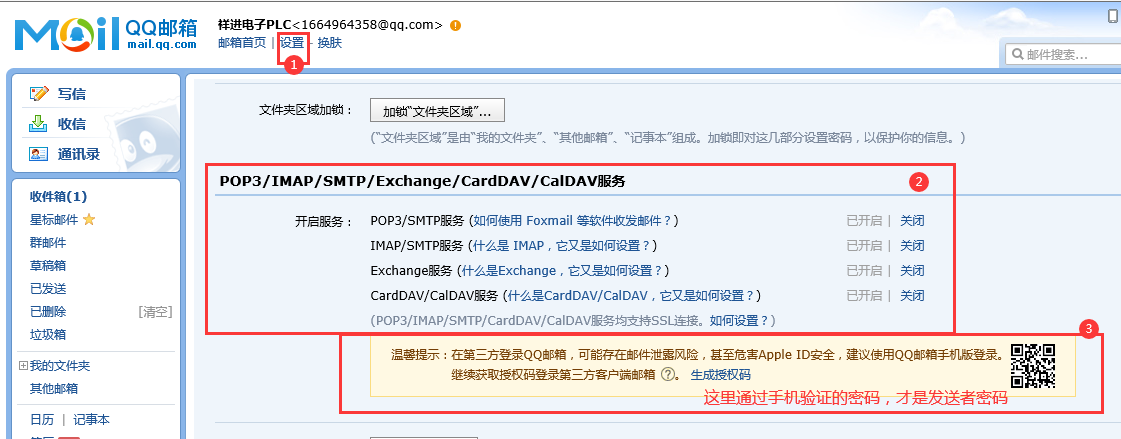
如果使用的是QQ邮箱,需要知道接收邮箱号,需要知道发送QQ邮箱号和发送邮箱密码,主要是注意这个密码(看下图);
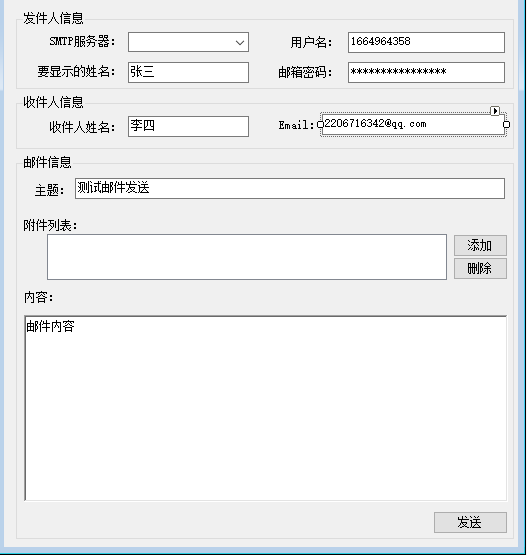
最后开始 C#设计
C# 代码区
using System;
using System.Collections.Generic;
using System.ComponentModel;
using System.Data;
using System.Drawing;
using System.Text;
using System.Windows.Forms;

using System.Net.Mail;
using System.Net.Mime;
using System.Net;
using System.IO;


namespace SendEmail
{
    public partial class Form1 : Form
    {
        public Form1()
        {
            InitializeComponent();
            this.ImeMode = ImeMode.Hangul;
        }

        //窗体的Load事件
        private void Form1_Load(object sender, EventArgs e)
        {
            //添加俩个smpt服务器的名称
            cmbBoxSMTP.Items.Add("smtp.qq.com");
            cmbBoxSMTP.Items.Add("smtp.163.com"); //hqttfdfpxbpnbfhc
            cmbBoxSMTP.Items.Add("smtp.gmail.com");

            //设置为下拉列表
            cmbBoxSMTP.DropDownStyle = ComboBoxStyle.DropDownList;
            //默认选中第一个选项
            cmbBoxSMTP.SelectedIndex = 0;
            //在下面添加你想要初始化的内容,比如显示姓名、用户名等

        }

        //添加按钮的单击事件
        private void btnAdd_Click(object sender, EventArgs e)
        {
            //定义并初始化一个OpenFileDialog类的对象
            OpenFileDialog openFile = new OpenFileDialog();
            openFile.InitialDirectory = Application.StartupPath;
            openFile.FileName = "";
            openFile.RestoreDirectory = true;
            openFile.Multiselect = false;

            //显示打开文件对话框,并判断是否单击了确定按钮
            if (openFile.ShowDialog() == DialogResult.OK)
            {
                //得到选择的文件名
                string fileName = openFile.FileName;
                //将文件名添加到TreeView中
                treeViewFileList.Nodes.Add(fileName);
            }
        }

        //删除按钮的单击事件
        private void btnDelete_Click(object sender, EventArgs e)
        {
            //判断是否选中了节点
            if (treeViewFileList.SelectedNode != null)
            {
                //得到选择的节点
                TreeNode tempNode = treeViewFileList.SelectedNode;
                //删除选中的节点
                treeViewFileList.Nodes.Remove(tempNode);
            }
            else
            {
                MessageBox.Show("请选择要删除的附件。");
            }
        }

        //发送按钮的单击事件
        private void btnSend_Click(object sender, EventArgs e)
        {
            try
            {
                //确定smtp服务器地址。实例化一个Smtp客户端
                System.Net.Mail.SmtpClient client = new System.Net.Mail.SmtpClient(cmbBoxSMTP.Text);
                //生成一个发送地址
                string strFrom = string.Empty;
                if (cmbBoxSMTP.Text == "smtp.163.com")  //cmbBoxSMTP
                {
                    strFrom = txtUserName.Text + "@163.com";
                }
                else if (cmbBoxSMTP.Text == "smtp.qq.com")
                {
                    strFrom = txtUserName.Text + "@qq.com";
                }
                else
                {
                    strFrom = txtUserName.Text + "@gmail.com";
                }


                //构造一个发件人地址对象
                MailAddress from = new MailAddress(strFrom, txtDisplayName.Text, Encoding.UTF8);
                //构造一个收件人地址对象
                MailAddress to = new MailAddress(txtEmail.Text, txtToName.Text, Encoding.UTF8);

                //构造一个Email的Message对象
                MailMessage message = new MailMessage(from, to);

                //为 message 添加附件
                foreach (TreeNode treeNode in treeViewFileList.Nodes)
                {
                    //得到文件名
                    string fileName = treeNode.Text;
                    //判断文件是否存在
                    if (File.Exists(fileName))
                    {
                        //构造一个附件对象
                        Attachment attach = new Attachment(fileName);
                        //得到文件的信息
                        ContentDisposition disposition = attach.ContentDisposition;
                        disposition.CreationDate = System.IO.File.GetCreationTime(fileName);
                        disposition.ModificationDate = System.IO.File.GetLastWriteTime(fileName);
                        disposition.ReadDate = System.IO.File.GetLastAccessTime(fileName);
                        //向邮件添加附件
                        message.Attachments.Add(attach);
                    }
                    else
                    {
                        MessageBox.Show("文件" + fileName + "未找到!");
                    }
                }

                //添加邮件主题和内容
                message.Subject = txtSubject.Text;
                message.SubjectEncoding = Encoding.UTF8;
                message.Body = rtxtBody.Text;
                message.BodyEncoding = Encoding.UTF8;

                //设置邮件的信息
                client.DeliveryMethod = SmtpDeliveryMethod.Network;
                message.BodyEncoding = System.Text.Encoding.UTF8;
                message.IsBodyHtml = false;

                //如果服务器支持安全连接,则将安全连接设为true。
                //gmail支持,163不支持,如果是gmail则一定要将其设为true
                if (cmbBoxSMTP.Text == "smpt.163.com")
                {
                    client.EnableSsl = false;

                }
                else if (cmbBoxSMTP.Text == "smtp.qq.com")
                {
                    client.EnableSsl = false;
                }
                else
                {
                    client.EnableSsl = true;
                }

                //设置用户名和密码。
                //string userState = message.Subject;
                client.UseDefaultCredentials = false;
                string username = txtUserName.Text;
                string passwd = txtPassword.Text;
                //用户登陆信息
                NetworkCredential myCredentials = new NetworkCredential(username, passwd);
                client.Credentials = myCredentials;
                //发送邮件
                client.Send(message);
                //提示发送成功
                MessageBox.Show("发送成功!");
            }
            catch (Exception ex)
            {
                MessageBox.Show(ex.Message);
            }
        }
    }
}
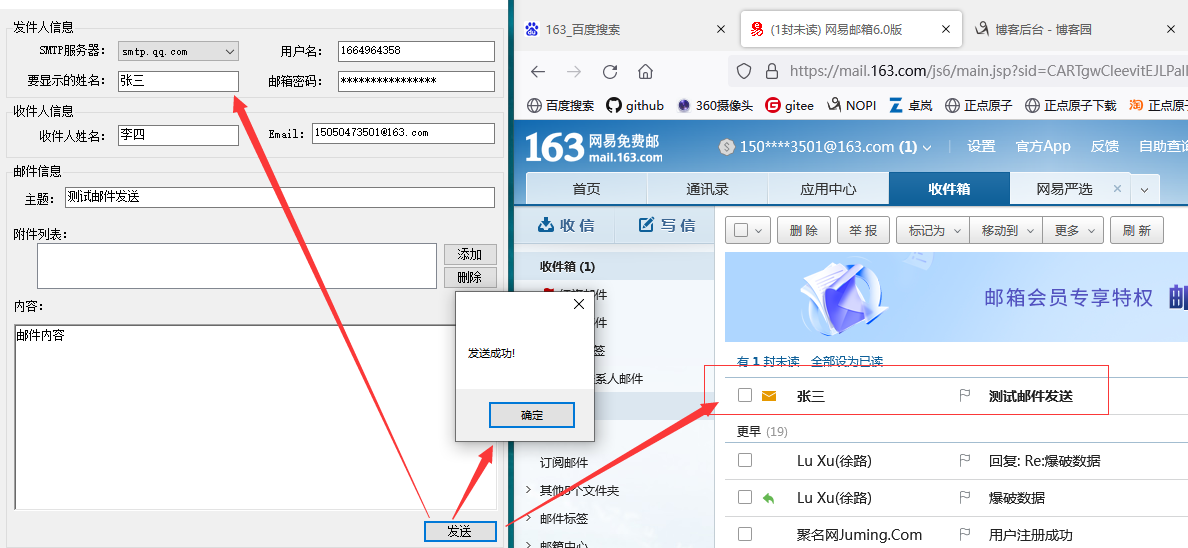
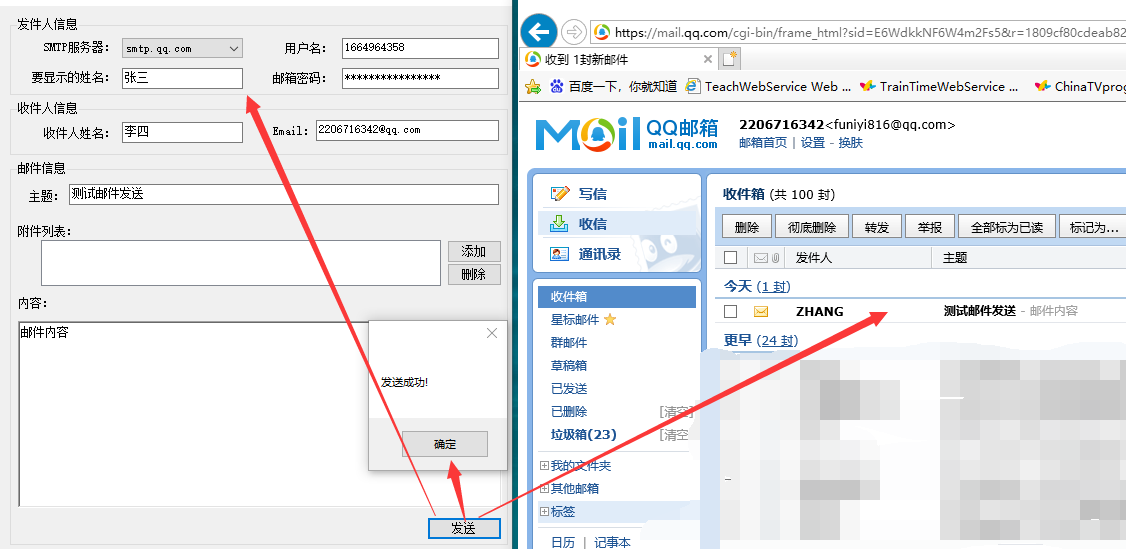
测试结果如下图:
QQ邮箱发送到163邮箱
QQ邮箱 发送到 QQ邮箱

 浙公网安备 33010602011771号