
字体加密
字体加密
5、JS 逆向实战案例解析5【字体加密】
1、什么是字体加密
字体加密是页面和前端字体文件想配合完成的一个反爬策略。通过css对其中一些重要数据进行加密,使我们在代码获取的和在页面上看到的数据是不同的。
2、猫眼案例

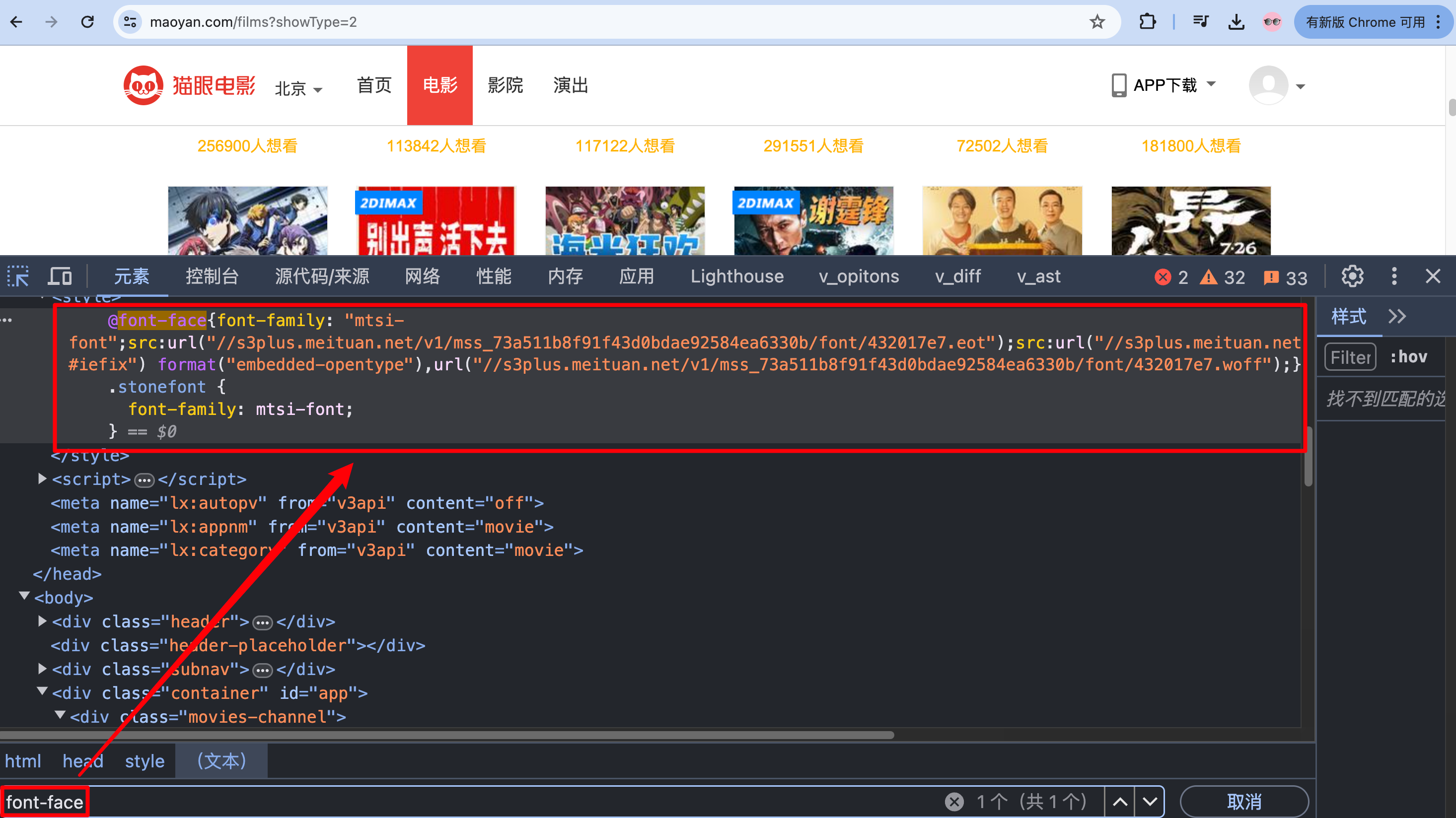
前端人员通过使用font-face来达到这个目的,font-face是CSS3中的一个模块,他主要是把自己定义的Web字体嵌入到你的网页中。而font-face的格式为:
@font-face {
	font-family: <FontName>;      # 定义字体的名称。
	src: <source> [<format>][, []]*;  # 定义该字体下载的网址,包括ttf,eof,woff格式等
}
也可以通过font筛选出字体文件
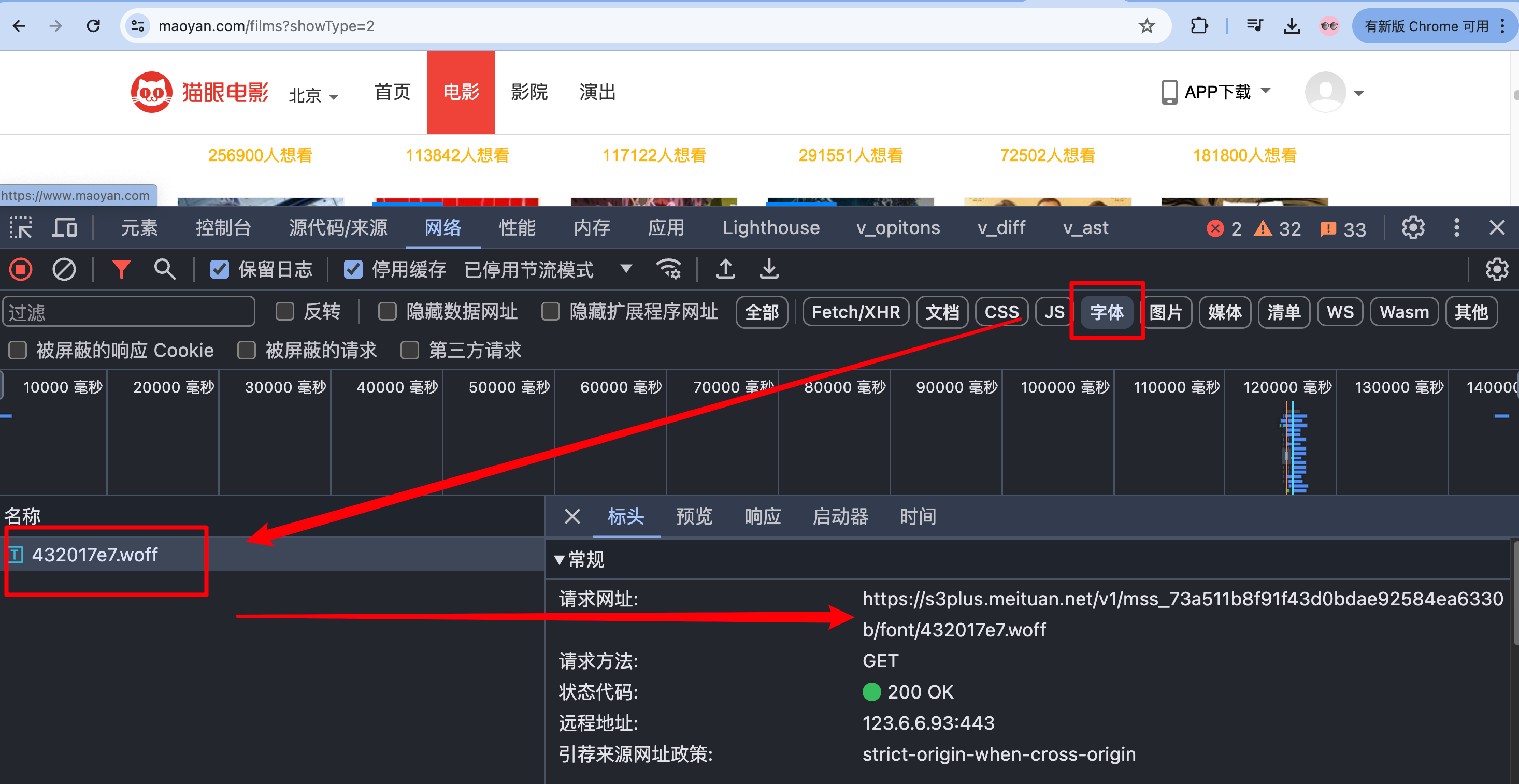
我们要打开ttf,eof,woff这些格式的字体文件有两种方式:



import requests
import re

cookies = {
    '__mta': '141882637.1719377969700.1719378200723.1719378227484.6',
    'uuid_n_v': 'v1',
    'uuid': 'DDBE40E0337811EFB68E812F46251267C957ACAF4AFB4C57AA50A05CE0737D88',
    '_csrf': 'ec509db4813923e1fd67580c732c5af8af46b2c39b74aa8206b21674c8ded952',
    'Hm_lvt_703e94591e87be68cc8da0da7cbd0be2': '1719377969',
    '_lxsdk_cuid': '19052e9bdf7c8-0c0b857db77fe8-1a525637-1612e8-19052e9bdf7c8',
    '_lxsdk': 'DDBE40E0337811EFB68E812F46251267C957ACAF4AFB4C57AA50A05CE0737D88',
    'Hm_lpvt_703e94591e87be68cc8da0da7cbd0be2': '1719378416',
    '__mta': '141882637.1719377969700.1719378227484.1719378416611.7',
    '_lxsdk_s': '19052e9bdf8-9b1-b60-006%7C%7C27',
}

headers = {
    'Accept': 'text/html,application/xhtml+xml,application/xml;q=0.9,image/avif,image/webp,image/apng,*/*;q=0.8,application/signed-exchange;v=b3;q=0.7',
    'Accept-Language': 'zh-CN,zh;q=0.9',
    'Cache-Control': 'no-cache',
    'Connection': 'keep-alive',
    # 'Cookie': '__mta=141882637.1719377969700.1719378200723.1719378227484.6; uuid_n_v=v1; uuid=DDBE40E0337811EFB68E812F46251267C957ACAF4AFB4C57AA50A05CE0737D88; _csrf=ec509db4813923e1fd67580c732c5af8af46b2c39b74aa8206b21674c8ded952; Hm_lvt_703e94591e87be68cc8da0da7cbd0be2=1719377969; _lxsdk_cuid=19052e9bdf7c8-0c0b857db77fe8-1a525637-1612e8-19052e9bdf7c8; _lxsdk=DDBE40E0337811EFB68E812F46251267C957ACAF4AFB4C57AA50A05CE0737D88; Hm_lpvt_703e94591e87be68cc8da0da7cbd0be2=1719378416; __mta=141882637.1719377969700.1719378227484.1719378416611.7; _lxsdk_s=19052e9bdf8-9b1-b60-006%7C%7C27',
    'Pragma': 'no-cache',
    'Sec-Fetch-Dest': 'document',
    'Sec-Fetch-Mode': 'navigate',
    'Sec-Fetch-Site': 'none',
    'Sec-Fetch-User': '?1',
    'Upgrade-Insecure-Requests': '1',
    'User-Agent': 'Mozilla/5.0 (Macintosh; Intel Mac OS X 10_15_7) AppleWebKit/537.36 (KHTML, like Gecko) Chrome/125.0.0.0 Safari/537.36',
    'sec-ch-ua': '"Google Chrome";v="125", "Chromium";v="125", "Not.A/Brand";v="24"',
    'sec-ch-ua-mobile': '?0',
    'sec-ch-ua-platform': '"macOS"',
}

params = {
    'showType': '2',
}

response = requests.get('https://www.maoyan.com/films', params=params, cookies=cookies, headers=headers)
print(response.text)

# 下载woff文件
path = re.findall(',url\("(.*?woff)"', response.text)[0]
print(path)
woff_url = "https:" + path

res = requests.get(woff_url)

with open("font.woff", "wb") as f:
    f.write(res.content)
要统一,因为它的woff文件每次请求是不同的!
开发一个将字体字符转换为图像的小工具:
from fontTools.ttLib import TTFont
import ddddocr
from io import BytesIO
from PIL import Image, ImageDraw, ImageFont


def convert_cmap_to_image(cmap_code, font_path):
    img_size = 1024
    img = Image.new("1", (img_size, img_size), 255)  # 创建一个黑白图像对象
    draw = ImageDraw.Draw(img)  # 创建绘图对象
    font = ImageFont.truetype(font_path, img_size)  # 加载字体文件
    character = chr(cmap_code)  # 将 cmap code 转换为字符

    bbox = draw.textbbox((0, 0), character, font=font)  # 获取文本在图像中的边界框
    width = bbox[2] - bbox[0]  # 文本的宽度
    height = bbox[3] - bbox[1]  # 文本的高度
    draw.text(((img_size - width) // 2, (img_size - height) // 2), character, font=font)  # 绘制文本,并居中显示
    return img


def extract_text_from_font(font_path):
    font = TTFont(font_path)  # 加载字体文件
    font.saveXML("xxx.xml")
    ocr = ddddocr.DdddOcr(beta=True, show_ad=False)  # 实例化 ddddocr 对象
    font_map = {}
    for cmap_code, glyph_name in font.getBestCmap().items():
        bytes_io = BytesIO()
        image = convert_cmap_to_image(cmap_code, font_path)  # 将字体字符转换为图像
        image.save(bytes_io, "PNG")

        text = ocr.classification(bytes_io.getvalue())  # 图像识别
        image.save(f"{text}.png", "PNG")  # 保存图像
        print(f"Unicode码点:{cmap_code} - Unicode字符:{glyph_name},识别结果:{text}")
        font_map[cmap_code] = text

    return font_map


font_file_path = "font.woff"
print(extract_text_from_font(font_file_path))
完整版本:
import requests
import re

from fontTools.ttLib import TTFont
import ddddocr
from io import BytesIO
from PIL import Image, ImageDraw, ImageFont

from lxml import etree

cookies = {
    '__mta': '141882637.1719377969700.1719378200723.1719378227484.6',
    'uuid_n_v': 'v1',
    'uuid': 'DDBE40E0337811EFB68E812F46251267C957ACAF4AFB4C57AA50A05CE0737D88',
    '_csrf': 'ec509db4813923e1fd67580c732c5af8af46b2c39b74aa8206b21674c8ded952',
    'Hm_lvt_703e94591e87be68cc8da0da7cbd0be2': '1719377969',
    '_lxsdk_cuid': '19052e9bdf7c8-0c0b857db77fe8-1a525637-1612e8-19052e9bdf7c8',
    '_lxsdk': 'DDBE40E0337811EFB68E812F46251267C957ACAF4AFB4C57AA50A05CE0737D88',
    'Hm_lpvt_703e94591e87be68cc8da0da7cbd0be2': '1719378416',
    '__mta': '141882637.1719377969700.1719378227484.1719378416611.7',
    '_lxsdk_s': '19052e9bdf8-9b1-b60-006%7C%7C27',
}

headers = {
    'Accept': 'text/html,application/xhtml+xml,application/xml;q=0.9,image/avif,image/webp,image/apng,*/*;q=0.8,application/signed-exchange;v=b3;q=0.7',
    'Accept-Language': 'zh-CN,zh;q=0.9',
    'Cache-Control': 'no-cache',
    'Connection': 'keep-alive',
    # 'Cookie': '__mta=141882637.1719377969700.1719378200723.1719378227484.6; uuid_n_v=v1; uuid=DDBE40E0337811EFB68E812F46251267C957ACAF4AFB4C57AA50A05CE0737D88; _csrf=ec509db4813923e1fd67580c732c5af8af46b2c39b74aa8206b21674c8ded952; Hm_lvt_703e94591e87be68cc8da0da7cbd0be2=1719377969; _lxsdk_cuid=19052e9bdf7c8-0c0b857db77fe8-1a525637-1612e8-19052e9bdf7c8; _lxsdk=DDBE40E0337811EFB68E812F46251267C957ACAF4AFB4C57AA50A05CE0737D88; Hm_lpvt_703e94591e87be68cc8da0da7cbd0be2=1719378416; __mta=141882637.1719377969700.1719378227484.1719378416611.7; _lxsdk_s=19052e9bdf8-9b1-b60-006%7C%7C27',
    'Pragma': 'no-cache',
    'Sec-Fetch-Dest': 'document',
    'Sec-Fetch-Mode': 'navigate',
    'Sec-Fetch-Site': 'none',
    'Sec-Fetch-User': '?1',
    'Upgrade-Insecure-Requests': '1',
    'User-Agent': 'Mozilla/5.0 (Macintosh; Intel Mac OS X 10_15_7) AppleWebKit/537.36 (KHTML, like Gecko) Chrome/125.0.0.0 Safari/537.36',
    'sec-ch-ua': '"Google Chrome";v="125", "Chromium";v="125", "Not.A/Brand";v="24"',
    'sec-ch-ua-mobile': '?0',
    'sec-ch-ua-platform': '"macOS"',
}

params = {
    'showType': '2',
}

response = requests.get('https://www.maoyan.com/films', params=params, cookies=cookies, headers=headers)
# print(">>>", response.text)
data = response.text
# (1) 下载woff文件
path = re.findall(',url\("(.*?woff)"', data)[0]
print(path)
woff_url = "https:" + path

res = requests.get(woff_url)
with open("font.woff", "wb") as f:
    f.write(res.content)


# (2) 解析woff文件
def convert_cmap_to_image(cmap_code, font_path):
    """
    将字体字符转换为图像
    :param cmap_code: 字体字符对应的 cmap code
    :param font_path: 字体文件路径
    :return: PIL 图像对象
    """
    img_size = 1024
    img = Image.new("1", (img_size, img_size), 255)  # 创建一个黑白图像对象
    draw = ImageDraw.Draw(img)  # 创建绘图对象
    font = ImageFont.truetype(font_path, img_size)  # 加载字体文件
    character = chr(cmap_code)  # 将 cmap code 转换为字符
    bbox = draw.textbbox((0, 0), character, font=font)  # 获取文本在图像中的边界框
    width = bbox[2] - bbox[0]  # 文本的宽度
    height = bbox[3] - bbox[1]  # 文本的高度
    draw.text(((img_size - width) // 2, (img_size - height) // 2), character, font=font, fill=0)  # 绘制文本,并居中显示
    return img


def extract_text_from_font(font_path):
    font = TTFont(font_path)  # 加载字体文件
    ocr = ddddocr.DdddOcr(beta=True)  # 实例化 ddddocr 对象
    font_map = {}

    for cmap_code, glyph_name in font.getBestCmap().items():
        bytes_io = BytesIO()
        image = convert_cmap_to_image(cmap_code, font_path)  # 将字体字符转换为图像
        image.save(bytes_io, "PNG")

        text = ocr.classification(bytes_io.getvalue())  # 图像识别
        image.save(f"{text}.png", "PNG")  # 保存图像
        print(f"Unicode码点:{cmap_code} - Unicode字符:{glyph_name},识别结果:{text}")
        font_map[glyph_name.replace("uni", "&#x").lower()] = text

    return font_map


font_map = extract_text_from_font("font.woff")
print(font_map)
# 全文替换
for k, v in font_map.items():
    # print(k, v)
    data = data.replace(k + ";", v)

# (3) 解析数据
html_Data = etree.HTML(data)
div_list = html_Data.xpath('//dl[@class="movie-list"]//dd')

for v in div_list:
    try:
        title = v.xpath(f'./div[2]/a/text()')[0]
        stone_font = v.xpath(f'./div[3]/span/text()')[0]

        print("title:", title)
        print("stone_font:", stone_font)
        print("*" * 30)
    except IndexError:
        continue
3、懂车帝案例
import requests
from fontTools.ttLib import TTFont
import ddddocr
from io import BytesIO
from PIL import Image, ImageDraw, ImageFont


def convert_cmap_to_image(cmap_code, font_path):
    """
    将字体字符转换为图像
    :param cmap_code: 字体字符对应的 cmap code
    :param font_path: 字体文件路径
    :return: PIL 图像对象
    """
    img_size = 1024
    img = Image.new("1", (img_size, img_size), 255)  # 创建一个黑白图像对象
    draw = ImageDraw.Draw(img)  # 创建绘图对象
    font = ImageFont.truetype(font_path, int(img_size * 0.7))  # 加载字体文件
    character = chr(cmap_code)  # 将 cmap code 转换为字符
    bbox = draw.textbbox((0, 0), character, font=font)  # 获取文本在图像中的边界框
    width = bbox[2] - bbox[0]  # 文本的宽度
    height = bbox[3] - bbox[1]  # 文本的高度
    draw.text(((img_size - width) // 2, (img_size - height) // 7), character, font=font, fill=0)  # 绘制文本,并居中显示
    return img


def extract_text_from_font(font_path):
    font = TTFont(font_path)  # 加载字体文件
    ocr = ddddocr.DdddOcr(beta=True)  # 实例化 ddddocr 对象
    font_map = {}

    for cmap_code, glyph_name in font.getBestCmap().items():
        bytes_io = BytesIO()
        image = convert_cmap_to_image(cmap_code, font_path)  # 将字体字符转换为图像
        image.save(bytes_io, "PNG")

        text = ocr.classification(bytes_io.getvalue())  # 图像识别
        image.save(f"./imgs/{text}.png", "PNG")  # 保存图像
        print(f"Unicode码点:{cmap_code} - Unicode字符:{glyph_name},识别结果:{text}")
        font_map[hex(cmap_code).replace("0x", r"")] = text

    return font_map


def change_code(codes, font_map):
    s = ""
    for i in codes:
        if i != ".":
            i = font_map[repr(i)[3:-1]]
        s += i

    return s


def change(data, font_map):
    if data.find("|") != -1:
        a, b = data.split("|")
        return change_code(a.strip(), font_map) + change_code(b.strip(), font_map)
    else:
        return change_code(data, font_map)


def spider():
    cookies = {
        'ttwid': '1%7ClIT2oukRZ_NfyWmsngxmEQlC5hqRobIYKnnFyQ9oyXA%7C1719139665%7Cf46380d28ee8758fc9e09cb5776f44f33789c500f05fcbcb6b0511c7d4d63037',
        'tt_webid': '7383648566011053630',
        'tt_web_version': 'new',
        'is_dev': 'false',
        'is_boe': 'false',
        'Hm_lvt_3e79ab9e4da287b5752d8048743b95e6': '1719139664',
        '_gid': 'GA1.2.1582689636.1719139665',
        's_v_web_id': 'verify_lxrfdax5_Uv8PLjd2_J4Hf_4NGX_8MgD_zMbeV5IFbWIX',
        'city_name': '%E5%8C%97%E4%BA%AC',
        'Hm_lpvt_3e79ab9e4da287b5752d8048743b95e6': '1719139732',
        '_gat_gtag_UA_138671306_1': '1',
        '_ga_YB3EWSDTGF': 'GS1.1.1719139664.1.1.1719139732.60.0.0',
        '_ga': 'GA1.1.1046902624.1719139665',
    }

    headers = {
        'accept': '*/*',
        'accept-language': 'zh-CN,zh;q=0.9',
        'cache-control': 'no-cache',
        'content-type': 'application/x-www-form-urlencoded',
        # 'cookie': 'ttwid=1%7ClIT2oukRZ_NfyWmsngxmEQlC5hqRobIYKnnFyQ9oyXA%7C1719139665%7Cf46380d28ee8758fc9e09cb5776f44f33789c500f05fcbcb6b0511c7d4d63037; tt_webid=7383648566011053630; tt_web_version=new; is_dev=false; is_boe=false; Hm_lvt_3e79ab9e4da287b5752d8048743b95e6=1719139664; _gid=GA1.2.1582689636.1719139665; s_v_web_id=verify_lxrfdax5_Uv8PLjd2_J4Hf_4NGX_8MgD_zMbeV5IFbWIX; city_name=%E5%8C%97%E4%BA%AC; Hm_lpvt_3e79ab9e4da287b5752d8048743b95e6=1719139732; _gat_gtag_UA_138671306_1=1; _ga_YB3EWSDTGF=GS1.1.1719139664.1.1.1719139732.60.0.0; _ga=GA1.1.1046902624.1719139665',
        'origin': 'https://www.dongchedi.com',
        'pragma': 'no-cache',
        'priority': 'u=1, i',
        'referer': 'https://www.dongchedi.com/usedcar/x-x-x-x-x-x-x-x-x-x-x-x-x-x-x-x-x-x-x-x-x-x-x-x-x-x-x',
        'sec-ch-ua': '"Google Chrome";v="125", "Chromium";v="125", "Not.A/Brand";v="24"',
        'sec-ch-ua-mobile': '?0',
        'sec-ch-ua-platform': '"macOS"',
        'sec-fetch-dest': 'empty',
        'sec-fetch-mode': 'cors',
        'sec-fetch-site': 'same-origin',
        'user-agent': 'Mozilla/5.0 (Macintosh; Intel Mac OS X 10_15_7) AppleWebKit/537.36 (KHTML, like Gecko) Chrome/125.0.0.0 Safari/537.36',
        'x-forwarded-for': '',
    }

    params = {
        'aid': '1839',
        'app_name': 'auto_web_pc',
    }

    data = '&sh_city_name=全国&page=3&limit=20'.encode()

    response = requests.post(
        'https://www.dongchedi.com/motor/pc/sh/sh_sku_list',
        params=params,
        cookies=cookies,
        headers=headers,
        data=data,
    )
    info_list = response.json().get("data").get("search_sh_sku_info_list")

    return info_list


def main():
    font_path = "96fc7b50b772f52.woff2"
    font_map = extract_text_from_font(font_path)

    info_list = spider()

    for item in info_list:
        # print(item)

        d = {
            "标题": item.get("title"),
            "品牌": item.get("brand_name"),
            "官方指导价 ": change_code(item.get("official_price"), font_map),
            "售价 ": change(item.get("sh_price"), font_map),
            "子标题 ": change(item.get("sub_title"), font_map),
        }
        print(d)


main()

 浙公网安备 33010602011771号