
Avalonia:用 ReactiveUI 的方法绑定数据、事件和命令
Avalonia集成了ReactiveUI,使用它的方法绑定数据、事件和命令很特色,据说可以预防内存泄露的风险。
还是在基础导航的基础上,体验一下,先建ColorsViewModel。
using Avalonia.Data.Converters;
using Avalonia.Media;
using ReactiveUI.SourceGenerators;
using System;
using System.Collections.ObjectModel;
using System.Reflection;

namespace ReactiveUIDemo.ViewModels
{
    public partial class ColorsViewModel : ViewModelBase
    {
        [Reactive]
        private string? _colorName;
        [Reactive]
        private Color? _color;

        public readonly ObservableCollection<ColorsViewModel> Colors = [];
        public ColorsViewModel()
        {

        }

        [ReactiveCommand]
        private void Init()
        {
            var properties = typeof(Colors).GetProperties(BindingFlags.Static | BindingFlags.Public);

            foreach(var property in properties)
            {
                if(property.GetValue(null) is Color color)
                {
                    Colors.Add(new ColorsViewModel
                    {
                        ColorName = property.Name,
                        Color = color
                    });
                }
            }
        }

        public static FuncValueConverter<Color, string> ToHex { get; } = new FuncValueConverter<Color, string>(color =>
        $"#{color.R:X2}{color.G:X2}{color.B:X2}");

        public static FuncValueConverter<Color, string> ToCMYK { get; } = new FuncValueConverter<Color, string>(color =>
        {
            double r = color.R / 255.0;
            double g = color.G / 255.0;
            double b = color.B / 255.0;

            double k = 1 - Math.Max(Math.Max(r, g), b);

            double c = k < 1 ? (1 - r - k) / (1 - k) : 0;
            double m = k < 1 ? (1 - g - k) / (1 - k) : 0;
            double y = k < 1 ? (1 - b - k) / (1 - k) : 0;

            return $"C = {Math.Round(c * 100, 1)}% M = {Math.Round(m * 100, 1)}% Y = {Math.Round(y * 100, 1)}% K = {Math.Round(k * 100, 1)}%";
        });

    }
}
再建ColorsView自定义控件。
<rxui:ReactiveUserControl xmlns="https://github.com/avaloniaui"
			 xmlns:rxui ="http://reactiveui.net"
			 x:TypeArguments ="vm:ColorsViewModel"
             xmlns:x="http://schemas.microsoft.com/winfx/2006/xaml"
             xmlns:d="http://schemas.microsoft.com/expression/blend/2008"
			 xmlns:vm="using:ReactiveUIDemo.ViewModels"
             xmlns:mc="http://schemas.openxmlformats.org/markup-compatibility/2006"
             mc:Ignorable="d" d:DesignWidth="800" d:DesignHeight="450"
             x:Class="ReactiveUIDemo.Views.ColorsView">
  <Grid RowDefinitions="Auto,*" x:Name="GridRoot">
	  <TextBlock x:Name="ColorsCountTextBlock" Grid.Row="0" FontSize="16"/>
	  <ScrollViewer Grid.Row="1">
		  <ItemsControl x:Name="ColorsItemsControl">
			  <ItemsControl.ItemTemplate>
				  <DataTemplate DataType="vm:ColorsViewModel">
					  <StackPanel Orientation="Horizontal" Spacing="5">
						  <Rectangle Width="300" Height="30">
							  <Rectangle.Fill>
								  <SolidColorBrush Color="{Binding Color}"/>
							  </Rectangle.Fill>
						  </Rectangle>
						  <TextBlock Text="{Binding ColorName}" Width="120"/>
						  <TextBlock Text="{Binding Color,Converter={x:Static vm:ColorsViewModel.ToHex}}" Width="80"/>
						  <TextBlock Text="{Binding Color,Converter={x:Static vm:ColorsViewModel.ToCMYK}}"/>
					  </StackPanel>
				  </DataTemplate>
			  </ItemsControl.ItemTemplate>
		  </ItemsControl>
	  </ScrollViewer>
  </Grid>
</rxui:ReactiveUserControl>
注意要先引用xmlns:rxui ="http://reactiveui.net",然后引用ReactiveUI的控件,rxui:ReactiveUserControl,类型参数必须加上 x:TypeArguments ="vm:ColorsViewModel"。
在ColorsView.axaml.cs文件中绑定数据和事件,很有特色。
using Avalonia.ReactiveUI;
using ReactiveUI;
using ReactiveUIDemo.ViewModels;
using System.Reactive.Disposables;

namespace ReactiveUIDemo.Views;

public partial class ColorsView : ReactiveUserControl<ColorsViewModel>
{
    public ColorsView()
    {
        InitializeComponent();
        this.WhenActivated(disposables =>
        {
            this.OneWayBind(ViewModel, vm => vm.Colors.Count, v => v.ColorsCountTextBlock.Text, value => $"Avalonia.Media Colors {value}")
            .DisposeWith(disposables);

            this.BindCommand(ViewModel, vm => vm.InitCommand, v => v.GridRoot, nameof(GridRoot.Loaded))
            .DisposeWith(disposables);

            this.OneWayBind(ViewModel, vm => vm.Colors, v => v.ColorsItemsControl.ItemsSource)
            .DisposeWith(disposables);

        });
    }
}
我们发现绑定命令到事件非常容易,不像Xaml平台,需要引用包或者定义附加属性。this.BindCommand(ViewModel, vm => vm.InitCommand, v => v.GridRoot, nameof(GridRoot.Loaded))这样的写法是为了有智能提示,也可以直接写事件名,this.BindCommand(ViewModel, vm => vm.InitCommand, v => v.GridRoot, “Loaded”)也是可以的。
再建AboutViewModel。
using ReactiveUI.SourceGenerators;
using System.Reflection;

namespace ReactiveUIDemo.ViewModels
{
    public partial class AboutViewModel : ViewModelBase
    {
        [Reactive]
        private string? _appName;
        [Reactive]
        private string? _version;

        public string Message => "这是采用 Avalonia 框架的应用程序,集成 ReactiveUI,使用 ReactiveUI 方法绑定数据、事件和命令。";

        public AboutViewModel()
        {
            this.AppName = Assembly.GetExecutingAssembly().GetName().Name;

            this.Version = Assembly.GetExecutingAssembly()?.GetName()?.Version?.ToString();
        }
    }
}
在Views文件夹下新建AboutView.axaml。
<rxui:ReactiveUserControl xmlns="https://github.com/avaloniaui"
						  xmlns:x="http://schemas.microsoft.com/winfx/2006/xaml"
						  xmlns:rxui="http://reactiveui.net"
						  x:TypeArguments ="vm:AboutViewModel"
						  xmlns:vm="using:ReactiveUIDemo.ViewModels"
						  xmlns:d="http://schemas.microsoft.com/expression/blend/2008"
						  xmlns:mc="http://schemas.openxmlformats.org/markup-compatibility/2006"
						  mc:Ignorable="d" d:DesignWidth="800" d:DesignHeight="450"
						  x:Class="ReactiveUIDemo.Views.AboutView">
	<StackPanel>
		<StackPanel Orientation="Horizontal">
			<TextBlock x:Name="AppNameTextBlock" FontSize="20" FontWeight="Bold"/>
			<TextBlock x:Name="VersionTextBlock" FontSize="18" FontStyle="Italic"/>
		</StackPanel>
		<TextBlock x:Name="MessageTextBlock" FontSize="16"/>
	</StackPanel>
</rxui:ReactiveUserControl>
AboutView.axaml.cs代码后台。
using Avalonia.ReactiveUI;
using ReactiveUI;
using ReactiveUIDemo.ViewModels;
using System.Reactive.Disposables;

namespace ReactiveUIDemo.Views;

public partial class AboutView : ReactiveUserControl<AboutViewModel>
{
    public AboutView()
    {
        InitializeComponent();

        this.WhenActivated(disposables =>
        {
            this.WhenAnyValue(x => x.ViewModel!.AppName)
            .BindTo(this, v => v.AppNameTextBlock.Text)
            .DisposeWith(disposables);

            this.OneWayBind(ViewModel, vm => vm.Version, v => v.VersionTextBlock.Text)
            .DisposeWith(disposables);

            this.OneWayBind(ViewModel, vm => vm.Message, v => v.MessageTextBlock.Text)
            .DisposeWith(disposables);
        });
    }
}
在MainWindowViewModel中添加逻辑代码。
using ReactiveUI;
using ReactiveUI.SourceGenerators;
using Splat;
using System.Reactive.Linq;

namespace ReactiveUIDemo.ViewModels
{
    public partial class MainWindowViewModel : ViewModelBase
    {
        [Reactive]
        private ViewModelBase? _currentPage;

        public MainWindowViewModel()
        {
            CurrentPage = Locator.Current.GetService<ColorsViewModel>();

            _isColor = this.WhenAnyValue(x => x.CurrentPage)
                .Select(page => page?.GetType() == typeof(ColorsViewModel))
                .ToProperty(this, x=>x.IsColorPage);

            _isAbout = this.WhenAnyValue(x => x.CurrentPage)
                .Select(page => page?.GetType() == typeof(AboutViewModel))
                .ToProperty(this, x => x.IsAboutPage);
        }

        [ReactiveCommand]
        private void GotoColors()
        {
            if(CurrentPage is not ColorsViewModel)
            {
                CurrentPage = Locator.Current.GetService<ColorsViewModel>();
            }
        }

        [ReactiveCommand]
        private void GotoAbout()
        {
            if(CurrentPage is not AboutViewModel)
            {
                CurrentPage = Locator.Current.GetService<AboutViewModel>();
            }
        }

        private readonly ObservableAsPropertyHelper<bool> _isColor;
        public bool IsColorPage => _isColor.Value;

        private readonly ObservableAsPropertyHelper<bool> _isAbout;
        public bool IsAboutPage => _isAbout.Value;
    }
}
在MainWindow中设计布局。
<rxui:ReactiveWindow xmlns="https://github.com/avaloniaui"
					 x:TypeArguments="vm:MainWindowViewModel"
					 xmlns:x="http://schemas.microsoft.com/winfx/2006/xaml"
					 xmlns:vm="using:ReactiveUIDemo.ViewModels"
					 xmlns:d="http://schemas.microsoft.com/expression/blend/2008"
					 xmlns:mc="http://schemas.openxmlformats.org/markup-compatibility/2006"
					 xmlns:rxui="http://reactiveui.net"
					 mc:Ignorable="d" d:DesignWidth="1084" d:DesignHeight="560"
					 Width="1084" Height="560"
					 x:Class="ReactiveUIDemo.Views.MainWindow"
					 x:DataType="vm:MainWindowViewModel"
					 Icon="/Assets/avalonia-logo.ico"
					 Title="ReactiveUIDemo">

    <Design.DataContext>
        <!-- This only sets the DataContext for the previewer in an IDE,
             to set the actual DataContext for runtime, set the DataContext property in code (look at App.axaml.cs) -->
        <vm:MainWindowViewModel/>
    </Design.DataContext>

	<Grid ColumnDefinitions="Auto,*">
		<Border Grid.Column="0" x:Name="Menu">
			<StackPanel x:Name="StackPanelMenu">
				<TextBlock Text="基  础  导  航" x:Name="Caption"/>
				<Button x:Name="ColorsButton">
					<StackPanel Orientation="Horizontal" Spacing="10">
						<Image Source="/Assets/Images/color.png" Width="32" Height="32"/>
						<TextBlock Text="色  彩"/>
					</StackPanel>
				</Button>
				<Button x:Name="AboutButton">
					<StackPanel Orientation="Horizontal" Spacing="10">
						<Image Source="/Assets/Images/about.png" Width="32" Height="32"/>
						<TextBlock Text="关  于"/>
					</StackPanel>
				</Button>
			</StackPanel>
		</Border>
		<Border Grid.Column="1" x:Name="Client">
			<TransitioningContentControl x:Name="TransitioningContent"/>
		</Border>
	</Grid>

</rxui:ReactiveWindow>
MainWindow.axaml.cs后台代码。
using Avalonia.ReactiveUI;
using ReactiveUI;
using ReactiveUIDemo.ViewModels;
using System;
using System.Reactive.Disposables;
using System.Reactive.Linq;

namespace ReactiveUIDemo.Views
{
    public partial class MainWindow : ReactiveWindow<MainWindowViewModel>
    {
        public MainWindow()
        {
            InitializeComponent();
            this.WhenActivated(disposables =>
            {
                this.OneWayBind(ViewModel, vm => vm.CurrentPage, v => v.TransitioningContent.Content)
                .DisposeWith(disposables);

                this.BindCommand(ViewModel, vm => vm.GotoColorsCommand, v => v.ColorsButton)
                .DisposeWith(disposables);

                this.BindCommand(ViewModel, vm => vm.GotoAboutCommand, v => v.AboutButton)
                .DisposeWith(disposables);

                this.WhenAnyValue(x => x.ViewModel!.IsColorPage)
                .Subscribe(active =>
                {
                    var classes = this.ColorsButton.Classes;
                    if (active)
                    {

                        if (!classes.Contains("active"))
                        {
                            classes.Add("active");
                        }
                    }
                    else
                    {
                        classes.Remove("active");
                    }
                }).DisposeWith(disposables);

                this.WhenAnyValue(x => x.ViewModel!.IsAboutPage)
                .Subscribe(active =>
                {
                    var classes = this.AboutButton.Classes;
                    if (active)
                    {

                        if (!classes.Contains("active"))
                        {
                            classes.Add("active");
                        }
                    }
                    else
                    {
                        classes.Remove("active");
                    }
                }).DisposeWith(disposables);

            });

        }
    }
}
在App.axaml中设计样式
<Application xmlns="https://github.com/avaloniaui"
             xmlns:x="http://schemas.microsoft.com/winfx/2006/xaml"
             x:Class="ReactiveUIDemo.App"
             xmlns:local="using:ReactiveUIDemo"
             RequestedThemeVariant="Default">
             <!-- "Default" ThemeVariant follows system theme variant. "Dark" or "Light" are other available options. -->

    <Application.DataTemplates>
        <local:ViewLocator/>
    </Application.DataTemplates>
	<Application.Resources>
		<SolidColorBrush x:Key="PrimaryBackground">#14172D</SolidColorBrush>
		<SolidColorBrush x:Key="PrimaryForeground">#cfcfcf</SolidColorBrush>
		<LinearGradientBrush x:Key="PrimaryGradientBackground" StartPoint="0%,0%" EndPoint="100%,0%">
			<GradientStop Offset="0" Color="#111214"/>
			<GradientStop Offset="100" Color="#151E3E"/>
		</LinearGradientBrush>
		<SolidColorBrush x:Key="PrimaryHoverForeground">White</SolidColorBrush>
		<SolidColorBrush x:Key="PrimaryHoverBackground">#334455</SolidColorBrush>
		<SolidColorBrush x:Key="PrimaryActiveBackground">#115599</SolidColorBrush>
	</Application.Resources>

    <Application.Styles>
        <FluentTheme />
		<!--设计样式-->
		<Style Selector="Border#Menu">
			<Setter Property="Background" Value="{DynamicResource PrimaryGradientBackground}"/>
			<Setter Property="Padding" Value="10"/>
		</Style>
		<Style Selector="Border#Client">
			<Setter Property="Background" Value="{DynamicResource PrimaryBackground}"/>
			<Setter Property="Padding" Value="10"/>
		</Style>
		<Style Selector="TextBlock">
			<Setter Property="Foreground" Value="{DynamicResource PrimaryForeground}"/>
			<Setter Property="Margin" Value="5"/>
			<Setter Property="VerticalAlignment" Value="Center"/>
		</Style>
		<Style Selector="TextBlock#Caption">
			<Setter Property="FontSize" Value="28"/>
			<Setter Property="HorizontalAlignment" Value="Center"/>
		</Style>
		<Style Selector="Button">
			<Setter Property="HorizontalAlignment" Value="Center"/>
			<Setter Property="Margin" Value="5"/>
			<Setter Property="Width" Value="150"/>
			<Setter Property="HorizontalContentAlignment" Value="Center"/>
		</Style>
		<Style Selector="Button /template/ ContentPresenter">
			<Setter Property="Foreground" Value="{DynamicResource PrimaryForeground}"/>
			<Setter Property="FontSize" Value="20"/>
			<Setter Property="Padding" Value="5"/>
			<Setter Property="Transitions">
				<Transitions>
					<BrushTransition Property="Background" Duration="0:0:0.1"/>
				</Transitions>
			</Setter>
		</Style>
		<Style Selector="Button.active">
			<Setter Property="Background" Value="{DynamicResource PrimaryActiveBackground}"/>
		</Style>
		<Style Selector="Button:pointerover /template/ ContentPresenter">
			<Setter Property="Background" Value="{DynamicResource PrimaryHoverBackground}"/>
			<Setter Property="Foreground" Value="{DynamicResource PrimaryHoverForeground}"/>
		</Style>
		<Style Selector="StackPanel#StackPanelMenu">
			<Setter Property="Width" Value="200"/>
		</Style>
		<Style Selector="StackPanel > Rectangle">
			<Setter Property="Margin" Value="5"/>
		</Style>
    </Application.Styles>
</Application>
在App.axaml.cs中使用Splat(斯普拉特)容器。
using Avalonia;
using Avalonia.Controls.ApplicationLifetimes;
using Avalonia.Markup.Xaml;
using ReactiveUIDemo.ViewModels;
using ReactiveUIDemo.Views;
using Splat;

namespace ReactiveUIDemo
{
    public partial class App : Application
    {
        public override void Initialize()
        {
            AvaloniaXamlLoader.Load(this);
        }

        public override void OnFrameworkInitializationCompleted()
        {
            RegisterViewModel();

            if (ApplicationLifetime is IClassicDesktopStyleApplicationLifetime desktop)
            {
                desktop.MainWindow = new MainWindow
                {
                    DataContext = new MainWindowViewModel(),
                };
            }

            base.OnFrameworkInitializationCompleted();
        }

        private void RegisterViewModel()
        {
            Locator.CurrentMutable.Register(() => new ColorsViewModel(), typeof(ColorsViewModel));
            Locator.CurrentMutable.Register(() => new AboutViewModel(), typeof(AboutViewModel));
        }

    }
}
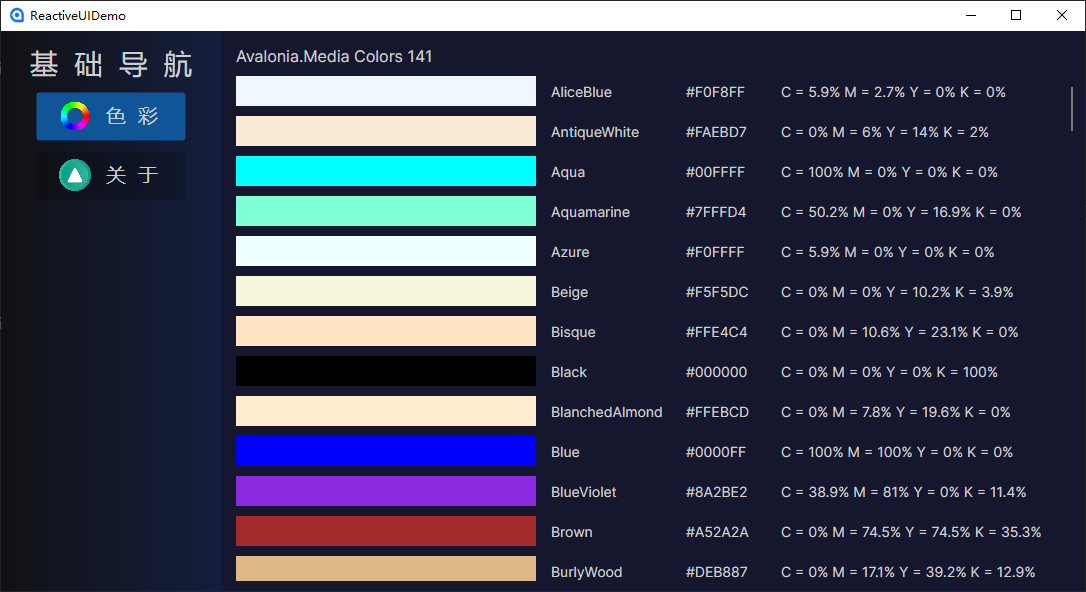
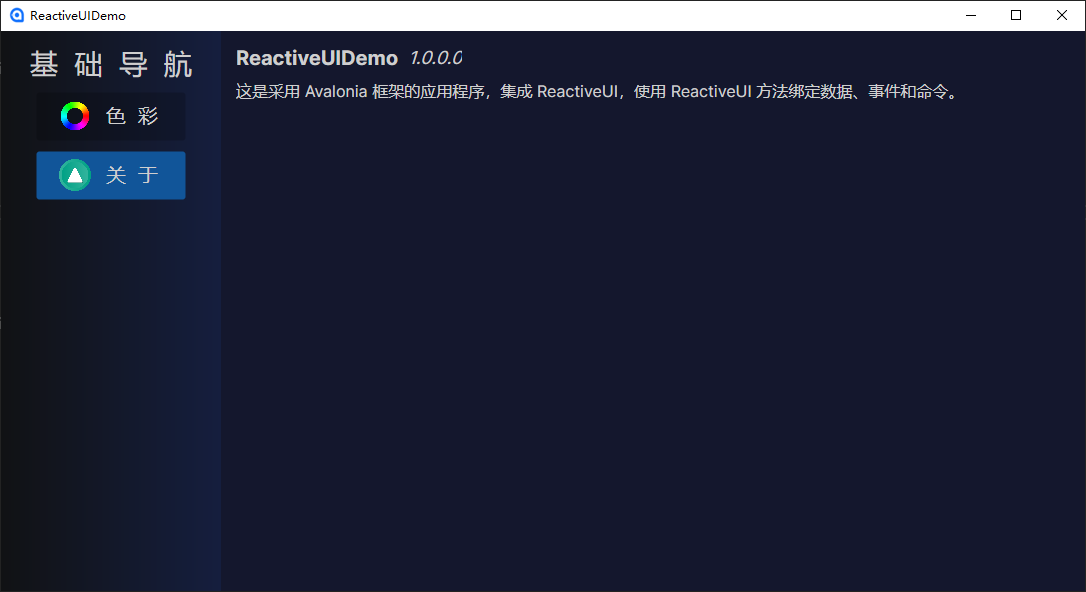
运行效果。

 浙公网安备 33010602011771号