
Avalonia:基础导航
Avalonia本身就可以实现导航功能,在主页面放置 TransitioningContentControl 控件,把它绑定到ViewModel 中的一个属性上 ViewModelBase? _currentPage;,通过更新这个属性实现导航。
我们先建二个ViewModel,一个是ColorsViewModel,一个是AboutViewModel。
using Avalonia.Data.Converters;
using Avalonia.Media;
using ReactiveUI.SourceGenerators;
using System;
using System.Collections.ObjectModel;
using System.Linq;
using System.Reflection;

namespace BasicRoutingExample.ViewModels
{
    public partial class ColorsViewModel : ViewModelBase
    {
        [Reactive]
        private string? _colorName;
        [Reactive]
        private Color? _color;

        public static FuncValueConverter<Color, string> ToCMYK { get; } = new(color =>
        {
            double r = color.R / 255.0;
            double g = color.G / 255.0;
            double b = color.B / 255.0;

            double k = 1 - Math.Max(Math.Max(r, g), b);

            double C = k < 1 ? (1 - r - k) / (1 - k) : 0;
            double M = k < 1 ? (1 - g - k) / (1 - k) : 0;
            double Y = k < 1 ? (1 - b - k) / (1 - k) : 0;

            return $"C={Math.Round(C * 100, 1)}% M={Math.Round(M * 100, 1)}% Y={Math.Round(Y * 100, 1)}% K={Math.Round(k * 100, 1)}%";
        });

        public ObservableCollection<ColorsViewModel> Colors { get; } = [];

        public ColorsViewModel() { }

        [ReactiveCommand]
        private void Init()
        {
            var properties = typeof(Colors).GetProperties(BindingFlags.Static | BindingFlags.Public)
                .Where(p => p.PropertyType == typeof(Color));

            foreach (var property in properties)
            {
                if (property.GetValue(null) is Color color)
                {
                    Colors.Add(new ColorsViewModel
                    {
                        Color = color,
                        ColorName = property.Name
                    });
                }
            }
        }
    }
}
using System.Reflection;

namespace BasicRoutingExample.ViewModels
{
    public partial class AboutViewModel : ViewModelBase
    {
        public string? AppName => Assembly.GetExecutingAssembly().GetName().Name;

        public string? Version => Assembly.GetExecutingAssembly().GetName()?.Version?.ToString();

        public string Message => "这是用 Avalonia 设计的 App,使用 ReactiveUI 响应式框架。";
    }
}
再建二个View。先建ColorsView。
<UserControl xmlns="https://github.com/avaloniaui"
             xmlns:x="http://schemas.microsoft.com/winfx/2006/xaml"
             xmlns:d="http://schemas.microsoft.com/expression/blend/2008"
             xmlns:mc="http://schemas.openxmlformats.org/markup-compatibility/2006"
			 xmlns:vm="using:BasicRoutingExample.ViewModels"
			 xmlns:b="using:BasicRoutingExample.Behaviors"
			 xmlns:cv="using:Avalonia.Controls.Converters"
             mc:Ignorable="d" d:DesignWidth="800" d:DesignHeight="560"
			 x:DataType="vm:ColorsViewModel"
			 b:LoadedBehavior.ExecuteCommandOnLoaded="{Binding InitCommand}"
             x:Class="BasicRoutingExample.Views.ColorsView">
	<UserControl.Resources>
		<cv:ColorToHexConverter x:Key="ColorToHex" AlphaPosition="Leading" IsAlphaVisible="False"/>
	</UserControl.Resources>
	<Grid RowDefinitions="Auto,*">
		<TextBlock Text="{Binding Colors.Count,StringFormat='Avalonia.Media Colors {0}'}" FontSize="18" Margin="5"/>
		<ScrollViewer Grid.Row="1">
			<ItemsControl ItemsSource="{Binding Colors}">
			<ItemsControl.ItemTemplate>
				<DataTemplate>
					<StackPanel Orientation="Horizontal" Spacing="10" Margin="5">
						<Rectangle Width="300" Height="30">
							<Rectangle.Fill>
								<SolidColorBrush Color="{Binding Color}"/>
							</Rectangle.Fill>
						</Rectangle>
						<TextBlock Text="{Binding ColorName}" Width="110"/>
						<TextBlock Text="{Binding Color,Converter={StaticResource ColorToHex},ConverterParameter={x:True}}" Width="80"/>
						<TextBlock Text="{Binding Color,Converter={x:Static vm:ColorsViewModel.ToCMYK}}"/>
					</StackPanel>
				</DataTemplate>
			</ItemsControl.ItemTemplate>
		</ItemsControl>
		</ScrollViewer>
	</Grid>
</UserControl>
再建AboutView。
<UserControl xmlns="https://github.com/avaloniaui"
             xmlns:x="http://schemas.microsoft.com/winfx/2006/xaml"
             xmlns:d="http://schemas.microsoft.com/expression/blend/2008"
             xmlns:mc="http://schemas.openxmlformats.org/markup-compatibility/2006"
			 xmlns:vm="using:BasicRoutingExample.ViewModels"
             mc:Ignorable="d" d:DesignWidth="800" d:DesignHeight="560"
			 x:DataType="vm:AboutViewModel"
             x:Class="BasicRoutingExample.Views.AboutView">
	<Grid RowDefinitions="Auto,Auto">
		<StackPanel Orientation="Horizontal" Spacing="5" Grid.Row="0">
			<TextBlock Text="{Binding AppName}" FontWeight="Bold" FontSize="24"/>
			<TextBlock Text="{Binding Version}" FontSize="20"/>
		</StackPanel>
		<TextBlock Text="{Binding Message}" Grid.Row="1" FontSize="18"/>
	</Grid>
</UserControl>
在MainWindowViewModel中实现更新页面的逻辑。
using Microsoft.Extensions.DependencyInjection;
using ReactiveUI;
using ReactiveUI.SourceGenerators;
using System.Reactive.Linq;

namespace BasicRoutingExample.ViewModels
{
    public partial class MainWindowViewModel : ViewModelBase
    {
        [Reactive]
        private ViewModelBase? _currentPage;

        [ReactiveCommand]
        private void GotoColors()
        {
            if(CurrentPage is not ColorsViewModel)
            {
                CurrentPage = App.Current.Services?.GetRequiredService<ColorsViewModel>();
            }
        }

        [ReactiveCommand]
        private void GotoAbout()
        {
            if(CurrentPage is not AboutViewModel)
            {
                CurrentPage = App.Current.Services?.GetRequiredService<AboutViewModel>();
            }
        }

        public MainWindowViewModel()
        {
            CurrentPage = App.Current.Services?.GetRequiredService<ColorsViewModel>();

            _isColorsPage = this.WhenAnyValue(x => x.CurrentPage)
                 .Select(x => x?.GetType() == typeof(ColorsViewModel))
                 .ToProperty(this, x => x.IsColorsPage);
            _isAboutPage = this.WhenAnyValue(x => x.CurrentPage)
                .Select(x => x?.GetType() == typeof(AboutViewModel))
                .ToProperty(this, x => x.IsAboutPage);
        }

        private readonly ObservableAsPropertyHelper<bool> _isColorsPage;
        private readonly ObservableAsPropertyHelper<bool> _isAboutPage;

        public bool IsColorsPage => _isColorsPage.Value;
        public bool IsAboutPage => _isAboutPage.Value;
    }
}
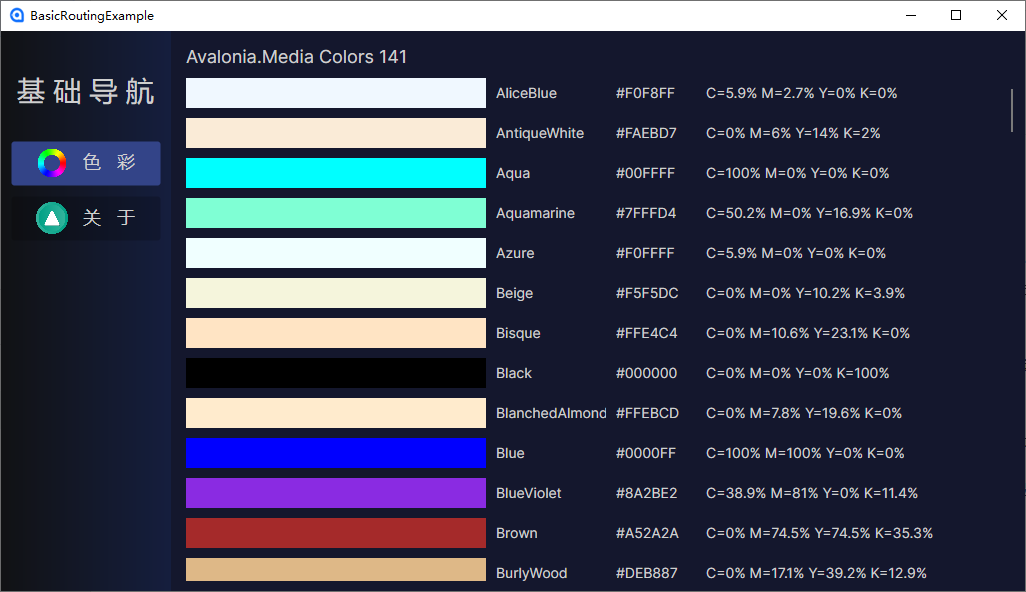
为了实现按钮被选中的效果,Avalonia可以这样做。
<Style Selector="Button.active /template/ ContentPresenter">
	<Setter Property="Background" Value="{StaticResource PrimaryActiveBackground}"/>
	<Setter Property="Foreground" Value="{StaticResource PrimaryActiveForeground}"/>
</Style>
<Button Command="{Binding GotoColorsCommand}" Classes.active="{Binding IsColorsPage}">
				<StackPanel Orientation="Horizontal" Spacing="15">
					<Image Source="/Assets/images/colors.png" Width="32"/>
					<TextBlock Text="色   彩"/>
				</StackPanel>
</Button>
<Button Command="{Binding GotoAboutCommand}" Classes.active="{Binding IsAboutPage}">
				<StackPanel Orientation="Horizontal" Spacing="15">
					<Image Source="/Assets/images/aboutA.png" Width="32"/>
					<TextBlock Text="关   于"/>
				</StackPanel>
</Button>
把Button按钮的Classes.active绑定到一个属性上IsColorsPage或IsAboutPage,由这个属性决定按钮是否被“选中”或“激活”。当页面属性 CurrentPage 属性发生改变时,通知前面二个公开属性,我们发现要实现这样的功能,ReactiveUI要敲更多的代码。
_isColorsPage = this.WhenAnyValue(x => x.CurrentPage)
     .Select(x => x?.GetType() == typeof(ColorsViewModel))
     .ToProperty(this, x => x.IsColorsPage);
_isAboutPage = this.WhenAnyValue(x => x.CurrentPage)
    .Select(x => x?.GetType() == typeof(AboutViewModel))
    .ToProperty(this, x => x.IsAboutPage);
如果使用communitytoolkit.mvvm,可能只需要更少的代码。
Avalonia有一个非常轻量的转换器FuncValueConverter,不需要建一个类,把它放到ViewModel中的一个属性上就可以使用,非常非常方便。
 public static FuncValueConverter<Color, string> ToCMYK { get; } = new(color =>
 {
     double r = color.R / 255.0;
     double g = color.G / 255.0;
     double b = color.B / 255.0;

     double k = 1 - Math.Max(Math.Max(r, g), b);

     double C = k < 1 ? (1 - r - k) / (1 - k) : 0;
     double M = k < 1 ? (1 - g - k) / (1 - k) : 0;
     double Y = k < 1 ? (1 - b - k) / (1 - k) : 0;

     return $"C={Math.Round(C * 100, 1)}% M={Math.Round(M * 100, 1)}% Y={Math.Round(Y * 100, 1)}% K={Math.Round(k * 100, 1)}%";
 });
把它设置成静态属性,可以这样直接使用。
<TextBlock Text="{Binding Color,Converter={x:Static vm:ColorsViewModel.ToCMYK}}"/>
在App.axaml.cs中使用communitytoolkit.mvvm的Ioc容器。
using Avalonia;
using Avalonia.Controls.ApplicationLifetimes;
using Avalonia.Data.Core.Plugins;
using Avalonia.Markup.Xaml;
using BasicRoutingExample.ViewModels;
using BasicRoutingExample.Views;
using Microsoft.Extensions.DependencyInjection;
using System;

namespace BasicRoutingExample
{
    public partial class App : Application
    {
        public override void Initialize()
        {
            AvaloniaXamlLoader.Load(this);
        }

        public override void OnFrameworkInitializationCompleted()
        {
            BindingPlugins.DataValidators.RemoveAt(0);
            Services = ConfigureServices();

            if (ApplicationLifetime is IClassicDesktopStyleApplicationLifetime desktop)
            {
                desktop.MainWindow = new MainWindow
                {
                    DataContext = new MainWindowViewModel(),
                };
            }
            base.OnFrameworkInitializationCompleted();
        }

        public new static App Current => (App)Application.Current!;

        public IServiceProvider? Services { get; private set; }

        private static ServiceProvider ConfigureServices()
        {
            var services = new ServiceCollection();

            services.AddTransient<ColorsViewModel>();
            services.AddTransient<AboutViewModel>();

            return services.BuildServiceProvider();
        }

    }
}
在App.axaml中使用样式。
<Application xmlns="https://github.com/avaloniaui"
             xmlns:x="http://schemas.microsoft.com/winfx/2006/xaml"
             x:Class="BasicRoutingExample.App"
             xmlns:local="using:BasicRoutingExample"
             RequestedThemeVariant="Default">
             <!-- "Default" ThemeVariant follows system theme variant. "Dark" or "Light" are other available options. -->

    <Application.DataTemplates>
        <local:ViewLocator/>
    </Application.DataTemplates>
	<Application.Resources>
		<SolidColorBrush x:Key="PrimaryBackground">#14172D</SolidColorBrush>
		<SolidColorBrush x:Key="PrimaryForeground">#cfcfcf</SolidColorBrush>
		<LinearGradientBrush x:Key="PrimaryGradient" StartPoint="0%,0%" EndPoint="100%,0%">
			<GradientStops>
				<GradientStop Offset="0" Color="#111214"/>
				<GradientStop Offset="1" Color="#151E3E"/>
			</GradientStops>
		</LinearGradientBrush>
		<SolidColorBrush x:Key="PrimaryHoverBackground">#333853</SolidColorBrush>
		<SolidColorBrush x:Key="PrimaryHoverForeground">White</SolidColorBrush>
		<SolidColorBrush x:Key="PrimaryActiveBackground">#334488</SolidColorBrush>
		<SolidColorBrush x:Key="PrimaryActiveForeground">AliceBlue</SolidColorBrush>
	</Application.Resources>

    <Application.Styles>
        <FluentTheme />
		<Style Selector="TextBlock">
			<Setter Property="Foreground" Value="{StaticResource PrimaryForeground}"/>
			<Setter Property="VerticalAlignment" Value="Center"/>
		</Style>
		<Style Selector="TextBlock.caption">
			<Setter Property="FontSize" Value="28"/>
			<Setter Property="HorizontalAlignment" Value="Center"/>
			<Setter Property="VerticalAlignment" Value="Center"/>
		</Style>
		<Style Selector="Border.menu">
			<Setter Property="Background" Value="{StaticResource PrimaryGradient}"/>
			<Setter Property="Padding" Value="10"/>
		</Style>
		<Style Selector="Border.client">
			<Setter Property="Padding" Value="10"/>
			<Setter Property="Background" Value="{StaticResource PrimaryBackground}"/>
		</Style>
		<Style Selector="Button">
			<Setter Property="HorizontalContentAlignment" Value="Center"/>
			<Setter Property="Width" Value="150"/>
		</Style>
		<Style Selector="Button /template/ContentPresenter">
			<Setter Property="Background" Value="Transparent"/>
			<Setter Property="Foreground" Value="{StaticResource PrimaryForeground}"/>
			<Setter Property="FontSize" Value="18"/>
		</Style>
		<Style Selector="Button:pointerover /template/ContentPresenter">
			<Setter Property="Background" Value="{StaticResource PrimaryHoverBackground}"/>
			<Setter Property="Foreground" Value="{StaticResource PrimaryHoverForeground}"/>
		</Style>
		<Style Selector="Button.active /template/ ContentPresenter">
			<Setter Property="Background" Value="{StaticResource PrimaryActiveBackground}"/>
			<Setter Property="Foreground" Value="{StaticResource PrimaryActiveForeground}"/>
		</Style>
    </Application.Styles>
</Application>
实现效果

 浙公网安备 33010602011771号