<!DOCTYPE html>
<html>
<style>
 p.dashed{border-style:dashed; border-width: 5px;}
  .solid {border-style: solid;  border-width: 10px;border-color:red; text-align: center;}

  .border {
  border: 5px solid red; text-align: center;
}
.round1{
border:2px solid blue;
border-radius:8px;
text-align: center;
width:100px;
}
/**
外边距
**/
.round2{
border:2px solid blue;
border-radius:8px;
text-align: center;
margin: 25px 25px 25px 25px;
}

/**
内边距
**/
.round3{
border:2px solid blue;
border-radius:8px;
text-align: center;
padding: 15px ;
}
.round4 {
  height: 200px;
  width: 80%;
  background-color: powderblue;
}
/**
轮廓
**/

p.outline_solid {outline-style: solid ;
 outline-color: red;}
p.outline_solid2 {outline: 5px solid red ;}
p.outline_solid3{
  margin: 30px;
  border: 1px solid black;
  outline: 1px solid red;
  outline-offset: 10px;
}

/**
 vertical-align   //垂直对齐  上top  中middle 下botton
 text-align       //内容对齐  左left 中center,右right
 text-decoration  //文字装饰  加租 overline,中划线line-through, 下划线underline
 text-transform    //字母大小写  大写uppercase 小写lowercase  首个字母大写 capitalize
  text-indent      //文字缩进  50px
 letter-spacing    //字母间距 3px 与此类似word-spacing
 line-height   行之间的间距   1.2
 position    //元素位置 静态 static,相对relative,固定fixed , absolute; 的元素相对于最近的定位祖先元素进行定位(而不是相对于视口定位,如 fixed)
              //sticky的元素根据用户的滚动位置进行定位
z-index      //重叠元素
overflow 属性指定在元素的内容太大而无法放入指定区域时是剪裁内容还是添加滚动条。

overflow 属性可设置以下值:
visible - 默认。溢出没有被剪裁。内容在元素框外渲染
hidden - 溢出被剪裁,其余内容将不可见
scroll - 溢出被剪裁,同时添加滚动条以查看其余内容
auto - 与 scroll 类似,但仅在必要时添加滚动条

**/
h1 {
  text-shadow: 2px 2px 5px red;    //阴影效果
}
/**
a:link, a:visited {
  background-color: #f44336;
  color: white;
   width:80px;
   font-size: 20px;
  text-align: center;
  text-decoration: none;
  display: inline-block;
  border:5px solid f44336;
  border-radius:8px;
  padding: 15px ;
}
**/

a:hover, a:active {
  background-color: red;
}

.container {
  position: relative;
}

.topleft {
  position: absolute;
  top: 8px;
  left: 16px;
  font-size: 18px;
}

img {
  width: 100%;
  height: auto;
  opacity: 0.3;
}

.button {
  background-color: #4CAF50; /* Green */
  border: none;
  color: white;
  padding: 16px 32px;
  text-align: center;
  text-decoration: none;
  display: inline-block;
  font-size: 16px;
  margin: 4px 2px;
  transition-duration: 0.4s;
  cursor: pointer;
}

.button1 {
  background-color: white;
  color: black;
  border: 2px solid #4CAF50;
}

.button1:hover {
  background-color: #4CAF50;
  color: white;
}

.button2 {
  background-color: white;
  color: black;
  border: 2px solid #008CBA;
}

.button2:hover {
  background-color: #008CBA;
  color: white;
}

.button3 {
  background-color: white;
  color: black;
  border: 2px solid #f44336;
}

.button3:hover {
  background-color: #f44336;
  color: white;
}

.button4 {
  background-color: white;
  color: black;
  border: 2px solid #e7e7e7;
}

.button4:hover {background-color: #e7e7e7;}

.button5 {
  background-color: white;
  color: black;
  border: 2px solid #555555;
}

.button5:hover {
  background-color: #555555;
  color: white;
}

.pagination {
  display: inline-block;
}

.pagination a {
  color: black;
  float: left;
  padding: 8px 16px;
  text-decoration: none;
  border: 1px solid #ddd;
}

.pagination a.active {
  background-color: #4CAF50;
  color: white;
  border: 1px solid #4CAF50;
}

.pagination a:hover:not(.active) {background-color: #ddd;}

.pagination a:first-child {
  border-top-left-radius: 5px;
  border-bottom-left-radius: 5px;
}

.pagination a:last-child {
  border-top-right-radius: 5px;
  border-bottom-right-radius: 5px;
}

</style>
<body>

<h1 style="border: 1px solid ;">Hello World</h1>

<h1 style="border: 2px solid DodgerBlue;">Hello World</h1>


<p class="dashed">china</p>
<div class="solid">实线边框。</div>
<p class="border">此属性是 border-width、border-style 以及 border-color 的简写属性。</p>
<div class="round1">提交</div>    <div class="round1">取消</div>
<div class="round2">提交</div>    <div class="round2">取消</div>
<div class="round3">内边距</div>
<div class="round4">设置元素的高度和宽度</div>

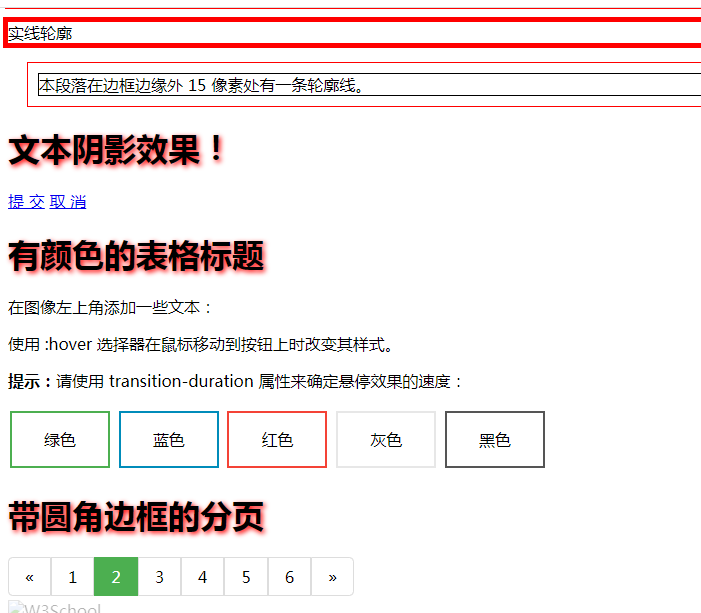
<p class="outline_solid">实线轮廓</p>
<p class="outline_solid2">实线轮廓</p>
<p class="outline_solid3">本段落在边框边缘外 15 像素处有一条轮廓线。</p>
<h1>文本阴影效果!</h1>
<a href="default.asp" target="_blank">提 交</a>  <a href="default.asp" target="_blank">取 消</a>
<h1>有颜色的表格标题</h1>
<p>在图像左上角添加一些文本:</p>
<p>使用 :hover 选择器在鼠标移动到按钮上时改变其样式。</p>

<p><b>提示:</b>请使用 transition-duration 属性来确定悬停效果的速度:</p>

<button class="button button1">绿色</button>
<button class="button button2">蓝色</button>
<button class="button button3">红色</button>
<button class="button button4">灰色</button>
<button class="button button5">黑色</button>

<h1>带圆角边框的分页</h1>

<div class="pagination">
  <a href="#">«</a>
  <a href="#">1</a>
  <a class="active" href="#">2</a>
  <a href="#">3</a>
  <a href="#">4</a>
  <a href="#">5</a>
  <a href="#">6</a>
  <a href="#">»</a>
</div>
<div class="container">
  <img src="/i/logo/w3logo-2.png" alt="W3School" width="800" height="450">
  <div class="topleft">Top Left</div>
</div>


</body>
</html>
![]()

 浙公网安备 33010602011771号