
Laravel QQ邮箱发送
1.开启 SMTP 服务

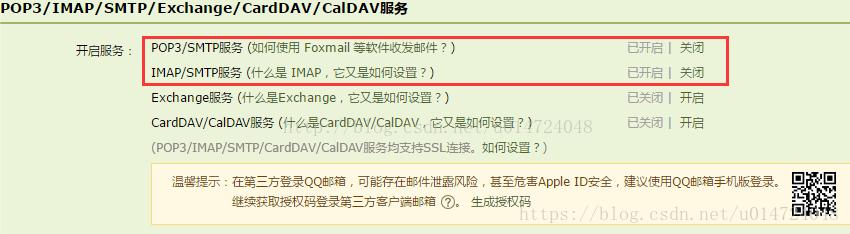
2.获取授权码
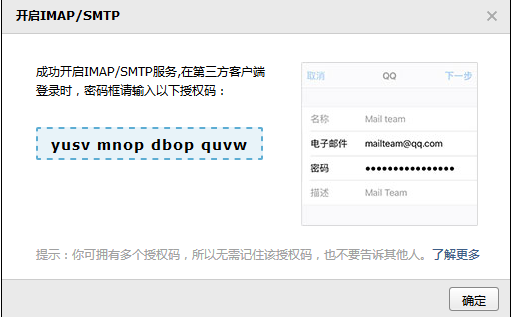
SMTP 服务器认证密码,需要妥善保管(PS:密码直接没有空格)
3.在laravel中配置服务器
打开.env文件
MAIL_DRIVER=smtp
MAIL_HOST=smtp.qq.com
MAIL_PORT=25
MAIL_USERNAME=邮箱
MAIL_PASSWORD=你的授权密码
MAIL_ENCRYPTION=
MAIL_FROM_ADDRESS=邮箱
清空缓存:
php artisan config:cache
4.单独的路由发送邮件:
     //发送邮件
       Route::get('user/email',function (){
          \Mail::send('mail.adduser',['user'=>'张三'],function (\Illuminate\Mail\Message $message){
              $message->to('2022808269@qq.com');
              $message->subject('邮件消息');
          });
       });
<!doctype html>
<html lang="en">
<head>
    <meta charset="UTF-8">
    <title>添加用户</title>
    <style>
        div{
            font-size: 20px;
            color: red;
        }
    </style>
</head>
<body>
    <h3>
        测试邮件{
        { $user }}
    </h3>

</body>
</html>
5.注册时发送邮件//添加处理
use Mail;
use Illuminate\Mail\Message;

    public function store(Request $request){
        $data = $request->except('_token','password_confirmation');   //接收表单传来的数据 除了其中的两个字段
        $pwd = $data['password'];          //获取单独的密码
        $data['password'] = bcrypt($data['password']);    /将密码进行加密
        $res = User::create($data);       //添加数据库

        //发送邮  main.useraa是视图层  compact('res','pwd')参数传到视图层
        Mail::send('mail.useradd',compact('res','pwd'),function (Message $message) use ($res){
            //发送的人
            $message->to($res->email);
            //内容
            $message->subject('开通账号通知');
        });
        if($res) {
            return redirect(route('admin.user.index'))->with('success','添加成功');     //成功后跳转的页面
        }
        return redirect(route('admin.user.add'))->with('success','添加失败');   //失败后跳转的页面
    }
视图层代码: 返回手机端的页面如图
<!doctype html>
<html lang="en">
<head>
    <meta charset="UTF-8">
    <style>
        body{
            font-size: 14px;
        }
        div{
            margin-bottom: 10px;
        }
    </style>
</head>
<body>
    <div>您的账号:{{ $res->username }}</div>
    <div>您的密码:{{ $pwd }}</div>
    <div>您的手机:{{ $res->phone }}</div>
</body>
</html>
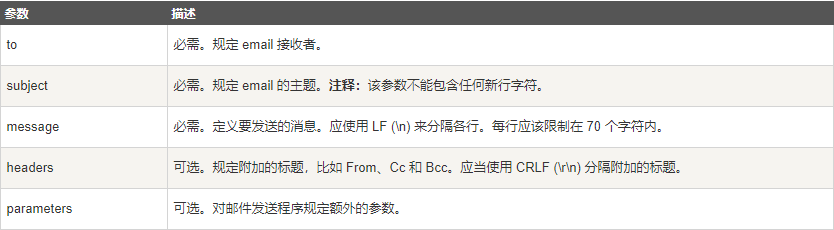
<?php
$to = "someone@example.com";         // 邮件接收者
$subject = "参数邮件";                // 邮件标题
$message = "Hello! 这是邮件的内容。";  // 邮件正文
$from = "someonelse@example.com";   // 邮件发送者
$headers = "From:" . $from;         // 头部信息设置
mail($to,$subject,$message,$headers);
echo "邮件已发送";
?>

 浙公网安备 33010602011771号