

git clone设置下载代理
git clone设置下载代理
1. 前置条件:有代理
2. 设置代理
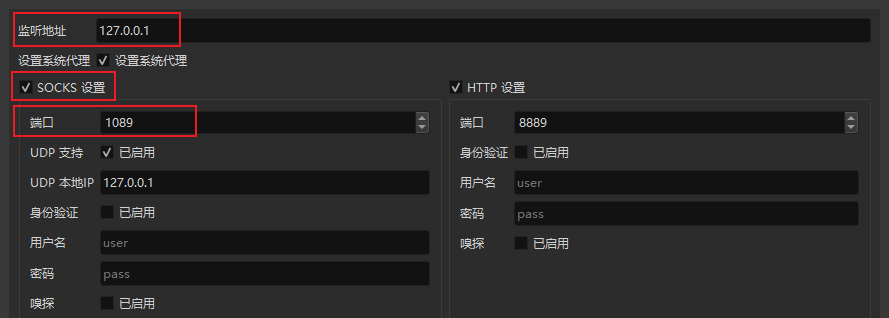
查看自己代理的代理地址和端口,注意是红框处 SOCKS设置 的端口。按照上图我的设置是:
git config --global http.proxy socks5://127.0.0.1:1089
设置之后 git clone 就会走代理了,速度直接起飞,从K到M的那种。
我也不知道为啥我在别的博客上看到的类似如下设置不好用,希望大神能解答。
git config --global http.proxy http://127.0.0.1:1080
git config --global https.proxy https://127.0.0.1:1080
看到有大佬说 git 没有 https 代理,http 包含了 https,并且地址不能加单引号,所以如下设置是错的:
git config --global http.proxy 'socks5://127.0.0.1:1080'
git config --global https.proxy 'socks5://127.0.0.1:1080'
3. 取消代理
git config --global --unset http.proxy
4. 查看所有代理
git config --global --list

 浙公网安备 33010602011771号