
GIT学习笔记
GIT操作
git主要分区结构
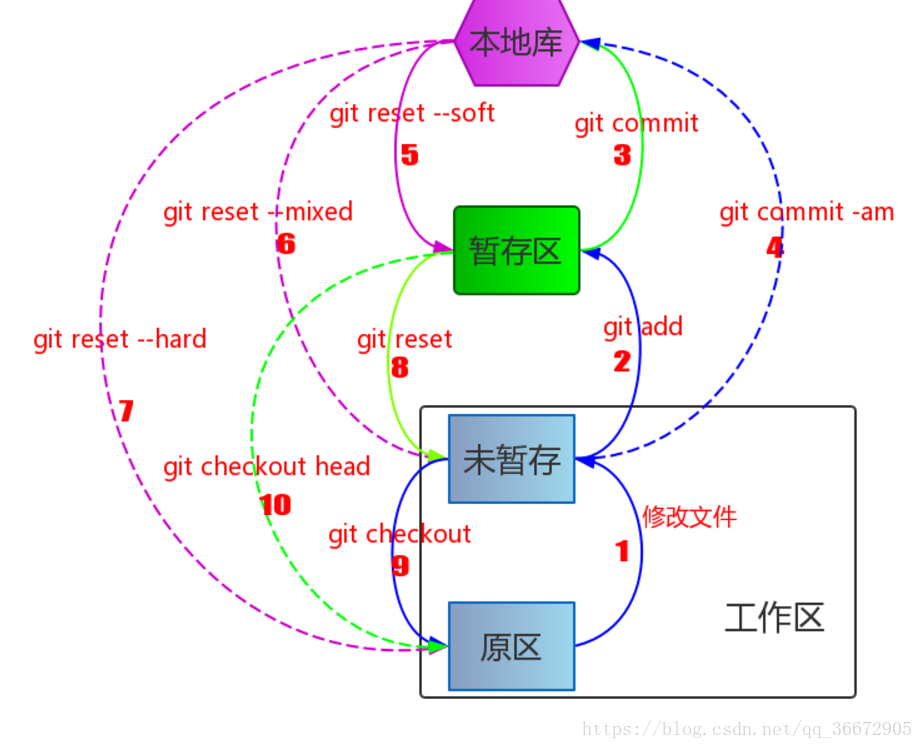
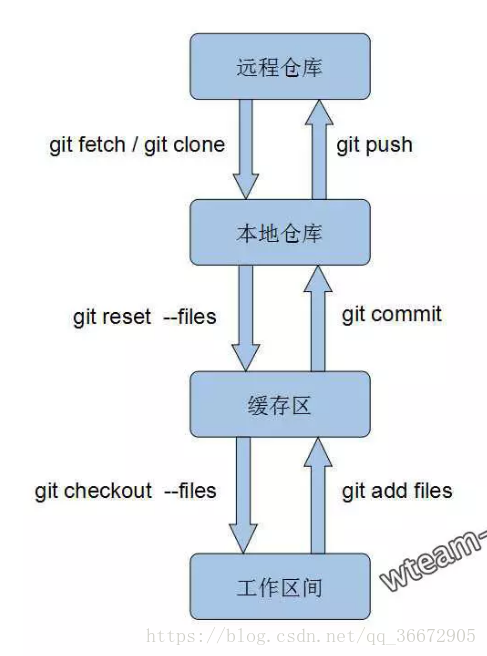

基础
git help
git init: 创建一个新的 git 仓库,其数据会存放在一个名为 .git 的目录下
git status: 显示当前的仓库状态
Git: 版本控制工具
git add
git commit: 创建一个新的提交
git log: 显示历史日志
git log --all --graph --decorate: 可视化历史记录(有向无环图)
git diff
git diff
git checkout
分支和合并
git branch: 显示分支
git branch
- git checkout -b
- 创建分支并切换到该分支
相当于 git branch
git merge
git mergetool: 使用工具来处理合并冲突
git rebase: 将一系列补丁变基(rebase)为新的基线
远端操作
git remote: 列出远端
git remote add
git push
端并更新远端引用
git branch --set-upstream-to=
和远端分支的关联关系
git fetch: 从远端获取对象/索引
git pull: 相当于 git fetch; git merge
git clone: 从远端下载仓库
撤销
git commit --amend: 编辑提交的内容或信息
git reset HEAD
git checkout --
Git 高级操作
git config: Git 是一个 高度可定制的 工具
git clone --depth=1: 浅克隆(shallow clone),不包括完整的版本历史信息
git add -p: 交互式暂存
git rebase -i: 交互式变基
git blame: 查看最后修改某行的人
git stash: 暂时移除工作目录下的修改内容
git bisect: 通过二分查找搜索历史记录
.gitignore: 指定故意不追踪的文件
git使用笔记
1.配置用户名和密码
git config --global user.name "follow"
git config --global user.email "follow@qq.com"
2.重新创建本地仓库,并编辑提交文件:
	mkdir learngit
	cd learngit
	git init
	vi readme.txt
	git add readme.txt
	git commit -m "add a file"
git ls -files可查看已提交进本地仓库的文件
3.checkout小记
(1)使用checkout恢复文件
zzh@ubuntu:~/Desktop/learn_git.cd$ git checkout master #切换分支
M	a.txt
Already on 'master'
zzh@ubuntu:~/Desktop/learn_git.cd$ cat a.txt
nahida is not an op
zzh@ubuntu:~/Desktop/learn_git.cd$ git checkout a.txt
Updated 1 path from the index
zzh@ubuntu:~/Desktop/learn_git.cd$ cat a.txt
nahida is an op
更多请见git checkout命令 - Git教程 (yiibai.com)
如果已进行add,可以git reset HEAD <file>撤回文件到工作区
git reset --hard HEAD^
可以使缓存区和工作区回到上一次commit的结果
^^可以回到上上次
~3为上上上次
(2)git checkout
其中commit可以用git log查看
4.使用GitHub
【1】基本操作
(1)创建新仓库
echo "# learn_git" >> README.md
git init
git add README.md
git commit -m "first commit"
git branch -M main
git remote add origin https://github.com/ftmg12138/learn_git.git
git push -u origin main
(2)push已存在的本地仓库
git remote add origin https://github.com/ftmg12138/learn_git.git
git branch -M main
git push -u origin main
【2】使用笔记
(1)使用时出现remote: Support for password authentication was removed on August 13, 2021.因为自从 21 年 8 月 13 后不再支持用户名密码的方式验证了
此时可以:
2.添加远程库,详见Git 远程仓库(Github) | 菜鸟教程 (runoob.com)
zzh@ubuntu:~/.ssh$ ssh -T git@github.com
The authenticity of host 'github.com (20.205.243.166)' can't be established.
ECDSA key fingerprint is SHA256:p2QAMXNIC1TJYWeIOttrVc98/R1BUFWu3/LiyKgUfQM.
Are you sure you want to continue connecting (yes/no/[fingerprint])? yes
Warning: Permanently added 'github.com,20.205.243.166' (ECDSA) to the list of known hosts.
Hi ftmg12138! You've successfully authenticated, but GitHub does not provide shell access.

 浙公网安备 33010602011771号