Python - 协程coroutine
总结
asyncio里面,await的用法有两种:
await coroutine,就像普通的函数调用一样,执行coroutine对应的代码await task,中断当前代码的执行,event loop开始调度任务,直到task执行结束,恢复执行当前代码。
前言
常见的Python代码都是一行一行执行的,非常易懂。然而,有时候我们也会在Python代码中看到一些async/await等与异步编程相关的代码。为了能够顺利读懂这些代码,我们需要了解Python异步编程的一些基础知识。
事实上,Python 3.5就已经开始支持异步编程语法了。从这个角度来看,了解异步编程也是必要的,它早已成为了Python生态里的一部分。
Python中的异步编程的核心语法就是async/await两个关键字,主要涉及的概念就是协程(coroutine)。关于协程的解释,什么是协程?这篇文章给出了很好的介绍。简单来说,协程就是在一个线程(thread)里通过事件循环(event loop)模拟出多个线程并发的效果。
Python中的协程概念
在Python中,协程coroutine有两层含义:
- 使用
async def定义的函数是一个coroutine,这个函数内部可以用await关键字。 - 使用
async def定义的函数,调用之后返回的值,是一个coroutine对象,可以被用于await或者asyncio.run等
我们可以看到:
- 第一层含义是语法层面的概念,一个函数(一段代码)由
async def定义,那么它就是一个coroutine。带来的效果是,这个函数内部可以用await。那么反过来就是说,一个普通的def定义的函数,内部不能用await,否则就会触发语法错误(SyntaxError)。 - 第二层含义是Python解释器运行时的概念,
coroutine是Python解释器里内置的一个类。当我们调用async def定义的函数时,得到的返回值的类型就是coroutine。
例如下面的代码:
import asyncio

async def hello_world():
    await asyncio.sleep(1)
    print("Hello, world!")

coro = hello_world()
print(hello_world) # <function hello_world at 0x102a93e20>
print(coro.__class__) # <class 'coroutine'>
asyncio.run(coro) # Hello, world!
从语法层面上来说,hello_world函数是个coroutine函数。但是运行时,hello_world函数的类型依然是function,这个函数调用之后的返回对象coro是一个coroutine对象。
await + coroutine
当我们对一个coroutine使用await时,当前函数中断执行,Python解释器开始执行coroutine的代码,这和普通的函数调用没什么区别:
import asyncio
import time

async def async_hello_world():
    now = time.time()
    await asyncio.sleep(1)
    print(time.time() - now) # 1.0013360977172852
    print("Hello, world!") # Hello, world!
    await asyncio.sleep(1)
    print(time.time() - now) # 2.0025689601898193

print(asyncio.sleep(1)) # <coroutine object sleep at 0x102f663b0>
coro = async_hello_world()
asyncio.run(coro)
由此我们可以看到,asyncio.sleep(1)是一个coroutine object,对它进行await就会使得当前coroutine休眠一秒。
虽然这段代码经常被用于展示coroutine的基本用法,但这段代码其实完全没有展现coroutine的优势。我们可以不用coroutine写出功能一致的代码:
import time
def normal_hello_world():
    now = time.time()
    time.sleep(1)
    print(time.time() - now) # 1.0050458908081055
    print("Hello, world!") # Hello, world!
    time.sleep(1)
    print(time.time() - now) # 2.010284900665283

normal_hello_world()
只需要删除所有的async/await,把asyncio.sleep换成time.sleep,就可以了。
那么,我们为什么还要coroutine呢?
其实,coroutine最大的优势在于用单个线程模拟多个线程并发:
import asyncio
import time

async def async_hello_world():
    now = time.time()
    await asyncio.sleep(1)
    print(time.time() - now)
    print("Hello, world!")
    await asyncio.sleep(1)
    print(time.time() - now)

async def main():
    await asyncio.gather(async_hello_world(), async_hello_world(), async_hello_world())

now = time.time()
# run 3 async_hello_world() coroutine concurrently
asyncio.run(main())

print(f"Total time for running 3 coroutine: {time.time() - now}")

import time
def normal_hello_world():
    now = time.time()
    time.sleep(1)
    print(time.time() - now)
    print("Hello, world!")
    time.sleep(1)
    print(time.time() - now)

now = time.time()
normal_hello_world()
normal_hello_world()
normal_hello_world()
print(f"Total time for running 3 normal function: {time.time() - now}")
输出为:
1.0004000663757324
Hello, world!
1.0004527568817139
Hello, world!
1.0004589557647705
Hello, world!
2.001703977584839
2.0017318725585938
2.0017342567443848
Total time for running 3 coroutine: 2.0025317668914795
1.005108118057251
Hello, world!
2.010077953338623
1.005120038986206
Hello, world!
2.00691294670105
1.0018260478973389
Hello, world!
2.0058960914611816
Total time for running 3 normal function: 6.0232861042022705
可以看到,一个coroutine执行需要2秒,3个coroutine同时执行还是只需要2秒;而普通的函数,一个函数执行需要2秒,3个函数执行就需要6秒了。
await + task
在Python的异步编程中,真正并发的对象是任务(Task)。当我们对一个Task进行await的时候,event loop开始调度当前可执行的全部任务,直到被await的Task结束。
我们可以用Task来模拟asyncio.gather的效果(事实上,asyncio.gather内部也是通过Task来实现的):
import asyncio
import time

async def async_hello_world():
    now = time.time()
    await asyncio.sleep(1)
    print(time.time() - now)
    print("Hello, world!")
    await asyncio.sleep(1)
    print(time.time() - now)

async def main():
    task1 = asyncio.create_task(async_hello_world())
    task2 = asyncio.create_task(async_hello_world())
    task3 = asyncio.create_task(async_hello_world())
    await task1
    await task2
    await task3

now = time.time()
# run 3 async_hello_world() coroutine concurrently
asyncio.run(main())

print(f"Total time for running 3 coroutine: {time.time() - now}")
输出为:
1.0012600421905518
Hello, world!
1.0013139247894287
Hello, world!
1.0013208389282227
Hello, world!
2.0027778148651123
2.0029189586639404
2.002932071685791
Total time for running 3 coroutine: 2.0102150440216064
与预期结果一致,三个coroutine执行一共只花了2秒。
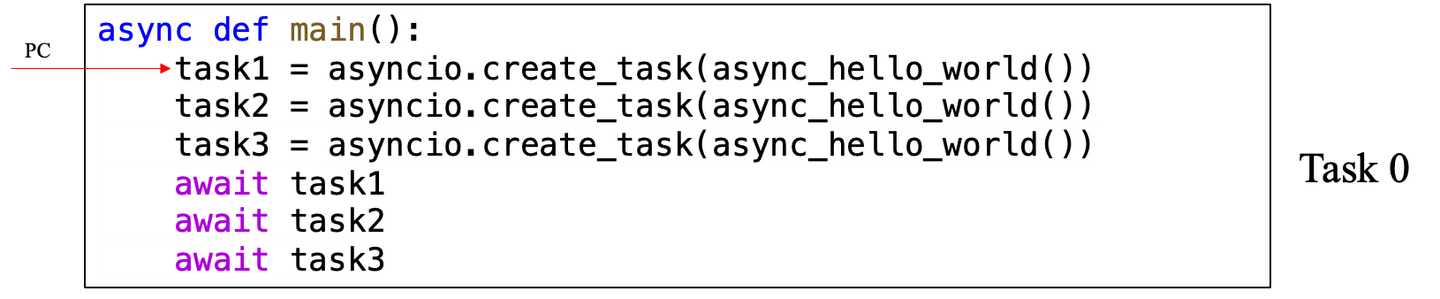
如何理解这段代码呢?我们可以使用代码与程序计数器(Program Counter,即PC)来理解:一个Task就是一段将要运行的代码,PC就是当前Task运行到的位置。
当我们运行asyncio.run(main())时,Python会自动将这个coroutine对象包装成一个Task(记为Task 0)。此时,我们的任务列表长这样:
Task 0执行了3次asyncio.create_task(async_hello_world())后,我们的任务列表为:
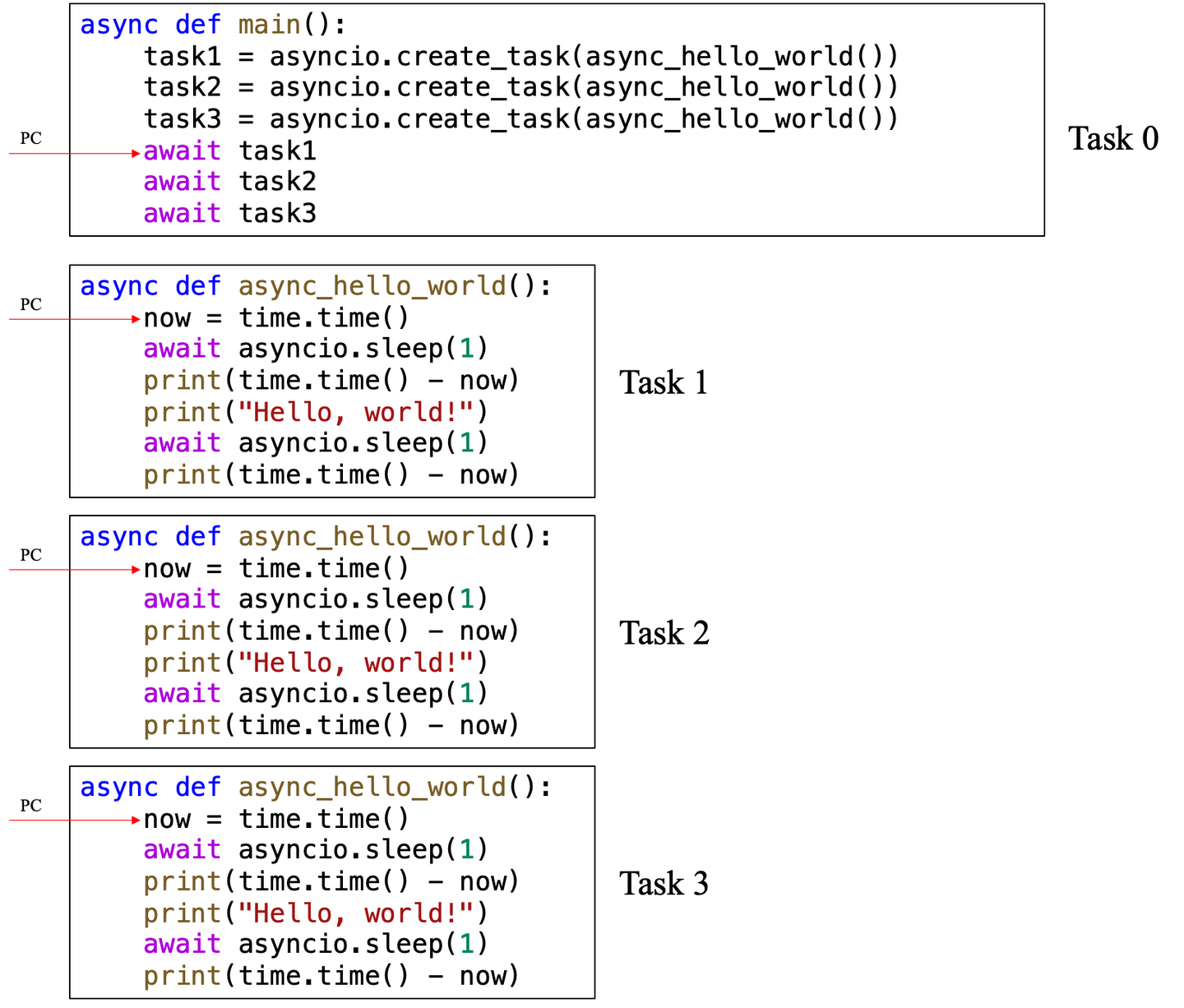
接下来,Task 0开始await task1,带来的效果为:
- Task 0中断执行,直到
Task 1结束。于是event loop寻找下一个可以执行的任务(即Task 1) - Task 1执行到
await asyncio.sleep(1),也中断执行,等到1秒后再执行。于是event loop寻找下一个可以执行的任务(即Task 2) - Task 2执行到
await asyncio.sleep(1),也中断执行,等到1秒后再执行。于是event loop寻找下一个可以执行的任务(即Task 3) - Task 3执行到
await asyncio.sleep(1),也中断执行,等到1秒后再执行。于是event loop寻找下一个可以执行的任务。 - 此时没有任务可以执行,于是event loop自己休眠1秒。
- 休眠1秒后,Task 1可以执行,执行了
print(time.time() - now)与print("Hello, world!")后,Task 1执行到await asyncio.sleep(1),再次中断执行。于是event loop寻找下一个可以执行的任务(即Task 2) - Task 2执行了
print(time.time() - now)与print("Hello, world!")后,在await asyncio.sleep(1)处再次中断执行。于是event loop寻找下一个可以执行的任务(即Task 3) - Task 3同理,执行了
print(time.time() - now)与print("Hello, world!")后,在await asyncio.sleep(1)处再次中断执行。 - 此时没有任务可以执行,于是event loop自己休眠1秒。
- 休眠1秒后,Task 1可以执行,执行了
print(time.time() - now)之后,Task 1结束。 - Task 0发现Task 1执行结束,于是
await task1执行结束,开始await task2。此时Task 0中断执行。 - Task 2执行了
print(time.time() - now)之后,Task 2结束。 - Task 0发现Task 2执行结束,于是
await task2执行结束,开始await task3。此时Task 0中断执行。 - Task 3执行了
print(time.time() - now)之后,Task 3结束。 - Task 0发现Task 3执行结束,于是
await task3执行结束,整个Task 0执行结束。
以上流程画成动图会更加生动形象,可惜我不会画动图。如果有感兴趣的朋友可以用一个动图来展示上述流程。
由此我们可以看到,协程最重要的特性,在于多个协程可以同时asyncio.sleep(1),现实世界只过去了1秒,而三个协程的时间都过去了1秒,从而节约了等待的时间。
上述分析假设了event loop查询任务状态的顺序为Task 0 --> Task 1 --> Task 2 --> Task 3。实际情况可能是乱序的,例如第6步中,event loop休眠1秒后,Task 1、Task 2、Task 3都可以执行,此时的执行顺序无法预测。同理,第10步中,event loop休眠1秒后,Task 1、Task 2、Task 3都可以执行,谁先执行谁就先结束。我们的await task1只是保证这段代码必须在task1结束后继续执行,此时有可能task2及task3已经执行结束了。后续的await task2与await task3,只是在确保等到task2及task3结束。

 浙公网安备 33010602011771号