
Web技术课程基础笔记
该部分为本科期间web技术课程的部分笔记备份。
Unit 1 Introduction
World Wide Web
World Wide Web
- The web is a network of computers all overthe world.
- All the computers in the web can communicate with each other.
- All the computers use a communication protocol called HTTP
Web Pages
- Web Pages
- Web information is stored in documents called web pages
- Filenames usually have an .htm or .html extension
- HTML
- Hypertext Markup Language
- a standard format for web documents
<!DOCTYPE html>
<html>
<head><title></title></head>
<body></body>
</html>
Web Servers
Web Servers:Web pages are files stored on computers called web servers.
Web site:The collection of all your web pages is called your web site.
Takes a client request and gives something back to the client.
publish web site: copy site to a web server -> connected to a network -> Service Provider(ISP)
Web hosting网页寄存:
- ISP provides Internet Services
- common Internet service: web hosting
- means storing your web site on a public server
- normally includes email services
- often includes domain name registration
Web Client
Computers reading the web pages
Web browser: View the pages with a program
Web browser
All web pages contain instructions for display
The browser displays the page by reading these instructions
The most common display instructions are called HTML tags
URL & HTTP
URL: Uniform Resource Locator,协议名://服务器地址:端口/目录/具体资源名,网址以"http://"开头
protocol://server: port/path/resource
Web Technologies
JavaScript、PHP...
MEAN Stack
a free and open-source JavaScript software stack for building dynamic web sites and web applications.
MongoDB, Express.js, AngularJS (or Angular), and Node.js. All are written in JavaScript.
be written in one language for both server-side and client-side execution environments.
MEAN
- MongoDB, a NoSQL database
- Node.js, an execution environment for event-driven server-side and networking applications
- Express.js, a web application framework that runs on Node.js
- Angular.js or Angular, JavaScript MVC frameworks that run in browser JavaScript engines
Evolution
- Web 1.0 (1990-2000) - Read Only Web
- read-only and static
- could read the websites and its contents but could not add or interact with the websites
- Web 2.0 (2000-2010) - Read and Write Web
- not only able to read the websites but they could also interact and connect with other users
- Web 3.0 (2010-2020) - The Semantic Web
- defines organized or structured data to simplify automation, integration and discovery across multiple applications
- focuses on the intelligent connection between people and machines
- Growth of IoT or Internet of Things(物联网)
- Web 4.0, Web 5.0 and Artificial Intelligence
- Web 4.0: reach upto the level of human intelligence and human brain
- Web 5.0: highly advanced and complex web generation, things such as brain implants will be highly popular
Unit 2 Web Application
Browser Environment is different:
- Web browsers display Documents described in HTML
- Make applications out of documents
- Early web apps:Multiple documents (pages) with 'form' tag for input
- Current:Use JavaScript to dynamically generate and update documents
HTML
HyperText Markup Language
- Markup Language - Include directives with content
- Directives can dictate presentation or describe content
- Approach
- Start with content to be displayed
- Annotate(注释) it with tags
HTML tags
uses < > to denote tags.
<h1></h1><!--top-level heading-->
<p></p><!--paragraph-->
<ul><li></li></ul><!--unordered list-->
<i><!--italic-->
<img><!--additional info to display-->
HTML Evolution
missing closing </...>:
- Complain bitterly about malformed HTML
- Figure out there was a missing
</p>, add it, and continue processing.
XHTML
a stricter and cleaner version of HTML,XML application
All new browsers have support for XHTML.
<?xml version="1.0" encoding="utf-8"?>
<!DOCTYPE html PUBLIC "-//W3C//DTD XHTML 1.0 Strict//EN"
"http://www.w3.org/TR/xhtml1/DTD/xhtml1-strict.dtd">
<!--Indicate that this is an XHTML document, conforming to version 1.0 of the
standard; use these lines verbatim in all the web pages you create-->

<html xmlns="http://www.w3.org/1999/xhtml" xml:lang="en" lang="en">
<!--Outermost(最外层) element containing the document-->

<head><title></title></head>
<!--Contains miscellaneous things such as page title, CSS stylesheets, etc-->

<body></body><!--the main body of the document-->
</html>
Document: hierarchical collection of elements, starting with <html>
- Element: start tag, contents, end tag
- Elements may be nested(伏窝)
- Every element must have an explicit(明确的) start and end
- exp:Can use
<foo />as shorthand for<foo></foo>
- exp:Can use
- Start tags can contain attributes
- exp:
<input type="text" value="94301" name="zip">
- exp:
HTML differences from XHTML
- HTML supports the same tags, same features, but allows quirkier syntax
- Can skip some end tags, such as
</br>,</p> - Not all attributes have to have values:
<select multiple> - Elements can overlap:
<p><b>first</p><p>second</b> third</p>
- Can skip some end tags, such as
- Early browsers tried to "do the right thing" even in the face of incorrect HTML
- Ignore unknown tags
- Carry on even with obvious syntax errors such as missing
<body>or</html> - Infer the position of missing close tags
- Guess that some
<characters are literal, as in "What if x < 0?" - Not obvious how to interpret(解释) some documents (and browsers differed)
- Most Important Differences
- XHTML elements must be properly nested
- XHTML elements must always be closed
- XHTML elements must be in lowercase
- XHTML documents must have one root element,which means All XHTML elements must be nested within the
<html>root element
Common XHTML tags
<p>: element defines a paragraph.
<br />: if you want a line break (a new line) without starting a new paragraph
<h1> <h2> <h3> <h4> <h5> <h6>: header
<!--comment here-->: Comments, not displayed by the browser, help document your HTML
<ul><li>: unordered list
<ol><li>: unordered list
<textarea>: a multi-line input field
Hyperlinks tag
<a>:Hyperlinks, an element, a text, or an image that you can click on, and jump to another document.
href attribute: specifies the destination address, link text is the visible part.Clicking on the link text, will send you to the specified address
When you move the mouse cursor over a link, two things will normally happen
- mouse arrow will turn into a little hand
- color of the link element will change
<a href="lastpage.html">: Relative URL,A local link (link to the same web site)
<a href="http://www.microsoft.com/">: Absolute URL,A full web address
href="default.asp": in the same folder
href="/html/default.asp": in the html folder on the current website
href="../default.asp": the folder one level up from the current folde
<a target="...">: specifies where to open the linked document
Bookmark Implemention: <a href="#CA"> ----> <h1 id="CA">
Need to handle markup characters in content
img tag
defined with the <img> tag,not have a closing tag.
<img src="url" alt="some_text">
alt attribute: specifies an alternate text for the image, if it cannot be displayed.
The alt attribute is required. A web page will not validate correctly without it.
table tags
<table><tr><td>
<tr>: table rows
td: table data
<th>: table headings
<caption>: 定义表格标题,在<table>后。
colspan="...": 设置单元格可横跨的列数。
- If you do not specify a border for the table, it will be displayed without borders.
- If you want the borders to collapse into one border: border-collapse property
div tag
<div>: grouping related elements, where the group occupies entire lines (forces a line break
before and after)
block element: <h1> <p> <ul> <table> <li>
span tag
<span>: grouping related elements, where the group is within a single line (no forced line breaks)
inline element:<b>, <a>, <img>
form tags
<form> element defines an HTML form
different types of input elements, checkboxes, radio buttons, submit buttons, and more
<form action="..." method="...">
<input type="..." name="..."/>
</form>
- HTTP GET method
- If the form submission is passive (like a search engine query), and without sensitive information
- When you use GET, the form data will be visible in the page address
- HTTP POST method
- If the form is updating data, or includes sensitive information (password).
- POST offers better security because the submitted data is not visible in the page address.
input tag in form: <input>
<input type="text" />
<input type="password" />
<input type="radio" checked="check"/>
<input type="checkbox" />
<input type="submit" />
<input type="reset" />
select tag
defines a drop-down list, <select> element define a drop-down list, <option> elements defines the options to select.
a selected attribute to define a predefined option.
一般单选,如果在属性里添加multiple="multiple"则为多选。
Character entities
used to display reserved characters:&entity_name; &#entity_number
| Result | Description | Entity Name | Entity Number |
|---|---|---|---|
| non-breaking space | |
  |
|
| < | less than | < |
< |
| > | greater than | > |
> |
| & | ampersand | & |
& |
| ¢ | cent | ¢ |
¢ |
| £ | pound | £ |
£ |
| ¥ | yen | ¥ |
¥ |
| © | copyright | © |
€ |
| ® | registered trademark | ® |
® |
Non Breaking Space: browser will remove extra spaces, only one space show. add real spaces
<head> section
<title>: a title for the page,appear in the title bar
<link>: Specify a title for the page, which will appear in the title bar
<meta>: metadata about the HTML document, specify page description,keywords, author of the document, last modified
<script>: Used to add Javascript to a page
<style>: CSS style
HTML5
New HTML5 Elements:
- semantic elements like
<header>,<footer>,<article>, and<section> - graphic elements:
<svg>and<canvas> - multimedia elements:
<audio>and<video>
semantic elements
describes its meaning to both the browser and the developer
non-semantic elements: <div>, <span>
semantic elements: <form>, <table>, and <article>
graphic elements
<svg> element is a container for SVG graphics
SVG: Scalable Vector Graphics, define graphics for the Web, W3C recommendation, a language for describing 2D graphics in XML, has several methods for drawing paths, boxes, circles, text, and graphic images.
multimedia elements
<video>: 视频
<audio>: 音频
HTML5 API
HTML Geolocation、HTML Drag and Drop、HTML Local Storage、HTML Web Workers、HTML SSE
HTML Character Sets
Beginning: ASCII(7 bits)
In Windows: Windows-1252(8 bits)
HTML 4: ISO-8859-1, an extension to ASCII, with added international characters, from 128 to 159 are not defined.
HTML5: Unicode UTF-8
unit3 CSS
Style sheets
Style sheets were added to address this
- the World Wide Web Consortium (W3C)
- created STYLES in addition to HTML 4.0
- Content (what to display) is in HTML files
- Styles define how to display HTML elements
- Specify style to use rather than browser default
- Not have to code styling on every element
Element-specific styles
useful for applying a unique style to a single HTML element
<p style="color: red; margin-left: 20px">
Page-specific styles
using a <style> element in the HTML <head> section, define a common style for all HTML elements on a page.
<style type="text/css">
CSS Statements
</style>
Separate style sheet
Separate style sheet(best way)
- Formatting information (how to display it) is in separate style sheets (.css files).
- Each page must include a link to the style sheet with the
<link>tag. - The
<link>tag goes inside the head section
<link rel="stylesheet"
href="mystyle.css" type="text/css" />
Selector {
Property:value;
}
DRY principle: Don't Repeat Yourself
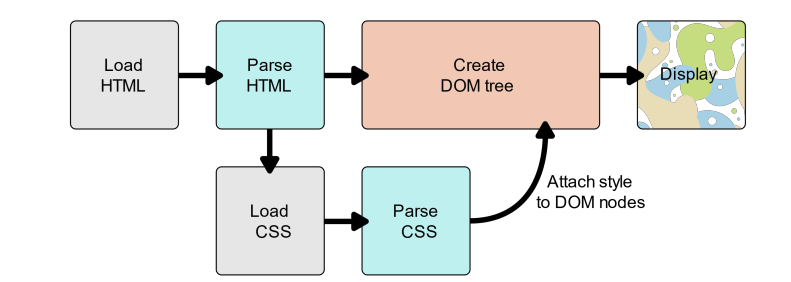
DOM tree:HTML document exposed as a collection of JavaScript objects and methods
| CSS Selector | CSS | HTML |
|---|---|---|
| Tag name | h1 | <h1></h1> |
| Class attribute | .large | <p class="large"> |
| Tag and Class | p.large | <p class="large"> |
| Element id | #id | <pd id="id"> |
Selectors
Hierarchical Selectors
- 子选择器:元素1 > 元素2
- 表示匹配存在的所有由第一个元素作为祖先元素(但不一定是父元素)的第二个元素, 无论它在 DOM 中"跳跃" 多少次.
- 相邻兄弟选择器: former_element + target_element
- 当第二个元素紧跟在第一个元素之后,并且两个元素都是属于同一个父元素的子元素,则第二个元素将被选中。
- 通用兄弟选择器: former_element ~ target_element
- 兄弟选择符,位置无须紧邻,只须同层级,A~B 选择A元素之后所有同层级B元素。
- 后代选择器:元素1 元素2
- 连接两个元素时使得该选择器可以只匹配那些由第一个元素作为祖先元素的所有第二个元素(后代元素)
- 后代选择器与 子选择器 很相似, 但是后代选择器不需要相匹配元素之间要有严格的父子关系
- s1,s2
- 匹配所有s1,s2元素的选择
Attribute Selectors
[attr]: 表示带有以 attr 命名的属性的元素。
[attr=value]: 表示带有以 attr 命名的属性,且属性值为"value"的元素。
[attr~=value]: 表示带有以 attr 命名的属性的元素,并且该属性是一个以空格作为分隔的值列表,其中[至少]一个值匹配"value"。
[attr|=value]: 表示带有以 attr 命名的属性的元素,属性值为“value”或是以“value-”为前缀("-"为连字符,Unicode编码为U+002D)开头。典型的应用场景是用来来匹配语言简写代码(如zh-CN,zh-TW可以用zh作为value)。
[attr^=value]: 表示带有以 attr 命名的属性,且属性值是以"value"开头的元素。
[attr$=value]: 表示带有以 attr 命名的属性,且属性值是以"value"结尾的元素。
[attr*=value]: 表示带有以 attr 命名的属性,且属性值包含有"value"的元素。
[attr operator value i]: 表示带有以 attr 命名的属性, 且属性值匹配"value" [忽略属性值大小] 的元素。在带有属性值的属性选型选择器表达式的右方括号, 前添加用空格间隔开的字母i(或I)可以忽略属性值的大小写(ASCII字符范围内的字母)
Content Filtering Selectors
根据相应内容进行选择
- s:contains(text)
- 选择含有text内容的所有s元素
- s:empty
- 选择没有子元素的所有s元素,主题内容算入子元素
- s:parent
- 选择所有有子元素的s元素
- s1:has(s2)
- 选择所有直接或间接含有s2的所有s元素
CSS Pseudo Selectors
hover - Apply rule when mouse is over element
a:link, a:visited - Apply rule when link has been visited or not visited (link)
p:hover, a:hover {background-color: yellow;}
a:visited{color:green;}
a:link{color:blue;}
| Pseudo Classes | Description |
|---|---|
| :link | Selects all unvisited links |
| :visited | Selects all visited links |
| :hover | Selects links on mouse over |
| :active | Selects the active link |
| :first-child | Selects the first child of its parent |
| :focus | Selects the input element which has focus |
CSS Properties
color
RGB: 8-bit hexadecimal numbers for red, green, blue
HSL:
- Hue: 0 is red, 120 is green, and 240 is blue,from 0 to 360
- Saturation: 0% means a shade of gray, and 100% is the full color
- Luminance: 0% is black, 50% is neither light or dark, 100% is white
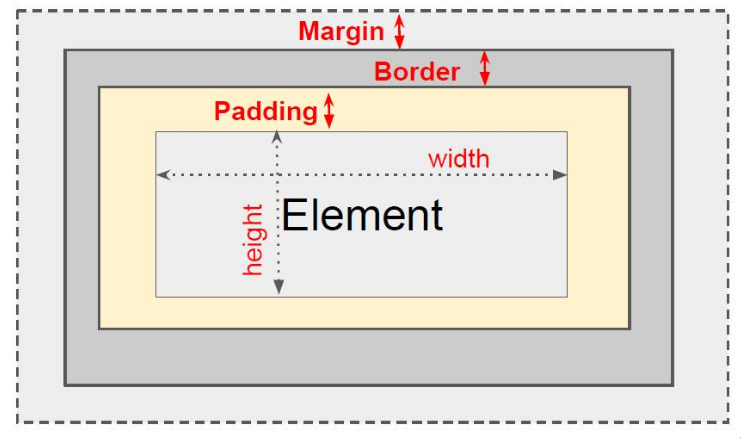
Box Model
Consists: Margins, Borders, Padding, The actual content
Distance units
| Absolute | |
|---|---|
| 2px | pixels |
| 1mm | milimeters |
| 2cm | centimeters |
| 0.2in | inches 1 in=2.54cm |
| 3pt | printer point 1/72 inch |
| Relative | |
|---|---|
| 2em | 2 times the element's current font size |
| 3rem | 3 times the root element's current font size |
font-size设置字体大小
Size properties
element,padding,margin,border
P1{margin:margin-top margin-right margin-bottom margin-left;}
P2{border:border-width border-style border-color;}
Properties:border-bottom-color、border-bottom-style、border-bottom-width、border-left-color、border-left-style、border-left-width、border-right-color、border-right-style、border-right-width
border-width:thin、medium、thick、length
border-style:hidden、dotted、dashed、solid、double、groove、ridge、inset、outset
position property
| 值 | 描述 |
|---|---|
| absolute | 生成绝对定位的元素,相对于 static 定位以外的第一个父元素进行定位。元素的位置通过 "left", "top", "right" 以及 "bottom" 属性进行规定。 |
| fixed | 生成绝对定位的元素,相对于浏览器窗口进行定位。元素的位置通过 "left", "top", "right" 以及 "bottom" 属性进行规定。 |
| relative | 生成相对定位的元素,相对于其正常位置进行定位。因此,"left:20" 会向元素的 LEFT 位置添加 20 像素。 |
| static | 默认值。没有定位,元素出现在正常的流中(忽略 top, bottom, left, right 或者 z-index 声明)。 |
| inherit | 规定应该从父元素继承 position 属性的值。 |
other properties
background-image: image for element's background
background-repeat: should background image bedisplayed in a repeating pattern (versus once only)
font, font-family, font-size, font-weight, font-style:font information for text
text-align, vertical-align: Alignment: center, left, right
cursor - Set the cursor when over element (e.g.help)
display:none、inline、block、flex、grid
visibility:hidden、visible
Flexbox Layout Module
Before the Flexbox Layout module, there were four layout modes:
- Block, for sections in a webpage
- Inline, for text
- Table, for two-dimensional table data
- Positioned, for explicit position of an element
The Flexible Box Layout Module, makes it easier to design flexible responsive layout structure without using float or positioning.
Flexbox Elements
Flex Container
define a flex container: flex container becomes flexible by setting the display property to flex
.box{
display: flex;
}

Flex direction
defines in which direction the container wants to stack the flex items
flex-direction: row | row-reverse | column | column-reverse;

.box{
display: flex;
flex-direction:column;
/*flex-direction: row-reverse; */
}
justify-content
used to align the flex items:
| value | description |
|---|---|
| flex-start | 从行首开始排列。每行第一个弹性元素与行首对齐,同时所有后续的弹性元素与前一个对齐。 |
| flex-end | 从行尾开始排列。每行最后一个弹性元素与行尾对齐,其他元素将与后一个对齐。 |
| center | 伸缩元素向每行中点排列。每行第一个元素到行首的距离将与每行最后一个元素到行尾的距离相同。 |
| space-between | 在每行上均匀分配弹性元素。相邻元素间距离相同。每行第一个元素与行首对齐,每行最后一个元素与行尾对齐。 |
| space-around | 在每行上均匀分配弹性元素。相邻元素间距离相同。每行第一个元素到行首的距离和每行最后一个元素到行尾的距离将会是相邻元素之间距离的一半。 |
| space-evenly | flex项都沿着主轴均匀分布在指定的对齐容器中。相邻flex项之间的间距,主轴起始位置到第一个flex项的间距,,主轴结束位置到最后一个flex项的间距,都完全一样。 |

align-items
align the flex items vertically:

align-content
align the flex lines:

flex-wrap
specifies whether the flex items should wrap or not
flex-wrap: wrap | nowrap

other CSS issues
- Inheritance
- Some properties (e.g. font-size) are inherited from parent elements
- Others (border, background) are not inherited.
- Not have to code styling on every element
- Multiple Styles Will Cascade Into One
- CSS stands for Cascading Style Sheets
- Multiple rule matches:General idea: most specific rule wins
<span>Text1</span>
span.test { color: green }
<span class="test">Text2</span> span { color: red }
/*Result:Green*/
CSS Preprocessor
CSS preprocessors are commonly used:Sass、Less
Composition is a problem:It can be really hard to figure out what rule from which stylesheet is messing things up
Sass
- Sass is a CSS pre-processor.
- Sass reduces repetition of CSS and therefore saves time.
- Syntactically Awesome Stylesheet designed by Hampton Catlin and developed by Natalie Weizenbaum in 2006
- Sass lets you use features that do not exist in
- CSS, like variables, nested rules, mixins, imports, inheritance, built-in functions, and other stuff.
Less
- Less looks just like CSS, learning it is a breeze.
- Less only makes a few convenient additions to the CSS language
- Designed by Alexis Sellier influenced by Sass
variable and Function
Add variable and functions to help in maintaining large collections of style sheets
@width: 10px;
@height: @width + 10px;
#header {
width: @width;
height: @height;
}
/*result*/
#header {
width: 10px;
height: 20px;
}
Apply scoping using the naming conventions
@var: red;
#page {
@var: white;
#header {
color: @var; /*white*/}
}
- A browser does not understand Sass/Less code.
- transpiling
- you will need a pre-processor to convert Sass/Less code into standard CSS.
- Install Sass/Less
- Sass was designed to both simplify and extend CSS
- Less was designed to be as close to CSS as possible
- as a result existing CSS can be used as valid Less code
unit 4 Universal Resource Locator
Hypertext:Text with links to other text, Click on links takes you somewhere else
Hypertext History
Ted Nelson coined the term
- hypertext and hypermedia in 1963 and published them in 1965
- built Xanadu system:the goal of creating a computer network with a simple user interface, a predecessor of modern World Wide Web
- Old idea
- Doug Englebart :"Mother of all demos" in 1968
- a name retroactively applied to a landmark computer demonstration
- demonstrated a 'hypertext' (meaning editing) interface to the public for the first time
- Doug Englebart worked at his Augmentation Research Center Lab in SRI International resulted in creation of the computer mouse
- Engelbart's prototype of a computer mouse, as designed by Bill English from Engelbart's sketches
- HyperCard for the Macintosh: 1987
- based on the concept of a "stack" of virtual "cards".
- contains a set of interactive objects, including text fields, check boxes, buttons, and similar common graphical user interface (GUI) elements
- as a general-purpose presentation program.
- Doug Englebart :"Mother of all demos" in 1968
- In 1992, Lynx was born as an early Internet web browser.
- provide hypertext links within documents that could reach into documents anywhere on the Internet
URL Defination
Uniform Resource Locators (URL):Provided names for web content
Uniform Resource Locators were defined in RFC 1738 in 1994 by Tim Berners-Lee, the inventor of the World Wide Web.
HTTP URL: scheme:[//authority]path[?query][#fragment]
authority = [userinfo@]host[:port]

example:http://www.company.com:81/a/b/c.html?user=Alice&year=2020#p2
- scheme(http):identifies protocol used to fetch the content
- host(www.company.com):name of a machine to connect to
- port(81):allows multiple servers to run on the same machine
- path(/a/b/c.html):used by server to find content
- query(user=Alice&year=2020):provides additional parameters
- fragment(p2):Have browser scroll page to fragment(html: p2 is anchor tag)
URL elements
schemes
identifies protocol used to fetch the content
http: is the most common scheme; it means use the HTTP protocol
https:is similar to http: except that it uses SSL encryptionSSL(Secure Sockets Layer
file: means read a file from the local disk
mailto: means open an email program composing a messa
host
name of a machine: to connect to the registered name
an IP address:
- IPv4 addresses must be in dot-decimal notation(四点表示法)
- IPv6 addresses must be enclosed in brackets:128bit,in hexadecimal
path
Hierarchical portion: Passed to the web server for interpretation
- Path name for a static HTML file
- Path name of a program that will generate the HTML content
Web server programmed with routing information:
- Map hierarchical position to function to be performed and possibly the function's parameters
- encompasses every thing or entity that can be identified, named, addressed, or handled, in any way whatsoever, on the Web
Query Parameters
Traditionally has been to provide parameters to operation
For modern apps has implications(意义) of when the browser switches pages
links
Browser maintains a notion of current location
Links: content in a page which, when clicked on, causes the browser to go to URL
Links are implemented with the <a> tag:
<a href="http://www.company.com/news/2020.html">2020 news</a>
Different types of links
Full URL:<a href="http://www.company.com/news/2020.html">2020 News</a>
Absolute URL:
<a href="/stock/quote.html">2020 stock</a>
相同于:<a href="http://www.xyz.com/stock/quote.html">2020 stock</a>
Relative URL (intra-site links):<a href="2019/March.html">2019 News</a>
相同于:<a href="http://www.xyz.com/news/2019/March.html">2019 News</a>
Define an anchor point (a position that can be referenced with # notation):<a name="sec3">
Go to a different place in the same page:<a href="#sec3">
Uses of URLs
- Loading a page:type the URL into your browser
- Load a image:
<img src="..." /> - Load a stylesheet:
<link rel="stylesheet" type="text/css" href="... - Embedded a page:
<iframe src="http://www.google.com">
URL Encoding
URLs can only be sent over the Internet using the ASCII character-set
non-ASCII character must be represented as %xx, where xx is the hexadecimal value of the character
URI
Uniform Resource Identifier (URI): a string of characters that unambiguously(明确地) identifies a particular resource
A Uniform Resource Locator (URL) is a URI that specifies the means of acting upon or obtaining the representation of a resource.
unit 5 JavaScript
Introduction
It is created to “make web pages alive"
It can be written right in a web page’s HTML and run automatically as the page loads,don’t need special preparation or compilation to run
Java & JavaScript
- Not to be confused with Java
- Completely different
- Java a powerful and much more complex programming language
- JavaScript is a scripting language
- Beginnings at Netscape
- known as ECMAScript
JavaScript engine
JavaScript can execute:in the browser,on the server,r actually on any device that has a special program called the JavaScript engine
JavaScript engines are programs that convert JavaScript code into lower level or machine code.
browser sometimes is called "JavaScript virtual machine"
Different engines:V8(Chrome and Opera)、SpiderMonkey(Firefox)、CharaCore(Microsoft Edge)、Nitro(Safari)
Languages “over” JavaScript
- CoffeeScript: “syntactic sugar” for JavaScript.shorter syntax, allowing us to write clearer and more precise code
- TypeScri: concentrated on adding “strict data typing” to simplify the development and support of complex systems
- Flow: adds data typing, but in a different way
- Dart: standalone language that has its own engine that runs in non-browser environments;also can be transpiled to JavaScript
Two ways to include js
Embed JavaScript in a HTML document:
<script type="text/javascript">
 …JavaScript code…
</script>
External JavaScript:
<script src="externalJS.js" >
</script>
Note:If src is set, the script content is ignored.
what is JavaScript
- high-level, dynamic, untyped, and interpreted programming language
- prototype-based with first-class functions
- object-oriented, imperative, and functional programming
- has an API for working with text, arrays, dates and regular expressions
high-level programming language
- strong abstraction from the details of the computer
- may use natural language elements, be easier to use
- making the process of developing a program simpler and more understandable
- may automate (or even hide entirely) significant areas of computing systems
Dynamic programming language
- static programming language:perform many common programming behaviors during compilation
- dynamic programming language:perform many common programming behaviors at runtime(JS)
interpreted programming language
- compiled language:typically compilers,translators that generate machine code from source code
- interpreters:step-by-step executors of source code,no pre-runtime translation takes place
untyped
untyped:do not make you define the type of a variable,hold a value of
any data type: var year='2020';
typed:int year=2020;
dynamic typing: explicitly preceded by the keyword var
var i;//Need to define variable;note: untyped
typeof i == 'undefined' //It does have a type of 'undefined
Variable naming:
- must contain only letters, digits, or the symbols $ and _
- first character must not be a digit
- When the name contains multiple words, camelCase is commonly used
- 变量一般用小驼峰法标识。驼峰法的意思是:除第一个单词之外,其他单词首字母大写。
- 大驼峰法(即帕斯卡命名法)把第一个单词的首字母也大写了。常用于类名,属性,命名空间等。
- Case sensitive
Primitive types
JS Primitive types:undefined、number、string、boolean、function、object
number type
stored in 64-bit Floating Point
Double-precision floating-point format
MAX_INT=(2^53-1)
NaN,Infinity are numbers
1/0 == Infinity
Math.sqrt(-1) == NaN
floating point arithmetic is not always 100% accurate(浮点数之间运算存在精度误差)
if((0.1 + 0.2) == 0.3) alert("happy");
else alert("sad");//result sad
Integers (numbers without a period or exponent notation) are accurate up to 15 digits.(整数除法得到的浮点数更精准)
if((0.1 *10+ 0.2*10) /10== 0.3) alert("happy");//result happy
else alert("sad");
string type
be surrounded by quotes.
Double quotes: "Hello" Single quotes: 'Hello'. Backticks: `Hello`
Backticks are “extended functionality” quotes:
- allow us to embed variables and expressions into a string by wrapping them in $
- this can only be done in backticks
- Other quotes don’t have this embedding functionality
var foo = 'This is a test';
foo.length//14
foo = foo + 'XXX'; //This is a testXXX
'foo'.toUpperCase()
String Method:
indexOf(), charAt(), match(), search(), replace(), toUpperCase(), toLowerCase(), slice(), substr()
boolean type
Either true or false
classifies values as either truthy or falsy, Used when a value is converted to a boolean
Falsy: false, 0, "", null, undefined, and NaN
Truthy:Not falsy (all objects, non-empty strings, non-zero numbers, functions, etc.)
Everything With a "Value" is True. Everything Without a "Value" is False
var foo;//if "var foo=100",alert happy
if(foo) alert("happy");
else alert("sad");//result sad
undefined and null
undefined: does not have a value assign
null: a value that represents whatever the user wants it to
Both are falsy
if(null==undefined) alert("happy");
else alert("sad");//result happy
if(typeof(null)==typeof(undefined)) alert("happy");
else alert("sad");//result sad
The typeof operator
returns the type of the argument.
supports two forms of syntax:
- As an operator: typeof x
- As a function: typeof(x)
it works with parentheses or without them. The result is the same
Type Conversions
ToString: String(value); ToNumber: Number(value); ToBoolean: Boolean(value).
var value = true; alert(typeof value); // boolean
value = String(value); // now value is a string
alert(typeof value); // string "true"
var x=null;x=String(x);//string "null"

var age = Number("an arbitrary string instead of a number");
alert(age); // NaN
alert( Number(" 123 ") ); //Number 123
alert( Number("123z") ); //NaN
alert( Number(true) ); //Number 1
alert( Number(false) ); //Number 0
Number(undefined);//NaN
Number(null);//0
first-class functions
it treats functions as first-class citizens
- passing functions as arguments to other functions
- returning functions as the values from other functions
- assigning functions to variables or storing them in data structures
function type
All functions return a value,default is undefined
Unspecified arguments have value undefined
function function_name ([parameter=..., parameter=...]){
statements;
[return expression;]
}//argument可以带默认值
Default parameters:Parameters not specified
function myfunc(a){a=a||1;}//old way
function myfunc(a=1){}//new way
function myFunction(x, y = 10) {
// y is 10 if not passed or undefined
return x + y;
}
myFunction(5); // will return 15
myFunction();//NaN

function f(x = 1, y) {
return [x, y];
}
f() // [1, undefined]
f(2) // [2, undefined])
f(, 1) // syntaxError
f(undefined, 1) // [1, 1]
function f(x, y = 5, z) {
return [x, y, z];
}
f() // [undefined, 5, undefined]
f(1) // [1, 5, undefined]
f(1, ,2) // syntaxError
f(1, undefined, 2) // [1, 5, 2]
Rest parameters:Additional paraments handle (获取传入的其他参数)
function myFunc(){var a=arguments[0];...arugments[N];...}//old way
function myFunc(a,b,...theArgsArray){var c=theArgsArray[0];}//new way
function add(...values) {
    let sum = 0;
    for (var i=0;i<values.length;i++) sum += values[i];
    return sum;
}
add(2, 5, 3) // 10
Variable scoping
Two scopes: Global and function local
All var statements hoisted to top of scope.JavaScript only hoists declarations, not initializations.
var globalVar;
function test() {
    //localVar2 is hoisted here but has value undefined,变量提升
    var localVar;
    if (globalVar > 0){var localVar2 = 2;}
    // localVar2 is valid here
}
Global variables are bad in browsers.
Hoisting(提升) can cause confusion in local scopes
Var scope problems
Declare Your Variables At the Top:
- If a developer doesn't understand hoisting, programs may contain bugs (errors).
- To avoid bugs, always declare all variables at the beginning of every scope: "use strict" JavaScript in strict mode
- new in ECMAScript version 5
- indicate that the code should be executed in "strict mode"
- With strict mode, you can not, for example, use undeclared variables
- Always “use strict”: always starting scripts with "use strict",不能在函数定义内使用,不然Illegal 'use strict' directive
- ES6 introduced non-hoisting, scoped let and explicit scopes. Some coding environments ban var and use let or const instead
- let keyword can have Block Scope: Variables declared inside a block {} can not be accessed from outside the block
- Declaring a variable with const is similar to let when it comes to Block Scope. Variables defined with const behave like let variables, except they cannot be reassigned(重新分配)
<script> "use strict";
if(foo) alert("happy");
else alert("sad"); </script>
<!--Result:ReferenceError-->
function myfunc(){"use strict";...}//Illegal 'use strict' directive
let x = 2; // Allowed
var x = 3; // Not allowed
{let x = 4; // Allowed
var x = 5;} // Not allowed
difference of var and let
“var” has no block scope: function-wide or global
“var” declarations are processed at the function start
- hoisting
- Declarations are hoisted, but assignments are not.
Function expressions
a function is not a “magical language structure”, but a special kind of value (类似于匿名函数).
var variable=function(){...};
assigning functions to variables or storing them in data structures—— Recursion
passing functions as arguments to other functions
returning functions as the values from other functions
var foobar=function (x){
    if (x <= 1) return 1;
    return x*foobar(x-1);
};
function expression vs function declaration:
- Function Declaration: a function, declared as a separate statement
- Function Expression:the function is created at the right side of the “assignment expression” =.
- A Function Expression is created when the execution reaches it and is usable only from that moment.
- A Function Declaration can be called earlier than it is defined: hoisting.
sayHi("John"); // Hello, John
function sayHi(name) {alert( `Hello, ${name}` );}
sayHi("John"); // Error
let sayHi=function(name) {alert( `Hello, ${name}` );}
Arrow functions
one more very simple and concise syntax for creating functions
let func = (arg1, arg2, ...argN) => {expression}
object type
Object: an unordered collection of name-value pairs called properties
let user = {let user = {name: "Alice", age: 23, state: "California"};
let x = { "": "empty","---": "dashes"}//Name can be any string
//Referenced either like a structure or like a hash table with string keys
bar.name or bar["name"]
x["---"] // have to use hash format for illegal names
To add, just assign to the property:let user={};user.name="A";
To remove use delete:delete user.name;
To enumerate use Object.keys():
let list={name: "Alice", age: 23};
Object.keys(list);Object.values(list);
supporting object-oriented programming:
- the concept of "objects"
- Encapsulation
- inheritance
- Polymorphism
Arrays
special objects:typeof anArr == 'object'
Indexed by non-negative integers
Can be sparse and polymorphic
Like strings, have many methods:push(), pop(), shift(), unshift(), sort(), reverse(), splice(),length......
queue: shift()出第一个元素,push()进尾部元素,unshift()进第一个元素
stack:pop()出尾部元素,push进尾部元素
Methods push/pop run fast, while shift/unshift are slow.
Dates
special objects:typeof date == 'object'
use the browser's time zone and display a date as a full text string
Many methods for returning and setting the data object
var d = new Date();
d.toISOString()//ISO 8601 is the international
standard for the representation of dates and times
d.toLocaleString()//locale conventions
Regular Expressions
rule: /pattern/modifier
regular expression : a sequence of characters that forms a search pattern
Defines a pattern that can be searched for in a string:
- String: search(), match(), replace(), and split()
- RegExp: exec() and test()
var re = /ab+c/;
var re2 = new RegExp("ab+c");
Regular Expression Modifiers
正则表达式修饰符 modifiers;
| Modifiers | Description |
|---|---|
| i | 执行对大小写不敏感的匹配。 |
| g | 执行全局匹配(查找所有匹配而非在找到第一个匹配后停止) |
| m | 执行多行匹配。 |
Regular Expression Patterns
正则表达式模式 Patterns, 括号用于查找一定范围的字符串;
| Expreesion | Pattern type | Description |
|---|---|---|
[abc] |
方括号 | 查找方括号之间的任何字符。 |
[0-9] |
方括号 | 查找任何从 0 至 9 的数字。 |
[^abc] |
方括号 | 查找任何不在方括号之间的字符。 |
[a-z] |
方括号 | 查找任何从小写 a 到小写 z 的字符。 |
[A-Z] |
方括号 | 查找任何从大写 A 到大写 Z 的字符。 |
[A-z] |
方括号 | 查找任何从大写 A 到小写 z 的字符。 |
[adgk] |
方括号 | 查找给定集合内的任何字符。 |
[^adgk] |
方括号 | 查找给定集合外的任何字符。 |
| `(red | blue | green)` |
| `(x | y)` | 方括号 |
| n+ | 量词 | 匹配任何包含至少一个 n 的字符串。 |
| n* | 量词 | 匹配任何包含零个或多个 n 的字符串。 |
| n? | 量词 | 匹配任何包含零个或一个 n 的字符串。 |
| n | 量词 | 匹配包含 X 个 n 的序列的字符串。 |
| n | 量词 | 匹配包含 X到Y 个 n 的序列的字符串。 |
| n | 量词 | 匹配包含至少 X 个 n 的序列的字符串。 |
| n$ | 量词 | 匹配任何结尾为 n 的字符串。 |
| ^n | 量词 | 匹配任何开头为 n 的字符串。 |
| ?=n | 量词 | 匹配任何其后紧接指定字符串 n 的字符串。 |
| ?!n | 量词 | 匹配任何其后没有紧接指定字符串 n 的字符串 |
| . | 元字符 | 查找单个字符,除了换行和行结束符。 |
| \w | 元字符 | 查找单词字符。 |
| \W | 元字符 | 查找非单词字符。 |
| \d | 元字符 | 查找数字。 |
| \D | 元字符 | 查找非数字字符。 |
| \s | 元字符 | 查找空白字符。 |
| \S | 元字符 | 查找非空白字符。 |
| \b | 元字符 | 匹配单词边界。 |
| \B | 元字符 | 匹配非单词边界。 |
| \0 | 元字符 | 查找 NUL 字符。 |
| \n | 元字符 | 查找换行符。 |
| \f | 元字符 | 查找换页符。 |
| \r | 元字符 | 查找回车符。 |
| \t | 元字符 | 查找制表符。 |
| \v | 元字符 | 查找垂直制表符。 |
| \xxx | 元字符 | 查找以八进制数 xxx 规定的字符。 |
| \xdd | 元字符 | 查找以十六进制数 dd 规定的字符。 |
| \uxxxx | 元字符 | 查找以十六进制数 xxxx 规定的 Unicode 字符。 |
'XXX abbbbbbc'.search(/ab+c/); // Returns 4 (position of 'a')
'XXX ac'.search(/ab+c/); // Returns -1, no match
'XXX ac'.search(/ab*c/); // Returns 4
'12e34'.search(/[^\d]/); // Returns 2
'foo: bar;'.search(/...\s*:\s*...\s*;/); // Returns 0

/HALT/.test(str); // Returns true if string str has the substr HALT
/halt/i.test(str); // Same but ignore case
/[Hh]alt [A-Z]/.test(str); // Returns true if str either “Halt L” or “halt

var str = "This has 'quoted' words like 'this'";
var re = /'[^']*'/g;
re.exec(str); // Returns ["'quoted'", index: 9, input: …
re.exec(str); // Returns ["'this'", index: 29, input: …
re.exec(str); // Returns null
str.match(/'[^']*'/g); // Returns ["'quoted'","'this'"]
str.replace(/'[^']*'/g,'XXX');// Returns: 'This has XXX words with XXX
Exceptions try/catch
Error reporting frequently done with exceptions
try {Block of code to try}
catch(err) {Block of code to handle errors}
finally{...}
nonExistentFunction():Terminates execution with error
Raise exceptions with throw statement
Conventions are to throw sub-classes of Error object

Debugging in Chrome
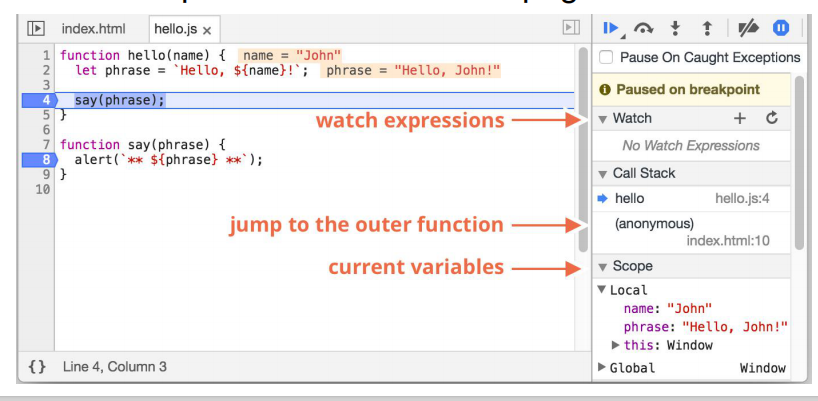
developer tools have been embedded in browsers(F12)
open sources => Find the problem js file => open in Sources =>the right is Debug Tools
- Console:type commands there and press Enter to execute
- Breakpoints: click at line number,see in the Toolbar Breakoints Options
- Pause and look around: press F5 to reload the page
- Watch: shows current values for any expressions.
- Call Stack: shows the nested calls chain.
- Scope: current variables.
- Tracing the execution
Some thoughts about JavaScript
-
Example of a scripting language
- Interpreted, less declaring of things, just use them
-
Seems like it was designed in a rush
- Some “Good Parts”, some not so good
- Got bad reputation
-
Many programmers use a subset that avoids some common problems
- "use strict"; tweaks language to avoid some problematic parts
-
Language being extended to enhance things:New ECMAScript every year!
-
Transpiling common so new features used: e.g ECMAScript Version N, TypeScript
-
Code quality checkers (e.g. jslint, jshint, eslint) widely used
unit 6 Javascript programming
Object-oriented programming
supporting object-oriented programming
- the concept of "objects"
- Encapsulation
- inheritance
- Polymorphism
A property of an object can be a function
this
In methods, this will be bound to the object
let o = {oldProp: 'this is an old property'};
o.aMethod = function() {
    this.newProp = "this is a new property";
    return Object.keys(this); // will contain 'newProp'
};
o.aMethod(); // will return ['oldProp','aMethod','newProp']
In non-method functions:this will be the global object [object Window]; Or if "use strict"; this will be undefined
let aMethod= function() {
    this.newProp = "this is a new property";
    alert(this);
    return this.newProp; //[Object Window]
}
aMethod();
Classes
JavaScript Accessors (Getters and Setters):获取对象属性与设置对象属性
functions can have properties too.
Functions are classes in JavaScript
function Rectangle(width, height) {
    this.width = width;
    this.height = height;
    this.area = function() { return this.width*this.height; }//Not correct way of adding methods
}
var r = new Rectangle(26, 14);//Functions used in this way are called constructors
r.constructor.name == 'Rectangle'
console.log(r)
To add a new property to a constructor, you must add it inside the constructor function
Adding methods to an object must be done inside the constructor function
revise the constructor
inheritance
prototype-based programming:
- behaviour reuse (known as inheritance)
- performed via a process of reusing existing objects via delegation that serve as prototypes(通过委托作为原型重用现有对象的过程来执行的。)
Class-based programming:Object-oriented
Javascript has the notion of a prototype object for each object instance, Prototype objects can have prototype objects forming a prototype chain.
On an object property read access JavaScript will search the up the prototype chain until the property is found.
Effectively the properties of an object are its own property in addition to all the properties up the prototype chain. This is called prototype-based inheritance(基于原型的继承)
Property updates are different: always create property in object if not found
Note: Dynamic, changing prototype will cause all instances to change.
function Rectangle(width, height) {
    this.width = width;
    this.height = height;
}
Rectangle.prototype.area = function() {
    return this.width*this.height;
}//add new properties (or methods) to an object constructor:
Rectangle.prototype.description="hello";
var r1 = new Rectangle(26, 14);
var v1= r1.area();
Object.keys(r1); // own properties,don't need to revise the constructor
console.log(r1);
function Shape(str){ this.str=str;  }
Shape.prototype.sdescription="Shape"
function Rectangle(width, height) {
    this.width = width;
    this.height = height;}
Rectangle.prototype = new Shape("shape");
var r=new Rectangle();
r.str //"shape"
r.sdescription //"shape"
//If desired property not in Rectangle.prototype then JavaScript will look in Shape.prototype and so on.
Prototype-based inheritance:
- Single inheritance support
- Can be dynamically created and modified
Only modify your own prototypes. Never modify the prototypes of standard JavaScript objects.
ECMAScript version 6 extensions:
class Shape{constructor(str) {this.str=str;}}
class Rectangle extends Shape { // Definition and Inheritance
    constructor(height, width) {
        super(height, width);
        this.height = height;
        this.width = width;}
    area() {return this.width * this.height;}// Method definition
    static countRects() {} // Static method...
}
var r = new Rectangle(10,20);
React
A JavaScript library for building user interfaces
Component-Based:Build encapsulated components that manage their own state, then compose them to make complex UIs
class HelloWorld extends React.Component {
    constructor(props) {super(props);...}
    render() {return (<div>Hello World</div>);}
}// ES6 class to define a component
Functional Programming
函数式编程:它将计算机运算视为函数运算,并且避免使用程序状态以及易变对象。比起指令式编程,函数式编程更加强调程序执行的结果而非执行的过程
treats computation as the evaluation of mathematical functions.
a function's return value depends only on its arguments.
imperative programming:an imperative program consists of commands for the computer to perform
var anArr=[2,3,4];
var newArr1=[];
var newArr = anArr.map(function (val, ind) {return val*ind;});//Functional
for (var i = 0; i < anArr.length; i++) newArr1[i] = anArr[i]*i;//Imperative
console.log(newArr)
console.log(newArr1)
数组的方法filter(filterFunc),map(mapFunc),sort(sortFunc),reduce(reduceFunc)
- Array map() Method:(映射操作)原数组每个元素进行处理,并回传新的数组
- he map() method creates a new array with the results of calling a function for every array element.
- calls the provided function once for each element in an array, in order.
- this method does not change the original array.
- array.map(function(currentValue, index, arr), thisValue)
- currentValue:required,The value of the current element
- index:Optional,the array index of current element
- arr:Optional,the array object the curent elment belongs to
- Array filter() Method:(过滤操作),筛选符合条件的所有元素,若为true则返回组成新数组
- creates an array filled with all array elements that pass a test (provided as a function).
- does not execute the function for array elements without values
- does not change the original array
- array.filter(function(currentValue, index, arr), thisValue)
- currentValue:required,The value of the current element
- index:Optional,the array index of current element
- arr:Optional,the array object the curent elment belongs to
- Array reduce() Method: (归并操作)遍历数组累加回传的返回值
- reduce() method reduces the array to a single value
- executes a provided function for each value of the array (from left-to-right)
- The return value of the function is stored in an accumulator (result/total)
- array.reduce(function(total, currentValue, currentIndex, arr), initialValue)
- total:Required, the initalValue,or the previously returned value of the function
- currentValue:Required, the value of the current element
- currentIndex:Optional,the array index of current element
- arr:Optional,the array object the curent elment belongs to
Arrow function
don't redefine function
var anArr = [45, 4, 9, 16, 25];
function filterFunc(value){return value <45;}
function mapFunc(value,ind){return value*ind;}
function reduceFunc(total,value){return total+value;}
anArr.filter(filterFunc).map(mapFunc).reduce(reduceFunc);
//[4,9,16,25] [0,9,32,75],116
anArr.filter(value=>value<45).map((value,ind)=>value*ind).
reduce((total,value)=>total+value));
//箭头函数使用
callback
Can mostly but not totally avoid functional style,Beacuse:
- Many actions in JavaScript are asynchronous
- Asynchronous events done with callback functions
callback-based style of asynchronous programming: A function that does something asynchronously should provide a callback argument where we put the function to run after it's complete
function loadScript(src,callback) {
  let script = document.createElement('script');
  script.src = src;
  script.onload = () => callback(script);
  document.head.append(script);}
//load a new script.
//the loadScript function doesn’t provide a way to track the load completion
<body>
<script>
//Let’s say we want to use the new script when it loads.It probably declares new functions
function callbackFun() { newFunction();}// so now it works
//the browser loads and executes the script
loadScript('/my/script.js',callbackFun);//not finished
// the code below loadScript doesn't wait for the script loading to finish
</script>
</body>
setTimeout(function, delaytime):evaluates an expression after a specified amount of time
Node.js progrmimg:Node.js is an open source server environment,allows you to run JavaScript on the server,Asynchronously reads the entire contents of a file.
A Counter Dilemma Example
use a variable for counting something:
var counter = 0;// Initiate counter
function add() {counter += 1;}// Function to increment counter
add();add();add();// Call add() 3 times,Result:undefined
//Any code on the page can change the counter, without calling add()
reset the local counter every time we call the function:
function add() {
  var counter = 0;
  counter += 1;
  return counter;}// Function to increment counter
add();add();add();// Call add() 3 times,result is 1
We also need to find a way to execute counter = 0 only once:
function add() {
  var counter = 0;
  function plus() {counter += 1;}
  plus();
  return counter;}// Function to increment counter
add();add();add();// Call add() 3 times,result is 1
The best way(闭包+匿名函数)
var add = (function () {
    var counter = 0;
    return function () {counter += 1; return counter}
})();
add();add();add();// the counter is now 3
Using Scopes and Closures
closure: a function having access to the parent scope, even after the parent function has closed.
var myObj = (function() {
    var privateProp1 = 1;
    var privateProp2 = "test";
    var setPrivate1 = function(val1) { privateProp1 = val1; }
    var compute = function() {return privateProp1 + privateProp2;}
    return {compute: compute, setPrivate1: setPrivate1};
})();
typeof myObj; // 'object'
var p1=myObj.privaeProp1;//undefined
var p2=myObj.privaeProp2;//?udefined
Object.keys(myObj); // [ 'compute', 'setPrivate1' ]
myObj.compute();//What does myObj.compute() return?1test
myObj.setPrivate1(2);//?
myObj.compute();//1test
Generates error on the console.log state since this is undefined:
'use strict';
function readFileMethod() {
    fs.readFile(this.fileName, function (err, data) {
        if (!err) {console.log(this.fileName, 'has length', data.length);}
});}
var obj = {fileName: "aFile"; readFile: readFileMethod};
obj.readFile();
Works since an arrow function doesn't smash(破坏) this:
'use strict';
function readFileMethod() {
    fs.readFile(this.fileName,  (err, data)=> {
        if (!err) {console.log(this.fileName, 'has length', data.length);}
});}
var obj = {fileName: "aFile"; readFile: readFileMethod};
obj.readFile();
回调函数是一个作为变量传递给另外一个函数的函数,它在主体函数执行完之后执行。使用命令式代码时,闭包可能会非常棘手。
// Read files './file0' and './file1' and return their length
for (var fileNo = 0; fileNo < 2; fileNo++) {
    fs.readFile('./file' + fileNo, function (err, data) {
        if (!err) {console.log('file', fileNo, 'has length', data.length;}
});}//result file 2 has length
分析:
- Execution starts:fileNo= 0
- Note that fs.readFile returns after it has started reading the file but before it has called the callback function.
- execution does the fileNo++ and calls back to fs.readFile with an argument of "./file1" and a new closure and function. The closure has only fileNo (which is currently 1).
- Call the function fs.readFile, before we can we must evaluate the arguments:
- the first argument results from the string concatenation operation forming "./file0"
- the second argument is a function which is passed as a function and its closure containing the variables accessed by the function.
- In this case only fileNo is accessed by the function so the closure contains fileNo (which is currently 0).
- After creating two function with closures and calling fs.readFile twice the for loop finishes.
- Some time later in the execution the file reads will finish and fs.readFile will call the functions we passed.Recall that fileNo is now 2.
- './file0' is read so our callback starts executing err is falsy so we go to the console.log statement.
- When evaluating the arguments to console.log we go to the closure and look at the current value of fileNo.
- We find it as 2. The result is we print the correct data.length but the wrong file number. The same thing happens for the './fileNo1' callback.
改进:
function printFileLength(fileNo) {
    fs.readFile('./file' + fileNo, function (err, data) {
        if (!err) {console.log('file', fileNo, 'has length', data.length)}
});}
for (var fileNo = 0; fileNo < 2; fileNo++) {printFileLength(fileNo);}
Note: This works but sometimes it prints the file0 line first and sometimes it prints the file1 line first.
Bad Parts
| Problem | Workaround(解决方法) |
|---|---|
Declaring variables on use var |
Force declarations |
| Automatic semicolon insertion | Enforce semicolons(分号) with checkers |
| Type coercing(胁迫) equals: == | Always use =,! instead; ===:equal value and equal type; ==:equal to |
类型胁迫等于的相关例子:
| expression | boolean value | expression | boolean value |
|---|---|---|---|
| ""=="0" | false | ""==="0" | false |
| 0=="" | true | 0==="" | false |
| 0='0' | true | 0==='0' | false |
| null=undefined | true | null===undefined | false |
| false=='0' | true | false==='0' | false |
Assign a default value: hostname = hostname || "localhost";
Access a possibly undefined object property: var prop = obj &&
obj.propname;
Handling multiple this:self or =>
var self=this;
fs.readFile(self.fileName + fileNo, function (err, data) {
    console.log(self.fileName, fileNo);});

fs.readFile(this.fileName + fileNo, (err, data)=> {
    console.log(this.fileName, fileNo);
});
ECMAScript
- New standard for ECMAScript released yearly
- Relatively easy to get a new feature into the languag
- Transpiling: Translate new language to old style JavaScript
- Allows front-end software to be coded with new features but run everywhere.
- babel https://babeljs.io/en
- Frontend frameworks are aggressively using new language features
- React.js - Encourages use of newer ECMAScript features
- Angular - Encourages Typescript - Extended JavaScript with static types and type checking
new features in ECMAScript
Here are a few you might encounter:Modules、Default parameters
Rest parameters '...'、Spread operator '...'、Destructuring assignment、Template string literals、Set, Map, WeakSet, WeakMap objects
JavaScript 一直没有模块(module)体系,无法将一个大程序拆分成互相依赖的小文件,再用简单的方法拼装起来。这对开发大型的、复杂的项目形成了巨大障碍。

模块功能主要由两个命令构成:export和import。export命令用于规定模块的对外接口,import命令用于输入其他模块提供的功能
// profile.js
var firstName = 'Michael';
var lastName = 'Jackson';
var year = 1958;
export { firstName, lastName, year };

// main.js
import { firstName, lastName, year } from './profile.js';
function setName(element) {
  element.textContent = firstName + ' ' + lastName;
}
ES6 之前,不能直接为函数的参数指定默认值,只能采用变通的方法。ES6之后,可以默认传入的指定参数。
ES6 引入 rest 参数(形式为...变量名),用于获取函数的多余参数剩余参数的设置,必须是(...变量名)
allows an iterable:

apply()调用函数,iterable迭代
var numbers = [5, 6, 2, 3, 7];
var max = Math.max(9,...numbers,100);
console.log(max);
// expected output: 7
var min = Math.min(0,3,...numbers);
console.log(min);
Destructuring assignment:
JavaScript表达式,可以将数组中的值或对象的属性解包为不同的变量。
解构赋值使用类似的语法,但在赋值的左侧定义要从源变量解包的值。

Template string literals:允许嵌入表达式的字符串文字。 您可以使用多行字符串和字符串插值功能。

for of

Set, Map, WeakSet, WeakMap objects: Defined interfaces for common abstractions
async/await and Promises: Asynchronous programming help
unit 7 Document Object Model
HTML document exposed as a collection of
JavaScript objects and methods
DOM: Document Object Model
JavaScript can query or modify the HTML document
Accessible via the JavaScript global scope, aliases
DOM hierarchy

Rooted at window.document
follows HTML document structure: window.document.head;window.document.body
<html><head><title> My title </title></head><body><a href="a.html" > My link </a><h1> My header </h1></body></html>

DOM objects have tons of properties,most private: Objects (representing elements, raw text, etc) have a common set of properties and methods
called a DOM "Node"
DOM Node properties and methods
Identification: nodeName property, element type (uppercase: P, DIV, etc.) or #text
Encode document's hierarchical structure: parentNode, nextSibling, previousSibling, firstChild, lastChild
Provide accessor and mutator methods: getAttribute, setAttribute methods

Accessing DOM Nodes
- Walk DOM hierarchy (not recommended):
- element = document.body.firstChild.nextSibling.firstChild
- Use DOM lookup method:
- document.getElementById()
- Many
- document.getElementsByTagName()
- document.getElementsByClassName()
- Can start lookup at any element
- document.body.firstChild.getElementsByTagName()
<body><p>Hello</p><p>Hello P</p><p>Hello DOM</p>
<script>var arrList=document.getElementsByTagName("p");</script>
</body>
<div class="example">A div element with class="example"</div>
<div class="example">Another div element with class="example"</div>
<p class="example">A p element with class="example"</p>
<script>var arrList=document.getElementsClassTagName("example");</script>
More commonly used Node properties/methods:
- textContent: text content of a node and its descendants
- innerHTML: HTML syntax describing the element's descendants. n only valid for element node
- outerHTML: similar but includes element
- getAttribute()/setAttribute(): Get or set the attribute of an element
nodeName/tagName:
- The tagName property exists only for Element nodes. n The nodeName is defined for any Node
- nodeValue/data
- text node content
- hidden
- When set to true, does the same as CSS display:none.
<p id="mp">Sample<b>bold</b>display</p>
<script>
var op=document.getElementById("mp");
console.log(op.textContent);//Samplebolddisplay
console.log(op.innertHTML);//Sample<b>bold</b>display
console.log(op.outerHTML);//<p id="mp">Sample<b>bold</b>display</p>
op.setAttribute("class","cp");</script>

<img src="images/eg_bulboff.gif" id="img"/>
<script>
var oimg=document.getElementById("img");
oimg.src="images/eg_bulbon.gif";
</script>
DOM and CSS interactions
- Can update an element's class: element.className = "active"
- Can update element's style: element.style.color = "#ff0000";
- Can also query DOM by CSS selector: document.querySelector();document.querySelectorAll();
<head><style type="text/css" media="screen">
.center {text-align: center; color: red;}
.left {text-align: left; color: blue;}</style></head>
<body>
<h1 id="h"class="center">Hello World!</h1>
<p class="left">Hello World!</p>
<script type="text/javascript">document.getElementById("h").className="left";// interaction</script>
</body>
<html>
<body>
<h2>JavaScript HTML DOM!</h2>
<p>Hello World!</p>
<p>Hello Norway!</p>
<p>Click the button to change the color of all p elements.</p>
<button onclick="myFunction()">Try it</button>
<script>
function myFunction() {
    var myNodelist = document.querySelectorAll("p");
    var i;
    for (i = 0; i < myNodelist.length; i++) {myNodelist[i].style.color = "red";}
}
</script>
</body>
</html>
Changing the Node structure
//Create a new element (can also cloneNode()an existing one)
element1= document.createElement("P");
element2= document.createTextNode("My Text");

//Add it to an existing one
parent.appendChild(element);
parent.insertBefore(element, sibling);

//Can also remove an Nodes
ode.removeChild(oldNode);
example:
<div id="div1">
<p id="p1">This is a paragraph.</p>
<p id="p2">This is another paragraph.</p>
</div>
<script>
var para = document.createElement("p");
var node = document.createTextNode("This is new.");
para.appendChild(node);
var element = document.getElementById("div1");
var child = document.getElementById("p1");
element.insertBefore(para, child);
</script>
Javacript Object Notation
JSON: a syntax for storing and exchanging data.
When exchanging data between a browser and a server, the data can only be text.
JSON is the standard format for sending data to and from a browser
Javascript Object<--->JSON is text:
- convert any JavaScript object into JSON, and send JSON to the server
- convert any JSON received from the server into JavaScript objects


var obj = { ps: 'str', pn: 1, pa: [1,'two',3,4], po: { sop: 1}};
var myJSON = JSON.stringify(obj);
typeof s == 'string'
A common use of JSON is to read data from a web server, and display the data in a web page.
JSON.parse(text): can be used to convert a JSON text into a JavaScript object. (String=>Object)
var s='{ "name":"John", "age":30, "city":"New York"}';
var myobj=JSON.parse(s);
typeof myobj=='object'
JSON arrays are written inside square brackets
"employees":[{"firstName":"John", "lastName":"Doe"},{"firstName":"Anna", "lastName":"Smith"},{"firstName":"Peter", "lastName":"Jones"}
]
Much Like XML:
- Both JSON and XML is plain text
- Both JSON and XML is "self-describing" (human readable)
- Both JSON and XML is hierarchical (values within values)
- Both JSON and XML can be fetched with an HttpRequest
Much Unlike XML:
- JSON doesn't use end tag
- JSON is shorter
- JSON is quicker to read and write
- JSON can use arrays
- XML has to be parsed with an XML parser, JSON can be parsed by a standard JavaScript function
Using XML:
- Fetch an XML document
- Use the XML DOM to loop through the document
- Extract values and store in variables
Using JSON
- Fetch a JSON string
- JSON.Parse the JSON string
A common use of JSON is to read data from a web server, and display the data in a web page.
//json file
[{"display":"JavaScript Tutorial","url":"javascript.jsp"},
{"display":"HTML Tutorial","url":"html.jsp"},
{"display":"CSS Tutorial","url":"css.jsp"}]
//.js file
//Create a JavaScript function to display the array.
function myFunction(arr) {
    var out = "";
    var i;
    out+="<ul>";
    for (i = 0; i < arr.length; i++) {
        out += '<li><a href="' + arr[i].url + '">' + arr[i].display+ '</a></li>';}
    document.getElementById("id01").innerHTML = out;
    out+="</ul>";}
More DOM operations
- Redirect to a new page:
- window.location.href = "newPage.html";
- window.history.go(-1)
- Note: Can result in JavaScript script execution termination
- Communicating with the user
BOM
interact with the user:
- window.alert(message)
- window.prompt(message)
- window.confirm(message)
history object
- history object keeps track of the pages (in a stack) that the user has visited.
- The history object can reference only those pages that have been visited.
- It has a length property and three methods called go(),back() and forward()
window.history.go(-1);
history.go(-3); // Go back three pages
history.go(3); // Go forward three pages
history.back(); // Same as history.go(-1)
history.forward();// Same as history.go(1)
DOM's Coordinate System
The screen origin is at the upper left; y increases as you go down
The position of an element is determined by the upper-left outside corner of its margin
Read location with element.offsetLeft,element.offsetTop
Coordinates are relative to element.offsetParent,which is not necessarily the same as element.parentNode
DOM Coordinates
<div class="div1"><div class="div2"><div class="div3"></div></div>/</div>

Position
Position elements
Normally elements are positioned automatically by the
browser as part of the document
To pull an element out of the document flow and position it
explicitly:
element.style.position = "absolute";
// anything but "static"
element.style.left = "40px";
element.style.top = "10px";
"absolute" - the element no longer occupies space in thedocument flow.
The origin inside an offsetParent (for positioningdescendants) is just inside the upper-left corner of its border.
Positioning context
Each element has an offsetParent (some ancestor element). n When an element is positioned, coordinates such as element.style.left are relative to its offsetParent.
Default offsetParent is the element. n Some elements define a new positioning context:
- position CSS attribute is absolute (element is explicitly positioned)
- position CSS attribute is relative (element is positioned automatically by the browser in the usual way)
This element will become the offsetParent for all its descendents
(unless overridden by another positioning context)
Positioning Children:

Element dimensions
Reading dimensions:element.offsetWidth,element.offsetHeight
Include contents, padding, border, but not margin
Updating dimensions: element.style.width,element.style.height
unit 8 Event
Event-based programming
the flow of the program is determined by events such as user actions (mouse clicks, key presses)
a main loop:
- listens for events
- and then triggers a callback function when one of those events is detected——event Handler
DOM communicates to JavaScript with Event
Event types:
- Mouse-related: mouse movement, buttonclick, enter/leave element
- Keyboard-related: down, up, pressn
- Focus-related: focus in, focus out (blur)
- Input field changed, Form submitted
- Timer events
- Miscellaneous
- Content of an element has changed
- Page loaded/unloaded
- Image loaded
- Uncaught exception
Event handling
Creating an event handler: must specify 3 things:
- What happened: the event of interest.
- Where it happened: an element of interest.
- What to do: JavaScript to invoke when theevent occurs on the element
Specifying the JavaScript of an Event
Option #1: in the HTML:HTML Event Attributes:
<div onclick="gotMouseClick('id42');">...</di
Option #2: from Javascript using the DOM:
element.onclick = mouseClick;
Reacting to Event
What to do: JavaScript to invoke when the event occurs on the element
<!DOCTYPE html>
<html><body>
<h1 id="h">Click on this text!</h1>
<script>
function changeText(this) {this.innerHTML = "Ooops!";}
document.getElementById("h").onclick=changeText;
</script>
</body>
</html>
Possible mistakes:
button.onclick = sayThanks;// right
button.onclick = sayThanks();// wrong
<input type="button" id="button" onclick="sayThanks()">
EventListener
element.addEventListener("click", mouseClick)
<h1 id="h">Click on this text!</h1>
<script>document.getElementById("h").addEventListener("click",function({this.innerHTML = "Ooops!";});
</script>
Event listener functions passed an Event object:Typically sub-classed MouseEvent, KeyboardEvent etc.
Some Event properties:
- type - The name of the event
- timeStamp - The time that the event was created
- currentTarget - Element that listener was registered on
- target - Element that dispatched the event
Some MouseEvent properties
- button - mouse button that was pressed
- pageX, pageY: mouse position relative to the top-left corner of document
- screenX, screenY: mouse position in screen coordinates
Some KeyboardEvent properties
- keyCode: identifier for the keyboard key that was pressed
- Not necessarily an ASCII character!
- charCode: integer Unicode value corresponding to keypress, if there is one.

 浙公网安备 33010602011771号