
ACL访问控制列表
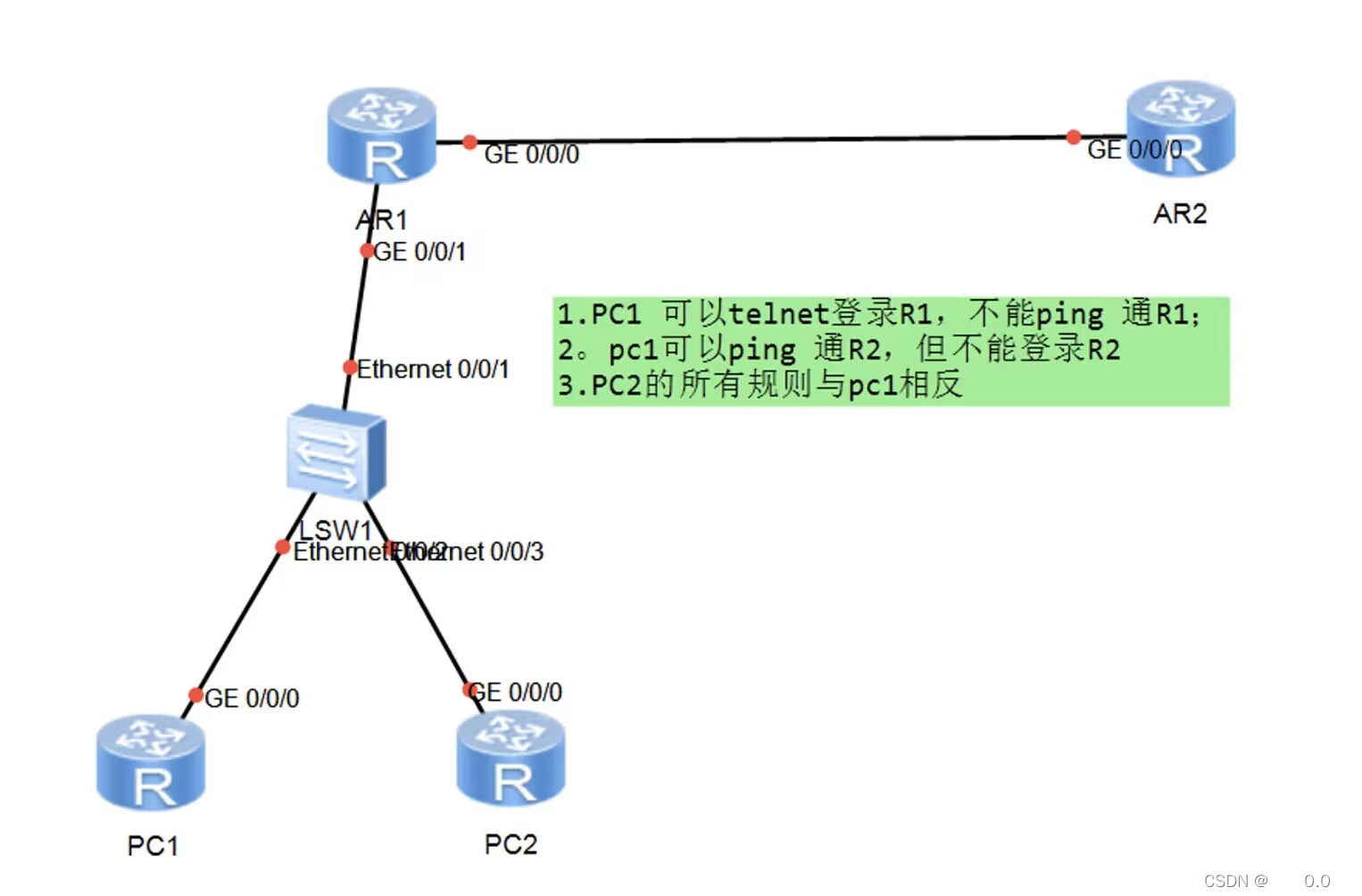
实验要求如上
首先要做到全网段可达这里
我使用ospf
AR1作为ABR(区域边界路由器)
设定
PC1 g0/0/0 1.1.1.1 24
PC2 g0/0/0 1.1.1.2 24
AR1 g0/0/1 1.1.1.3 24
AR1 g0/0/0 2.2.2.1 24
AR2 g0/0/0 2.2.2.2 24
pc1可以telnet r1 但不可以 ping r1
在r1上指定高级acl
[ar1]acl name nihao 3000
[ar1-acl-adv-nihao]rule deny icmp source 1.1.1.1 0.0.0.0 destination 1.1.1.3 0.0.0.0
[ar1-acl-adv-nihao]rule deny icmp source 1.1.1.1 0.0.0.0 destination 2.2.2.1 0.0.0.0
制定acl 拒绝pc1 ping pc2
ping命令属于icmp(网际控制协议)
在r1上开启telnet(远程登陆协议)
aaa 进入aaa认证
local-user xiaowang privilege level 15 password cipher 123456 创建用户以及密码
local-user xiaowang service-type telnet 开启该用户的telnet服务
退出到系统视图
user-interface 0 4 开启0-4的虚拟登录端口
authentication-mode aaa 三a模式登录认证
在pc2上实验登录
<pc 2>telnet 1.1.1.3
  Press CTRL_] to quit telnet mode
  Trying 1.1.1.3 ...
  Connected to 1.1.1.3 ...

Login authentication


Username:xiaowang
Password:
登陆后即可进入ar1的命令窗口
在r1的g0/0/0口上实施acl nihao
[ar1-GigabitEthernet0/0/1]traffic-filter inbound acl name nihao
<pc 1>ping 1.1.1.3
  PING 1.1.1.3: 56  data bytes, press CTRL_C to break
    Request time out
    Request time out
    Request time out
    Request time out
    Request time out
可以看到acl生效
再看看telnet能否登录
Username:xiaowang
Password:
  -----------------------------------------------------------------------------

  User last login information:
  -----------------------------------------------------------------------------
  Access Type: Telnet
  IP-Address : 1.1.1.1
  Time       : 2023-05-15 20:54:59-08:00
  -----------------------------------------------------------------------------
可以看到还是能够登陆的
pc1能ping通r2但不能telnet r2
还是在r1上阻挡 防止信息污染其他网段
[ar1-acl-adv-nihao]rule deny tcp source 1.1.1.1 0.0.0.0 destination 2.2.2.2 0.0.0.0 destination-port eq 23
pc2的要求与pc1 相反
[ar1-acl-adv-nihao]rule deny tcp source 1.1.1.2 0.0.0.0 destination 1.1.1.3 0.0.
0.0 destination-port eq 23
[ar1-acl-adv-nihao]rule deny tcp source 1.1.1.2 0.0.0.0 destination 2.2.2.1 0.0.
0.0 destination-port eq 23
[ar1-acl-adv-nihao]rule deny icmp source 1.1.1.2 0.0.0.0 destination 2.2.2.2 0.0
.0.0
最后的acl表
rule 5 deny icmp source 1.1.1.1 0 destination 1.1.1.3 0
 rule 10 deny icmp source 1.1.1.1 0 destination 2.2.2.1 0
 rule 15 deny tcp source 1.1.1.1 0 destination 2.2.2.2 0 destination-port eq tel
net
 rule 20 deny tcp source 1.1.1.2 0 destination 1.1.1.3 0 destination-port eq tel
net
 rule 25 deny tcp source 1.1.1.2 0 destination 2.2.2.1 0 destination-port eq tel
net
 rule 30 deny icmp source 1.1.1.2 0 destination 2.2.2.2 0
[ar1-GigabitEthernet0/0/1]traffic-filter inbound acl NAME nihao 在 r1上应用这一acl
进行检测
pc2 ping r1
pc2 ping r2
<pc 2>ping 1.1.1.3
  PING 1.1.1.3: 56  data bytes, press CTRL_C to break
    Reply from 1.1.1.3: bytes=56 Sequence=1 ttl=255 time=60 ms
    Reply from 1.1.1.3: bytes=56 Sequence=2 ttl=255 time=50 ms
    Reply from 1.1.1.3: bytes=56 Sequence=3 ttl=255 time=50 ms
    Reply from 1.1.1.3: bytes=56 Sequence=4 ttl=255 time=60 ms
    Reply from 1.1.1.3: bytes=56 Sequence=5 ttl=255 time=30 ms

  --- 1.1.1.3 ping statistics ---
    5 packet(s) transmitted
    5 packet(s) received
    0.00% packet loss
    round-trip min/avg/max = 30/50/60 ms

<pc 2>ping 2.2.2.2
  PING 2.2.2.2: 56  data bytes, press CTRL_C to break
    Request time out
    Request time out
    Request time out
    Request time out
    Request time out

  --- 2.2.2.2 ping statistics ---
    5 packet(s) transmitted
    0 packet(s) received
    100.00% packet loss
pc2 telnet r2
pc2 telnet r1
<pc 2>telnet 2.2.2.2
  Press CTRL_] to quit telnet mode
  Trying 2.2.2.2 ...
  Connected to 2.2.2.2 ...

Login authentication


Username:xiaoli
Password:
<ar2>
<pc 2>telnet 1.1.1.3
  Press CTRL_] to quit telnet mode
  Trying 1.1.1.3 ...
  Error: Can't connect to the remote host
pc1 ping r1
pc1 ping r2
<pc 1>ping 1.1.1.3
  PING 1.1.1.3: 56  data bytes, press CTRL_C to break
    Request time out
    Request time out
    Request time out
    Request time out

  --- 1.1.1.3 ping statistics ---
    4 packet(s) transmitted
    0 packet(s) received
    100.00% packet loss

<pc 1>ping 2.2.2.2
  PING 2.2.2.2: 56  data bytes, press CTRL_C to break
    Reply from 2.2.2.2: bytes=56 Sequence=1 ttl=254 time=50 ms
    Reply from 2.2.2.2: bytes=56 Sequence=2 ttl=254 time=40 ms
    Reply from 2.2.2.2: bytes=56 Sequence=3 ttl=254 time=30 ms
    Reply from 2.2.2.2: bytes=56 Sequence=4 ttl=254 time=40 ms
    Reply from 2.2.2.2: bytes=56 Sequence=5 ttl=254 time=40 ms

  --- 2.2.2.2 ping statistics ---
    5 packet(s) transmitted
    5 packet(s) received
    0.00% packet loss
    round-trip min/avg/max = 30/40/50 ms
pc1 telnet r1
pc1 telnet r2
<pc 1>telnet 1.1.1.3
  Press CTRL_] to quit telnet mode
  Trying 1.1.1.3 ...
  Connected to 1.1.1.3 ...

Login authentication


Username:xiaowang
Password:
  -----------------------------------------------------------------------------

  User last login information:
  -----------------------------------------------------------------------------
  Access Type: Telnet
  IP-Address : 1.1.1.1
  Time       : 2023-05-15 21:29:30-08:00
  -----------------------------------------------------------------------------
<ar1>q

  Configuration console exit, please retry to log on

  The connection was closed by the remote host
<pc 1>telnet 2.2.2.2
  Press CTRL_] to quit telnet mode
  Trying 2.2.2.2 ...
  Error: Can't connect to the remote host
符合题目要求

 浙公网安备 33010602011771号