

tsc编译错误'error TS1008: Unexpected token; 'module, class, interface, enum, import or statement' expect
给遗留的JS代码写了类型声明,兴冲冲地跑去编译,结果报了一堆错,人都傻了:
H:\project\dataStore.d.ts(1,9): error TS1005: ';' expected.
H:\project\dataStore.d.ts(1,19): error TS1005: ';' expected.
H:\project\dataStore.d.ts(1,25): error TS1005: ';' expected.
H:\project\dataStore.d.ts(2,5): error TS1008: Unexpected token; 'statement' expected.
H:\project\dataStore.d.ts(19,1): error TS1008: Unexpected token; 'module, class, interface, enum, import or statement' expected.
当然了,不是直接编译声明文件,是在main里导入,然后编译main。这个声明文件是这样的:
declare namespace NSApp {
    class DataStore {
        private data: IData;
        constructor();
        add(key: string, val: any): void;
        get(key: string): any;
        getAll(): IData;
        remove(key: string): void;
    }
    interface IData {
        [email: string]: any;
    }
}
看起来是不是没什么问题?事实上,就是没问题。因为换了一个项目,同样的代码编译成功了。实在是神秘。
我一开始怀疑是tsc的调用出了问题。去全局库里查看tsc脚本的内容:
@IF EXIST "%~dp0\node.exe" (
  "%~dp0\node.exe"  "%~dp0\node_modules\typescript\bin\tsc" %*
) ELSE (
  @SETLOCAL
  @SET PATHEXT=%PATHEXT:;.JS;=;%
  node  "%~dp0\node_modules\typescript\bin\tsc" %*
)
可以看出,tsc在被调用的时候确实指向的就是全局库。如果不放心,还可以顺便看看Linux环境下的shell脚本确认一下,因为理论上库的表现应该是一致的;毕竟,按照信息隐藏的观点,操作系统是需要被隐藏的实现细节:
#!/bin/sh
basedir=$(dirname "$(echo "$0" | sed -e 's,\\,/,g')")

case `uname` in
    *CYGWIN*) basedir=`cygpath -w "$basedir"`;;
esac

if [ -x "$basedir/node" ]; then
  "$basedir/node"  "$basedir/node_modules/typescript/bin/tsc" "$@"
  ret=$?
else
  node  "$basedir/node_modules/typescript/bin/tsc" "$@"
  ret=$?
fi
exit $ret
而且,如果在npm的全局库里直接调用tsc,是可以编译的(同时也进一步说明了代码真的没问题)。那么,问题就不在npm上了。事实上,我在查TypeScript的issue的时候,看到了微软工程师的一句评论:

然后在查看tsc的版本的时候,我注意到了一个细节:
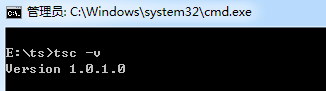
然而事实上我安装的typescript是最新版的3.5.3。这是咋回事,版本变了?
然后我去查了一下这个版本。官网上最早的文档是1.1的……不过在1.5版本的文档里提到:
namespace keyword
TypeScript used the module keyword to define both “internal modules” and “external modules”; this has been a bit of confusion for developers new to TypeScript. “Internal modules” are closer to what most people would call a namespace; likewise, “external modules” in JS speak really just are modules now.
Note: Previous syntax defining internal modules are still supported.
Before:
module Math { export function add(x, y) { ... } }After:
namespace Math {
 export function add(x, y) { ... }
}
letandconstsupportES6
letandconstdeclarations are now supported when targeting ES3 and ES5.
事实上,直到1.5版本,才引入了namespace关键字和let、const关键字的支持,而这个1.0.3.0的版本显然是不支持的,所以编译不通过就解释得通了。
找到了编译不通过的原因,现在的问题是,为什么会有这个版本呢?查了一下,发现C盘里有这样一个文件夹:C:\Program Files (x86)\Microsoft SDKs\TypeScript\1.0。然后在系统变量的Path里也有这一条: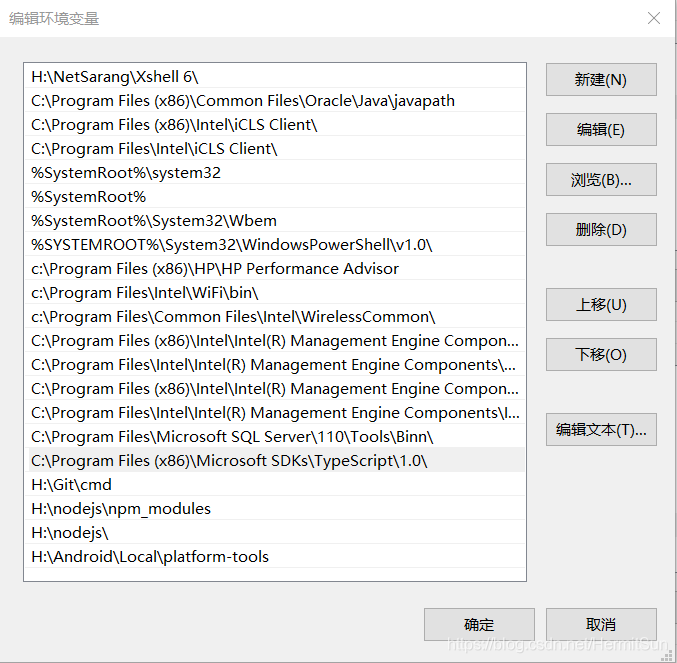
这就说得通了。我们都知道,对于Windows的环境变量来说,上面的会覆盖下面的,所以这个1.0.3.0版本覆盖了通过npm安装的3.5.3版本;而这个Microsoft SDKs文件夹是安装Visual Studio的时候(被)安装的。
以下是考据环节,不感兴趣的读者可以略过:
我当时装的是VS 2013,正好对应TS的1.0版本;因为TS1.0正式发行是在2014年4月3日前后(见参考资料,因为微软官网上关于这个的页面已经404了),正好对应当时的’Visual Studio 2013 and Visual Studio Web Express 2013 Spring Update’,从这个版本之后的VS里都有TS了。
而我装的是VS Community 2013 update 4,时间是2014年12月11日: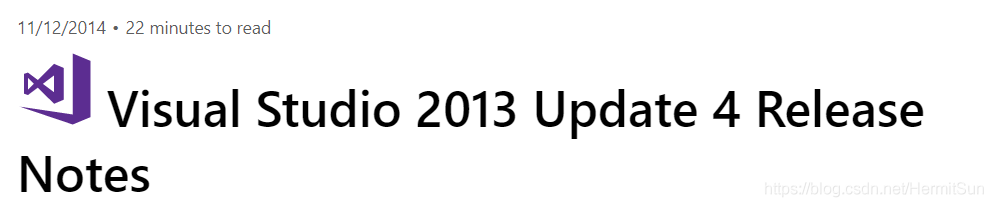
自然也是有的。应该就在Web Developer Tools里:
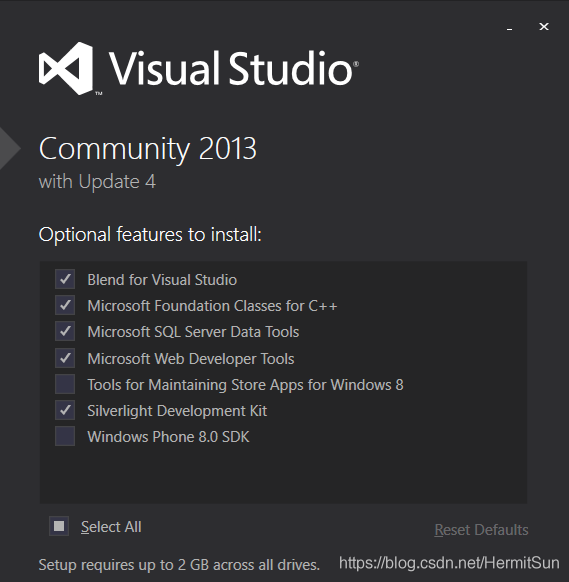
事实上,我换了另一台电脑,上面的TypeScript版本就不一样了,然后又换了一台没装过VS的电脑,里面就没有这个文件夹了,验证了这个猜想。也就是说,两年前为了学习C语言装的VS,在两年后坑了我……
找到了问题,那么就是解决方案了。目前我发现的方案有两种:
第一种,从源头上解决,删除这个文件夹(没影响的),或者从环境变量里删掉这一条。如果实在不放心,就调整一下环境变量的顺序,让npm的全局仓库在它上面,把它覆盖掉。
第二种,我们都知道Node会优先使用项目库,然后再使用全局库,所以我们可以把这个项目初始化成一个Node项目(如果之前不是Node项目),然后npm install typescript,安装一个项目内部的typescript依赖,这时候tsc就会优先寻找项目内部的typescript依赖,这样也能解决。
为什么跟Node有关?可以看看之前的tsc脚本,里面明确写了是通过Node调用的:
node "%~dp0\node_modules\typescript\bin\tsc" %*
转: https://blog.csdn.net/HermitSun/article/details/96478912

 浙公网安备 33010602011771号