Elasticsearch客户端

1. Elasticsearch客户端

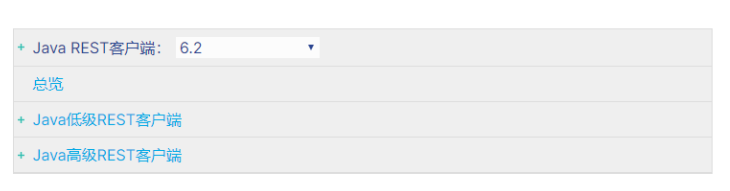
  在elasticsearch官网中提供了各种语言的客户端:https://www.elastic.co/guide/en/elasticsearch/client/index.html


  • 创建Demo工程

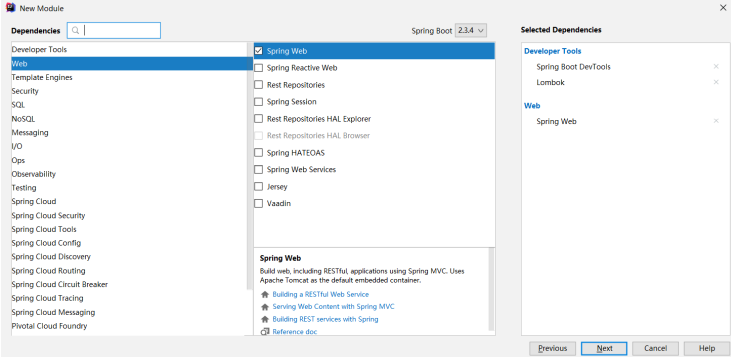
  • pom文件:需要手动引入elasticsearchHigh-level-Rest-Client的依赖
    <?xml version="1.0" encoding="UTF-8"?>
    <project xmlns="http://maven.apache.org/POM/4.0.0" xmlns:xsi="http://www.w3.org/2001/XMLSchema-instance"
             xsi:schemaLocation="http://maven.apache.org/POM/4.0.0 https://maven.apache.org/xsd/maven-4.0.0.xsd">
        <modelVersion>4.0.0</modelVersion>
        <parent>
            <groupId>org.springframework.boot</groupId>
            <artifactId>spring-boot-starter-parent</artifactId>
            <version>2.1.3</version>
        </parent>
        <groupId>com.rf</groupId>
        <artifactId>esclient</artifactId>
        <version>0.0.1-SNAPSHOT</version>
        <name>esclient</name>
        <description>Demo project for Spring Boot</description>
        <properties>
            <java.version>11</java.version>
        </properties>
        <dependencies>
            <dependency>
                <groupId>org.springframework.boot</groupId>
                <artifactId>spring-boot-starter-web</artifactId>
            </dependency>
    
            <dependency>
                <groupId>org.springframework.boot</groupId>
                <artifactId>spring-boot-devtools</artifactId>
                <scope>runtime</scope>
                <optional>true</optional>
            </dependency>
            <dependency>
                <groupId>org.projectlombok</groupId>
                <artifactId>lombok</artifactId>
                <optional>true</optional>
            </dependency>
            <dependency>
                <groupId>org.springframework.boot</groupId>
                <artifactId>spring-boot-starter-test</artifactId>
                <scope>test</scope>
            </dependency>
            <dependency>
                <groupId>junit</groupId>
                <artifactId>junit</artifactId>
                <version>4.12</version>
                <scope>test</scope>
            </dependency>
            <dependency>
                <groupId>org.springframework.boot</groupId>
                <artifactId>spring-boot-starter-logging</artifactId>
            </dependency>
            <dependency>
                <groupId>com.google.code.gson</groupId>
                <artifactId>gson</artifactId>
                <version>2.8.5</version>
            </dependency>
            <dependency>
                <groupId>org.apache.commons</groupId>
                <artifactId>commons-lang3</artifactId>
                <version>3.8.1</version>
            </dependency>
            <!--Apache开源组织提供的用于操作JAVA BEAN的工具包-->
            <dependency>
                <groupId>commons-beanutils</groupId>
                <artifactId>commons-beanutils</artifactId>
                <version>1.9.1</version>
            </dependency>
            <!--ES高级Rest Client-->
            <dependency>
                <groupId>org.elasticsearch.client</groupId>
                <artifactId>elasticsearch-rest-high-level-client</artifactId>
                <version>6.4.3</version>
            </dependency>
        </dependencies>
    
        <build>
            <plugins>
                <plugin>
                    <groupId>org.springframework.boot</groupId>
                    <artifactId>spring-boot-maven-plugin</artifactId>
                </plugin>
            </plugins>
        </build>
    
    </project>
  • 配置文件applic.yml
  • 索引库及映射

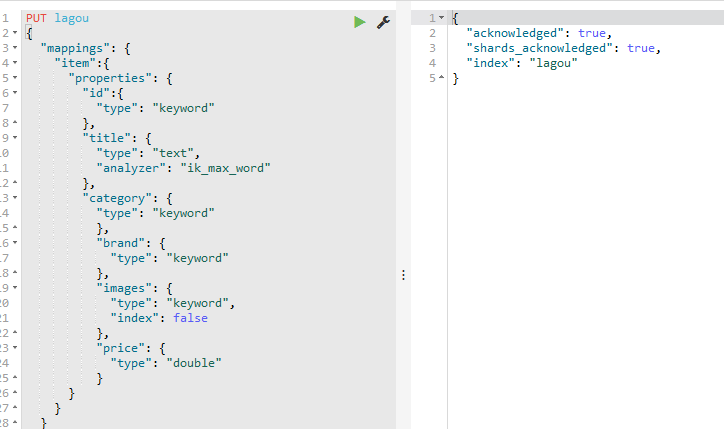
创建索引库的同时,我们也会创建type及其映射关系,但是这些操作不建议使用java客户端完成,原因如下:

  索引库和映射往往是初始化时完成,不需要频繁操作,不如提前配置好

  官方提供的创建索引库及映射API非常繁琐,需要通过字符串拼接json结构

package com.es.pojo;

import lombok.Data;

@Data
public class Product {
    private Long id;
    private String title; //标题
    private String category;// 分类
    private String brand; // 品牌
    private Double price; // 价格
    private String images; // 图片地址
}
    • id:可以认为是主键,将来判断数据是否重复的标示,不分词,可以使用keyword类型
    • title:搜索字段,需要分词,可以用text类型
    • category:商品分类,这个是整体,不分词,可以使用keyword类型
    • brand:品牌,与分类类似,不分词,可以使用keyword类型
    • price:价格,这个是double类型  
    • images:图片,用来展示的字段,不搜索,indexfalse,不分词,可以使用keyword类型
  • 索引库操作
    • 初始化客户端 :完成任何操作都需要通过HighLevelRestClient客户端
    package com.rf;
    
    
    import com.google.gson.Gson;
    import org.apache.http.HttpHost;
    import org.elasticsearch.client.RestClient;
    import org.elasticsearch.client.RestClientBuilder;
    import org.elasticsearch.client.RestHighLevelClient;
    
    import org.junit.After;
    import org.junit.Before;
    import org.junit.Test;
    import org.junit.runner.RunWith;
    import org.springframework.boot.test.context.SpringBootTest;
    import org.springframework.test.context.junit4.SpringRunner;
    
    import java.io.IOException;
    
    @RunWith(SpringRunner.class)
    @SpringBootTest
    public class ElasticSearchTest {
        private RestHighLevelClient restHighLevelClient;
        // Json工具
        private Gson gson=new Gson();
        @Before
        public void init(){
            RestClientBuilder restClientBuilder=RestClient.builder(
                    new HttpHost("127.0.0.1", 9201, "http"),
                    new HttpHost("127.0.0.1", 9202, "http"),
                    new HttpHost("127.0.0.1", 9203, "http"));
            // 初始化HighLevel客户端
            restHighLevelClient= new RestHighLevelClient(restClientBuilder);
        }
        @After
        public void close() throws Exception{
            // 关闭客户端
            restHighLevelClient.close();
        }
        @Test
        public void test() throws IOException {
            System.out.println(restHighLevelClient);
        }
    
    
    }
    • 新增文档
       @Test
          public void testInsert() throws Exception{
              //1.文档数据
              Product product = new Product();
              product.setBrand("华为");
              product.setCategory("手机");
              product.setId(1L);
              product.setImages("http://image.huawei.com/1.jpg");
              product.setPrice(5999.99);
              product.setTitle("华为P50就是棒");
              //2.将文档数据转换为json格式
              String source = gson.toJson(product);
              //3.创建索引请求对象 访问哪个索引库、哪个type、指定文档ID
              //public IndexRequest(String index, String type, String id)
              IndexRequest indexRequest = new IndexRequest("lagou", "item", product.getId().toString());
              indexRequest.source(source, XContentType.JSON);
              // 4.发出请求
              IndexResponse response=restHighLevelClient.index(indexRequest, RequestOptions.DEFAULT);
              System.out.println("response = " + response);
      
          }
      
          
    • 查看文档
          @Test
          public void testFindIndex() throws Exception{
              // 创建get请求,并指定id,  public GetRequest(String index, String type, String id)
              GetRequest getRequest=new GetRequest("lagou","item","1");
      
              // 查询,得到响应
              GetResponse response = restHighLevelClient.get(getRequest, RequestOptions.DEFAULT);
              // 解析响应,应该是json
              String source = response.getSourceAsString();
              // 转换json数据
              Product product = gson.fromJson(source, Product.class);
              System.out.println("product = " + product);
          }
    • 修改文档:新增时,如果传递的id是已经存在的,则会完成修改操作,如果不存在,则是新增
    • 删除文档
       @Test
          public void testDeleteIndex() throws Exception{
              // 准备删除的请求,参数为id
              DeleteRequest deleteRequest =new DeleteRequest("lagou","item","2");
              DeleteResponse delete = restHighLevelClient.delete(deleteRequest, RequestOptions.DEFAULT);
              System.out.println("delete = " + delete);
          }
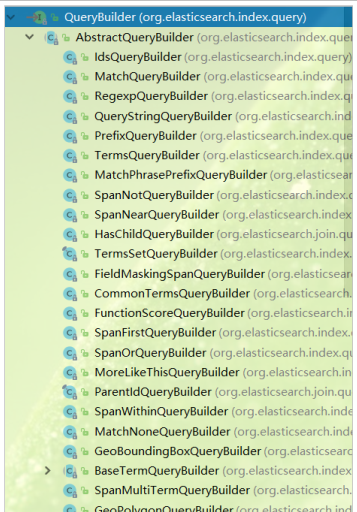
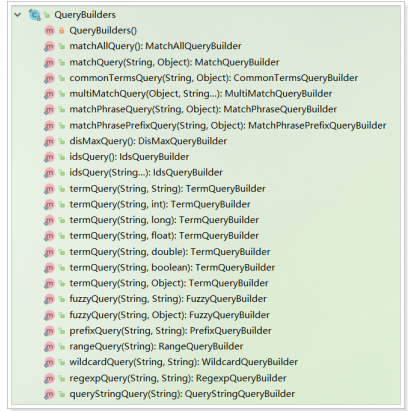
  • 搜索数据:搜索条件是通过 sourceBuilder.query(QueryBuilder)来添加的。这个 query() 方法接受的参数是: QueryBuilder 接口类型。这个接口提供了很多实现类,分别对应我们在之前中学习的不同类型的查询,例如:term查询、match查询、range查询、boolean查询等,如图:如果要使用各种不同查询,其实仅仅是传递给 sourceBuilder.query() 方法的参数不同而
    已。而这些实现类不需要我们去 new ,官方提供了 QueryBuilders 工厂帮我们构建各种实现类
  

 如果要使用各种不同查询,其实仅仅是传递给 sourceBuilder.query() 方法的参数不同而已。而这些实现类不需要我们去 new ,官方提供了 QueryBuilders 工厂帮我们构建各种实现类:
    • 查询所有match_all
 @Test
    public void testMatchAll() throws IOException{
        // 创建搜索对象
        SearchRequest request = new SearchRequest();
// 查询构建工具
        SearchSourceBuilder sourceBuilder = new SearchSourceBuilder();
// 添加查询条件,通过QueryBuilders获取各种查询
        sourceBuilder.query(QueryBuilders.matchAllQuery());
        request.source(sourceBuilder);
// 搜索
        SearchResponse response = restHighLevelClient.search(request, RequestOptions.DEFAULT);
// 解析
        SearchHits hits = response.getHits();
        SearchHit[] searchHits = hits.getHits();
        for (SearchHit hit : searchHits) {
// 取出source数据
            String json = hit.getSourceAsString();
// 反序列化
            Product item = gson.fromJson(json, Product.class);
            System.out.println("item = " + item);
        }
    }
    • 关键字搜索match
      @Test
        public void testMatch()throws Exception{
            // 查询构建工具
            SearchSourceBuilder sourceBuilder = new SearchSourceBuilder();
    // 添加查询条件,通过QueryBuilders获取各种查询
            sourceBuilder.query(QueryBuilders.matchQuery("category","手机"));
            baseQuery(sourceBuilder);
        }
    
        private void baseQuery(SearchSourceBuilder sourceBuilder) throws IOException{
            // 创建搜索对象
            SearchRequest request = new SearchRequest();
    
            request.source(sourceBuilder);
    // 搜索
            SearchResponse response = restHighLevelClient.search(request, RequestOptions.DEFAULT);
    // 解析
            SearchHits hits = response.getHits();
            SearchHit[] searchHits = hits.getHits();
            for (SearchHit hit : searchHits) {
    // 取出source数据
                String json = hit.getSourceAsString();
    // 反序列化
                Product item = gson.fromJson(json, Product.class);
                System.out.println("item = " + item);
            }
        }
    • 范围查询range
        @Test
        public void testRange()throws Exception{
            // 查询构建工具
            SearchSourceBuilder sourceBuilder = new SearchSourceBuilder();
    // 添加查询条件,通过QueryBuilders获取各种查询
            sourceBuilder.query(QueryBuilders.rangeQuery("price").lte("4000").gte("2000"));
            baseQuery(sourceBuilder);
        }
    • source过滤
     @Test
        public void testSourceFilter()throws Exception{
            // 查询构建工具
            SearchSourceBuilder searchSourceBuilder = new SearchSourceBuilder();
            // 添加查询条件,通过QueryBuilders获取各种查询
            searchSourceBuilder.query(QueryBuilders.matchAllQuery());
            // 添加source过滤 @Nullable String[] includes, @Nullable String[] excludes
            searchSourceBuilder.fetchSource(new String[]{"title","price","brand"},null);
            baseQuery(searchSourceBuilder);
        }
  • 排序
      @Test
        public void testSortQuery()throws Exception{
            // 查询构建工具
            SearchSourceBuilder sourceBuilder = new SearchSourceBuilder();
            // 添加查询条件,通过QueryBuilders获取各种查询
            sourceBuilder.query(QueryBuilders.matchAllQuery());
            //设置排序
            sourceBuilder.sort("price", SortOrder.DESC);
            baseQuery(sourceBuilder);
        }
  • 分页
        @Test
        public void testSortAndPageQuery()throws Exception{
            // 查询构建工具
            SearchSourceBuilder sourceBuilder = new SearchSourceBuilder();
            // 添加查询条件,通过QueryBuilders获取各种查询
            sourceBuilder.query(QueryBuilders.matchAllQuery());
            //设置排序
            sourceBuilder.from(0);
            sourceBuilder.size(3);
            baseQuery(sourceBuilder);
        }

2. Spring Data Elasticsearch

  Spring Data Elasticsearch(以后简称SDE)是Spring Data项目下的一个子模块。Spring Data 的使命是给各种数据访问提供统一的编程接口,不管是关系型数据库(如MySQL),还是非关系数据库(如Redis),或者类似Elasticsearch这样的索引数据库。从而简化开发人员的代码,提高开发效率。

  Spring Data Elasticsearch的页面:https://projects.spring.io/spring-data-elasticsearch/

特征:

  • 支持Spring的基于 @Configuration java配置方式,或者XML配置方式
  • 提供了用于操作ES的便捷工具类 ElasticsearchTemplate 。包括实现文档到POJO之间的自动智能映射
  • 利用Spring的数据转换服务实现的功能丰富的对象映射
  • 基于注解的元数据映射方式,而且可扩展以支持更多不同的数据格式,可以定义JavaBean:类名、属性
  • 根据持久层接口自动生成对应实现方法,无需人工编写基本操作代码(类似mybatis,根据接口自动得到实现)。当然,也支持人工定制查询

2.1.配置SpringDataElasticsearch

  • pom文件中,引入SpringDataElasticsearch的启动器
<dependency>
<groupId>org.springframework.boot</groupId>
<artifactId>spring-boot-starter-data-elasticsearch</artifactId>
</dependency>
  • resources下新建application.yml文件,引入elasticsearchhostport即可
spring:
  data:
    elasticsearch:
      cluster-name: lagou-elastic
      cluster-nodes: 127.0.0.1:9301,127.0.0.1:9302,127.0.0.1:9303
  • SpringDataElasticsearch底层使用的不是Elasticsearch提供的RestHighLevelClient,而是TransportClient,并不采用Http协议通信,而是访问elasticsearch对外开放的tcp端口,我们之前集群配置中,设置的分别是:9301,9302,9303
  • 添加引导类
package com.rf;

import org.springframework.boot.SpringApplication;
import org.springframework.boot.autoconfigure.SpringBootApplication;

@SpringBootApplication
public class EsclientApplication {

    public static void main(String[] args) {
        SpringApplication.run(EsclientApplication.class, args);
    }

}

  SpringBoot已经帮我们配置好了各种SDE配置,并且注册了一个ElasticsearchTemplate供使用

2.2.索引库操作

  • 创建索引库准备一个pojo对象,然后准备一个新的实体类,作为下面与索引库对应的文档
  • 创建一个测试类,然后注入ElasticsearchTemplate,创建索引库的API示例


package com.rf;

import com.rf.pojo.Product;
import org.junit.Test;
import org.junit.runner.RunWith;
import org.springframework.beans.factory.annotation.Autowired;
import org.springframework.boot.test.context.SpringBootTest;
import org.springframework.data.elasticsearch.core.ElasticsearchTemplate;
import org.springframework.test.context.junit4.SpringRunner;

@RunWith(SpringRunner.class)
@SpringBootTest
public class EsClientTest {
    @Autowired
    private ElasticsearchTemplate esTemplate;

    @Test
    public void testCreateIndex(){
// 创建索引库,并制定实体类的字节码
        esTemplate.createIndex(Product.class);
    }
}


  • 发现没有,创建索引库需要指定的信息,比如:索引库名、类型名、分片、副本数量、还有映射信息都没有填写
  • SDE是通过实体类上的注解来配置索引库信息的,我们需要在Product上添加一些注解


package com.rf.pojo;

import lombok.Data;
import org.springframework.data.annotation.Id;
import org.springframework.data.elasticsearch.annotations.Document;
import org.springframework.data.elasticsearch.annotations.Field;
import org.springframework.data.elasticsearch.annotations.FieldType;

@Data
@Document(indexName = "lagou",type = "product",shards = 3 ,replicas = 1)
public class Product {
    @Id
    private Long id;
    @Field(type = FieldType.Text,analyzer = "ik_max_word")
    private String title; //标题
    @Field(type = FieldType.Keyword)
    private String category;// 分类
    @Field(type = FieldType.Keyword)
    private String brand; // 品牌
    @Field(type = FieldType.Double)
    private Double price; // 价格
    @Field(type = FieldType.Keyword,index = false)
    private String images; // 图片地址
}
    • @Document:声明索引库配置
      • indexName:索引库名称
      • type:类型名称,默认是“docs”
      • shards:分片数量,默认5
      • replicas:副本数量,默认1
    • @Id:声明实体类的id
    • @Field:声明字段属性
      • type:字段的数据类型
      • analyzer:指定分词器类型
      • index:是否创建索引

2.3 创建映射

package com.rf;

import com.rf.pojo.Product;
import org.junit.Test;
import org.junit.runner.RunWith;
import org.springframework.beans.factory.annotation.Autowired;
import org.springframework.boot.test.context.SpringBootTest;
import org.springframework.data.elasticsearch.core.ElasticsearchTemplate;
import org.springframework.test.context.junit4.SpringRunner;

@RunWith(SpringRunner.class)
@SpringBootTest
public class EsClientTest {
    @Autowired
    private ElasticsearchTemplate esTemplate;

    @Test
    public void testCreateIndex(){
// 创建索引库,并制定实体类的字节码
        esTemplate.putMapping(Product.class);
    }
}


2.4 索引数据CRUD

SDE的索引数据CRUD并没有封装在ElasticsearchTemplate中,而是有一个叫做ElasticsearchRepository的接口,需要自定义接口,继承ElasticsearchRespository

package com.rf.repository;

import com.rf.pojo.Product;
import org.springframework.data.elasticsearch.repository.ElasticsearchRepository;

public interface ESElasticsearchRespository  extends ElasticsearchRepository<Product,Long> {
}
  • 创建索引数据
    • 单个创建
       @Autowired
        private ESElasticsearchRespository esElasticsearchRespository;
    
        @Test
        public void addDocument(){
            Product product = new Product(1L, "小米手机9", " 手机",
                    "小米", 3499.00, "http://image.lagou.com/13123.jpg");
            esElasticsearchRespository.save(product);
        }
    • 批量创建
@Test
    public void addListDocument(){
        // 准备文档数据:
        List<Product> list = new ArrayList<>();
        list.add(new Product(2L, "小米手机7", "手机", "小米", 3299.00, "/13123.jpg"));
        list.add(new Product(3L, "坚果手机R1", "手机", "锤子", 3699.00, "/13123.jpg"));
        list.add(new Product(4L, "华为META10", "手机", "华为", 4499.00, "/13123.jpg"));
        list.add(new Product(5L, "小米Mix2S", "手机", "小米", 4299.00, "/13123.jpg"));
        list.add(new Product(6L, "荣耀V10", "手机", "华为", 2799.00, "/13123.jpg"));
        esElasticsearchRespository.saveAll(list);
    }
    • 通过elasticsearch-head查看


  • 查询索引数据:默认提供了根据id查询,查询所有两个功能
    @Test
    public void testQueryById(){
        Optional<Product> optional = esElasticsearchRespository.findById(1L);
        System.out.println(optional.orElse(null));
    }
    @Test
    public void testQueryAll(){
        Iterable<Product> products = esElasticsearchRespository.findAll();
        products.forEach(System.out::println);
    }
  • 自定义方法查询:只要遵循SpringData提供的语法,我们可以任意定义方法声明,
  @Test
    public void testQueryDefined(){
        Iterable<Product> products = esElasticsearchRespository.findByPriceBetween(2000.00,4000.00);
        products.forEach(System.out::println);
    }


package com.rf.repository;

import com.rf.pojo.Product;
import org.springframework.data.elasticsearch.repository.ElasticsearchRepository;

import java.util.List;

public interface ESElasticsearchRespository  extends ElasticsearchRepository<Product,Long> {
    /**
     * 根据价格区间查询
     * @param from 开始价格
     * @param to 结束价格
     * @return 符合条件的goods
     */
    List<Product> findByPriceBetween(Double from, Double to);
}


  • 原生查询:如果觉得上述接口依然不符合你的需求,SDE也支持原生查询,这个时候还是使用ElasticsearchTemplate,而查询条件的构建是通过一个名为 NativeSearchQueryBuilder 的类来完成的,不过这个类的底层还是使用的原生API中的 QueryBuilders AggregationBuilders HighlightBuilders 等工具
    • 查询title中包含小米手机的商品,以价格升序排序,分页查询:每页展示2条,查询第1
    • 对查询结果进行聚合分析:获取品牌及个数
    package com.rf;
    
    import com.rf.pojo.Product;
    import com.rf.repository.ESElasticsearchRespository;
    
    import org.elasticsearch.index.query.QueryBuilders;
    import org.elasticsearch.search.aggregations.AggregationBuilder;
    import org.elasticsearch.search.aggregations.AggregationBuilders;
    import org.elasticsearch.search.aggregations.Aggregations;
    import org.elasticsearch.search.aggregations.bucket.terms.Terms;
    import org.elasticsearch.search.suggest.SortBy;
    import org.junit.After;
    import org.junit.Test;
    import org.junit.runner.RunWith;
    import org.springframework.beans.factory.annotation.Autowired;
    import org.springframework.boot.test.context.SpringBootTest;
    import org.springframework.data.domain.PageRequest;
    import org.springframework.data.domain.Sort;
    import org.springframework.data.elasticsearch.core.ElasticsearchTemplate;
    import org.springframework.data.elasticsearch.core.aggregation.AggregatedPage;
    import org.springframework.data.elasticsearch.core.query.FetchSourceFilter;
    import org.springframework.data.elasticsearch.core.query.NativeSearchQueryBuilder;
    import org.springframework.data.elasticsearch.repository.ElasticsearchRepository;
    import org.springframework.test.context.junit4.SpringRunner;
    
    import java.util.ArrayList;
    import java.util.List;
    import java.util.Optional;
    
    @RunWith(SpringRunner.class)
    @SpringBootTest
    public class EsClientTest {
        @Autowired
        private ElasticsearchTemplate esTemplate;
    
        @Test
        public void testCreateIndex(){
    // 创建索引库,并制定实体类的字节码
            esTemplate.putMapping(Product.class);
        }
    
    
        @Autowired
        private ESElasticsearchRespository esElasticsearchRespository;
    
        @Test
        public void addDocument(){
            Product product = new Product(1L, "小米手机9", " 手机",
                    "小米", 3499.00, "http://image.lagou.com/13123.jpg");
            esElasticsearchRespository.save(product);
        }
        @Test
        public void addListDocument(){
            // 准备文档数据:
            List<Product> list = new ArrayList<>();
            list.add(new Product(2L, "小米手机7", "手机", "小米", 3299.00, "/13123.jpg"));
            list.add(new Product(3L, "坚果手机R1", "手机", "锤子", 3699.00, "/13123.jpg"));
            list.add(new Product(4L, "华为META10", "手机", "华为", 4499.00, "/13123.jpg"));
            list.add(new Product(5L, "小米Mix2S", "手机", "小米", 4299.00, "/13123.jpg"));
            list.add(new Product(6L, "荣耀V10", "手机", "华为", 2799.00, "/13123.jpg"));
            esElasticsearchRespository.saveAll(list);
        }
    
    
        @Test
        public void testQueryById(){
            Optional<Product> optional = esElasticsearchRespository.findById(1L);
            System.out.println(optional.orElse(null));
        }
        @Test
        public void testQueryAll(){
            Iterable<Product> products = esElasticsearchRespository.findAll();
            products.forEach(System.out::println);
        }
        @Test
        public void testQueryDefined(){
            Iterable<Product> products = esElasticsearchRespository.findByPriceBetween(2000.00,4000.00);
            products.forEach(System.out::println);
        }
    
        @Test
        public void testNativeQuery(){
            // 原生查询构建器
            NativeSearchQueryBuilder queryBuilder=new NativeSearchQueryBuilder();
            // 1.1 source过滤
            queryBuilder.withSourceFilter(new FetchSourceFilter(new String[0],new String[0]));
            // 1.2搜索条件
            queryBuilder.withQuery(QueryBuilders.matchQuery("title","小米手机"));
            // 1.3分页及排序条件
            queryBuilder.withPageable(PageRequest.of(0,3, Sort.by(Sort.Direction.DESC,"price")));
            // 1.4高亮显示
            // queryBuilder.withHighlightBuilder(new HighlightBuilder().field("title"));
            //1.5聚合
            queryBuilder.addAggregation(AggregationBuilders.terms("brandAgg").field("brand"));
            // 构建查询条件,并且查询
            AggregatedPage<Product> result = esTemplate.queryForPage(queryBuilder.build(), Product.class);
            // 2、解析结果:
            // 2.1分页结果
            long total = result.getTotalElements();
            int totalPages = result.getTotalPages();
            List<Product> list = result.getContent();
            System.out.println("总条数 = " + total);
            System.out.println("总页数 = " + totalPages);
            System.out.println(list);
            // 2.2.聚合结果
            Aggregations aggregations = result.getAggregations();
            Terms terms = aggregations.get("brandAgg");
            terms.getBuckets().forEach(b -> {
                System.out.println("品牌 = " + b.getKeyAsString());
                System.out.println("count = " + b.getDocCount());
            });
        }
    }
  • 高亮展示
    • 自定义搜索结果映射
    package com.rf.mapper;
    
    import com.google.gson.Gson;
    import org.elasticsearch.action.search.SearchResponse;
    import org.elasticsearch.common.text.Text;
    import org.elasticsearch.search.SearchHit;
    import org.elasticsearch.search.SearchHits;
    import org.elasticsearch.search.fetch.subphase.highlight.HighlightField;
    import org.springframework.data.domain.Pageable;
    import org.springframework.data.elasticsearch.core.SearchResultMapper;
    import org.springframework.data.elasticsearch.core.aggregation.AggregatedPage;
    import org.springframework.data.elasticsearch.core.aggregation.impl.AggregatedPageImpl;
    
    import java.util.ArrayList;
    import java.util.List;
    import java.util.Map;
    
    public class EsResultMapper implements SearchResultMapper {
        @Override
        public <T> AggregatedPage<T> mapResults(SearchResponse response, Class<T> aClass, Pageable pageable) {
            // 记录分桶下的总条数
            long totalHits = response.getHits().getTotalHits();
            // 记录列表(泛型) - 构建Aggregate使用
            List<T> list = new ArrayList<>();
            // 获取搜索结果(真正的的记录)
            SearchHits hits = response.getHits();
            for (SearchHit hit : hits) {
                if (hits.getHits().length <= 0) {
                    return null;
                }
                // 将原本的JSON对象转换成Map对象
                Map<String, Object> map = hit.getSourceAsMap();
              // 获取高亮的字段Map
                Map<String, HighlightField> highlightFields = hit.getHighlightFields();
                for (Map.Entry<String, HighlightField> highlightField : highlightFields.entrySet()) {
                // 获取高亮的Key
                    String key = highlightField.getKey();
                // 获取高亮的Value
                    HighlightField value = highlightField.getValue();
                    //2、高亮实现// 实际fragments[0]就是高亮的结果,无需遍历拼接
                    Text[] fragments = value.getFragments();
                // 因为高亮的字段必然存在于Map中,就是key值
                    map.put(key, fragments[0].toString());
                } // 把Map转换成对象
                Gson gson = new Gson();
                T item = gson.fromJson(gson.toJson(map), aClass);
                list.add(item);
            } // 返回的是带分页的结果
            return new AggregatedPageImpl<>(list, pageable, totalHits);
        }
    }
    • 高亮实现
    @Test
    public void testNativeQuery(){
        // 原生查询构建器
        NativeSearchQueryBuilder queryBuilder=new NativeSearchQueryBuilder();
        // 1.1 source过滤

        // 1.2搜索条件
        queryBuilder.withQuery(QueryBuilders.matchQuery("title","小米手机"));
        // 1.3分页及排序条件
        queryBuilder.withPageable(PageRequest.of(0,4, Sort.by(Sort.Direction.DESC,"price")));
        // 1.4高亮显示
        HighlightBuilder.Field field= new HighlightBuilder.Field("title");
        field.preTags("<font style='color:red'>");
        field.postTags("</font>");
        queryBuilder.withHighlightFields(field);
        NativeSearchQuery build = queryBuilder.build();

        //1.5聚合
        queryBuilder.addAggregation(AggregationBuilders.terms("brandAgg").field("brand"));
        // 构建查询条件,并且查询
        AggregatedPage<Product> result = esTemplate.queryForPage(queryBuilder.build(), Product.class,new EsResultMapper());
        // 2、解析结果:
        // 2.1分页结果
        long total = result.getTotalElements();
        int totalPages = result.getTotalPages();
        List<Product> list = result.getContent();
        System.out.println("总条数 = " + total);
        System.out.println("总页数 = " + totalPages);
        list.stream().forEach(product -> System.out.println(product));
    }


ElasticsearchRespository

posted @ 2021-09-03 17:21  forever_fate  阅读(1036)  评论(0)    收藏  举报