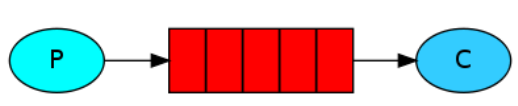
RabbitMQ


1. RabbitMQ简介

1.1 MQMessage Queue)消息队列

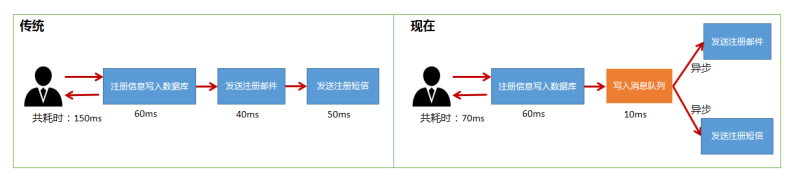
  • 消息队列中间件是分布式系统中的重要组件,消息队列主要解决异步处理、应用解耦、流量削峰等问题,从而实现了高性能高可用,可伸缩和最终一致性的架构。
  • 主要的消息队列产品有RabbitMQRocketMQActiveMQZeroMQKafka等,按综合性来说RabbitMQ最佳,kafka性能爆炸,可能会丢失部分数据,RocketMQ稳定性最好
  • 异步处理

  • 应用解耦

    • 库存系统与订单系统应用解耦,用户下单后,订单系统完成持久化处理,将消息写入消息队列,返回用户,下单成功,库存系统订阅下单消息,根据下单消息进行库存操作
    • 消息队列是典型的生产者消费者模型,生产者不断的向消息队列中生产消息,消费者不断的从队列中获取消息,消息的生产和消费是异步的,没有业务逻辑的入侵,只关心消息的发送和接收,实现了生产者与消费者的解耦


  • 流量削峰,针对高并发的场景,在前端加入消息队列,设置队列长度,如果超如队列长度就抛弃该消息


1.2 RabbitMQ背景

  • AMQP高级消息队列协议Advanced Message Queuing Protocol
    • 一个提供统一消息服务的应用层标准高级消息队列协议,在第七层
    • 基于此协议的客户端可以与消息中间件进行消息的传递
    • 不收产品、开发语言等条件的限制
  • JMS即Java Message Server
    • 是java消息服务应用程序接口,与AMQP对接的规范
    • 是一个java平台中关于面向消息中间件的API,用于在两个应用程序之间或分布式系统中发送消息,进行异步通信
  • 联系
    • JMS定义了统一接口,统一消息操作,是java语言
    • AMQP通过协议统一数据交互格式,是一种协议
  • Erlang语言
    • 是一种通用的面向并发的编程余元,创造一种可以应对大规模并发活动的编程语言和运行环境的实施软并行计算系统
    • Erlang运行时环境是一个虚拟机,代码一经编译随处运行

1.3 为什么选择RabbitMQ

  • Erlang开发,AMQP的最佳搭档,安装部署简单,上手门槛低
  • 企业级消息队列,有强大的web管理页面,强大的社区支持
  • 支持消息持久化、消息确认机制、灵活的任务分发机制,功能丰富
  • 易进行集群扩展,可以通过增加节点实现成倍的性能提升

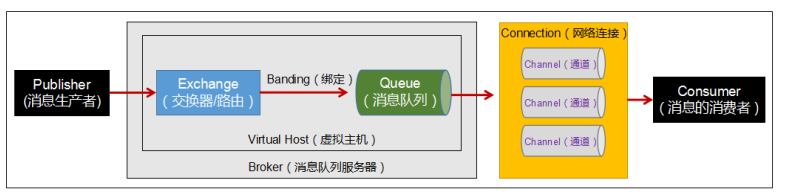
1.4 各组件功能

  • Broker:消息队列服务器实体
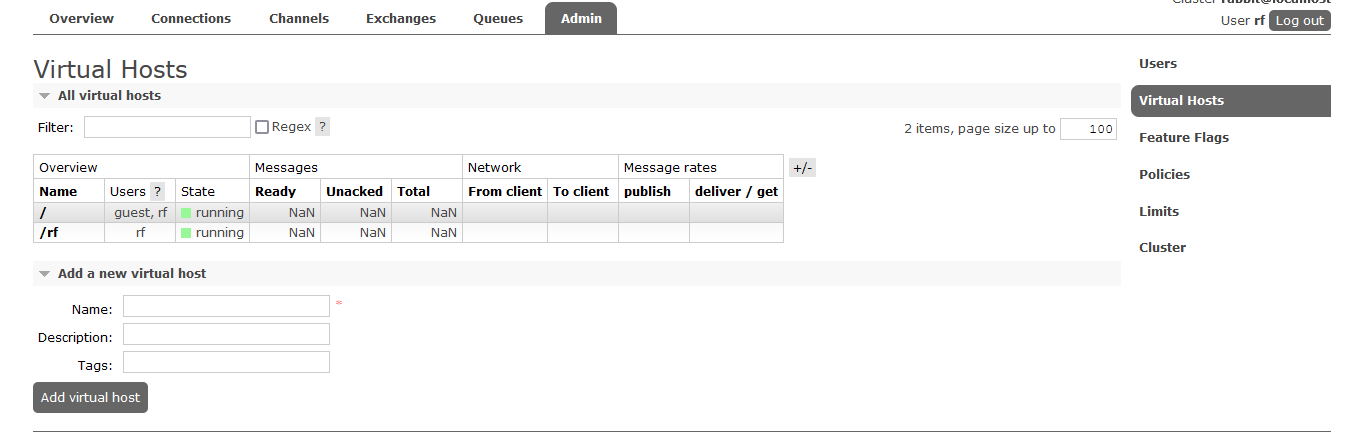
  • Virtual Host:虚拟的主机,RabbitMQ默认的vhost/,必须在链接时指定标识一批交换机、消息队列和相关对象而形成的整体,虚拟主机共享相同的身份认证和加密环境的独立服务器域,每个虚拟主机本质上是一个迷你版的RabbitMQ服务器,拥有自己的队列、交换器、绑定和权限机制
  • Exchange:交换机,路由,用来接收生产者发送的消息并将这些消息路由给服务器中的队列
  • Queue:用来保存消息知道发送给消费者,一个消息可以投递给多个队列,是消息的容器和终点,消息一直在队列里面,等待消费者连接到这个队列将其取走
  • Banding:绑定,用于消息队列和交换机之间的关联
  • Channel:通道,多路复用连接中的一条独立的双向数据流通道,AMQP通过信道发出,消息操作在信道完成,可以减小TCP连接的开销
  • Connection:网络连接
  • Publisher:生产者,一个向交换机发布消息的客户端应用程序
  • Consumer:消费者,一个从消息队列中取得消息的客户端应用程序
  • Message:消息,由消息头和消息体组成,消息体不透明,消息头由一系列可选属性组成,包括路由键routing-key,优先级priority,(持久性存储)消息的路由模式delivery-mode

2. RabbitMQ使用

  • RabbitMQ的安装需要先安装erlang语言环境,有版本的匹配要求https://www.rabbitmq.com/which-erlang.ht
  • 安装前先下载erlanghttps://dl.bintray.com/rabbitmq-erlang/rpm/erlang)、socathttp://repo.iotti.biz/CentOS/7/x86_64/socat-1.7.3.2-5.el7.lux.x86_64.rpm)和RabbitMQhttps://www.rabbitmq.com/install-rpm.html#downloads

2.1 安装

  • 安装
    [root@localhost opt]# rpm -ivh erlang-21.3.8.16-1.el7.x86_64.rpm
    [root@localhost opt]# rpm -ivh socat-1.7.3.2-5.el7.lux.x86_64.rpm
    [root@localhost opt]# rpm -ivh rabbitmq-server-3.8.6-1.el7.noarch.rpm
  • 启动后台管理插件
    [root@localhost opt]# rabbitmq-plugins enable rabbitmq_management
  • 启动RabbitMQ
[root@localhost opt]# systemctl start rabbitmq-server.service
[root@localhost opt]# systemctl status rabbitmq-server.service
[root@localhost opt]# systemctl restart rabbitmq-server.service
[root@localhost opt]# systemctl stop rabbitmq-server.service
  • 查看进程
    [root@localhost opt]# ps -ef | grep rabbitmq
  • 关闭防火墙测试
     systemctl stop firewalld
    http://192.168.80.128:15672
  • 创建账号,设置用户角色、权限(默认guestguest用户默认不允许远程连接)
#创建账号
[root@localhost opt]# rabbitmqctl add_user rf 123456
#设置用户角色
[root@localhost opt]# rabbitmqctl set_user_tags rf administrator
#设置用户权限
[root@localhost opt]# rabbitmqctl set_permissions -p "/" rf ".*" ".*" ".*"
#查看当前用户和角色
[root@localhost opt]# rabbitmqctl list_users
#修改密码
[root@localhost opt]# rabbitmqctl change_password rf 123123
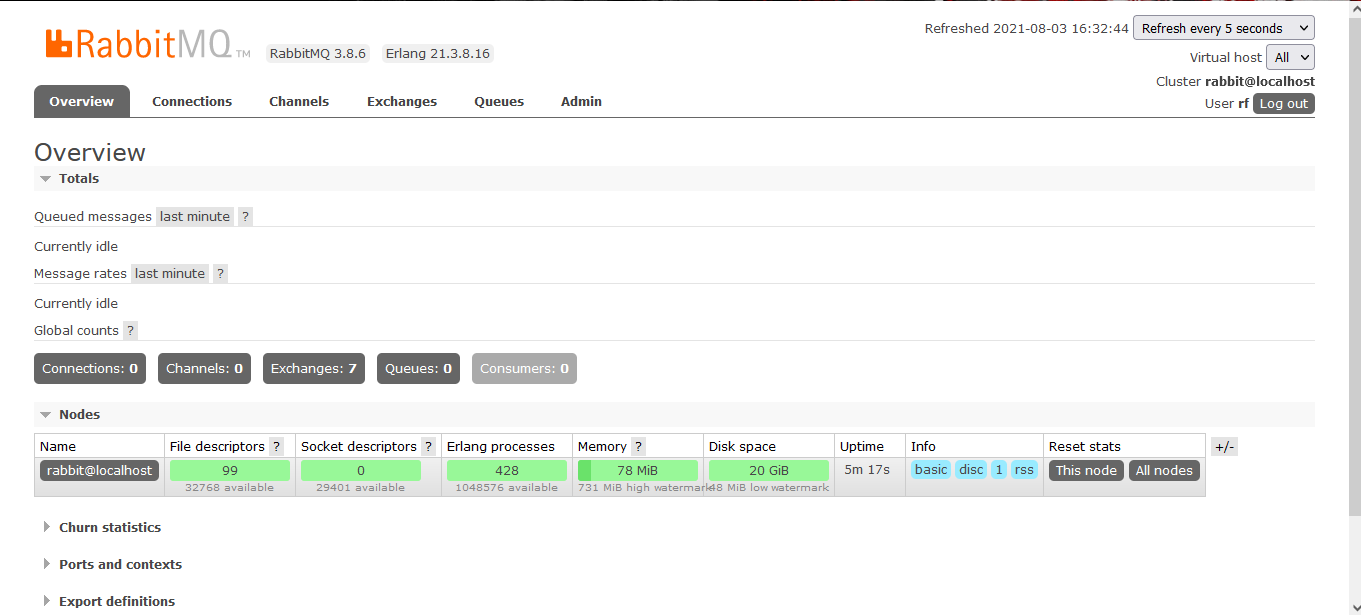
  • 进入浏览器查看管理界面
    • overview:概览
    • connections:连接情况
    • channels:信道或通道情况
    • Exchanges:交换机、路由
    • Queues:消息队列
    • Admin:用户,管理员列表
    • 端口:
      • 5672RabbitMQ提供给编程语言客户端链接的端口,java端口
      • 15672RabbitMQ管理界面的端口
      • 25672RabbitMQ集群的端口


2.2 RabbitMQ快速入门


  • 依赖

<?xml version="1.0" encoding="UTF-8"?>
<project xmlns="http://maven.apache.org/POM/4.0.0"
         xmlns:xsi="http://www.w3.org/2001/XMLSchema-instance"
         xsi:schemaLocation="http://maven.apache.org/POM/4.0.0 http://maven.apache.org/xsd/maven-4.0.0.xsd">
    <modelVersion>4.0.0</modelVersion>

    <groupId>org.example</groupId>
    <artifactId>rabbit-quick</artifactId>
    <version>1.0-SNAPSHOT</version>

    <dependencies>
    <!-- AMQP协议-->
    <dependency>
        <groupId>com.rabbitmq</groupId>
        <artifactId>amqp-client</artifactId>
        <version>5.7.3</version>
    </dependency>
    <!-- log4j-->
    <dependency>
        <groupId>org.slf4j</groupId>
        <artifactId>slf4j-log4j12</artifactId>
        <version>1.7.25</version>
        <scope>compile</scope>
    </dependency>
    <!--     lang3   -->
    <dependency>
        <groupId>org.apache.commons</groupId>
        <artifactId>commons-lang3</artifactId>
        <version>3.9</version>
    </dependency>
    </dependencies>
</project>
  • 日志依赖

log4j.appender.stdout=org.apache.log4j.ConsoleAppender
log4j.appender.stdout.Target=System.out
log4j.appender.stdout.layout=org.apache.log4j.PatternLayout
log4j.appender.stdout.layout.ConversionPattern=%d{yyyy-MM-dd HH:mm:ss} %m%n
log4j.appender.file=org.apache.log4j.FileAppender
log4j.appender.file.File=rebbitmq.log
log4j.appender.file.layout=org.apache.log4j.PatternLayout
log4j.appender.file.layout.ConversionPattern=%d{yyyy-MM-dd HH:mm:ss} %l %m%n
log4j.rootLogger=debug, stdout,file
  • 创建虚拟主机,连接


package utils;


import com.rabbitmq.client.Connection;
import com.rabbitmq.client.ConnectionFactory;

import java.io.IOException;
import java.util.concurrent.TimeoutException;

public class ConnectionUtil {
    public static Connection getConnection() throws Exception {
        //1.创建连接工厂
        ConnectionFactory connectionFactory = new ConnectionFactory();
        //2.在工厂对象中设置MQ的连接信息(ip,port,vhost,username,password)
        connectionFactory.setHost("192.168.80.128");
        connectionFactory.setPort(5672);
        connectionFactory.setVirtualHost("/rf");
        connectionFactory.setUsername("rf");
        connectionFactory.setPassword("123456");
        //3.通过工厂获得与MQ的连接
        Connection connection = connectionFactory.newConnection();
        return connection;
    }

    public static void main(String[] args) throws Exception {
        Connection connection = ConnectionUtil.getConnection();
        //mqp://rf@192.168.80.128:5672//rf
        System.out.println("connection = " + connection);
        connection.close();
    }

}

2.3 RabbitMQ模式

RabbitMQ提供了6中消息模型,第6种是RPC,不是消息队列,以下五种大致分为两类:点对点和发布订阅,RabbitMQ本身只是接收,存储和转发消息,并不会对信息进行处理

  • 点对点: p2p模式,包含消息队列,发送者和接受者,每个消息发送到一个特定队列中,接受者从中获得消息,队列中保留这些消息,直到它们被消费或超时
    • 普通模式和工作队列模式属于点对点模式
    • 每个消息只有一个消费者,一旦消费,消息就不在队列中
    • 发送者和接受者之间没有依赖性,发送者发送完成,不管接受者是否运行,都不会影响消息发送到队列中
    • 接受者成功接受到消息之后需要向对象发送确认,发送的每个消息都会被成功处理
  • 发布订阅模式:publishPub/subscribeSub,包含发布者、订阅者和交换机
    • 发布订阅模式、路由模式和通配符模式属于发布订阅类型
    • 多个发布者将消息发送给交换机,系统将这些消息传递给多个订阅者
    • 每个消息可以有多个订阅者
    • 发布者和订阅者在时间上有依赖,对于某个交换机的订阅者,必须创建一个订阅后,才能消费发布者发布的消息
    • 为了消费消息,订阅者必须保持运行状态
    • 适用于发送的消息被福讴歌消费者进行处理

2.3.1 简单模式


  • 生产者
package common;

import com.rabbitmq.client.Channel;
import com.rabbitmq.client.Connection;
import utils.ConnectionUtil;

//消息的生产者
public class Sender {

    public static void main(String[] args) throws Exception {
        //生产的消息
        String msg="hello,rabbit!我是rf";

        // 1.获得连接
        Connection connection = ConnectionUtil.getConnection();

        // 2.在连接中创建通道(信道)
        Channel channel = connection.createChannel();

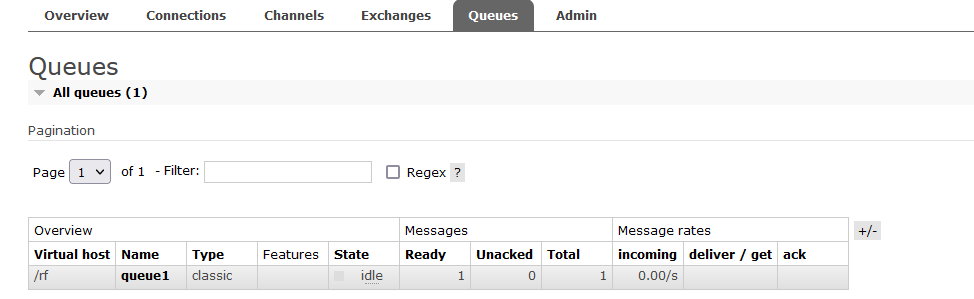
        // 3.创建消息队列(1,2,3,4,5)启动生产者,即可前往管理端查看队列中的信息,会有一条信息没有处理和确认
        /*
        参数1:队列的名称
        参数2:队列中的数据是否持久化
        参数3:是否排外(是否支持扩展,当前队列只能自己用,不能给别人用)
        参数4:是否自动删除(当队列的连接数为0时,队列会销毁,不管队列是否还存保存数据)
        参数5:队列参数(没有参数为null)
        */
           channel.queueDeclare("queue1",false,false,false,null);

        // 4.向指定的队列发送消息(1,2,3,4)
        /*
        参数1:交换机名称,当前是简单模式,也就是P2P模式,没有交换机,所以名称为""
        参数2:目标队列的名称
        参数3:设置消息的属性(没有属性则为null)
        参数4:消息的内容(只接收字节数组)
        */
        channel.basicPublish("","queue1",null,msg.getBytes());
        System.out.println("发送:" + msg+"成功");
        // 5.释放资源
        channel.close();
        connection.close();

    }


}
  • 消费者
package common;

import com.rabbitmq.client.*;
import utils.ConnectionUtil;

import java.io.IOException;

public class Receiver {
    public static void main(String[] args) throws Exception{
        
        // 1.获得连接
        Connection connection = ConnectionUtil.getConnection();
        // 2.获得通道(信道)
        Channel channel = connection.createChannel();
        // 3.从信道中获得消息
        DefaultConsumer defaultConsumer = new DefaultConsumer(channel){
            @Override //交付处理(收件人信息,包裹上的快递标签,协议的配置,消息)
            public void handleDelivery(String consumerTag, Envelope envelope, AMQP.BasicProperties properties, byte[] body) throws IOException {
                // body就是从队列中获取的消息
                String s=new String(body);
                System.out.println("接收 = " + s);
            }
        };

        // 4.监听队列 true:自动消息确认
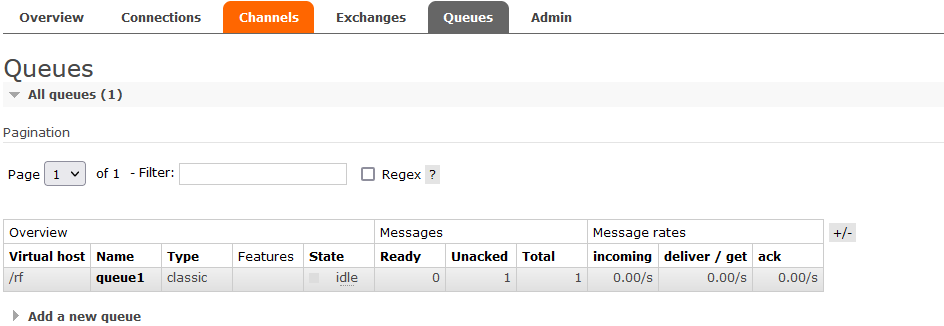
      channel.basicConsume("queue1", false,defaultConsumer); //若将监听队列改为true则进行消息确认,false则结束消费者,未确认的消息返回队列中
    }

}
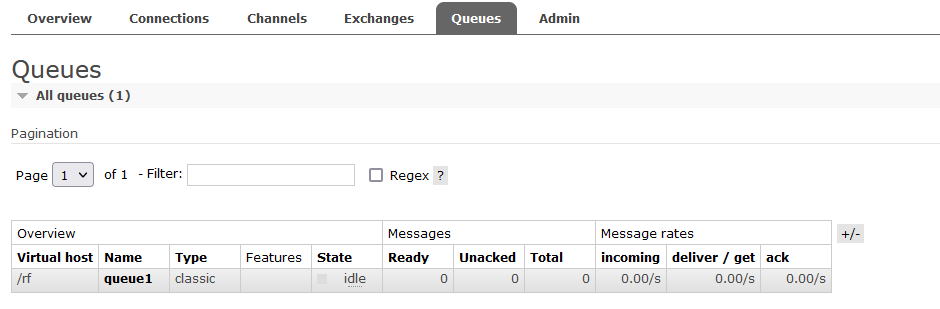


  • 加入消息确认机制
    • 消息一旦被消费,就会立刻从队列中移除
    • 若消费者接收消息后还未执行操作就出现异常导致消费失败,而RabbitMQ无从得知,消息就会丢失
    • 通过RabbitMQ的确认ACK机制,当消费者获取消息后,回想RabbitMQ发送回执确认,确认消息已经被接受
    • 如果消息不太重要,丢失也没有影响,选择自动确认机制
    • 如果消息非常重要,最好使用手动确认,否则当自动确认消费后,RabbitMQ就会删除消息,若此时消费者异常宕机,则消息永久丢失
  • 手动消息确认
package common;

import com.rabbitmq.client.*;
import utils.ConnectionUtil;

import java.io.IOException;

public class Receiver {
    public static void main(String[] args) throws Exception{
        
        // 1.获得连接
        Connection connection = ConnectionUtil.getConnection();
        // 2.获得通道(信道)
        Channel channel = connection.createChannel();
        // 3.从信道中获得消息
        DefaultConsumer defaultConsumer = new DefaultConsumer(channel){
            @Override //交付处理(收件人信息,包裹上的快递标签,协议的配置,消息)
            public void handleDelivery(String consumerTag, Envelope envelope, AMQP.BasicProperties properties, byte[] body) throws IOException {
                // body就是从队列中获取的消息
                String s=new String(body);
                System.out.println("接收 = " + s);
                //来一个确认一个
                // 手动确认(参数1:收件人信息,确认机制:是否同时确认多个消息)
                channel.basicAck(envelope.getDeliveryTag(),false);
            }
        };

        // 4.监听队列 true:自动消息确认
      channel.basicConsume("queue1", false,defaultConsumer);
    }

}

2.3.2 工作队列模式
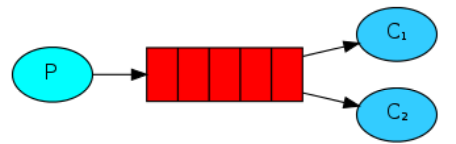


  •  如果生产者生产消息过快多,消费者能力有限,就会产生消息在队列中堆积
  • 使用多个消费者对消息进行处理,RabbitMQ采用的是公平分配机制,第n条消息发送给第N个消费者进行处理
  • 生产者
package workqueue;

import com.rabbitmq.client.Channel;
import com.rabbitmq.client.Connection;
import utils.ConnectionUtil;

public class Sender {
    public static void main(String[] args) throws Exception {

        Connection connection = ConnectionUtil.getConnection();
        Channel channel = connection.createChannel();
         /*
        参数1:队列的名称
        参数2:队列中的数据是否持久化
        参数3:是否排外(是否支持扩展,当前队列只能自己用,不能给别人用)
        参数4:是否自动删除(当队列的连接数为0时,队列会销毁,不管队列是否还存保存数据)
        参数5:队列参数(没有参数为null)
        */
        channel.queueDeclare("work_queue",false,false,false,null);

        for(int i=0;i<100;i++) {
            String msg = "羊肉串 --> "+i;
            /*
        参数1:交换机名称,当前是简单模式,也就是P2P模式,没有交换机,所以名称为""
        参数2:目标队列的名称
        参数3:设置消息的属性(没有属性则为null)
        参数4:消息的内容(只接收字节数组)
        */
            channel.basicPublish("", "work_queue", null,msg.getBytes() );
            System.out.println("师傅烤好:" + msg);
        }
        System.out.println("师傅烤好了" );
        channel.close();
        connection.close();
    }
}
  • 消费者1,2 内容类似
package workqueue;

import com.rabbitmq.client.*;
import utils.ConnectionUtil;

import java.io.IOException;

public class Receiver1 {
    private static Integer i=1;
    public static void main(String[] args) throws Exception {
        Connection connection = ConnectionUtil.getConnection();
      final   Channel channel = connection.createChannel();
        // 声明队列(此处为消费者,不是声明创建队列,获取队列)
        channel.queueDeclare("work_queue",false,false,false,null);
        DefaultConsumer consumer = new DefaultConsumer(channel) {
            @Override
            public void handleDelivery(String consumerTag, Envelope envelope, AMQP.BasicProperties properties, byte[] body) throws IOException {
                String msg = new String(body);
                System.out.println("【顾客1】吃掉 " + msg+" ! 共吃【"+i++ +"】串");
                try {
                    Thread.sleep(200);
                } catch (InterruptedException e) {
                    e.printStackTrace();
                }
                channel.basicAck(envelope.getDeliveryTag(), false);
            }
        };

        channel.basicConsume("work_queue",false,consumer);
    }
}
  • 先启动消费者,在启动生产者,两个消费者公平消费
  • 使用prefetchCount = 1basicQos方法可以实现对消费的分配处理,在消费者处理并确认一个消息前,不会有新消息发送给当前消费者,而分派给其他空闲的消费者
package workqueue;

import com.rabbitmq.client.*;
import utils.ConnectionUtil;

import java.io.IOException;

public class Receiver1 {
    private static Integer i=1;
    public static void main(String[] args) throws Exception {
        Connection connection = ConnectionUtil.getConnection();
      final   Channel channel = connection.createChannel();

        // 声明队列(此处为消费者,不是声明创建队列,获取队列)
        channel.queueDeclare("work_queue",false,false,false,null);
        // 避免消息堆积,谁速度快谁消费多
        channel.basicQos(1);
        DefaultConsumer consumer = new DefaultConsumer(channel) {
            @Override
            public void handleDelivery(String consumerTag, Envelope envelope, AMQP.BasicProperties properties, byte[] body) throws IOException {
                String msg = new String(body);
                System.out.println("【顾客1】吃掉 " + msg+" ! 共吃【"+i++ +"】串");
                try {
                    Thread.sleep(200);
                } catch (InterruptedException e) {
                    e.printStackTrace();
                }
                channel.basicAck(envelope.getDeliveryTag(), false);
            }
        };

        channel.basicConsume("work_queue",false,consumer);
    }
}
  • 必须结合手动确认机制
  • 如何避免消息堆积
    • 采用工作队列模式,多个消费者监听同一个队列
    • 当接收到消息后,通过线程池,进行异步消费,当前线程非空闲时,其它线程可以消费消息

2.3.3 发布订阅模式

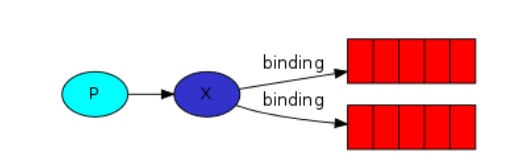
  • 一个发布消息,多个消费者接受发布的消息,x为路由,p生产者发送消息给x路由,x将消息转发给绑定x的队列
  • 必须想创建路由,路由在生产者中创建,由于路由没有存储信息的能力,当生产者将消息发送给路由时,消费者还未运行,此时没有消息队列
  • 先运行生产者,产生路由,在运行消费者,最后再运行生产者
  • 生产者
package subpub;

import com.rabbitmq.client.Channel;
import com.rabbitmq.client.Connection;
import utils.ConnectionUtil;

public class Publisher {
    public static void main(String[] args)throws Exception {
        Connection connection = ConnectionUtil.getConnection();
        Channel channel = connection.createChannel();
        // 声明路由(路由名,路由类型)
// fanout:不处理路由键(只需要将队列绑定到路由上,发送到路由的消息都会被转发到与该路由绑定的所有队列上)
        channel.exchangeDeclare("test_exchange_fanout","fanout");
        String msg = "hello,大家好!";
        channel.basicPublish("test_exchange_fanout", "", null, msg.getBytes());
        System.out.println("生产者:" + msg);
        channel.close();
        connection.close();
    }
}
  • 消费者
package subpub;

import com.rabbitmq.client.*;
import utils.ConnectionUtil;

import java.io.IOException;

public class Consumer1 {
    public static void main(String[] args)  throws Exception{
        Connection connection = ConnectionUtil.getConnection();
        Channel channel = connection.createChannel();
        channel.queueDeclare("test_exchange_fanout_queue_1",false,false,false,null);
        //        绑定路由
        /*
        参数1:队列名
        参数2:交换器名称
        参数3:路由key(暂时无用,""即可)
        */
        channel.queueBind("test_exchange_fanout_queue_1","test_exchange_fanout","");
        DefaultConsumer consumer = new DefaultConsumer(channel) {
            @Override
            public void handleDelivery(String consumerTag, Envelope envelope, AMQP.BasicProperties properties, byte[] body) throws IOException {
                String s = new String(body);
                System.out.println("【消费者1】 = " + s);
            }
        };

        channel.basicConsume("test_exchange_fanout_queue_1",true,consumer);
    }
}

2.3.4 路由模式
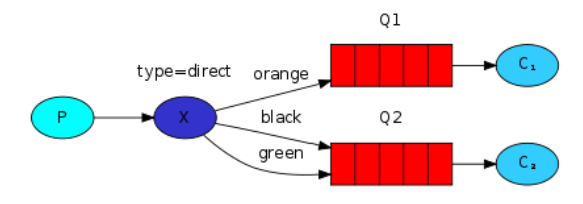


  • 路由会根据类型进行定向分发
  • 生产者
package router;

import com.rabbitmq.client.Channel;
import com.rabbitmq.client.Connection;
import utils.ConnectionUtil;

public class Sender {
        public static void main(String[] args) throws Exception {
            Connection connection = ConnectionUtil.getConnection();
            Channel channel = connection.createChannel();
             // 声明路由(路由名,路由类型)
             // direct:根据路由键进行定向分发消息
            channel.exchangeDeclare("test_exchange_direct", "direct");
            String msg = "用户注册,【userid=S101】";
            channel.basicPublish("test_exchange_direct", "select", null,
                    msg.getBytes());
            System.out.println("[用户系统]:" + msg);
            channel.close();
            connection.close();
        }

}
  • 消费者
package router;

import com.rabbitmq.client.*;
import utils.ConnectionUtil;

import java.io.IOException;

public class Receiver1 {

    public static void main(String[] args) throws Exception {
        Connection connection = ConnectionUtil.getConnection();
        Channel channel = connection.createChannel();
// 声明队列
        channel.queueDeclare("test_exchange_direct_queue_1", false, false, false, null);
// 绑定路由(如果路由键的类型是 添加,删除,修改 的话,绑定到这个队列1上)
        channel.queueBind("test_exchange_direct_queue_1", "test_exchange_direct", "insert");
        channel.queueBind("test_exchange_direct_queue_1",
                "test_exchange_direct", "update");
        channel.queueBind("test_exchange_direct_queue_1",
                "test_exchange_direct", "delete");

        DefaultConsumer consumer = new DefaultConsumer(channel) {
            @Override
            public void handleDelivery(String consumerTag, Envelope envelope, AMQP.BasicProperties properties, byte[] body) throws IOException {
                String s = new String(body);
                System.out.println("【消费者1】 = " + s);
            }
        };
// 4.监听队列 true:自动消息确认
        channel.basicConsume("test_exchange_direct_queue_1", true, consumer);
    }
}

2.3.5 通配符模式
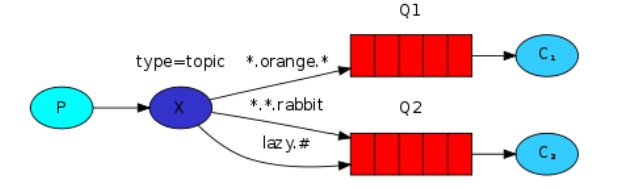


  • 路由键支持模糊匹配
  • * 只能匹配一个单词
  • #匹配0个或更多个单词
  • 生产者
package fuzzy;

import com.rabbitmq.client.Channel;
import com.rabbitmq.client.Connection;
import utils.ConnectionUtil;

public class Sender {
    public static void main(String[] args) throws Exception {
        Connection connection = ConnectionUtil.getConnection();
        Channel channel = connection.createChannel();
      // 声明路由(路由名,路由类型)
        // topic:模糊匹配的定向分发
        channel.exchangeDeclare("test_exchange_topic", "topic");
        String msg = "商品降价";
        channel.basicPublish("test_exchange_topic", "product.price", null, msg.getBytes());
        System.out.println("[用户系统]:" + msg);
        channel.close();
        connection.close();
    }
}
  • 消费者
package fuzzy;

import com.rabbitmq.client.*;
import utils.ConnectionUtil;

import java.io.IOException;

public class Receiver1 {
    public static void main(String[] args) throws Exception {
        Connection connection = ConnectionUtil.getConnection();
        Channel channel = connection.createChannel();
// 声明队列
        channel.queueDeclare("test_exchange_topic_queue_1",false,false,false,null);
// 绑定路由(绑定 用户相关 的消息)
        channel.queueBind("test_exchange_topic_queue_1", "test_exchange_topic",
                "user.#");
        DefaultConsumer consumer = new DefaultConsumer(channel){
            @Override
            public void handleDelivery(String consumerTag, Envelope envelope,
                                       AMQP.BasicProperties properties, byte[] body) throws IOException {
                String s = new String(body);
                System.out.println("【消费者1】 = " + s);
            }
        };
// 4.监听队列 true:自动消息确认
        channel.basicConsume("test_exchange_topic_queue_1", true,consumer);
    }
}
package fuzzy;

import com.rabbitmq.client.*;
import utils.ConnectionUtil;

import java.io.IOException;

public class Receiver2 {
    public static void main(String[] args) throws Exception {
        Connection connection = ConnectionUtil.getConnection();
        Channel channel = connection.createChannel();
         // 声明队列
        channel.queueDeclare("test_exchange_topic_queue_2",false,false,false,null);
         // 绑定路由(绑定 用户相关 的消息)
        channel.queueBind("test_exchange_topic_queue_2", "test_exchange_topic",
                "price.#");
        DefaultConsumer consumer = new DefaultConsumer(channel){
            @Override
            public void handleDelivery(String consumerTag, Envelope envelope,
                                       AMQP.BasicProperties properties, byte[] body) throws IOException {
                String s = new String(body);
                System.out.println("【消费者2】 = " + s);
            }
        };
        // 4.监听队列 true:自动消息确认
        channel.basicConsume("test_exchange_topic_queue_2", true,consumer);
    }
}

2.4 持久化

  • RabbitMQ有持久机制,要想消息持久化,路由和队列都要持久化
  • 生产者


package serial;

import com.rabbitmq.client.Channel;
import com.rabbitmq.client.Connection;
import com.rabbitmq.client.MessageProperties;
import utils.ConnectionUtil;

public class Sender {
    public static void main(String[] args) throws  Exception{
        Connection connection = ConnectionUtil.getConnection();
        Channel channel = connection.createChannel();
// 声明路由(路由名,路由类型,持久化)
        channel.exchangeDeclare("test_exchange_topic","topic",true);
        String msg="商品降价";
// 发送消息(第三个参数作业是让消息持久化)
        channel.basicPublish("test_exchange_topic","product.price", MessageProperties.PERSISTENT_TEXT_PLAIN,msg.getBytes());
        System.out.println("[用户系统]:"+msg);
        channel.close();
        connection.close();

    }

}
  • 消费者
    package serial;
    
    import com.rabbitmq.client.*;
    import utils.ConnectionUtil;
    
    import java.io.IOException;
    
    public class Receriver2 {
        public static void main(String[] args) throws Exception {
            Connection connection = ConnectionUtil.getConnection();
    
            Channel channel = connection.createChannel();
      // 声明队列( 第二个参数为true:支持持久化) 
            channel.queueDeclare("test_exchange_topic_queue2",true,false,false,null);
            channel.queueBind("test_exchange_topic_queue2","test_exchange_topic","user.#");
    
            DefaultConsumer defaultConsumer=new DefaultConsumer(channel){
                @Override
                public void handleDelivery(String consumerTag, Envelope envelope, AMQP.BasicProperties properties, byte[] body) throws IOException {
                    String s = new String(body);
                    System.out.println("[消费者2]="+s);
    
                }
            };
            channel.basicConsume("test_exchange_topic_queue2",true,defaultConsumer);
        }
    }
  • spring整合RabbitMQ
    • 企业中应用最广泛的是定向匹配topic
    • Spring AMQP是基于Spring框架的 AMQP消息解决方案,提供了模板化的发送和接收消息的抽象层,提供基于消息驱动端额POJO消息监听,简化RabbitMQ相关程序的开发
    • 生产端
      • pom.xml
      <?xml version="1.0" encoding="UTF-8"?>
      <project xmlns="http://maven.apache.org/POM/4.0.0"
               xmlns:xsi="http://www.w3.org/2001/XMLSchema-instance"
               xsi:schemaLocation="http://maven.apache.org/POM/4.0.0 http://maven.apache.org/xsd/maven-4.0.0.xsd">
          <modelVersion>4.0.0</modelVersion>
      
          <groupId>org.example</groupId>
          <artifactId>spring-rabbitmq-producer</artifactId>
          <version>1.0-SNAPSHOT</version>
      
          <properties>
              <maven.compiler.source>11</maven.compiler.source>
              <maven.compiler.target>11</maven.compiler.target>
          </properties>
          <dependencies>
              <dependency>
                  <groupId>org.springframework.amqp</groupId>
                  <artifactId>spring-rabbit</artifactId>
                  <version>2.0.1.RELEASE</version>
              </dependency>
              <dependency>
                  <groupId>org.slf4j</groupId>
                  <artifactId>slf4j-log4j12</artifactId>
                  <version>1.7.25</version>
                  <scope>compile</scope>
              </dependency>
              <dependency>
                  <groupId>org.apache.commons</groupId>
                  <artifactId>commons-lang3</artifactId>
                  <version>3.9</version>
              </dependency>
          </dependencies>
      
      </project
      • spring-rabbitmq-producer.xml
      <?xml version="1.0" encoding="UTF-8"?>
      <beans xmlns="http://www.springframework.org/schema/beans"
             xmlns:xsi="http://www.w3.org/2001/XMLSchema-instance"
             xmlns:rabbit="http://www.springframework.org/schema/rabbit"
             xsi:schemaLocation="
      http://www.springframework.org/schema/beans
      http://www.springframework.org/schema/beans/spring-beans.xsd
      http://www.springframework.org/schema/rabbit
      http://www.springframework.org/schema/rabbit/spring-rabbit.xsd">
      
          <!-- 1.配置连接 -->
          <rabbit:connection-factory
                  id="connectionFactory"
                  username="rf"
                  password="123456"
                  virtual-host="/rf"
                  port="5276"
                  host="192.168.80.128"
          />
          <!-- 2.配置队列 -->
          <rabbit:queue name="test_spring_queue_1" />
          <!-- 3.配置rabbitAdmin:主要用于在Java代码中对理队和队列进行管理,用于创建、绑定、删
      除队列与交换机,发送消息等 -->
          <rabbit:admin connection-factory="connectionFactory" />
          <!-- 4.配置topic类型exchange;队列绑定到交换机 -->
          <rabbit:topic-exchange name="spring_topic_exchange" >
              <rabbit:bindings>
                  <rabbit:binding queue="test_spring_queue_1" pattern="msg.#"></rabbit:binding>
              </rabbit:bindings>
          </rabbit:topic-exchange>
          <!-- 5. 配置消息对象json转换类 -->
          <bean id="jsonMessageConverter"
                class="org.springframework.amqp.support.converter.Jackson2JsonMessageConverter"
          />
          <!-- 6. 配置RabbitTemplate(消息生产者) -->
          <rabbit:template
                  id="rabbitTemplate"
                  exchange="spring_topic_exchange"
                  connection-factory="connectionFactory"
                  message-converter="jsonMessageConverter"
          />
      
      </beans
      • 发消息
import org.springframework.amqp.rabbit.core.RabbitTemplate;
import org.springframework.context.support.ClassPathXmlApplicationContext;

import java.util.HashMap;
import java.util.Map;

public class Sender {

    public static void main(String[] args) {
        // 1.创建spring容器
        ClassPathXmlApplicationContext applicationContext = new ClassPathXmlApplicationContext("spring-rabbitmq-producer.xml");
        // 2.从容器中获取对象
        RabbitTemplate rabbitTemplate = applicationContext.getBean(RabbitTemplate.class);
        // 3.发送消息
        Map<String, String> map = new HashMap();
        map.put("name", "eda");
        map.put("email", "19998539@qq.com");
        rabbitTemplate.convertAndSend("msg.user",map);
        applicationContext.close();

    }
}
    • 消费端
      • pom.xml
      <?xml version="1.0" encoding="UTF-8"?>
      <project xmlns="http://maven.apache.org/POM/4.0.0"
               xmlns:xsi="http://www.w3.org/2001/XMLSchema-instance"
               xsi:schemaLocation="http://maven.apache.org/POM/4.0.0 http://maven.apache.org/xsd/maven-4.0.0.xsd">
          <modelVersion>4.0.0</modelVersion>
      
          <groupId>org.example</groupId>
          <artifactId>spring-rabbitmq-consumer</artifactId>
          <version>1.0-SNAPSHOT</version>
      
          <properties>
              <maven.compiler.source>11</maven.compiler.source>
              <maven.compiler.target>11</maven.compiler.target>
          </properties>
          <dependencies>
              <dependency>
                  <groupId>org.springframework.amqp</groupId>
                  <artifactId>spring-rabbit</artifactId>
                  <version>2.0.1.RELEASE</version>
              </dependency>
              <dependency>
                  <groupId>org.slf4j</groupId>
                  <artifactId>slf4j-log4j12</artifactId>
                  <version>1.7.25</version>
                  <scope>compile</scope>
              </dependency>
              <dependency>
                  <groupId>org.apache.commons</groupId>
                  <artifactId>commons-lang3</artifactId>
                  <version>3.9</version>
              </dependency>
          </dependencies>
      
      
      </project>
      • spring-rabbitmq-consumer.xml
      <?xml version="1.0" encoding="UTF-8"?>
      <beans xmlns="http://www.springframework.org/schema/beans"
             xmlns:xsi="http://www.w3.org/2001/XMLSchema-instance"
             xmlns:rabbit="http://www.springframework.org/schema/rabbit"
             xmlns:context="http://www.springframework.org/schema/context"
             xsi:schemaLocation="
      http://www.springframework.org/schema/beans
      http://www.springframework.org/schema/beans/spring-beans.xsd
      http://www.springframework.org/schema/rabbit
      http://www.springframework.org/schema/rabbit/spring-rabbit.xsd
      http://www.springframework.org/schema/context
      http://www.springframework.org/schema/context/spring-context.xsd">
          <!-- 1. 配置连接 -->
          <rabbit:connection-factory
                  id="connectionFactory"
                  host="192.168.80.128"
                  port="5672"
                  username="rf"
                  password="123456"
                  virtual-host="/rf"
          />
          <!-- 2. 配置队列 -->
          <rabbit:queue name="test_spring_queue_1" />
          <!-- 3.配置rabbitAdmin -->
         <rabbit:admin connection-factory="connectionFactory"/>
          <!-- 4.springIOC注解扫描包-->
          <context:component-scan base-package="controller"/>
          <!-- 5.配置监听 -->
          <rabbit:listener-container connection-factory="connectionFactory">
              <rabbit:listener ref="consumerListener" queue-names="test_spring_queue_1"/>
          </rabbit:listener-container>
      
      
      </beans
      • 消费者,MessageListener接口用于spring容器接收到消息后处理消息,如果需要使用自己定义的类型来实现 处理消息时,必须实现该接口,并重写onMessage()方法,当spring容器接收消息后,会自动交由onMessage进行处理
        package listener;
        
        import com.fasterxml.jackson.databind.JsonNode;
        import com.fasterxml.jackson.databind.ObjectMapper;
        import org.springframework.amqp.core.Message;
        import org.springframework.amqp.core.MessageListener;
        import org.springframework.stereotype.Component;
        import org.springframework.stereotype.Controller;
        
        import java.io.IOException;
        
        @Component
        //   MessageListener接口用于spring容器接收到消息后处理消息,
        public class ConsumerListener implements MessageListener {
            // jackson提供序列化和反序列中使用最多的类,用来转换json的
            private static final ObjectMapper MAPPER=new ObjectMapper();
            //   如果需要使用自己定义的类型来实现处理消息时,必须实现该接口,并重写onMessage()方法,当spring容器接收消息后,会自动交由onMessage进行处理
            @Override
            public void onMessage(Message message) {
                // 将message对象转换成json
                try {
                    JsonNode jsonNode=MAPPER.readTree(message.getBody());
                    String name=jsonNode.get("name").asText();
                    String email = jsonNode.get("email").asText();
                    System.out.println("从队列中获取:【"+name+"的邮箱是:"+email+"】");
                } catch (IOException e) {
                    e.printStackTrace();
                }
            }


        }


2.5 消息成功确认机制


  • 事务机制
    • AMQP协议提供的一种保证消息成功投递的方式,通过信道开启 transactional 模式  
    • 利用信道的三个方法实现事务的发送,回滚,和成功提交
      • channel.txSelect(): 开启事务
      • channel.txCommit() :提交事务
      • channel.txRollback() :回滚事务 
      • spring已经对上述三个方法进行了封装


package tx;

import com.rabbitmq.client.Channel;
import com.rabbitmq.client.Connection;
import utils.ConnectionUtil;

import java.io.IOException;

public class Sender {
    public static void main(String[] args) throws Exception {
        Connection connection = ConnectionUtil.getConnection();
        Channel channel = connection.createChannel();
        channel.exchangeDeclare("test_transaction", "topic");
        channel.txSelect();//开启事务
        try {
            //事务
            channel.basicPublish("test_transaction", "product.price", null, "商品 降价1".getBytes());
            System.out.println(1/0); // 模拟异常!
            channel.basicPublish("test_transaction", "product.price", null, "商品 降价2".getBytes());
            System.out.println("消息全部发出!");
            channel.txCommit();
        } catch (Exception e) {

            System.out.println("出现异常!");
            channel.txRollback();
            e.printStackTrace();
        } finally {
            channel.close();
            connection.close();
        }

    }
}
package tx;

import com.rabbitmq.client.*;
import utils.ConnectionUtil;

import java.io.IOException;

public class Receiver1 {
    public static void main(String[] args) throws Exception {
        Connection connection = ConnectionUtil.getConnection();
        Channel channel = connection.createChannel();
        channel.queueDeclare("test_transaction_queue",false,false,false,null);
        channel.queueBind("test_transaction_queue", "test_transaction", "product.#");
        DefaultConsumer consumer = new DefaultConsumer(channel){
            @Override
            public void handleDelivery(String consumerTag, Envelope envelope, AMQP.BasicProperties properties, byte[] body) throws IOException {
                String s = new String(body);
                System.out.println("【消费者】 = " + s);
            }
        };
        channel.basicConsume("test_transaction_queue", true,consumer);
    }
}
  • 发布确认机制Confirm
    • 开启事务,性能最大损失会超过250倍,采用 Confirm模式更加高效
    • Confirm模式采用补发模式进行消息的确认和送达
    • spring-rabbitmq-producer.xml
    <?xml version="1.0" encoding="UTF-8"?>
    <beans xmlns="http://www.springframework.org/schema/beans"
           xmlns:xsi="http://www.w3.org/2001/XMLSchema-instance"
           xmlns:rabbit="http://www.springframework.org/schema/rabbit"
           xsi:schemaLocation="
    http://www.springframework.org/schema/beans
    http://www.springframework.org/schema/beans/spring-beans.xsd
    http://www.springframework.org/schema/rabbit
    http://www.springframework.org/schema/rabbit/spring-rabbit.xsd">
    
        <!-- 1.配置连接 -->
        <rabbit:connection-factory
                id="connectionFactory"
                username="rf"
                password="123456"
                virtual-host="/rf"
                port="5672"
                host="192.168.80.128"
                publisher-confirms="true"
        />
        <!-- 2.配置队列 -->
        <rabbit:queue name="test_spring_queue_1" />
        <!-- 3.配置rabbitAdmin:主要用于在Java代码中对理队和队列进行管理,用于创建、绑定、删
    除队列与交换机,发送消息等 -->
        <rabbit:admin  connection-factory="connectionFactory" />
        <!-- 4.配置topic类型exchange;队列绑定到交换机 -->
        <rabbit:topic-exchange name="spring_topic_exchange" >
            <rabbit:bindings>
                <rabbit:binding queue="test_spring_queue_1" pattern="msg.#"></rabbit:binding>
            </rabbit:bindings>
        </rabbit:topic-exchange>
        <!-- 5. 配置消息对象json转换类 -->
        <bean id="jsonMessageConverter"
              class="org.springframework.amqp.support.converter.Jackson2JsonMessageConverter"
        />
        <!--6.配置rabbitmq的模版,添加确认回调处理类:confirmcallback="msgSendConfirmCallback"-->
        <rabbit:template
                id="rabbitTemplate"
                exchange="spring_topic_exchange"
                connection-factory="connectionFactory"
                message-converter="jsonMessageConverter"
                confirm-callback="msgSendConfirmCallback"
        />
        <!--7.确认机制处理类-->
        <bean id="msgSendConfirmCallback" class="confirm.MsgSendConfirmCallback"/>
    
    </beans>
    • 消息确认处理类
    package confirm;
    
    import org.springframework.amqp.rabbit.core.RabbitTemplate;
    import org.springframework.amqp.rabbit.support.CorrelationData;
    
    public class MsgSendConfirmCallback implements RabbitTemplate.ConfirmCallback {
        @Override
        public void confirm(CorrelationData correlationData, boolean b, String s) {
    // boolean b 返回消息是否确认
            if (b){
                System.out.println("消息确认成功!!");
            } else {
                System.out.println("消息确认失败。。。");
    // 如果本条消息一定要发送到队列中,例如下订单消息,我们可以采用消息补发
    // 采用递归(固定次数,不可无限)或 redis+定时任务
            }
        }
    }
    • log4j.properties
    log4j.appender.stdout=org.apache.log4j.ConsoleAppender
    log4j.appender.stdout.Target=System.out
    log4j.appender.stdout.layout=org.apache.log4j.PatternLayout
    log4j.appender.stdout.layout.ConversionPattern=%d{yyyy-MM-dd HH:mm:ss} %m%n
    log4j.appender.file=org.apache.log4j.FileAppender
    log4j.appender.file.File=rabbitmq.log
    log4j.appender.file.layout=org.apache.log4j.PatternLayout
    log4j.appender.file.layout.ConversionPattern=%d{yyyy-MM-dd HH:mm:ss} %l%m%n
    log4j.rootLogger=debug, stdout,file
    • 发送消息
    import org.springframework.amqp.rabbit.core.RabbitTemplate;
    import org.springframework.context.support.ClassPathXmlApplicationContext;
    
    import java.util.HashMap;
    import java.util.Map;
    
    public class Sender {
    
        public static void main(String[] args) {
            // 1.创建spring容器
            ClassPathXmlApplicationContext applicationContext = new ClassPathXmlApplicationContext("spring-rabbitmq-producer.xml");
            // 2.从容器中获取对象
            RabbitTemplate rabbitTemplate = applicationContext.getBean(RabbitTemplate.class);
            // 3.发送消息
            Map<String, String> map = new HashMap();
            map.put("name", "eda");
            map.put("email", "19998539@qq.com");
    
            // 第一个参数是路由名称,
            // 不写,则使用spring容器中创建的路由
            // 乱写一个,因为路由名错误导致报错,则进入消息确认失败流程
            rabbitTemplate.convertAndSend("x","msg.user",map);
            applicationContext.close();
    
        }
    }

2.6 消费端限流

  • rabbitMQ服务器积累了大量的消息,会导致随便打开一个客户端,就有巨量消息涌入,造成客户端压垮崩溃
  • 当数据量特别大时,对生产端限流不科学,应该对消费端限流,保持消费端的稳定
  • rabbitMQ提供了一中Qos服务质量保证功能,在非自动确认消息的前提下,如果一定数目的消息未被确认前,不再消费新的消息
  • 模拟生产端循环发送消息
     for (int i = 0; i <10 ; i++) {
            rabbitTemplate.convertAndSend("msg.user",map);
            System.out.println("消息已发出...");
        }
  • 消费端限流
   <!--5.配置监听-->
    <!-- prefetch="3" 一次性消费的消息数量。会告诉 RabbitMQ 不要同时给一个消费者推送多于
    N 个消息,一旦有 N 个消息还没有ack,则该 consumer 将阻塞,直到消息被ack-->
    <!-- acknowledge-mode: manual 手动确认-->
    <rabbit:listener-container connection-factory="connectionFactory" prefetch="3" acknowledge="manual">
        <rabbit:listener ref="consumerListener" queue-names="test_spring_queue_1" />
    </rabbit:listener-container>
package listener;

import com.fasterxml.jackson.databind.JsonNode;
import com.fasterxml.jackson.databind.ObjectMapper;
import com.rabbitmq.client.Channel;
import org.springframework.amqp.core.Message;
import org.springframework.amqp.core.MessageDeliveryMode;
import org.springframework.amqp.core.MessageListener;
import org.springframework.amqp.rabbit.listener.adapter.AbstractAdaptableMessageListener;
import org.springframework.stereotype.Component;
import org.springframework.stereotype.Controller;

import java.io.IOException;

@Component
//AbstractAdaptableMessageListener用于在spring容器接收到消息后用于处理消息的抽象基类
public class ConsumerListener /*implements MessageListener*/ extends AbstractAdaptableMessageListener {
        // jackson提供序列化和反序列中使用最多的类,用来转换json的
    private static final ObjectMapper MAPPER=new ObjectMapper();
    @Override
    public void onMessage(Message message, Channel channel) throws Exception {
         //将message对象转换成json
        try {
            JsonNode jsonNode=MAPPER.readTree(message.getBody());
            String name=jsonNode.get("name").asText();
            String email = jsonNode.get("email").asText();
            System.out.println("从队列中获取:【"+name+"的邮箱是:"+email+"】");
            //手动确认
            long deliveryMode = message.getMessageProperties().getDeliveryTag();
            //确认收到(参数1,参数2)
                /*
                参数1:RabbitMQ 向该 Channel 投递的这条消息的唯一标识 ID,是一个单调递
                增的正整数,delivery_tag 的范围仅限于 Channel
                参数2:为了减少网络流量,手动确认可以被批处理,当该参数为 true 时,则可以
                一次性确认 delivery_tag 小于等于传入值的所有消息
                */
            channel.basicAck(deliveryMode,true);
            Thread.sleep(3000);
            System.out.println("休息三秒然后再接收消息");
        } catch (IOException e) {
            e.printStackTrace();
        }
    }


}

2.7 过期时间

  • 在过期时间内,消费可以被消费者正常消费,超过这个时间,则自动删除,dead message并投入到死信队列,无法消费该消息
  • RabbitMQ可以对消息和队列设置过期时,可以对队列中的所有消息设置,也可以单独对某个消息设置
  • 设置过期队列spring-rabbitmq-producer.xml
<!--2.重新配置一个队列,同时,对队列中的消息设置过期时间-->
<rabbit:queue name="test_spring_queue_ttl" auto-declare="true">
<rabbit:queue-arguments>
<entry key="x-message-ttl" value-type="long" value="5000"></entry>
</rabbit:queue-arguments>
</rabbit:queue>
  • 设置过期消息
import org.springframework.amqp.core.Message;
import org.springframework.amqp.core.MessageProperties;
import org.springframework.amqp.rabbit.core.RabbitTemplate;
import org.springframework.context.support.ClassPathXmlApplicationContext;

public class Sender2 {
    public static void main(String[] args) {
        ClassPathXmlApplicationContext applicationContext = new ClassPathXmlApplicationContext("spring-rabbitmq-producer.xml");
        RabbitTemplate rabbitTemplate = applicationContext.getBean(RabbitTemplate.class);
        // 创建消息配置对象
        MessageProperties messageProperties = new MessageProperties();

        // 设置消息过期时间
        messageProperties.setExpiration("6000");
        // 创建消息
        Message message = new Message("6s后删除".getBytes(), messageProperties);
        // 发送消息
        rabbitTemplate.convertAndSend(message);
    }
}

2.8 死信队列

  • DLXDead Letter Exchanges)死信交换机/死信邮箱,当消息在队列中由于某些原因没有被及时消费而变成死信(dead message)后,这些消息就会被分发到DLX交换机中,而绑定DLX交换机
    的队列,称之为:死信队列

import org.springframework.amqp.rabbit.core.RabbitTemplate;
import org.springframework.context.support.ClassPathXmlApplicationContext;

public class SenderDLX {
    public static void main(String[] args) {
        ClassPathXmlApplicationContext classPathXmlApplicationContext = new ClassPathXmlApplicationContext("spring-rabbitmq-producer-dlx.xml");
        RabbitTemplate rabbitTemplate = classPathXmlApplicationContext.getBean(RabbitTemplate.class);
        rabbitTemplate.convertAndSend("dlx_max", "测试长度1".getBytes());
        rabbitTemplate.convertAndSend("dlx_max", "测试长度2".getBytes());
        rabbitTemplate.convertAndSend("dlx_max", "测试长度3".getBytes());
        //rabbitTemplate.convertAndSend("dlx_ttl", "测试时间1".getBytes());

        System.out.println("消息已发出...");
        classPathXmlApplicationContext.close();


    }
}
<?xml version="1.0" encoding="UTF-8"?>
<beans xmlns="http://www.springframework.org/schema/beans"
       xmlns:xsi="http://www.w3.org/2001/XMLSchema-instance"
       xmlns:rabbit="http://www.springframework.org/schema/rabbit"
       xmlns:context="http://www.springframework.org/schema/context"
       xsi:schemaLocation="
http://www.springframework.org/schema/beans
http://www.springframework.org/schema/beans/spring-beans.xsd
http://www.springframework.org/schema/rabbit
http://www.springframework.org/schema/rabbit/spring-rabbit.xsd
http://www.springframework.org/schema/context
http://www.springframework.org/schema/context/spring-context.xsd">

    <rabbit:connection-factory
            id="connectionFactory"
            virtual-host="/rf"
            host="192.168.80.128"
            port="5672"
            username="rf"
            password="123456"
    />

    <rabbit:admin connection-factory="connectionFactory"/>
    <rabbit:template id="rabbitTemplate"
                     connection-factory="connectionFactory"
                     exchange="my_exchange"/>
    <!--定向死信交换机-->
    <rabbit:direct-exchange name="dlx_exchange">
        <rabbit:bindings>
            <rabbit:binding queue="dlx_queue" key="dlx_ttl" />
            <rabbit:binding queue="dlx_queue" key="dlx_max" />
        </rabbit:bindings>
    </rabbit:direct-exchange>
<!--死信队列-->
    <rabbit:queue name="dlx_queue"/>
<!--    测试队列-->
    <rabbit:queue name="test_ttl_queue" >
        <rabbit:queue-arguments>
            <!--队列ttl为6秒-->
            <entry key="x-message-ttl" value-type="long" value="3000"/>
            <!--超时 消息 投递给 死信交换机-->
            <entry key="x-dead-letter-exchange" value="dlx_exchange"/>
        </rabbit:queue-arguments>
    </rabbit:queue>

    <rabbit:queue name="test_max_queue">
        <rabbit:queue-arguments>
                <!-- 长度2个-->
            <entry key="x-max-length" value-type="long" value="2"/>
            <!--超过长度的消息 投递给 死信交换机-->
            <entry key="x-dead-letter-exchange" value="dlx_exchange"/>
        </rabbit:queue-arguments>
    </rabbit:queue>

    <!--定向测试交换机-->
    <rabbit:direct-exchange name="my_exchange" >
        <rabbit:bindings>
            <rabbit:binding queue="test_ttl_queue" key="dlx_ttl"/>
            <rabbit:binding queue="test_max_queue" key="dlx_max"/>
        </rabbit:bindings>
    </rabbit:direct-exchange>
</beans>
  • 消息没有被及时消费的原因:
    • 消息被拒绝(basic.reject/ basic.nack)并且不再重新投递 requeue=false
    • 消息超时未消费
    • 达到最大队列长度

2.9 延迟队列

  • 延迟队列:TTL + 死信队列的合体,死信队列只是一种特殊的队列,里面的消息仍然可以消费
 <!-- 监听死信队列 -->
    <rabbit:listener-container connection-factory="connectionFactory" prefetch="3"
                               acknowledge="manual">
        <rabbit:listener ref="consumerListener" queue-names="dlx_queue" />
    </rabbit:listener-container>


3. RabbitMQ集群

  • 集群模式主要有2种,rabbitMQ模式有3种
    • 单一模式:单击情况不做集群,单独运行一个rabbitMQ
    • 普通模式:默认模式,当消息进入A节点的队列后,消费者从B节点消费时,rabbitMQ在AB之间创建通道进行消息传输,把A中的消息实体取出经过通道给B发送到消费者,当A故障后,B就无法取得A中未消费的消息实体,若做了消息持久化,就等待A节点恢复才可被消费,否则消息就会丢失
    • 镜像模式:保证数据不丢失,采用3个节点
    • 其他模式: 主备模式、远程模式、多活模式等

3.1 集群搭建

  • 准备两台linux,并安装好rabbitmq
  • 修改 /etc/hosts 映射文件
[root@localhost ~]# vim /etc/hosts
[root@localhost ~]# reboot
#1号服务器
127.0.0.1 A localhost localhost.localdomain localhost4
localhost4.localdomain4
::1 A localhost localhost.localdomain localhost6
localhost6.localdomain6
192.168.204.141 A
192.168.204.142 B
#2号服务器
127.0.0.1 B localhost localhost.localdomain localhost4
localhost4.localdomain4
::1 B localhost localhost.localdomain localhost6
localhost6.localdomain6
192.168.204.141 A
192.168.204.142 B
  • 相互通信,cookie必须保持一致,同步 rabbitmqcookie 文件:跨服务器拷贝 .erlang.cookie (隐藏文件,使用 ls -all 显示)
[root@A ~]# scp /var/lib/rabbitmq/.erlang.cookie  192.168.80.131:/var/lib/rabbitmq
The authenticity of host '192.168.80.131 (192.168.80.131)' can't be established.
ECDSA key fingerprint is c9:77:04:c4:7b:b0:6c:c5:24:49:5f:f8:21:1a:ca:98.
Are you sure you want to continue connecting (yes/no)? yes
Warning: Permanently added '192.168.80.131' (ECDSA) to the list of known hosts.
root@192.168.80.131's password: 
.erlang.cookie                                        100%   20     0.0KB/s   00:00    
[root@A ~]# reboot
  • 停止防火墙,启动rabbitmq服务
[root@B ~]# systemctl stop firewalld
[root@B ~]# systemctl start rabbitmq-server
  • 加入集群节点
[root@B ~]# rabbitmqctl stop_app
Stopping rabbit application on node rabbit@B ...
[root@B ~]# rabbitmqctl join_cluster rabbit@A
Clustering node rabbit@B with rabbit@A
[root@B ~]# rabbitmqctl start_app
Starting node rabbit@B ...
  • 查看节点状态
[root@B ~]# rabbitmqctl cluster_status
Cluster status of node rabbit@B ...
Basics

Cluster name: rabbit@A

Disk Nodes

rabbit@A
rabbit@B

Running Nodes

rabbit@A
rabbit@B

Versions

rabbit@A: RabbitMQ 3.8.6 on Erlang 21.3.8.16
rabbit@B: RabbitMQ 3.8.6 on Erlang 21.3.8.16

Alarms

(none)

Network Partitions

(none)

Listeners

Node: rabbit@A, interface: [::], port: 15672, protocol: http, purpose: HTTP API
Node: rabbit@A, interface: [::], port: 25672, protocol: clustering, purpose: inter-node and CLI tool communication
Node: rabbit@A, interface: [::], port: 5672, protocol: amqp, purpose: AMQP 0-9-1 and AMQP 1.0
Node: rabbit@B, interface: [::], port: 15672, protocol: http, purpose: HTTP API
Node: rabbit@B, interface: [::], port: 25672, protocol: clustering, purpose: inter-node and CLI tool communication
Node: rabbit@B, interface: [::], port: 5672, protocol: amqp, purpose: AMQP 0-9-1 and AMQP 1.0

Feature flags

Flag: drop_unroutable_metric, state: disabled
Flag: empty_basic_get_metric, state: disabled
Flag: implicit_default_bindings, state: enabled
Flag: quorum_queue, state: enabled
Flag: virtual_host_metadata, state: enabled
  • 查看管理端
    • 搭建集群结构之后,之前创建的交换机、队列、用户都属于单一结构,在新的集群环境中是不能用的
    • 所以在新的集群中重新手动添加用户即可(任意节点添加,所有节点共享)
    [root@A ~]# rabbitmqctl add_user rf 123123
    Adding user "rf" ...
    [root@A ~]# rabbitmqctl set_user_tags rf administrator
    Setting tags for user "rf" to [administrator] ...
    [root@A ~]#  rabbitmqctl set_permissions -p "/" rf  ".*" ".*" ".*"
    Setting permissions for user "rf" in vhost "/" ...
    • 当节点脱离集群还原成单一结构后,交换机,队列和用户等数据 都会重新回来


  •  集群搭建完毕,但是默认采用的模式普通模式,可靠性不高

3.2 镜像模式

  • 将所有队列设置为镜像队列,即队列会被复制到各个节点,各个节点状态一致
  • set_policy {name} {pattern} {definition}
    • name:策略名,可自定义
    • pattern:队列的匹配模式(正则表达式),"^" 可以使用正则表达式,比如"^queue_" 表示对队列名称以“queue_”开头的所有队列进行镜像,而"^"表示匹配所有的队列
    • definition:镜像定义,包括三个部分ha-mode, ha-params, ha-sync-mode
      • ha-mode:(High Available,高可用)模式,指明镜像队列的模式,有效值为all/exactly/nodes,当前策略模式为 all,即复制到所有节点,包含新增节点
        • all:表示在集群中所有的节点上进行镜像
        • exactly:表示在指定个数的节点上进行镜像,节点的个数由ha-params指定
        • nodes:表示在指定的节点上进行镜像,节点名称通过ha-params指定
      • ha-paramsha-mode模式需要用到的参数
      • ha-sync-mode:进行队列中消息的同步方式,有效值为automaticmanual  
        [root@A ~]# rabbitmqctl set_policy xall "^" '{"ha-mode":"all"}'
        Setting policy "xall" for pattern "^" to "{"ha-mode":"all"}" with priority "0" for vhost "/" ...


3.3 HAProxy实现镜像队列的负载均衡


  • HAProxyHAHigh Available,高可用),Proxy(代理)
    • HAProxy是一款提供高可用性,负载均衡,并且基于TCPHTTP应用的代理软件,免费
    • 支持高并发连接,可以进行简单安全的整合架构,保护web服务器不被暴露到网络
    • 工作在OSI第4层和第7层,支持http和TCP协议,从效率上比Nginx有更出色的负载均衡速度,并发上优于Nginx
    • 支持8种负载均衡策略,支持心跳监测
    • 对于HTTP协议,处理效率比Nginx高,没有特殊要求下,一般使用Haproxy做HTTP协议负载
  • Nginx
    • 工作在OSI第7层,针对HTTP应用做分流策略,支持web应用
    • 安装配置简单,测试方便
    • 是负载均衡器,屙屎反向代理软件,也是功能强大的web应用服务
  • 安装配置
    • 解压,make时需要使用 TARGET 指定内核及版本
    [root@localhost opt]# tar -zxvf haproxy-1.8.12.tar.gz 
    
    [root@localhost opt]# uname -r 
    3.10.0-229.el7.x86_64
    • 进入目录,编译和安装
    [root@localhost opt]# cd haproxy-1.8.12
    [root@localhost haproxy-1.8.12]# make TARGET=linux2628
    PREFIX=/usr/local/haproxy
    [root@localhost haproxy-1.8.12]# make install PREFIX=/usr/local/haproxy
    • 安装成功后,查看版本
    [root@localhost haproxy-1.8.12]# /usr/local/haproxy/sbin/haproxy -v

    HA-Proxy version 1.8.12-8a200c7 2018/06/27
    Copyright 2000-2018 Willy Tarreau <willy@haproxy.org>
    • 配置启动文件,复制haproxy文件到/usr/sbin下 ,复制haproxy脚本,到/etc/init.d
    [root@localhost haproxy-1.8.12]# cp /usr/local/haproxy/sbin/haproxy  /usr/sbin/
    [root@localhost haproxy-1.8.12]# cp ./examples/haproxy.init  /etc/init.d/haproxy
    [root@localhost haproxy-1.8.12]# chmod 755 /etc/init.d/haproxy
    • 创建系统账号
  • [root@localhost haproxy-1.8.12]# useradd -r haproxy
    • haproxy.cfg 配置文件需要自行创建
    [root@localhost haproxy-1.8.12]# mkdir /etc/haproxy
    [root@localhost haproxy-1.8.12]# vim /etc/haproxy/haproxy.cfg
    • 添加配置信息到haproxy.cfg
    #全局配置
    global
    #设置日志
    log 127.0.0.1 local0 info
    #当前工作目录
    chroot /usr/local/haproxy
    #用户与用户组
    user haproxy
    group haproxy
    #运行进程ID
    uid 99
    gid 99
    #守护进程启动
    daemon
    #最大连接数
    maxconn 4096
    #默认配置
    defaults
    #应用全局的日志配置
    log global
    #默认的模式mode {tcp|http|health},TCP是4层,HTTP是7层,health只返回OK
    mode tcp
    #日志类别tcplog
    option tcplog
    #不记录健康检查日志信息
    option dontlognull
    #3次失败则认为服务不可用
    retries 3
    #每个进程可用的最大连接数
    maxconn 2000
    #连接超时
    timeout connect 5s
    #客户端超时30秒,ha就会发起重新连接
    timeout client 30s
    #服务端超时15秒,ha就会发起重新连接
    timeout server 15s
    #绑定配置
    listen rabbitmq_cluster
    bind 192.168.204.143:5672
    #配置TCP模式
    mode tcp
    #简单的轮询
    balance roundrobin
    #RabbitMQ集群节点配置,每隔5秒对mq集群做检查,2次正确证明服务可用,3次失败证
    明服务不可用
    server A 192.168.204.141:5672 check inter 5000 rise 2 fall 3
    server B 192.168.204.142:5672 check inter 5000 rise 2 fall 3
    #haproxy监控页面地址
    listen monitor
    bind 192.168.204.143:8100
    mode http
    option httplog
    stats enable
    # 监控页面地址 http://192.168.204.143:8100/monitor
    stats uri /monitor
    stats refresh 5s
    • 关闭防火墙,启动HAProxy
    [root@localhost haproxy]#  systemctl stop firewalld
    [root@localhost haproxy]#  service haproxy start
    • 访问监控中心 http://192.168.80.132:8100/monitor


  • 项目发消息,只需要将服务器地址修改为143即可,其余不变

  • 所有的请求都会交给HAProxy,其负载均衡给每个rabbitmq服务器

3.4 KeepAlived搭建高可用的HAProxy集群

  • 如果HAProxy服务器宕机,rabbitmq服务器就不可用了,因此对HAProxy服务器进行高可用的集群
  • KeepalivedLinux下一个轻量级别的高可用热备解决方案
    • Keepalived的作用是检测服务器的状态,它根据TCP/IP参考模型的第三、第四层、第五层交换机制检测每个服务节点的状态
    • 如果有一台web服务器宕机,或工作出现故障,Keepalived将检测到,并将有故障的服务器从系统中剔除,同时使用其他服务器代替该服务器的工作
    • 当服务器工作正常后Keepalived自动将服务器加入到服务器群中
    • 这些工作全部自动完成,不需要人工干涉,需要人工做的只是修复故障的服务器。
  • keepalived基于vrrpVirtual Router Redundancy Protocol,虚拟路由冗余协议)协议
    • vrrp是一种主备(主机和备用机)模式的协议,通过VRRP可以在网络发生故障时透明的进行设备切换而不影响主机之间的数据通信
    • 两台主机之间生成一个虚拟的ip,我们称漂移ip,漂移ip由主服务器承担,一但主服务器宕机,备份服务器就会抢夺漂移ip,继续工作,有效的解决了群集中的单点故障
    • 将多台路由器设备虚拟成一个设备,对外提供统一ipVIP
  • 修改hosts文件的地址映射
ip 用途 主机名
192.168.80.133 KeepAlived HAProxy C
192.168.80.134 KeepAlived HAProxy D
  • KeepAlived
[root@C ~]# yum install -y keepalived
  • 修改配置文件(内容大改,不如删掉,重新创建)


[root@C ~]# rm -rf /etc/keepalived/keepalived.conf
[root@C ~]# vim /etc/keepalived/keepalived.conf


global_defs {
    router_id C ## 非常重要,标识本机的hostname
} 
vrrp_script chk_haproxy{
    script "/etc/keepalived/haproxy_check.sh" ## 执行的脚本位置
    interval 2 ## 检测时间间隔
    weight -20 ## 如果条件成立则权重减20
}

vrrp_instance VI_1 {
    state MASTER ## 非常重要,标识主机,备用机143改为 BACKUP
    interface ens33 ## 非常重要,网卡名(ifconfig查看)
    virtual_router_id 66 ## 非常重要,自定义,虚拟路由ID号(主备节点要相同)
    priority 100 ## 优先级(0-254),一般主机的大于备机
    advert_int 1 ## 主备信息发送间隔,两个节点必须一致,默认1秒
    authentication { ## 认证匹配,设置认证类型和密码,MASTER和BACKUP必须使用相同的密码才能正常通信
    auth_type PASS
    auth_pass 1111
} 
track_script {
    chk_haproxy ## 检查haproxy健康状况的脚本
} 
virtual_ipaddress { ## 简称“VIP”
    192.168.80.66/24 ## 非常重要,虚拟ip,可以指定多个,以后连接mq就用这个虚拟ip
}
} 
    virtual_server 192.168.80.66 5672 { ## 虚拟ip的详细配置
    delay_loop 6 # 健康检查间隔,单位为秒
    lb_algo rr # lvs调度算法rr|wrr|lc|wlc|lblc|sh|dh
    lb_kind NAT # 负载均衡转发规则。一般包括DR,NAT,TUN 3种
    protocol TCP # 转发协议,有TCP和UDP两种,一般用TCP
    real_server 192.168.80.133 5672 { ## 本机的真实ipweight 1 # 默认为1,0为失效
}
}    
  • 创建执行脚本 /etc/keepalived/haproxy_check.sh
    #!/bin/bash
    COUNT=`ps -C haproxy --no-header |wc -l`
    if [ $COUNT -eq 0 ];then
    /usr/local/haproxy/sbin/haproxy -f /etc/haproxy/haproxy.cfg
    sleep 2
    if [ `ps -C haproxy --no-header |wc -l` -eq 0 ];then
    killall keepalived
    fi
    fi
    • Keepalived 组之间的心跳检查并不能察觉到 HAproxy 负载是否正常,所以需要使用此脚本。在 Keepalived 主机上,开启此脚本检测 HAproxy 是否正常工作,如正常工作,记录日志
    • 如进程不存在,则尝试重启 HAproxy 2秒后检测,如果还没有,则关掉主 Keepalived ,此时备机Keepalived 检测到主 Keepalived 挂掉,接管VIP,继续服务
  • 授权,否则不能执行
[root@C etc]# chmod +x /etc/keepalived/haproxy_check.sh
  • 启动keepalived(两台都启动)
[root@C etc]# systemctl stop firewalld
[root@C etc]# service keepalived start | stop | status | restart
  • 查看状态
[root@C etc]# ps -ef | grep haproxy
[root@C etc]# ps -ef | grep keepalived
  • 查看ip情况 ip addr ip a
[root@C etc]# ip a

  • 安装完毕,按照上面的步骤就可以安装第二台了(服务器hostnameip注意要修改)
  • 漂移规则  


 停止Dkeepalived,虚拟ip再漂移回C节点

测试vip+端口是否提供服务(在141A服务器上测试)

[root@A ~]# curl 192.168.204.66:5672
AMQP ## 正常提供AMQP服务,表示通过vip访问mq服务正常


posted @ 2021-08-03 15:59  forever_fate  阅读(111)  评论(0)    收藏  举报