
fabricjs 绘制辅助线的做法
有一个bug没处理, 就是当前拖拽的图形的坐标也算入辅助线里面了, 应该去除
图形中心点的辅助坐标没计算
计算方式, 用控制点aCoords的x坐标最大值与最小值相加, 取平均值, y同理
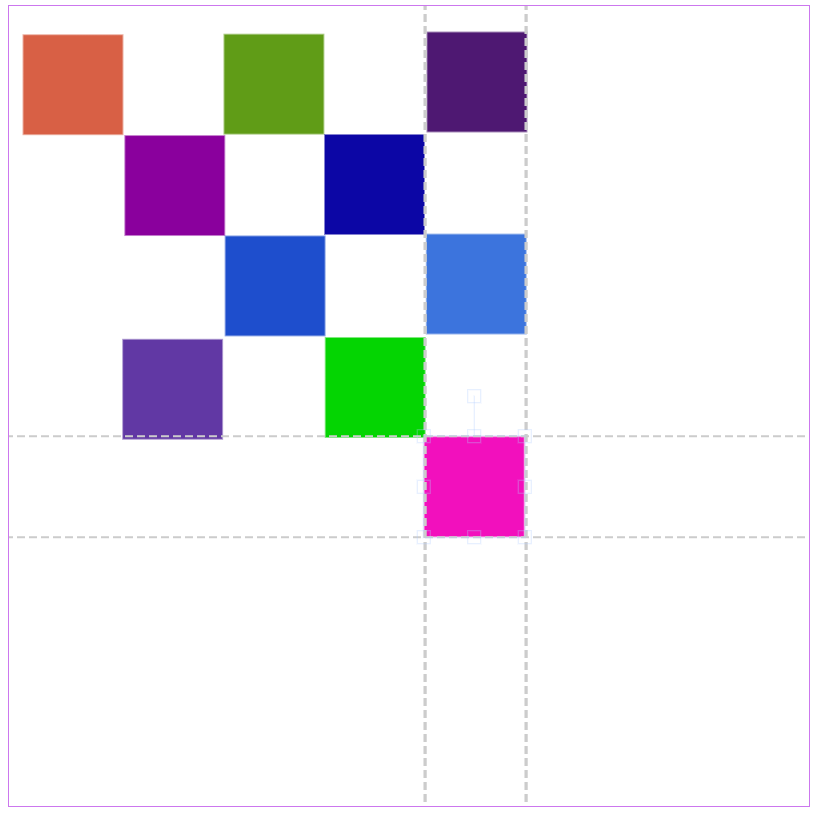
<!DOCTYPE html>
<html>
<head>
<meta charset="UTF-8">
<title>Fabric.js 6.6 加载 Base64 图片</title>
<script src="./fabric.js"></script>
<style>
canvas {
width: 800px;
height: 800px;
border: 1px solid #c7e;
}
</style>
</head>
<body>
<canvas
id="cvs"
width="800"
height="800"
></canvas>
<script>
const canvas = new fabric.Canvas('cvs');
let xLines = [canvas.getWidth() / 2]
let yLines = [canvas.getHeight() / 2]
// 判断是否需要绘制辅助线
function isDrawLine(xList, yList, errorRate = 1) {
const lines = {
x: [],
y: []
} // x坐标 y坐标
xLines.forEach(xl => {
const include = xList.some(x => Math.abs(x - xl) < errorRate)
if (include) {
lines['x'].push(xl)
}
})
yLines.forEach(yl => {
const include = yList.some(y => Math.abs(y - yl) < errorRate)
if (include) {
lines['y'].push(yl)
}
})
return lines
}
canvas.on({
'object:moving': function (e) {
const { bl, br, tl, tr } = e.target.aCoords
const xList = [bl.x, br.x, tl.x, tr.x]
const yList = [bl.y, br.y, tl.y, tr.y]
const drawLinesObj = isDrawLine(xList, yList)
renderAuxiliaryLine(drawLinesObj)
},
'mouse:up': function (e) {
console.log('鼠标抬起')
removeAuxiliaryLine()
console.log(canvas.toJSON(['__type']))
computedAuxiliaryLine()
}
})
// 计算辅助线
function computedAuxiliaryLine() {
xLines = [canvas.getWidth() / 2]
yLines = [canvas.getHeight() / 2]
const objs = canvas.getObjects()
objs.forEach(obj => {
const { bl, br, tl, tr } = obj.aCoords
const xList = [bl.x, br.x, tl.x, tr.x]
const yList = [bl.y, br.y, tl.y, tr.y]
xList.forEach(x => {
if (!xLines.includes(x)) {
xLines.push(x)
}
})
yList.forEach(y => {
if (!yLines.includes(y)) {
yLines.push(y)
}
})
})
}
// 移除辅助线
function removeAuxiliaryLine() {
const lis = canvas.getObjects().filter(i => i.__type === 'line')
canvas.remove(...lis)
}
// 绘制辅助线
function renderAuxiliaryLine({ x, y }) {
removeAuxiliaryLine()
const shapes = []
x.forEach(xp => {
// 创建直线对象
const line = new fabric.Line([xp, 0, xp, canvas.getHeight()], {
strokeWidth: 1,
stroke: '#ccc',
strokeWidth: 2,
strokeDashArray: [8, 4],
strokeDashOffset: 4, // 起始偏移量
selectable: false,
evented: false,
__type: 'line'
});
shapes.push(line)
})
y.forEach(yp => {
const line = new fabric.Line([0, yp, canvas.getWidth(), yp], {
strokeWidth: 1,
stroke: '#ccc',
strokeWidth: 2,
strokeDashArray: [8, 4],
strokeDashOffset: 4, // 起始偏移量
selectable: false,
evented: false,
__type: 'line'
});
shapes.push(line)
})
canvas.add(...shapes)
}
const randomColor = () => `rgb(${Math.floor(Math.random() * 255)},${Math.floor(Math.random() * 255)},${Math.floor(Math.random() * 255)})`
const sps = []
for (let i = 0; i < 10; i++) {
const rect = new fabric.Rect({
width: 100,
height: 100,
fill: randomColor(),
top: parseInt(Math.random() * 800),
left: parseInt(Math.random() * 800),
})
sps.push(rect)
}
canvas.add(...sps)
canvas.renderAll()
computedAuxiliaryLine()
</script>
</body>
</html>
本想把生活活成一首诗, 时而优雅 , 时而豪放 , 结果活成了一首歌 , 时而不靠谱 , 时而不着调

 浙公网安备 33010602011771号