Java网络通信基础系列-Netty粘包与拆包
一.Netty的粘包与拆包
Netty可以实现HTTP处理机制,但是Tomcat本身也是基于NIO的实现。
如果在实现Netty的过程之中只是进行这些简单的NIO包装处理实际上是没有任何优势的。
Netty的出现是为了解决传输问题,最为重要的情况就是粘包与拆包。
1.如果现在数据稍微有点大(又不是很大的时候),那么如果要进行多条数据的发送(缓冲区有大小限制);
2.粘包和拆包的问题解决方案有如下几种:
a.设置消息的边界内容,例如:每一个消息使用"\n"结尾操作;
b.使用特定消息头,在真实信息之前传入一个长度的信息;
c.使用定长信息。
3.Netty解决拆包与粘包问题的关键在于使用了分割器的模式来进行数据的拆分。
4.Netty默认分隔符是系统提供的分隔符常量,需要考虑分隔符的定义问题。
二.分析粘包与拆包操作的问题实例
如下实例也可以看出:在进行数据传输时,Netty可以保证长连接。
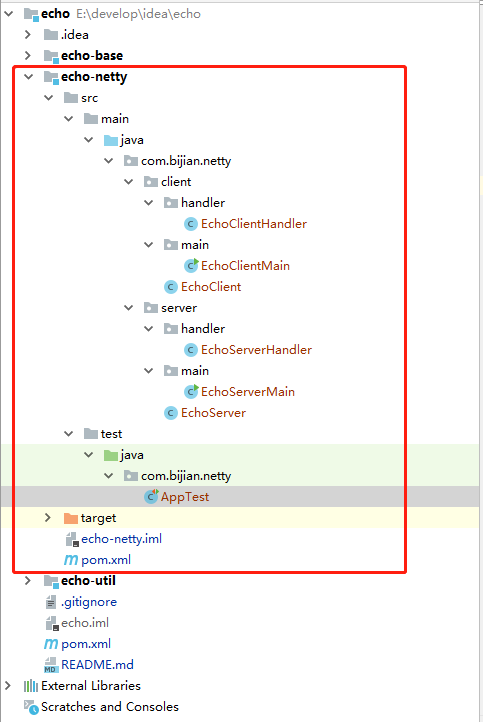
EchoServerMain.java
package com.bijian.netty.server.main;

import com.bijian.netty.server.EchoServer;

public class EchoServerMain {
    public static void main(String[] args) throws Exception {
        new EchoServer().run();
    }
}
EchoServer.java
package com.bijian.netty.server;

import com.bijian.netty.info.HostInfo;
import com.bijian.netty.server.handler.EchoServerHandler;
import io.netty.bootstrap.ServerBootstrap;
import io.netty.channel.ChannelFuture;
import io.netty.channel.ChannelInitializer;
import io.netty.channel.ChannelOption;
import io.netty.channel.EventLoopGroup;
import io.netty.channel.nio.NioEventLoopGroup;
import io.netty.channel.socket.SocketChannel;
import io.netty.channel.socket.nio.NioServerSocketChannel;

/**
 * 实现了基础的线程池与网络连接的配置项
 */
public class EchoServer {
    public void run() throws Exception {    // 进行服务器端的启动处理
        // 线程池是提升服务器性能的重要技术手段,利用定长的线程池可以保证核心线程的有效数量
        // 在Netty之中线程池的实现分为两类:主线程池(接收客户端连接)、工作线程池(处理客户端连接)
        EventLoopGroup bossGroup = new NioEventLoopGroup(10); // 创建接收线程池
        EventLoopGroup workerGroup = new NioEventLoopGroup(20); // 创建工作线程池
        System.out.println("服务器启动成功,监听端口为:" + HostInfo.PORT);
        try {
            // 创建一个服务器端的程序类进行NIO启动,同时可以设置Channel
            ServerBootstrap serverBootstrap = new ServerBootstrap();   // 服务器端
            // 设置要使用的线程池以及当前的Channel类型
            serverBootstrap.group(bossGroup, workerGroup).channel(NioServerSocketChannel.class);
            // 接收到信息之后需要进行处理,于是定义子处理器
            serverBootstrap.childHandler(new ChannelInitializer<SocketChannel>() {
                @Override
                protected void initChannel(SocketChannel socketChannel) throws Exception {
                    socketChannel.pipeline().addLast(new EchoServerHandler()); // 追加了处理器
                }
            });
            // 可以直接利用常量进行TCP协议的相关配置
            serverBootstrap.option(ChannelOption.SO_BACKLOG, 128);
            serverBootstrap.childOption(ChannelOption.SO_KEEPALIVE, true);
            // ChannelFuture描述的是异步回调的处理操作
            ChannelFuture future = serverBootstrap.bind(HostInfo.PORT).sync();
            future.channel().closeFuture().sync();// 等待Socket被关闭
        } finally {
            workerGroup.shutdownGracefully() ;
            bossGroup.shutdownGracefully() ;
        }
    }
}
EchoServerHandler.java
package com.bijian.netty.server.handler;

import io.netty.buffer.ByteBuf;
import io.netty.buffer.Unpooled;
import io.netty.channel.ChannelHandlerContext;
import io.netty.channel.ChannelInboundHandlerAdapter;
import io.netty.util.CharsetUtil;
import io.netty.util.ReferenceCountUtil;

/**
 * 处理Echo的操作方式,其中ChannelInboundHandlerAdapter是针对于数据输入的处理
 * Netty是基于NIO的一种开发框架的封装,这里面和AIO是没有任何关系的。
 */
public class EchoServerHandler extends ChannelInboundHandlerAdapter {

    @Override
    public void channelRead(ChannelHandlerContext ctx, Object msg) throws Exception {
        try {
            // 表示要进行数据信息的读取操作,对于读取操作完成后也可以直接回应
            // 对于客户端发送来的数据信息,由于没有进行指定的数据类型,所以都统一按照Object进行接收
            ByteBuf buf = (ByteBuf) msg;       // 默认情况下的类型就是ByteBuf类型
            // 在进行数据类型转换的过程之中还可以进行编码指定(NIO的封装)
            String inputData = buf.toString(CharsetUtil.UTF_8);    // 将字节缓冲区的内容转为字符串
            System.err.println("{服务器}" + inputData);
            String echoData = "【ECHO】" + inputData; // 数据的回应处理
            byte[] data = echoData.getBytes(); // 将字符串变为字节数组
            ByteBuf echoBuf = Unpooled.buffer(data.length);
            echoBuf.writeBytes(data);// 将内容保存在缓存之中
            ctx.writeAndFlush(echoBuf); // 回应的输出操作
        } finally {
            ReferenceCountUtil.release(msg) ; // 释放缓存
        }
    }

    @Override
    public void exceptionCaught(ChannelHandlerContext ctx, Throwable cause) throws Exception {
        cause.printStackTrace();
        ctx.close() ;
    }
}
EchoClientMain.java
package com.bijian.netty.client.main;

import com.bijian.netty.client.EchoClient;

public class EchoClientMain {
    public static void main(String[] args) throws Exception {
        new EchoClient().run();
    }
}
EchoClient.java
package com.bijian.netty.client;

import com.bijian.netty.client.handler.EchoClientHandler;
import com.bijian.netty.info.HostInfo;
import io.netty.bootstrap.Bootstrap;
import io.netty.channel.ChannelFuture;
import io.netty.channel.ChannelInitializer;
import io.netty.channel.ChannelOption;
import io.netty.channel.EventLoopGroup;
import io.netty.channel.nio.NioEventLoopGroup;
import io.netty.channel.socket.SocketChannel;
import io.netty.channel.socket.nio.NioSocketChannel;

public class EchoClient {
    public void run() throws Exception {
        // 1、如果现在客户端不同,那么也可以不使用多线程模式来处理;
        // 在Netty中考虑到代码的统一性,也允许你在客户端设置线程池
        EventLoopGroup group = new NioEventLoopGroup(); // 创建一个线程池
        try {
            Bootstrap client = new Bootstrap(); // 创建客户端处理程序
            client.group(group).channel(NioSocketChannel.class)
                    .option(ChannelOption.TCP_NODELAY, true) // 允许接收大块的返回数据
                    .handler(new ChannelInitializer<SocketChannel>() {
                        @Override
                        protected void initChannel(SocketChannel socketChannel) throws Exception {
                            socketChannel.pipeline().addLast(new EchoClientHandler()); // 追加了处理器
                        }
                    });
            ChannelFuture channelFuture = client.connect(HostInfo.HOST_NAME, HostInfo.PORT).sync();
            channelFuture.channel().closeFuture().sync() ; // 关闭连接
        } finally {
            group.shutdownGracefully();
        }
    }
}
EchoClientHandler.java
package com.bijian.netty.client.handler;

import com.bijian.netty.util.InputUtil;
import io.netty.buffer.ByteBuf;
import io.netty.buffer.Unpooled;
import io.netty.channel.ChannelHandlerContext;
import io.netty.channel.ChannelInboundHandlerAdapter;
import io.netty.util.CharsetUtil;
import io.netty.util.ReferenceCountUtil;

/**
 * 需要进行数据的读取操作,服务器端处理完成的数据信息会进行读取
 */
public class EchoClientHandler extends ChannelInboundHandlerAdapter {
    private static final int REPEAT = 500;// 消息重复发送次数

    @Override
    public void channelActive(ChannelHandlerContext ctx) throws Exception {
        for (int x = 0; x < REPEAT; x++) {  // 消息重复发送
            byte data [] = ("【" + x + "】Hello World").getBytes() ;
            ByteBuf buf = Unpooled.buffer(data.length) ;
            buf.writeBytes(data) ;
            ctx.writeAndFlush(buf);
        }
    }

    @Override
    public void channelRead(ChannelHandlerContext ctx, Object msg) throws Exception {
        // 只要服务器端发送完成信息之后,都会执行此方法进行内容的输出操作
        try {
            ByteBuf readBuf = (ByteBuf) msg;
            String readData = readBuf.toString(CharsetUtil.UTF_8).trim(); // 接收返回数据内容
            System.out.println(readData); // 输出服务器端的响应内容
        } finally {
            ReferenceCountUtil.release(msg); // 释放缓存
        }
    }

    @Override
    public void exceptionCaught(ChannelHandlerContext ctx, Throwable cause) throws Exception {
        cause.printStackTrace();
        ctx.close();
    }
}
先启动服务端,再启动客户端,运行效果如下:


三.使用Lined数据拆包与装包操作
EchoServer.java
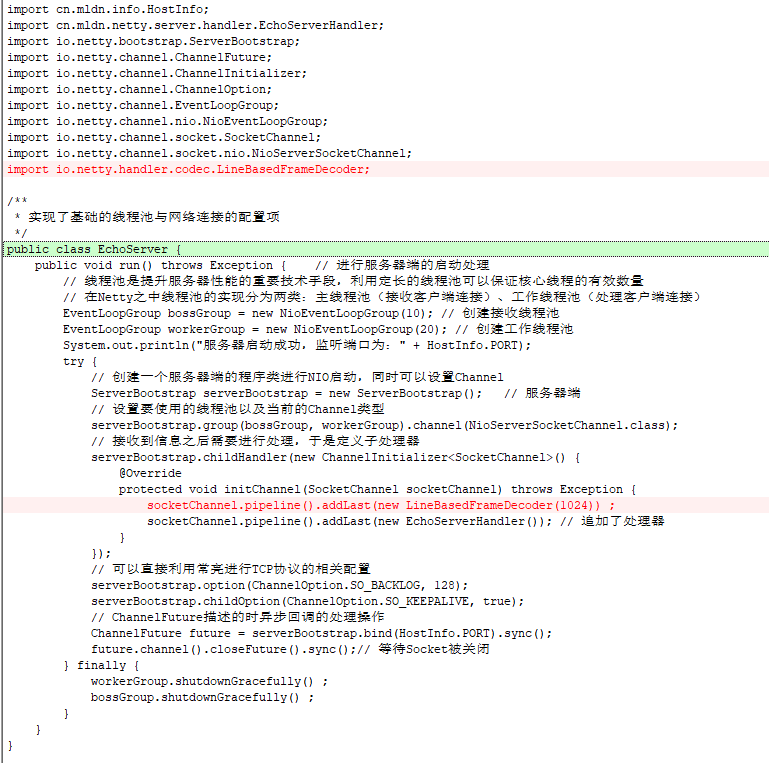
package com.bijian.netty.server;

import com.bijian.netty.info.HostInfo;
import com.bijian.netty.server.handler.EchoServerHandler;
import io.netty.bootstrap.ServerBootstrap;
import io.netty.channel.ChannelFuture;
import io.netty.channel.ChannelInitializer;
import io.netty.channel.ChannelOption;
import io.netty.channel.EventLoopGroup;
import io.netty.channel.nio.NioEventLoopGroup;
import io.netty.channel.socket.SocketChannel;
import io.netty.channel.socket.nio.NioServerSocketChannel;
import io.netty.handler.codec.LineBasedFrameDecoder;

/**
 * 实现了基础的线程池与网络连接的配置项
 */
public class EchoServer {
    public void run() throws Exception {    // 进行服务器端的启动处理
        // 线程池是提升服务器性能的重要技术手段,利用定长的线程池可以保证核心线程的有效数量
        // 在Netty之中线程池的实现分为两类:主线程池(接收客户端连接)、工作线程池(处理客户端连接)
        EventLoopGroup bossGroup = new NioEventLoopGroup(10); // 创建接收线程池
        EventLoopGroup workerGroup = new NioEventLoopGroup(20); // 创建工作线程池
        System.out.println("服务器启动成功,监听端口为:" + HostInfo.PORT);
        try {
            // 创建一个服务器端的程序类进行NIO启动,同时可以设置Channel
            ServerBootstrap serverBootstrap = new ServerBootstrap();   // 服务器端
            // 设置要使用的线程池以及当前的Channel类型
            serverBootstrap.group(bossGroup, workerGroup).channel(NioServerSocketChannel.class);
            // 接收到信息之后需要进行处理,于是定义子处理器
            serverBootstrap.childHandler(new ChannelInitializer<SocketChannel>() {
                @Override
                protected void initChannel(SocketChannel socketChannel) throws Exception {
                    socketChannel.pipeline().addLast(new LineBasedFrameDecoder(1024)) ;
                    socketChannel.pipeline().addLast(new EchoServerHandler()); // 追加了处理器
                }
            });
            // 可以直接利用常亮进行TCP协议的相关配置
            serverBootstrap.option(ChannelOption.SO_BACKLOG, 128);
            serverBootstrap.childOption(ChannelOption.SO_KEEPALIVE, true);
            // ChannelFuture描述的时异步回调的处理操作
            ChannelFuture future = serverBootstrap.bind(HostInfo.PORT).sync();
            future.channel().closeFuture().sync();// 等待Socket被关闭
        } finally {
            workerGroup.shutdownGracefully() ;
            bossGroup.shutdownGracefully() ;
        }
    }
}
EchoServerHandler.java
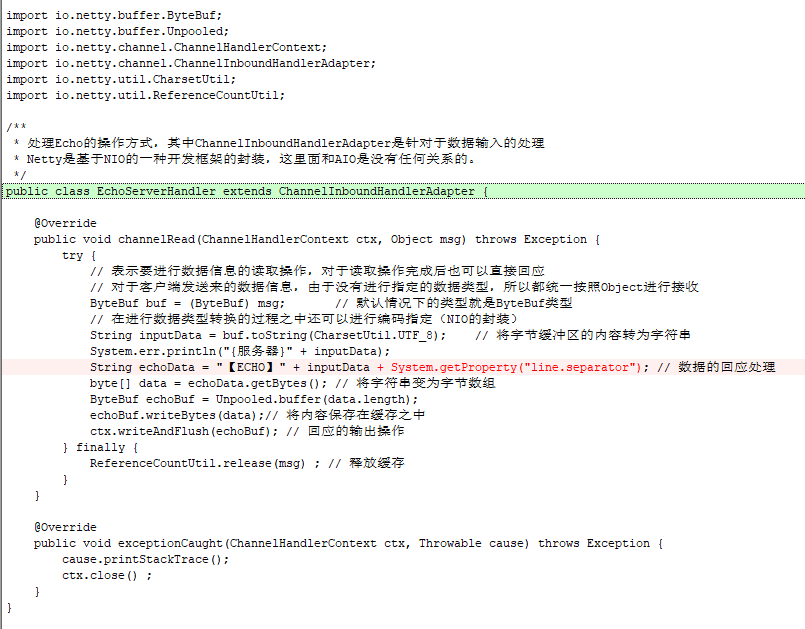
package com.bijian.netty.server.handler;

import io.netty.buffer.ByteBuf;
import io.netty.buffer.Unpooled;
import io.netty.channel.ChannelHandlerContext;
import io.netty.channel.ChannelInboundHandlerAdapter;
import io.netty.util.CharsetUtil;
import io.netty.util.ReferenceCountUtil;

/**
 * 处理Echo的操作方式,其中ChannelInboundHandlerAdapter是针对于数据输入的处理
 * Netty是基于NIO的一种开发框架的封装,这里面和AIO是没有任何关系的。
 */
public class EchoServerHandler extends ChannelInboundHandlerAdapter {

    @Override
    public void channelRead(ChannelHandlerContext ctx, Object msg) throws Exception {
        try {
            // 表示要进行数据信息的读取操作,对于读取操作完成后也可以直接回应
            // 对于客户端发送来的数据信息,由于没有进行指定的数据类型,所以都统一按照Object进行接收
            ByteBuf buf = (ByteBuf) msg;       // 默认情况下的类型就是ByteBuf类型
            // 在进行数据类型转换的过程之中还可以进行编码指定(NIO的封装)
            String inputData = buf.toString(CharsetUtil.UTF_8);    // 将字节缓冲区的内容转为字符串
            System.err.println("{服务器}" + inputData);
            String echoData = "【ECHO】" + inputData + System.getProperty("line.separator"); // 数据的回应处理
            byte[] data = echoData.getBytes(); // 将字符串变为字节数组
            ByteBuf echoBuf = Unpooled.buffer(data.length);
            echoBuf.writeBytes(data);// 将内容保存在缓存之中
            ctx.writeAndFlush(echoBuf); // 回应的输出操作
        } finally {
            ReferenceCountUtil.release(msg) ; // 释放缓存
        }
    }

    @Override
    public void exceptionCaught(ChannelHandlerContext ctx, Throwable cause) throws Exception {
        cause.printStackTrace();
        ctx.close() ;
    }
}
EchoClient.java
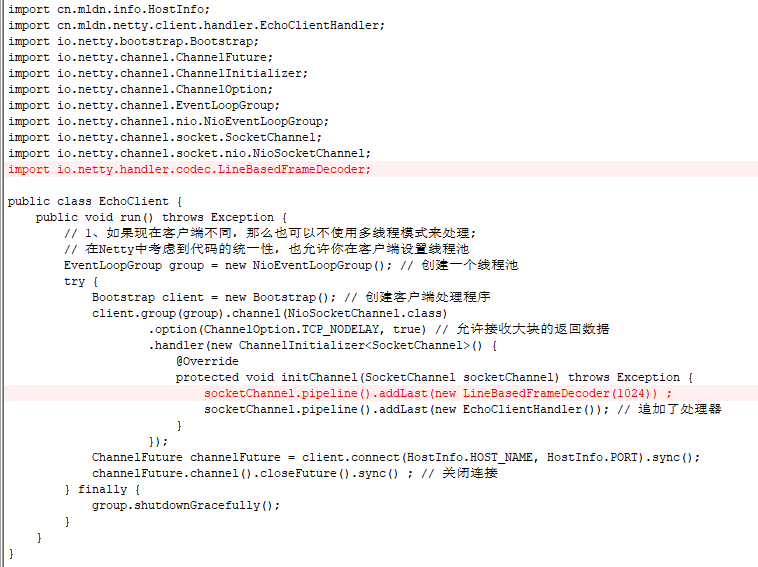
package com.bijian.netty.client;

import com.bijian.netty.client.handler.EchoClientHandler;
import com.bijian.netty.info.HostInfo;
import io.netty.bootstrap.Bootstrap;
import io.netty.channel.ChannelFuture;
import io.netty.channel.ChannelInitializer;
import io.netty.channel.ChannelOption;
import io.netty.channel.EventLoopGroup;
import io.netty.channel.nio.NioEventLoopGroup;
import io.netty.channel.socket.SocketChannel;
import io.netty.channel.socket.nio.NioSocketChannel;
import io.netty.handler.codec.LineBasedFrameDecoder;

public class EchoClient {
    public void run() throws Exception {
        // 1、如果现在客户端不同,那么也可以不使用多线程模式来处理;
        // 在Netty中考虑到代码的统一性,也允许你在客户端设置线程池
        EventLoopGroup group = new NioEventLoopGroup(); // 创建一个线程池
        try {
            Bootstrap client = new Bootstrap(); // 创建客户端处理程序
            client.group(group).channel(NioSocketChannel.class)
                    .option(ChannelOption.TCP_NODELAY, true) // 允许接收大块的返回数据
                    .handler(new ChannelInitializer<SocketChannel>() {
                        @Override
                        protected void initChannel(SocketChannel socketChannel) throws Exception {
                            socketChannel.pipeline().addLast(new LineBasedFrameDecoder(1024)) ;
                            socketChannel.pipeline().addLast(new EchoClientHandler()); // 追加了处理器
                        }
                    });
            ChannelFuture channelFuture = client.connect(HostInfo.HOST_NAME, HostInfo.PORT).sync();
            channelFuture.channel().closeFuture().sync() ; // 关闭连接
        } finally {
            group.shutdownGracefully();
        }
    }
}
EchoClientHandler.java
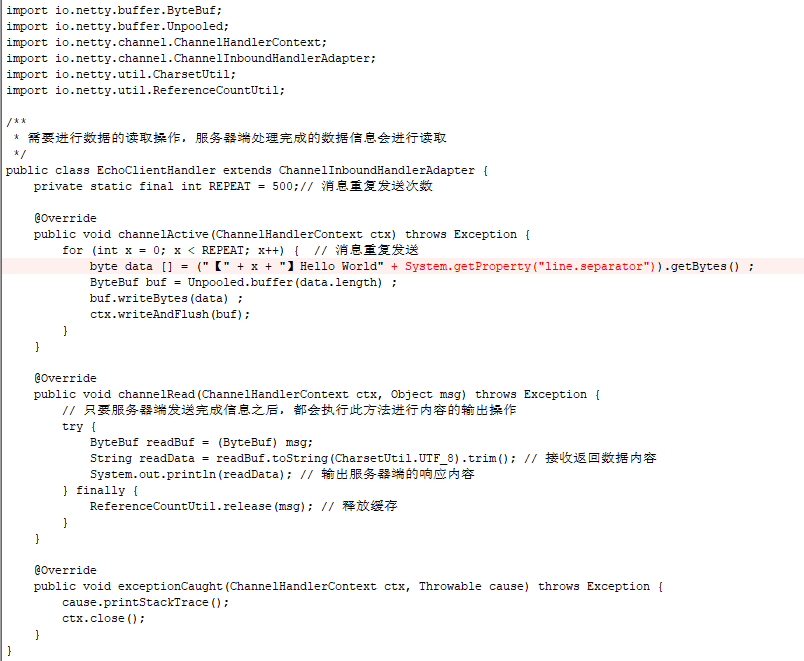
package com.bijian.netty.client.handler;

import com.bijian.netty.util.InputUtil;
import io.netty.buffer.ByteBuf;
import io.netty.buffer.Unpooled;
import io.netty.channel.ChannelHandlerContext;
import io.netty.channel.ChannelInboundHandlerAdapter;
import io.netty.util.CharsetUtil;
import io.netty.util.ReferenceCountUtil;

/**
 * 需要进行数据的读取操作,服务器端处理完成的数据信息会进行读取
 */
public class EchoClientHandler extends ChannelInboundHandlerAdapter {
    private static final int REPEAT = 500;// 消息重复发送次数

    @Override
    public void channelActive(ChannelHandlerContext ctx) throws Exception {
        for (int x = 0; x < REPEAT; x++) {  // 消息重复发送
            byte data [] = ("【" + x + "】Hello World" + System.getProperty("line.separator")).getBytes() ;
            ByteBuf buf = Unpooled.buffer(data.length) ;
            buf.writeBytes(data) ;
            ctx.writeAndFlush(buf);
        }
    }

    @Override
    public void channelRead(ChannelHandlerContext ctx, Object msg) throws Exception {
        // 只要服务器端发送完成信息之后,都会执行此方法进行内容的输出操作
        try {
            ByteBuf readBuf = (ByteBuf) msg;
            String readData = readBuf.toString(CharsetUtil.UTF_8).trim(); // 接收返回数据内容
            System.out.println(readData); // 输出服务器端的响应内容
        } finally {
            ReferenceCountUtil.release(msg); // 释放缓存
        }
    }

    @Override
    public void exceptionCaught(ChannelHandlerContext ctx, Throwable cause) throws Exception {
        cause.printStackTrace();
        ctx.close();
    }
}
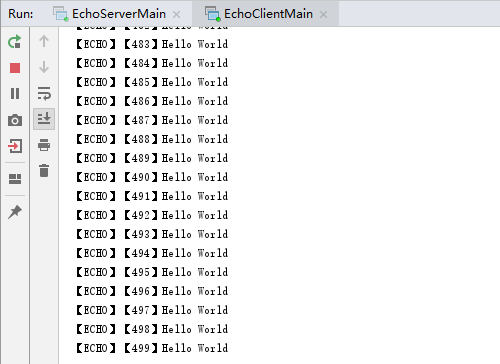
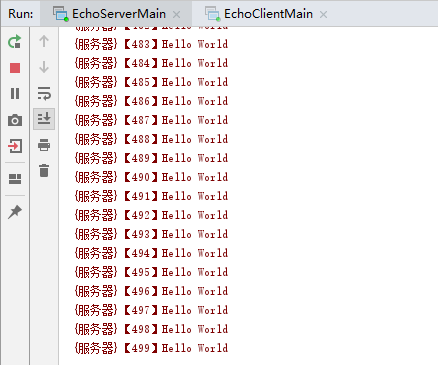
先启动服务端,再启动客户端,运行效果如下:
四.使用字符串处理器,可以进行字符串类型的数据传输
EchoServer.java
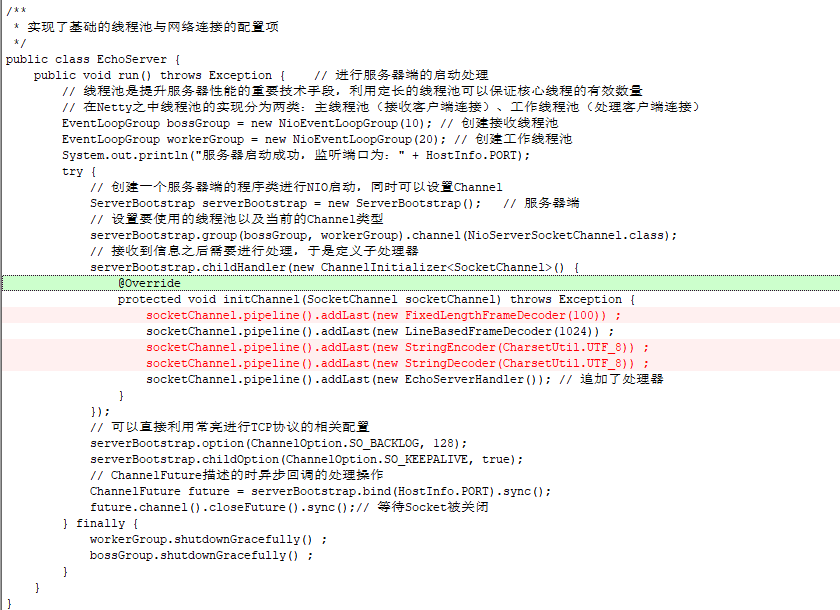
package com.bijian.netty.server;

import com.bijian.netty.info.HostInfo;
import com.bijian.netty.server.handler.EchoServerHandler;
import io.netty.bootstrap.ServerBootstrap;
import io.netty.channel.ChannelFuture;
import io.netty.channel.ChannelInitializer;
import io.netty.channel.ChannelOption;
import io.netty.channel.EventLoopGroup;
import io.netty.channel.nio.NioEventLoopGroup;
import io.netty.channel.socket.SocketChannel;
import io.netty.channel.socket.nio.NioServerSocketChannel;
import io.netty.handler.codec.FixedLengthFrameDecoder;
import io.netty.handler.codec.LineBasedFrameDecoder;
import io.netty.handler.codec.string.StringDecoder;
import io.netty.handler.codec.string.StringEncoder;
import io.netty.handler.codec.FixedLengthFrameDecoder;
import io.netty.handler.codec.LineBasedFrameDecoder;
import io.netty.handler.codec.string.StringDecoder;
import io.netty.handler.codec.string.StringEncoder;
import io.netty.util.CharsetUtil;

/**
 * 实现了基础的线程池与网络连接的配置项
 */
public class EchoServer {
    public void run() throws Exception {    // 进行服务器端的启动处理
        // 线程池是提升服务器性能的重要技术手段,利用定长的线程池可以保证核心线程的有效数量
        // 在Netty之中线程池的实现分为两类:主线程池(接收客户端连接)、工作线程池(处理客户端连接)
        EventLoopGroup bossGroup = new NioEventLoopGroup(10); // 创建接收线程池
        EventLoopGroup workerGroup = new NioEventLoopGroup(20); // 创建工作线程池
        System.out.println("服务器启动成功,监听端口为:" + HostInfo.PORT);
        try {
            // 创建一个服务器端的程序类进行NIO启动,同时可以设置Channel
            ServerBootstrap serverBootstrap = new ServerBootstrap();   // 服务器端
            // 设置要使用的线程池以及当前的Channel类型
            serverBootstrap.group(bossGroup, workerGroup).channel(NioServerSocketChannel.class);
            // 接收到信息之后需要进行处理,于是定义子处理器
            serverBootstrap.childHandler(new ChannelInitializer<SocketChannel>() {
                @Override
                protected void initChannel(SocketChannel socketChannel) throws Exception {
                    socketChannel.pipeline().addLast(new FixedLengthFrameDecoder(100)) ;
                    socketChannel.pipeline().addLast(new LineBasedFrameDecoder(1024)) ;
                    socketChannel.pipeline().addLast(new StringEncoder(CharsetUtil.UTF_8)) ;
                    socketChannel.pipeline().addLast(new StringDecoder(CharsetUtil.UTF_8)) ;
                    socketChannel.pipeline().addLast(new EchoServerHandler()); // 追加了处理器
                }
            });
            // 可以直接利用常亮进行TCP协议的相关配置
            serverBootstrap.option(ChannelOption.SO_BACKLOG, 128);
            serverBootstrap.childOption(ChannelOption.SO_KEEPALIVE, true);
            // ChannelFuture描述的时异步回调的处理操作
            ChannelFuture future = serverBootstrap.bind(HostInfo.PORT).sync();
            future.channel().closeFuture().sync();// 等待Socket被关闭
        } finally {
            workerGroup.shutdownGracefully() ;
            bossGroup.shutdownGracefully() ;
        }
    }
}
EchoServerHandler.java
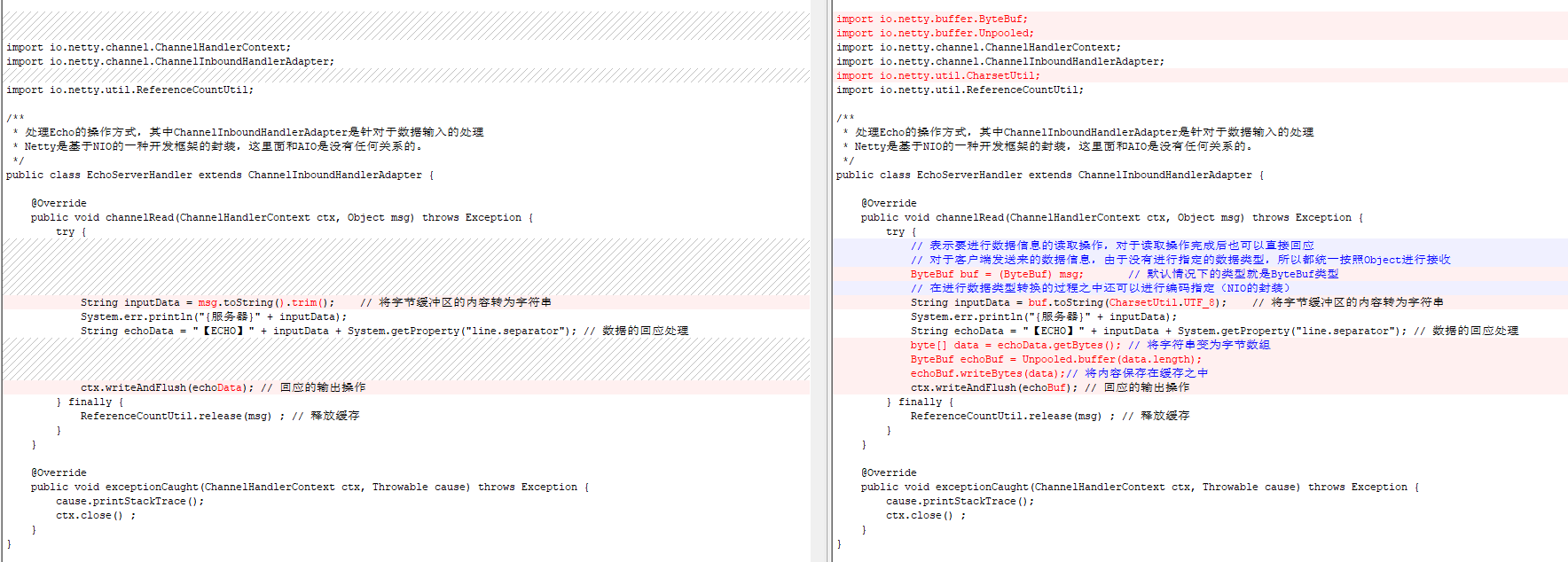
package com.bijian.netty.server.handler;

import io.netty.channel.ChannelHandlerContext;
import io.netty.channel.ChannelInboundHandlerAdapter;
import io.netty.util.ReferenceCountUtil;

/**
 * 处理Echo的操作方式,其中ChannelInboundHandlerAdapter是针对于数据输入的处理
 * Netty是基于NIO的一种开发框架的封装,这里面和AIO是没有任何关系的。
 */
public class EchoServerHandler extends ChannelInboundHandlerAdapter {

    @Override
    public void channelRead(ChannelHandlerContext ctx, Object msg) throws Exception {
        try {
            String inputData = msg.toString().trim();    // 将字节缓冲区的内容转为字符串
            System.err.println("{服务器}" + inputData);
            String echoData = "【ECHO】" + inputData + System.getProperty("line.separator"); // 数据的回应处理
            ctx.writeAndFlush(echoData); // 回应的输出操作
        } finally {
            ReferenceCountUtil.release(msg) ; // 释放缓存
        }
    }

    @Override
    public void exceptionCaught(ChannelHandlerContext ctx, Throwable cause) throws Exception {
        cause.printStackTrace();
        ctx.close() ;
    }
}
EchoClient.java
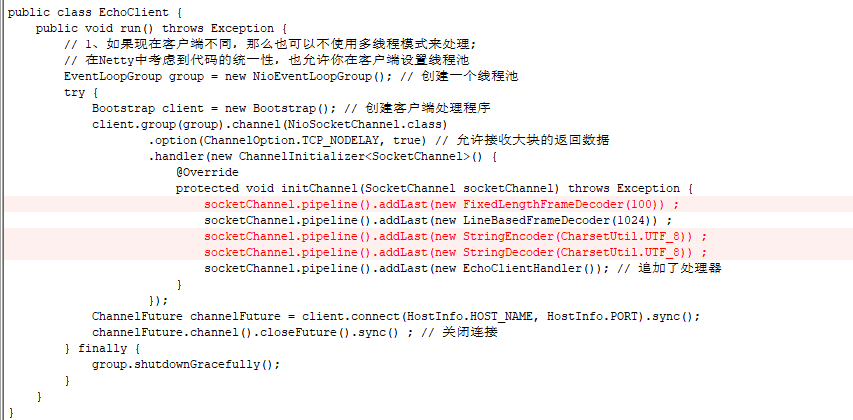
package com.bijian.netty.client;

import com.bijian.netty.client.handler.EchoClientHandler;
import com.bijian.netty.info.HostInfo;
import io.netty.bootstrap.Bootstrap;
import io.netty.channel.ChannelFuture;
import io.netty.channel.ChannelInitializer;
import io.netty.channel.ChannelOption;
import io.netty.channel.EventLoopGroup;
import io.netty.channel.nio.NioEventLoopGroup;
import io.netty.channel.socket.SocketChannel;
import io.netty.channel.socket.nio.NioSocketChannel;
import io.netty.handler.codec.FixedLengthFrameDecoder;
import io.netty.handler.codec.LineBasedFrameDecoder;
import io.netty.handler.codec.string.StringDecoder;
import io.netty.handler.codec.string.StringEncoder;
import io.netty.util.CharsetUtil;

public class EchoClient {
    public void run() throws Exception {
        // 1、如果现在客户端不同,那么也可以不使用多线程模式来处理;
        // 在Netty中考虑到代码的统一性,也允许你在客户端设置线程池
        EventLoopGroup group = new NioEventLoopGroup(); // 创建一个线程池
        try {
            Bootstrap client = new Bootstrap(); // 创建客户端处理程序
            client.group(group).channel(NioSocketChannel.class)
                    .option(ChannelOption.TCP_NODELAY, true) // 允许接收大块的返回数据
                    .handler(new ChannelInitializer<SocketChannel>() {
                        @Override
                        protected void initChannel(SocketChannel socketChannel) throws Exception {
                            socketChannel.pipeline().addLast(new FixedLengthFrameDecoder(100)) ;
                            socketChannel.pipeline().addLast(new LineBasedFrameDecoder(1024)) ;
                            socketChannel.pipeline().addLast(new StringEncoder(CharsetUtil.UTF_8)) ;
                            socketChannel.pipeline().addLast(new StringDecoder(CharsetUtil.UTF_8)) ;
                            socketChannel.pipeline().addLast(new EchoClientHandler()); // 追加了处理器
                        }
                    });
            ChannelFuture channelFuture = client.connect(HostInfo.HOST_NAME, HostInfo.PORT).sync();
            channelFuture.channel().closeFuture().sync() ; // 关闭连接
        } finally {
            group.shutdownGracefully();
        }
    }
}
EchoClientHandler.java
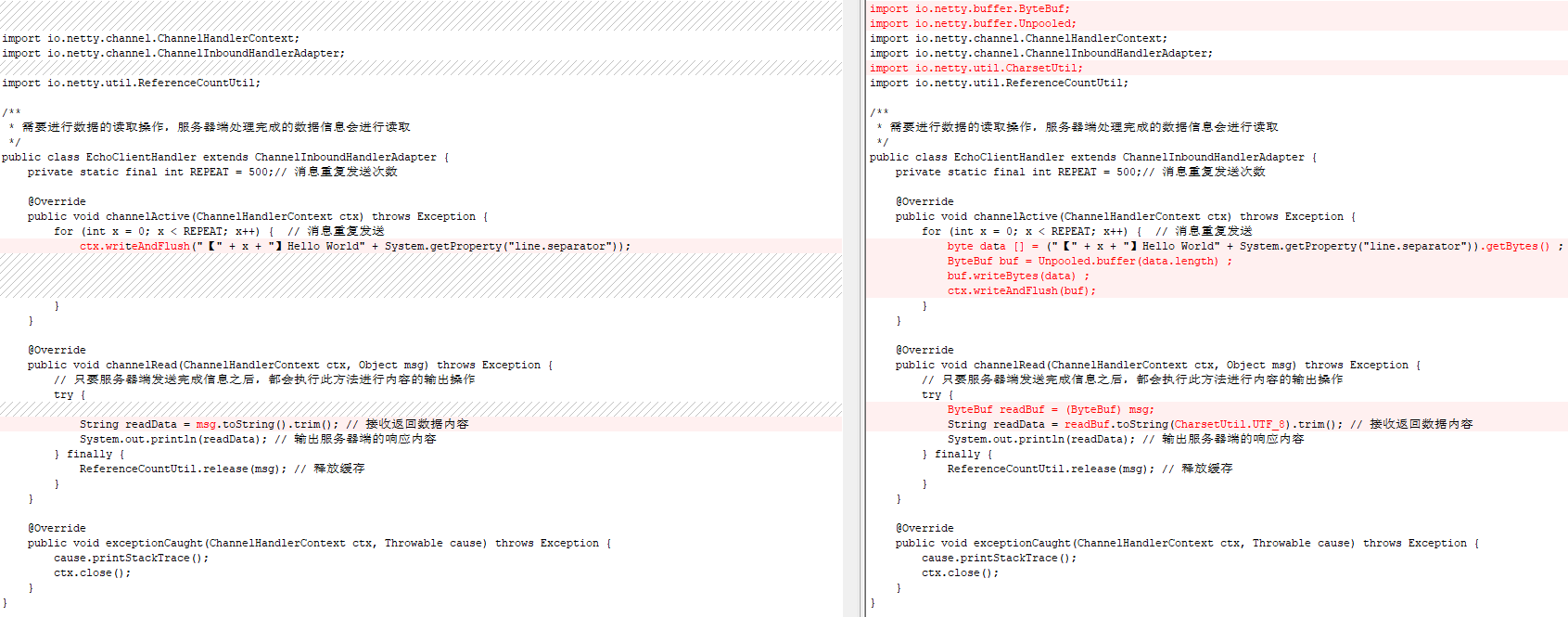
package com.bijian.netty.client.handler;

import com.bijian.netty.util.InputUtil;
import io.netty.buffer.ByteBuf;
import io.netty.buffer.Unpooled;
import io.netty.channel.ChannelHandlerContext;
import io.netty.channel.ChannelInboundHandlerAdapter;
import io.netty.util.CharsetUtil;
import io.netty.util.ReferenceCountUtil;

import io.netty.channel.ChannelHandlerContext;
import io.netty.channel.ChannelInboundHandlerAdapter;
import io.netty.util.ReferenceCountUtil;

/**
 * 需要进行数据的读取操作,服务器端处理完成的数据信息会进行读取
 */
public class EchoClientHandler extends ChannelInboundHandlerAdapter {
    private static final int REPEAT = 500;// 消息重复发送次数

    @Override
    public void channelActive(ChannelHandlerContext ctx) throws Exception {
        for (int x = 0; x < REPEAT; x++) {  // 消息重复发送
            ctx.writeAndFlush("【" + x + "】Hello World" + System.getProperty("line.separator"));
        }
    }

    @Override
    public void channelRead(ChannelHandlerContext ctx, Object msg) throws Exception {
        // 只要服务器端发送完成信息之后,都会执行此方法进行内容的输出操作
        try {
            String readData = msg.toString().trim(); // 接收返回数据内容
            System.out.println(readData); // 输出服务器端的响应内容
        } finally {
            ReferenceCountUtil.release(msg); // 释放缓存
        }
    }

    @Override
    public void exceptionCaught(ChannelHandlerContext ctx, Throwable cause) throws Exception {
        cause.printStackTrace();
        ctx.close();
    }
}
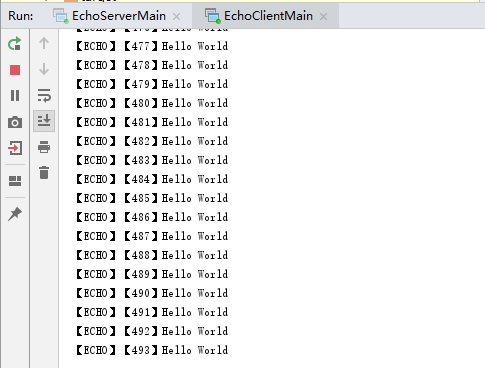
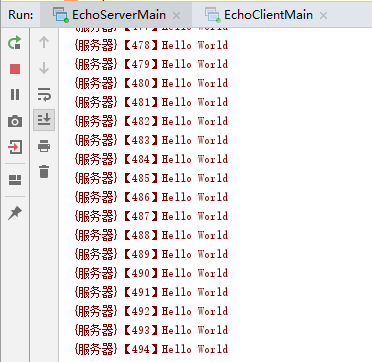
先启动服务端,再启动客户端,运行效果如下:
五.使用自定义分隔符
echo-util项目下的HostInfo.java

package com.bijian.netty.info;

public interface HostInfo {
    public static final String HOST_NAME = "localhost" ;
    public static final int PORT = 9999 ;
    public static final String SEPARATOR = "%$%" ;
}
EchoServer.java
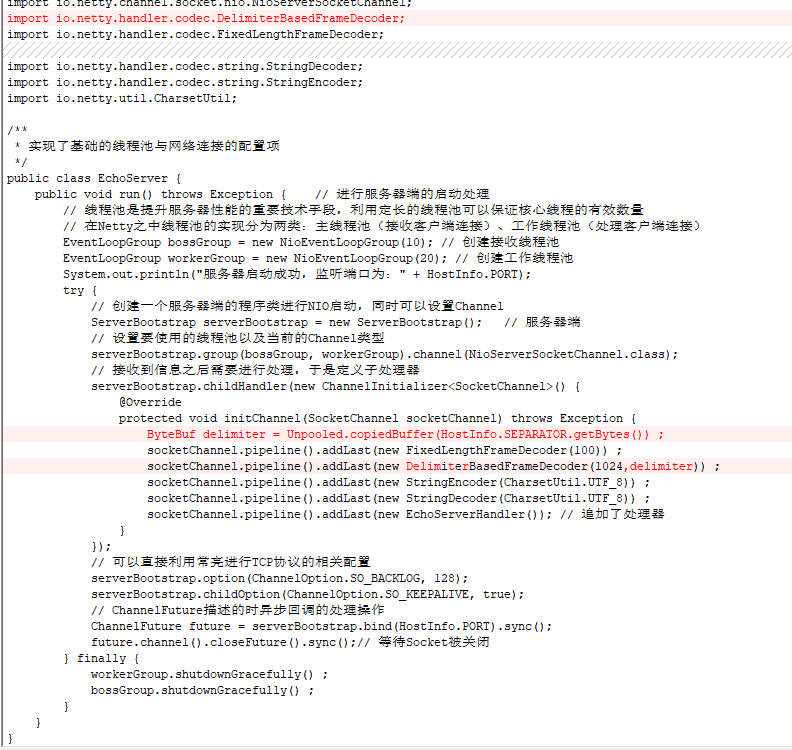
package com.bijian.netty.server;

import com.bijian.netty.info.HostInfo;
import com.bijian.netty.server.handler.EchoServerHandler;
import io.netty.bootstrap.ServerBootstrap;
import io.netty.channel.ChannelFuture;
import io.netty.channel.ChannelInitializer;
import io.netty.channel.ChannelOption;
import io.netty.channel.EventLoopGroup;
import io.netty.channel.nio.NioEventLoopGroup;
import io.netty.channel.socket.SocketChannel;
import io.netty.channel.socket.nio.NioServerSocketChannel;
import io.netty.handler.codec.FixedLengthFrameDecoder;
import io.netty.handler.codec.string.StringDecoder;
import io.netty.handler.codec.string.StringEncoder;
import io.netty.util.CharsetUtil;
import io.netty.buffer.ByteBuf;
import io.netty.buffer.Unpooled;
import io.netty.handler.codec.DelimiterBasedFrameDecoder;

/**
 * 实现了基础的线程池与网络连接的配置项
 */
public class EchoServer {
    public void run() throws Exception {    // 进行服务器端的启动处理
        // 线程池是提升服务器性能的重要技术手段,利用定长的线程池可以保证核心线程的有效数量
        // 在Netty之中线程池的实现分为两类:主线程池(接收客户端连接)、工作线程池(处理客户端连接)
        EventLoopGroup bossGroup = new NioEventLoopGroup(10); // 创建接收线程池
        EventLoopGroup workerGroup = new NioEventLoopGroup(20); // 创建工作线程池
        System.out.println("服务器启动成功,监听端口为:" + HostInfo.PORT);
        try {
            // 创建一个服务器端的程序类进行NIO启动,同时可以设置Channel
            ServerBootstrap serverBootstrap = new ServerBootstrap();   // 服务器端
            // 设置要使用的线程池以及当前的Channel类型
            serverBootstrap.group(bossGroup, workerGroup).channel(NioServerSocketChannel.class);
            // 接收到信息之后需要进行处理,于是定义子处理器
            serverBootstrap.childHandler(new ChannelInitializer<SocketChannel>() {
                @Override
                protected void initChannel(SocketChannel socketChannel) throws Exception {
                    ByteBuf delimiter = Unpooled.copiedBuffer(HostInfo.SEPARATOR.getBytes()) ;
                    socketChannel.pipeline().addLast(new FixedLengthFrameDecoder(100)) ;
                    socketChannel.pipeline().addLast(new DelimiterBasedFrameDecoder(1024,delimiter)) ;
                    socketChannel.pipeline().addLast(new StringEncoder(CharsetUtil.UTF_8)) ;
                    socketChannel.pipeline().addLast(new StringDecoder(CharsetUtil.UTF_8)) ;
                    socketChannel.pipeline().addLast(new EchoServerHandler()); // 追加了处理器
                }
            });
            // 可以直接利用常亮进行TCP协议的相关配置
            serverBootstrap.option(ChannelOption.SO_BACKLOG, 128);
            serverBootstrap.childOption(ChannelOption.SO_KEEPALIVE, true);
            // ChannelFuture描述的时异步回调的处理操作
            ChannelFuture future = serverBootstrap.bind(HostInfo.PORT).sync();
            future.channel().closeFuture().sync();// 等待Socket被关闭
        } finally {
            workerGroup.shutdownGracefully() ;
            bossGroup.shutdownGracefully() ;
        }
    }
}
EchoServerHandler.java
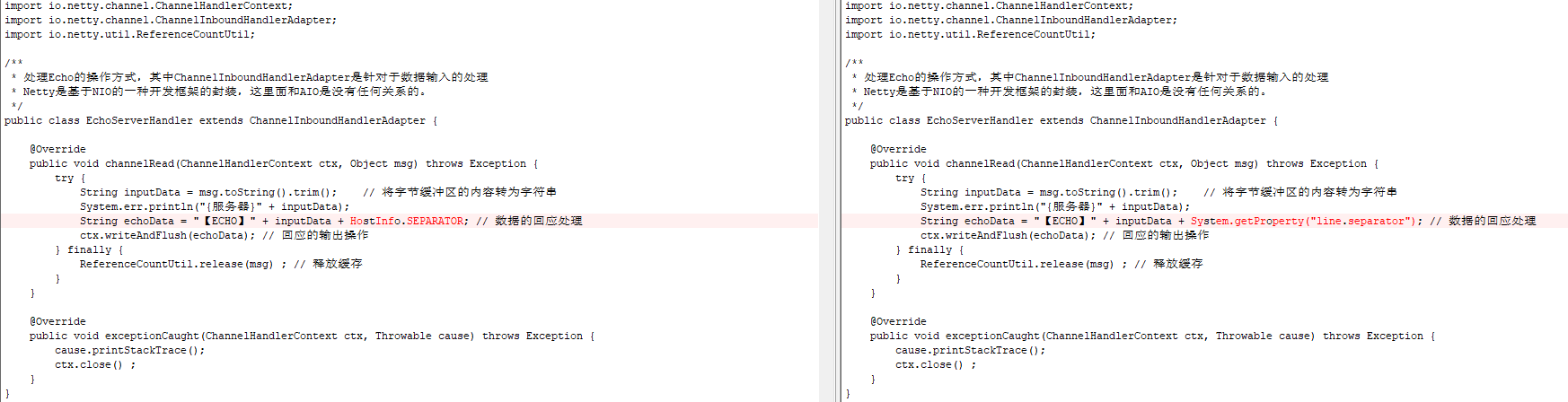
package com.bijian.netty.server.handler;

import com.bijian.netty.info.HostInfo;
import io.netty.channel.ChannelHandlerContext;
import io.netty.channel.ChannelInboundHandlerAdapter;
import io.netty.util.ReferenceCountUtil;

/**
 * 处理Echo的操作方式,其中ChannelInboundHandlerAdapter是针对于数据输入的处理
 * Netty是基于NIO的一种开发框架的封装,这里面和AIO是没有任何关系的。
 */
public class EchoServerHandler extends ChannelInboundHandlerAdapter {

    @Override
    public void channelRead(ChannelHandlerContext ctx, Object msg) throws Exception {
        try {
            String inputData = msg.toString().trim();    // 将字节缓冲区的内容转为字符串
            System.err.println("{服务器}" + inputData);
            String echoData = "【ECHO】" + inputData + HostInfo.SEPARATOR; // 数据的回应处理
            ctx.writeAndFlush(echoData); // 回应的输出操作
        } finally {
            ReferenceCountUtil.release(msg) ; // 释放缓存
        }
    }

    @Override
    public void exceptionCaught(ChannelHandlerContext ctx, Throwable cause) throws Exception {
        cause.printStackTrace();
        ctx.close() ;
    }
}
EchoClient.java
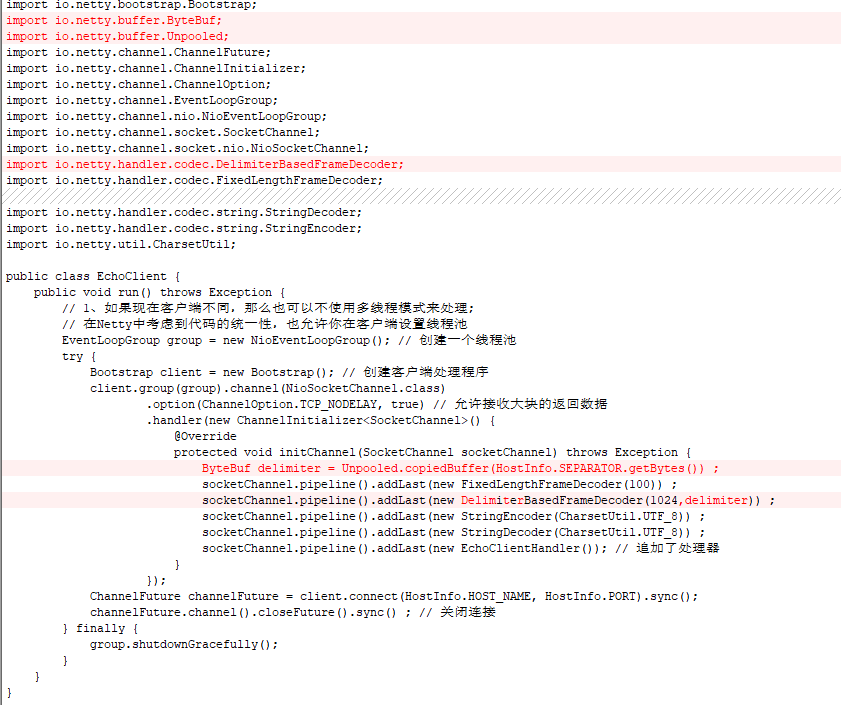
package com.bijian.netty.client;

import com.bijian.netty.client.handler.EchoClientHandler;
import com.bijian.netty.info.HostInfo;
import io.netty.bootstrap.Bootstrap;
import io.netty.buffer.ByteBuf;
import io.netty.buffer.Unpooled;
import io.netty.channel.ChannelFuture;
import io.netty.channel.ChannelInitializer;
import io.netty.channel.ChannelOption;
import io.netty.channel.EventLoopGroup;
import io.netty.channel.nio.NioEventLoopGroup;
import io.netty.channel.socket.SocketChannel;
import io.netty.channel.socket.nio.NioSocketChannel;
import io.netty.handler.codec.DelimiterBasedFrameDecoder;
import io.netty.handler.codec.FixedLengthFrameDecoder;
import io.netty.handler.codec.string.StringDecoder;
import io.netty.handler.codec.string.StringEncoder;
import io.netty.util.CharsetUtil;

public class EchoClient {
    public void run() throws Exception {
        // 1、如果现在客户端不同,那么也可以不使用多线程模式来处理;
        // 在Netty中考虑到代码的统一性,也允许你在客户端设置线程池
        EventLoopGroup group = new NioEventLoopGroup(); // 创建一个线程池
        try {
            Bootstrap client = new Bootstrap(); // 创建客户端处理程序
            client.group(group).channel(NioSocketChannel.class)
                    .option(ChannelOption.TCP_NODELAY, true) // 允许接收大块的返回数据
                    .handler(new ChannelInitializer<SocketChannel>() {
                        @Override
                        protected void initChannel(SocketChannel socketChannel) throws Exception {
                            ByteBuf delimiter = Unpooled.copiedBuffer(HostInfo.SEPARATOR.getBytes()) ;
                            socketChannel.pipeline().addLast(new FixedLengthFrameDecoder(100)) ;
                            socketChannel.pipeline().addLast(new DelimiterBasedFrameDecoder(1024,delimiter)) ;
                            socketChannel.pipeline().addLast(new StringEncoder(CharsetUtil.UTF_8)) ;
                            socketChannel.pipeline().addLast(new StringDecoder(CharsetUtil.UTF_8)) ;
                            socketChannel.pipeline().addLast(new EchoClientHandler()); // 追加了处理器
                        }
                    });
            ChannelFuture channelFuture = client.connect(HostInfo.HOST_NAME, HostInfo.PORT).sync();
            channelFuture.channel().closeFuture().sync() ; // 关闭连接
        } finally {
            group.shutdownGracefully();
        }
    }
}
EchoClientHandler.java
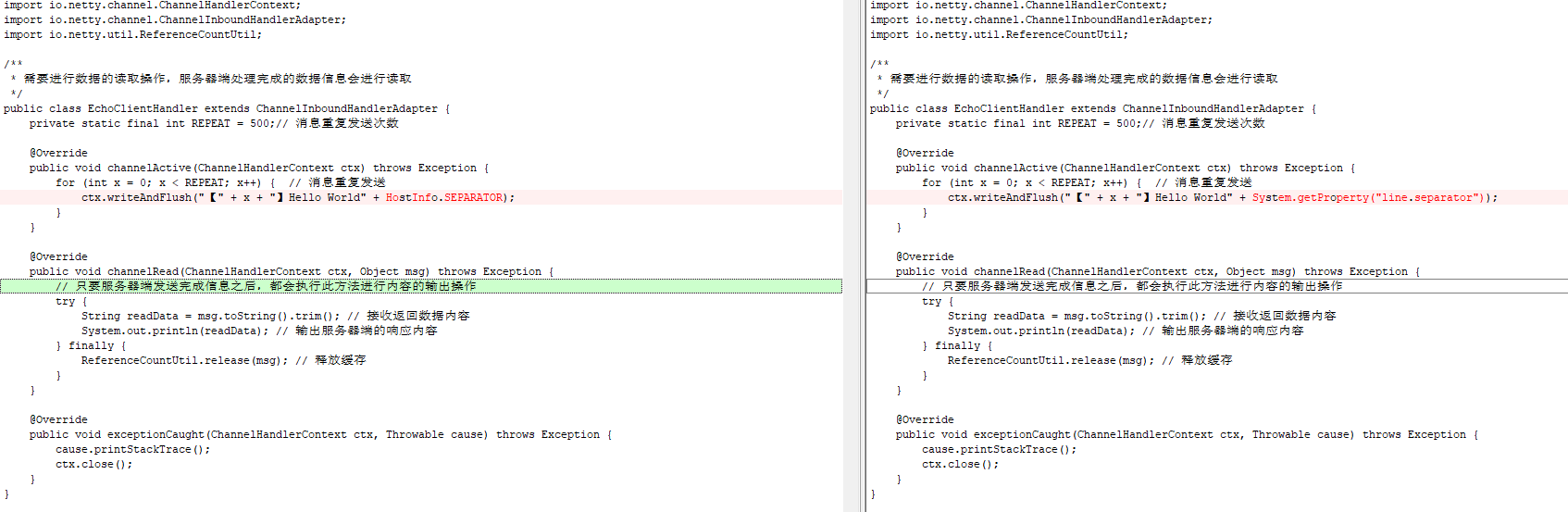
package com.bijian.netty.client.handler;

import com.bijian.netty.info.HostInfo;
import io.netty.channel.ChannelHandlerContext;
import io.netty.channel.ChannelInboundHandlerAdapter;
import io.netty.util.ReferenceCountUtil;

/**
 * 需要进行数据的读取操作,服务器端处理完成的数据信息会进行读取
 */
public class EchoClientHandler extends ChannelInboundHandlerAdapter {
    private static final int REPEAT = 500;// 消息重复发送次数

    @Override
    public void channelActive(ChannelHandlerContext ctx) throws Exception {
        for (int x = 0; x < REPEAT; x++) {  // 消息重复发送
            ctx.writeAndFlush("【" + x + "】Hello World" + HostInfo.SEPARATOR);
        }
    }

    @Override
    public void channelRead(ChannelHandlerContext ctx, Object msg) throws Exception {
        // 只要服务器端发送完成信息之后,都会执行此方法进行内容的输出操作
        try {
            String readData = msg.toString().trim(); // 接收返回数据内容
            System.out.println(readData); // 输出服务器端的响应内容
        } finally {
            ReferenceCountUtil.release(msg); // 释放缓存
        }
    }

    @Override
    public void exceptionCaught(ChannelHandlerContext ctx, Throwable cause) throws Exception {
        cause.printStackTrace();
        ctx.close();
    }
}
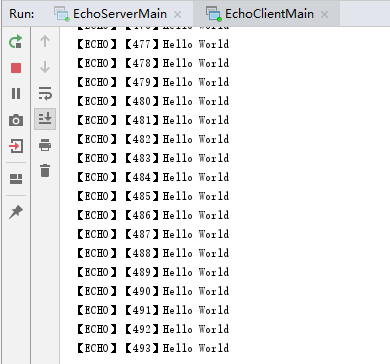
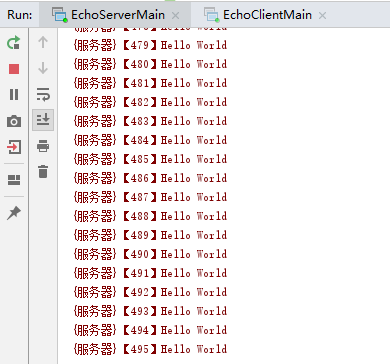
先启动服务端,再启动客户端,运行效果如下:
posted on 2019-06-15 22:37 bijian1013 阅读(1063) 评论(0) 收藏 举报


 浙公网安备 33010602011771号