Java网络通信基础系列-AIO模型
一.AIO模型
异步非阻塞IO
是在JDK 1.7的时候才推出的模型。
是利用了本地操作系统的IO操作处理模式,当有IO操作产生之后,会启动有一个单独的线程,它将所有的IO操作全部交由系统完成,只需要知道返回结果即可。 主要的模式是基于操作回调的方式来完成处理的,如果以烧水为例:在烧水的过程之中你不需要去关注这个水的状态,在烧水完成后才进行通知。
二.实例
AIOEchoServer.java
package cn.mldn.aio.server;

import cn.mldn.info.HostInfo;

import java.io.IOException;
import java.net.InetSocketAddress;
import java.nio.ByteBuffer;
import java.nio.channels.AsynchronousServerSocketChannel;
import java.nio.channels.AsynchronousSocketChannel;
import java.nio.channels.CompletionHandler;
import java.util.concurrent.CountDownLatch;

class EchoHandler implements CompletionHandler<Integer,ByteBuffer> {
    private AsynchronousSocketChannel clientChannel ;
    // 是否结束交互过程,exit = true表示结束,exit = false表示继续
    private boolean exit = false ;
    public EchoHandler(AsynchronousSocketChannel clientChannel) {
        this.clientChannel = clientChannel ;
    }
    @Override
    public void completed(Integer result, ByteBuffer buffer) {
        buffer.flip() ; // 读取之前需要执行重置处理
        String readMessage = new String(buffer.array(),0,buffer.remaining()).trim() ;
        String writeMessage = "【ECHO】" + readMessage ;  // 回应的数据信息
        if ("byebye".equalsIgnoreCase(readMessage)) {
            writeMessage = "【EXIT】拜拜,下次再见!" ;
            this.exit = true ; // 结束后期的交互
        }
        this.echoWrite(writeMessage);
    }

    private void echoWrite(String content) {
        ByteBuffer buffer = ByteBuffer.allocate(100) ;
        buffer.put(content.getBytes()) ;// 向缓存中保存数据
        buffer.flip() ;
        this.clientChannel.write(buffer, buffer, new CompletionHandler<Integer, ByteBuffer>() {
            @Override
            public void completed(Integer result, ByteBuffer buf) {
                if (buf.hasRemaining()) {   // 缓存中是否有数据
                    EchoHandler.this.clientChannel.write(buffer,buffer,this);
                } else {
                    if(EchoHandler.this.exit == false) {    // 还没有结束
                        ByteBuffer readBuffer = ByteBuffer.allocate(100) ;
                        EchoHandler.this.clientChannel.read(readBuffer,readBuffer,new EchoHandler(EchoHandler.this.clientChannel)) ;
                    }
                }
            }

            @Override
            public void failed(Throwable exc, ByteBuffer attachment) {
                try {
                    EchoHandler.this.clientChannel.close();
                } catch (IOException e) {
                }
            }
        });
    }

    @Override
    public void failed(Throwable exc, ByteBuffer attachment) {
        try {
            this.clientChannel.close();
        } catch (IOException e) {
        }
    }
}

// 连接接收的回调处理操作
class AcceptHandler implements CompletionHandler<AsynchronousSocketChannel,AIOServerThread> {

    @Override
    public void completed(AsynchronousSocketChannel channel, AIOServerThread aioThread) {
        aioThread.getServerChannel().accept(aioThread,this) ; // 接收连接
        ByteBuffer buffer = ByteBuffer.allocate(100) ;
        channel.read(buffer,buffer,new EchoHandler(channel)) ;
    }

    @Override
    public void failed(Throwable exc, AIOServerThread aioThread) {
        System.err.println("客户端连接创建失败....");
        aioThread.getLatch().countDown();
    }
}

// 设置一个单独的服务器的处理线程
class AIOServerThread implements Runnable {
    private AsynchronousServerSocketChannel serverChannel = null; // 服务器通道
    private CountDownLatch latch = null ; // 做一个同步处理操作

    public AIOServerThread() throws Exception {
        this.latch = new CountDownLatch(1) ;// 等待线程数量为1
        this.serverChannel = AsynchronousServerSocketChannel.open(); // 打开服务器的通道
        this.serverChannel.bind(new InetSocketAddress(HostInfo.PORT)) ; // 绑定端口
        System.out.println("服务器启动成功,监听端口为:" + HostInfo.PORT);
    }

    public AsynchronousServerSocketChannel getServerChannel() {
        return serverChannel;
    }

    public CountDownLatch getLatch() {
        return latch;
    }

    @Override
    public void run() {
        this.serverChannel.accept(this,new AcceptHandler()) ;
        try {
            this.latch.await(); // 线程等待
        } catch (InterruptedException e) {
            e.printStackTrace();
        }
    }
}


public class AIOEchoServer {
    public static void main(String[] args) throws Exception {
        new Thread(new AIOServerThread()).start();
    }
}
AIOEchoClient.java
package cn.mldn.aio.client;

import cn.mldn.info.HostInfo;
import cn.mldn.util.InputUtil;

import java.io.IOException;
import java.net.InetSocketAddress;
import java.nio.ByteBuffer;
import java.nio.channels.AsynchronousSocketChannel;
import java.nio.channels.CompletionHandler;
import java.util.concurrent.CountDownLatch;

class ClientReadHandler implements CompletionHandler<Integer,ByteBuffer> {
    private AsynchronousSocketChannel clientChannel ;
    private CountDownLatch latch ;
    public ClientReadHandler(AsynchronousSocketChannel clientChannel,CountDownLatch latch) {
        this.clientChannel = clientChannel ;
        this.latch = latch ;
    }
    @Override
    public void completed(Integer result, ByteBuffer buffer) {
        buffer.flip() ;
        String readMessage = new String(buffer.array(),0,buffer.remaining()) ;
        System.out.println(readMessage); // 输出读取内容
    }

    @Override
    public void failed(Throwable exc, ByteBuffer attachment) {
        try {
            this.clientChannel.close();
        } catch (IOException e) {
            e.printStackTrace();
        }
        this.latch.countDown();
    }
}

class ClientWriteHandler implements CompletionHandler<Integer,ByteBuffer> {
    private AsynchronousSocketChannel clientChannel ;
    private CountDownLatch latch ;
    public ClientWriteHandler(AsynchronousSocketChannel clientChannel,CountDownLatch latch) {
        this.clientChannel = clientChannel ;
        this.latch = latch ;
    }

    @Override
    public void completed(Integer result, ByteBuffer buffer) {
        if(buffer.hasRemaining()) {
            this.clientChannel.write(buffer,buffer,this);
        } else {
            ByteBuffer readBuffer = ByteBuffer.allocate(100) ; // 读取服务端回应
            this.clientChannel.read(readBuffer,readBuffer,new ClientReadHandler(this.clientChannel,this.latch)) ;
        }
    }

    @Override
    public void failed(Throwable exc, ByteBuffer attachment) {
        try {
            this.clientChannel.close();
        } catch (IOException e) {
            e.printStackTrace();
        }
        this.latch.countDown();
    }
}

class AIOClientThread implements Runnable {
    private AsynchronousSocketChannel clientChannel;
    private CountDownLatch latch;

    public AIOClientThread() {
        try {
            this.clientChannel = AsynchronousSocketChannel.open();
        } catch (IOException e) {
            e.printStackTrace();
        }
        this.clientChannel.connect(new InetSocketAddress(HostInfo.HOST_NAME, HostInfo.PORT));
        this.latch = new CountDownLatch(1);
    }

    @Override
    public void run() {
        try {
            this.latch.await();
        } catch (InterruptedException e) {
            e.printStackTrace();
        }
    }
    public boolean sendMessage(String msg) {
        ByteBuffer buffer = ByteBuffer.allocate(100) ;
        buffer.put(msg.getBytes()) ;
        buffer.flip() ;
        this.clientChannel.write(buffer,buffer,new ClientWriteHandler(this.clientChannel,this.latch));
        if("byebye".equalsIgnoreCase(msg)) {
            return false ;
        }
        return true ;
    }
}

public class AIOEchoClient {
    public static void main(String[] args) {
        AIOClientThread client = new AIOClientThread() ;
        new Thread(client).start();
        while(client.sendMessage(InputUtil.getString("请输入要发送的内容:"))) {
            ;
        }
    }
}
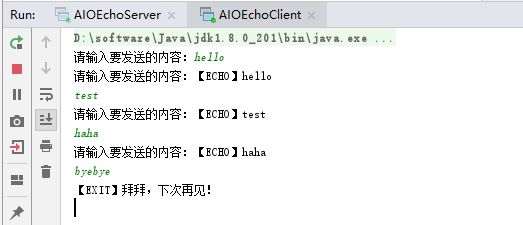
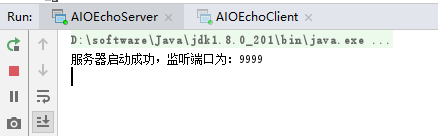
先启动AIOEchoServer.java,再启动AIOEchoClient.java,运行效果如下:
posted on 2019-06-15 11:39 bijian1013 阅读(366) 评论(0) 收藏 举报


 浙公网安备 33010602011771号