Java网络通信基础系列-NIO模型
一.NIO模型
同步非阻塞IO处理
在传统的Java环境里面,最初的程序需要依赖于JVM虚拟机技术。最早的时候由于虚拟机的性能很差,所以很少有人去关注通讯的速度问题,大部分的问题都出现在了CPU处理上。 但是随着硬件的性能提升,实际上CPU的处理速度加强了。所以从JDK 1.4开始就引入NIO的开发包,可以带来底层数据的传输性能。 在NIO之中采用了一个Reactor事件模型,注册的汇集点Selector。
传统IO的操作是基于数组的形式完成的,可以理解为是小蚂蚁搬家的形式,如一下很大的文件,用小蚂蚁搬家的形式一个一个的往回搬,把所有数据拷完之后,操作就完成了。新IO中其实也是一种蚂蚁搬家模式,只不过这种蚂蚁搬家模式的形式要比它智能一些,用了一个缓存的模式。
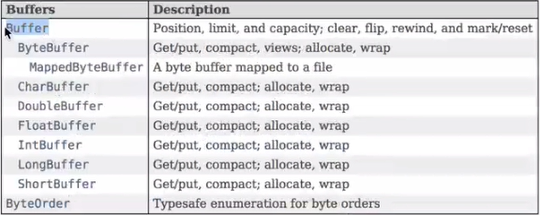
这些Buffer中有几个操作的形式,如ByteBuffer,有allocate(int capacity)是开避缓存区空间,而在Buffer方法中有flip()、limit()、position(),也就是说在整个流程里面,针对整个Buffer有如下几个操作形式的。
position:保存下一个要存的位置。
capacity:表示能够接受的容量。
limit:总的限制。
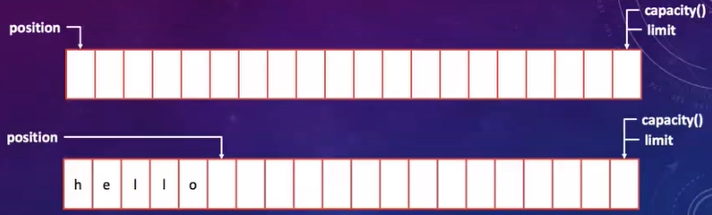
而当我们准备输出时(flip方法输出),position回到第0个位置,limit操作要改变位置到内存的最后位置,如下所示:

表示开始输出处理操作,这就是整个Buffer缓存区的整个操作流程。
Buffer的缺点:Buffer提供了过于底层的操作形式,并没有直接进行字符串的转换能力。
【NIO】烧水,不会一直傻站着看,你采用轮询的方式来观察水是否烧开。
二.实例
NIOEchoServer.java
package com.bijian.nio.server;

import com.bijian.info.HostInfo;

import java.net.InetSocketAddress;
import java.nio.ByteBuffer;
import java.nio.channels.SelectionKey;
import java.nio.channels.Selector;
import java.nio.channels.ServerSocketChannel;
import java.nio.channels.SocketChannel;
import java.util.Iterator;
import java.util.Set;
import java.util.concurrent.ExecutorService;
import java.util.concurrent.Executors;

public class NIOEchoServer {
    private static class EchoClientHandler implements Runnable {
        private SocketChannel clientChannel ; // 客户端通道
        private boolean flag = true ; // 循环处理标记
        public EchoClientHandler(SocketChannel clientChannel) {
            this.clientChannel = clientChannel ;
            // 严格意义上来讲,当已经成功的连接上了服务器,并且需要进行进一步处理之前要发送一些消息给客户端
        }
        @Override
        public void run() {
            ByteBuffer buffer = ByteBuffer.allocate(50) ; // 50个缓冲区
            try {
                while(this.flag) {  // 需要不断进行交互
                    buffer.clear() ;    // 清空缓冲区
                    int readCount = this.clientChannel.read(buffer) ; // 向缓冲区之中读取数据
                    String readMessage = new String(buffer.array(),0,readCount).trim() ;
                    String writeMessage = "【ECHO】" + readMessage + "\n" ; // 回应数据信息
                    if("byebye".equalsIgnoreCase(readMessage)) {
                        writeMessage = "【EXIT】拜拜,下次再见!" ;
                        this.flag = false ;
                     }
                     // 数据输入通过缓存的形式完成,而数据的输出同样需要进行缓存操作
                    buffer.clear() ; // 为了写入新的返回数据而定义
                    buffer.put(writeMessage.getBytes()) ; // 发送内容
                    buffer.flip() ; // 重置缓冲区
                    this.clientChannel.write(buffer) ;// 回应数据
                }
                this.clientChannel.close();
            } catch (Exception e) {
                e.printStackTrace();
            }
        }
    }

    public static void main(String[] args) throws Exception {
        // 1、NIO的实现考虑到性能的问题以及响应时间问题,需要设置一个线程池,采用固定大小的线程池
        ExecutorService executorService = Executors.newFixedThreadPool(10);
        // 2、NIO的处理是基于Channel控制的,所以有一个Selector就是负责管理所有的Channel
        ServerSocketChannel serverSocketChannel = ServerSocketChannel.open();
        // 3、需要为其设置一个非阻塞的状态机制
        serverSocketChannel.configureBlocking(false); // 非阻塞模式
        // 4、服务器上需要提供有一个网络的监听端口
        serverSocketChannel.bind(new InetSocketAddress(HostInfo.PORT));
        // 5、需要设置一个Selector,作为一个选择器的出现,目的是管理所有的Channel
        Selector selector = Selector.open();
        // 6、将当前的Channel注册到Selector之中
        serverSocketChannel.register(selector, SelectionKey.OP_ACCEPT); // 连接时处理
        System.out.println("服务器已经启动成功,服务器的监听端口为:" + HostInfo.PORT);
        // 7、NIO采用的是轮询模式,每当发现有用户连接的时候就需要启动一个线程(线程池管理)
        int keySelect = 0; // 接收轮询状态
        while((keySelect = selector.select()) > 0) {    // 实现了轮询处理
            Set<SelectionKey> selectionKeys = selector.selectedKeys() ;   // 获取全部的Key
            Iterator<SelectionKey> selectionIter = selectionKeys.iterator() ;
            while(selectionIter.hasNext()) {
                SelectionKey selectionKey = selectionIter.next() ;  // 获取每一个Key的信息
                if (selectionKey.isAcceptable()) {  // 为连接模式
                    SocketChannel clientChannel = serverSocketChannel.accept() ; // 等待连接
                    if (clientChannel != null) {
                        executorService.submit(new EchoClientHandler(clientChannel)) ;
                    }
                }
                selectionIter.remove();
            }
        }
        executorService.shutdown();
        serverSocketChannel.close();
    }
}
NIOEchoClient.java
package com.bijian.nio.client;

import com.bijian.info.HostInfo;
import com.bijian.util.InputUtil;

import java.net.InetSocketAddress;
import java.nio.ByteBuffer;
import java.nio.channels.SocketChannel;

public class NIOEchoClient {
    public static void main(String[] args) throws Exception {
        SocketChannel clientChannel = SocketChannel.open() ; // 打开客户端连接通道
        clientChannel.connect(new InetSocketAddress(HostInfo.HOST_NAME,HostInfo.PORT)) ;// 连接
        ByteBuffer buffer = ByteBuffer.allocate(50) ;// 开辟缓冲区
        boolean flag = true ;
        while(flag) {
            buffer.clear() ; // 清空缓冲区
            String inputData = InputUtil.getString("请输入要发送的信息:").trim() ;
            buffer.put(inputData.getBytes()) ; // 将输入的数据保存在缓冲区之中
            buffer.flip() ; // 重置缓冲区
            clientChannel.write(buffer) ; // 发送数据
            buffer.clear() ; // 在读取之前进行缓冲区清空
            int readCount = clientChannel.read(buffer) ;
            buffer.flip() ;
            System.err.println(new String(buffer.array(),0,readCount));
            if("byebye".equalsIgnoreCase(inputData)) {
                flag = false ;
            }
        }
        clientChannel.close();
    }
}
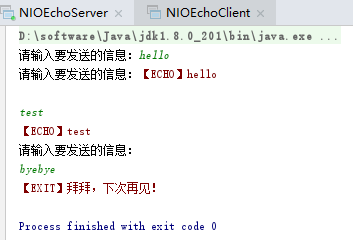
先运行NIOEchoServer.java,再运行NIOEchoClient.java,效果如下:
posted on 2019-06-15 11:38 bijian1013 阅读(453) 评论(0) 收藏 举报


 浙公网安备 33010602011771号