[Python专题学习]-python开发简单爬虫
掌握开发轻量级爬虫,这里的案例是不需要登录的静态网页抓取。涉及爬虫简介、简单爬虫架构、URL管理器、网页下载器(urllib2)、网页解析器(BeautifulSoup)
一.爬虫简介以及爬虫的技术价值
1.爬虫简介
爬虫:一段自动抓取互联网信息的程序。
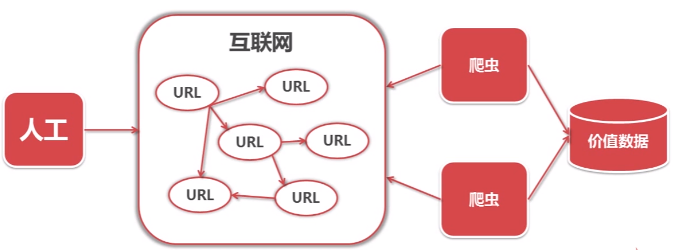
爬虫是自动访问互联网,并且提取数据的程序。
2.爬虫价值
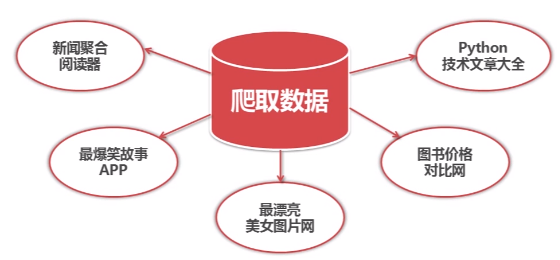
互联网数据,为我所用!
二.简单爬虫架构
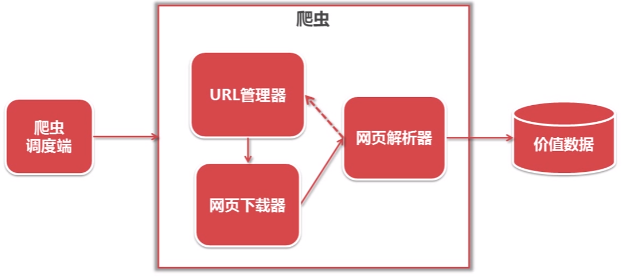
运行流程:
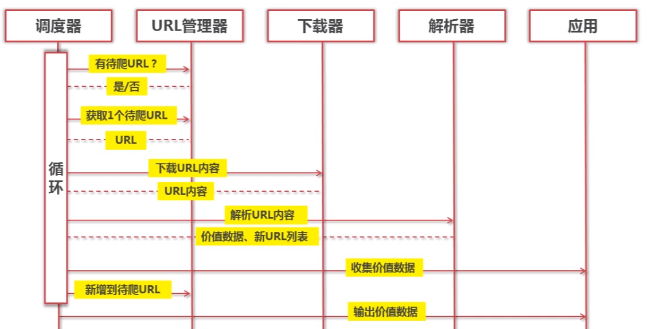
三.URL管理器和实现方法
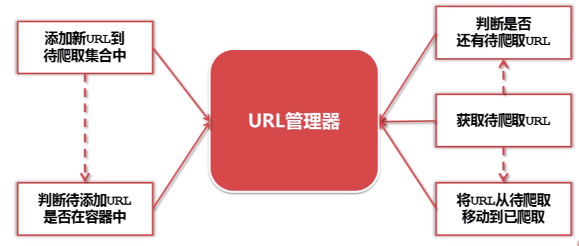
1.URL管理器
URL管理器:管理待抓取URL集合和已抓取URL集合,防止重复抓取、防止循环抓取
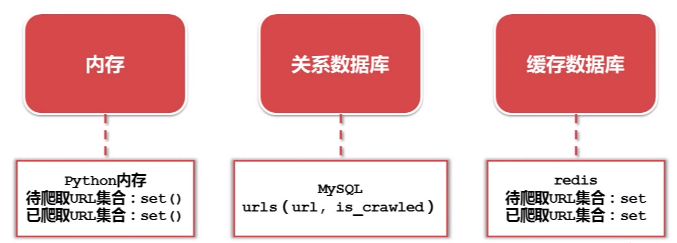
2.实现方式
四.网页下载器和urllib2模块
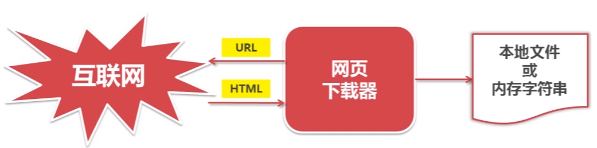
1.网页下载器
将互联网上URL对应的网页下载到本地的工具。
Python有哪几种网页下载器?
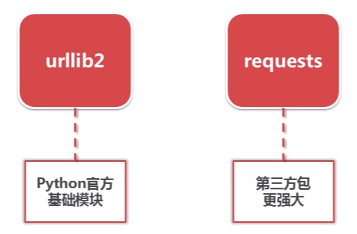
2.urllib2下载器网页的三种方法
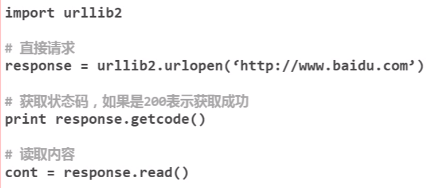
a.urllib2下载网页方法1:最简法方法
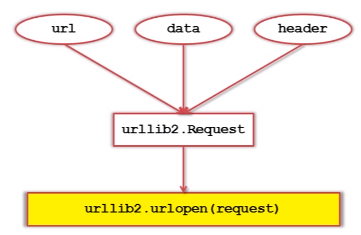
b.urllib2下载网页方法2:添加data、http header

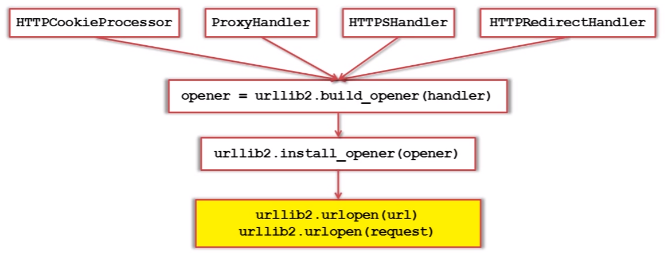
c.urllib2下载网页方法3:添加特殊情景的处理器
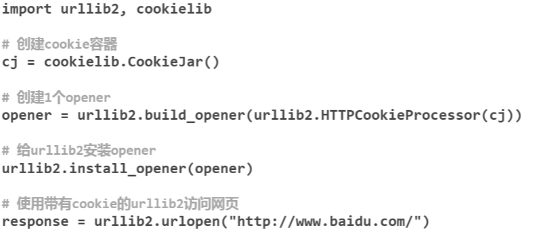
3.urllib2实例代码演示
由于我这里用的是python3.x,引用的不是urllib,而是urllib.request。
import urllib.request
import http.cookiejar

url = "http://www.baidu.com"

print('第一种方法')
response1 = urllib.request.urlopen(url)
print(response1.getcode())
print(len(response1.read()))

print('第二种方法')
request = urllib.request.Request(url)
request.add_header("user-agent", "Mozilla/5.0")
response2 = urllib.request.urlopen(request)
print(response2.getcode())
print(len(response2.read()))

print('第三种方法')
cj = http.cookiejar.CookieJar()
opener = urllib.request.build_opener(urllib.request.HTTPCookieProcessor(cj))
urllib.request.install_opener(opener)
response3 = urllib.request.urlopen(url)
print(response3.getcode())
print(cj)
print(response3.read())
运行结果:

五.网页解析器和BeautifulSoup第三方模块
1.网页解析器简介
从网页中提取有价值数据的工具。
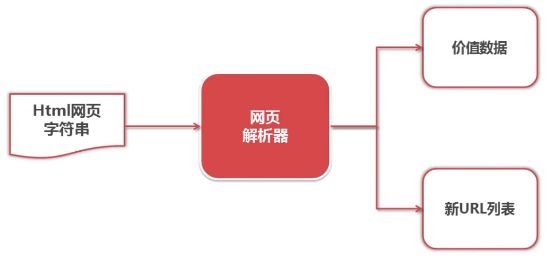
Python有哪几中网页解析器?

结构化解析-DOM(Document Object Model)树
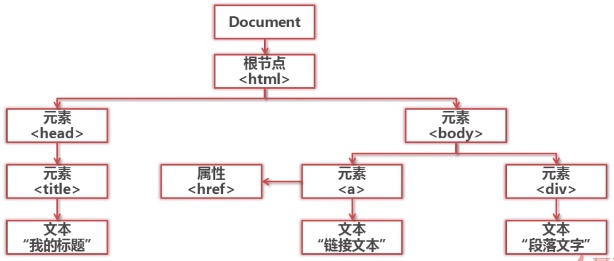
2.BeautifulSoup模块介绍和安装
BeautifulSoup是Python第三方库,用于从HTML或XML中提取数据,官网:https://www.crummy.com/software/BeautifulSoup/
安装并测试BeautifulSoup4,安装:pip install beautifulsoup4

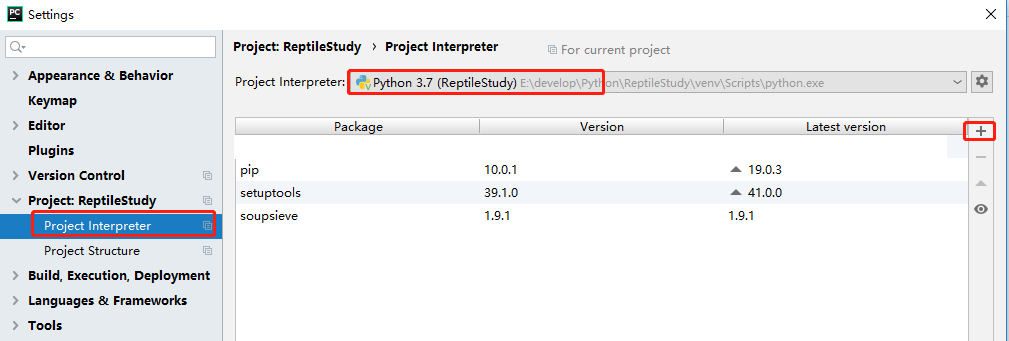
但这样安装成功后,在PyCharm中还是不能引入,于是再通过从官网上下载安装包解压,再安装,竟然还是不可以,依然报No module named 'bs4'。
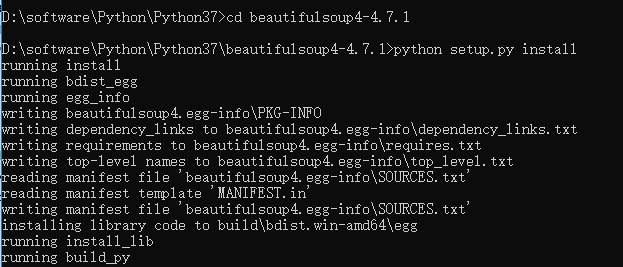
没办法,最后在PyCharm中通过如下方式安装后才可以。
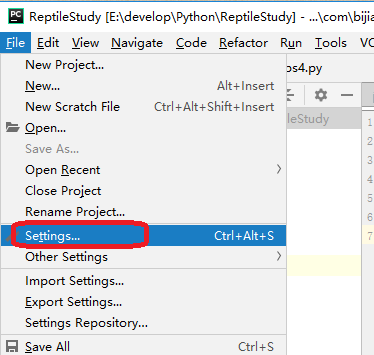
进入如下窗口。
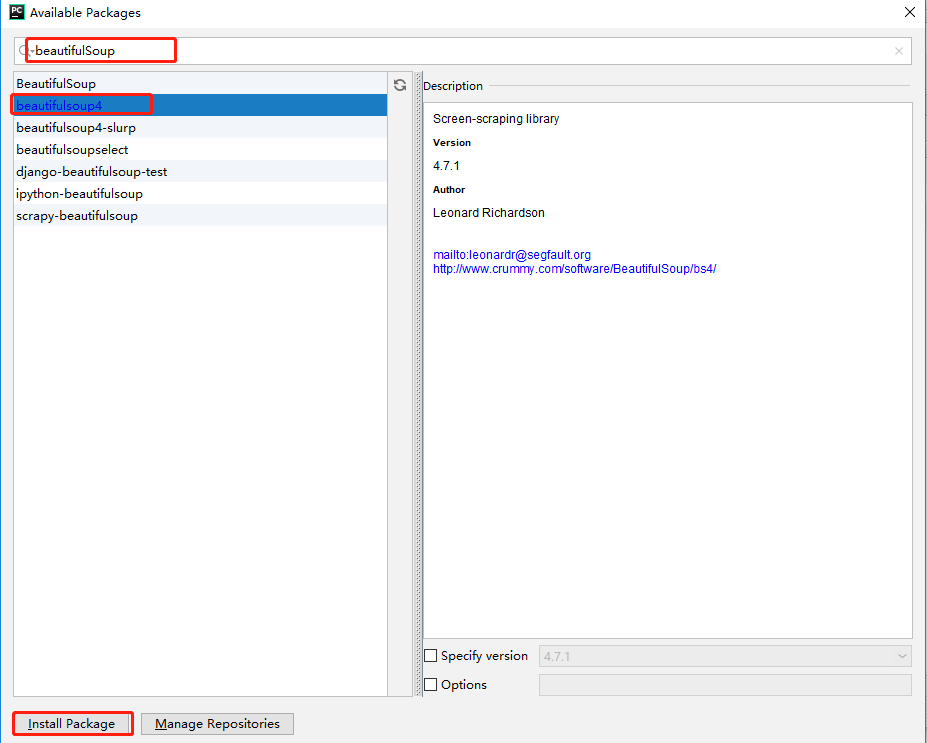
点击“Install Package”进行安装,出现如下提示表明安装成功。

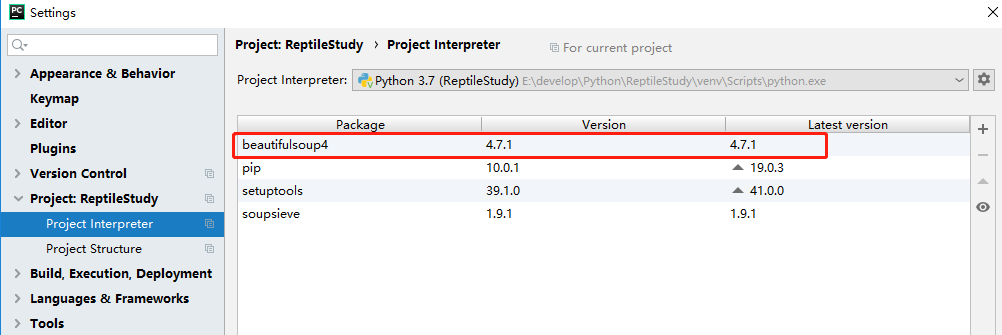
安装成功后,再次进入可以看到安装的版本等信息,如下所示。
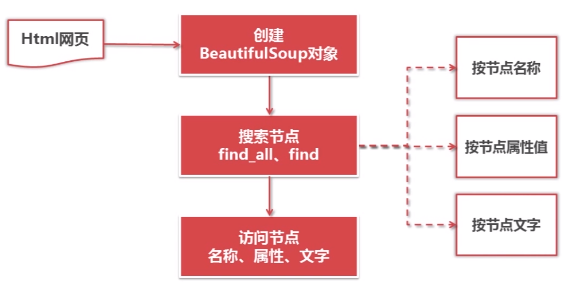
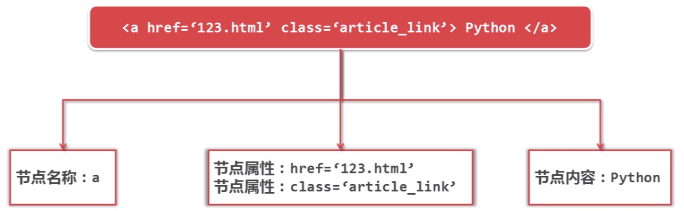
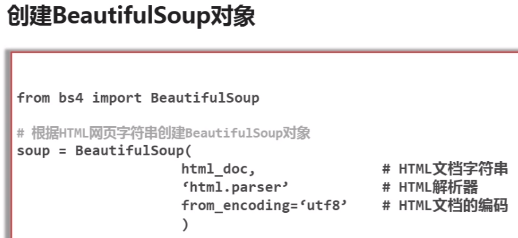
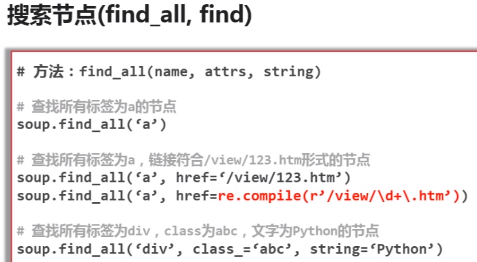
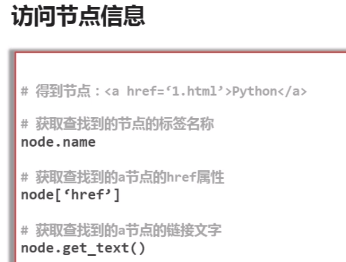
3.BeautifulSoup的语法
4.BeautifulSoup实例测试
from bs4 import BeautifulSoup
import re

html_doc = """
<html><head><title>The Dormouse's story</title></head>
<body>
<p class="title"><b>The Dormouse's story</b></p>

<p class="story">Once upon a time there were three little sisters; and their names were
<a href="http://example.com/elsie" class="sister" id="link1">Elsie</a>,
<a href="http://example.com/lacie" class="sister" id="link2">Lacie</a> and
<a href="http://example.com/tillie" class="sister" id="link3">Tillie</a>;
and they lived at the bottom of a well.</p>

<p class="story">...</p>
"""

#soup = BeautifulSoup(html_doc, 'html.parser', from_encoding='utf-8') python3 缺省的编码是unicode, 再在from_encoding设置为utf8, 会被忽视掉,去掉【from_encoding="utf-8"】
soup = BeautifulSoup(html_doc, 'html.parser')
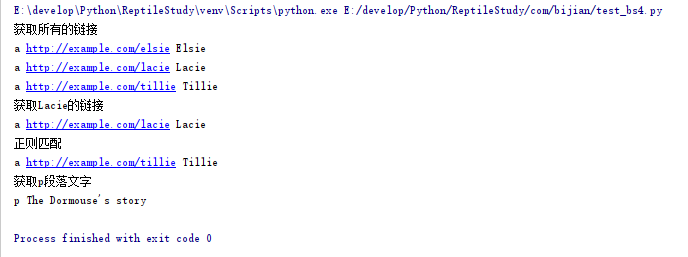
print("获取所有的链接")
links = soup.find_all('a')
for link in links:
    print(link.name, link['href'], link.get_text())

print("获取Lacie的链接")
link_node = soup.find('a', href="http://example.com/lacie")
print(link_node.name, link_node['href'], link_node.get_text())

print("正则匹配")
link_node = soup.find('a', href=re.compile(r"ill"))
print(link_node.name, link_node['href'], link_node.get_text())

print("获取p段落文字")
p_node = soup.find('p', class_="title")
print(p_node.name, p_node.get_text())
运行结果:
六.实战演练:爬取百度百科1000个页面的数据
1.分析目标
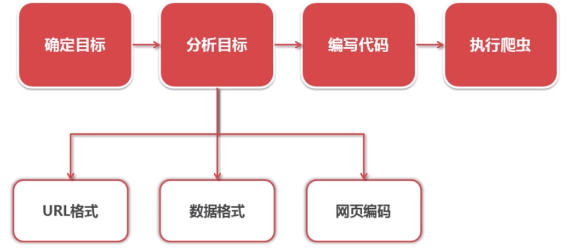
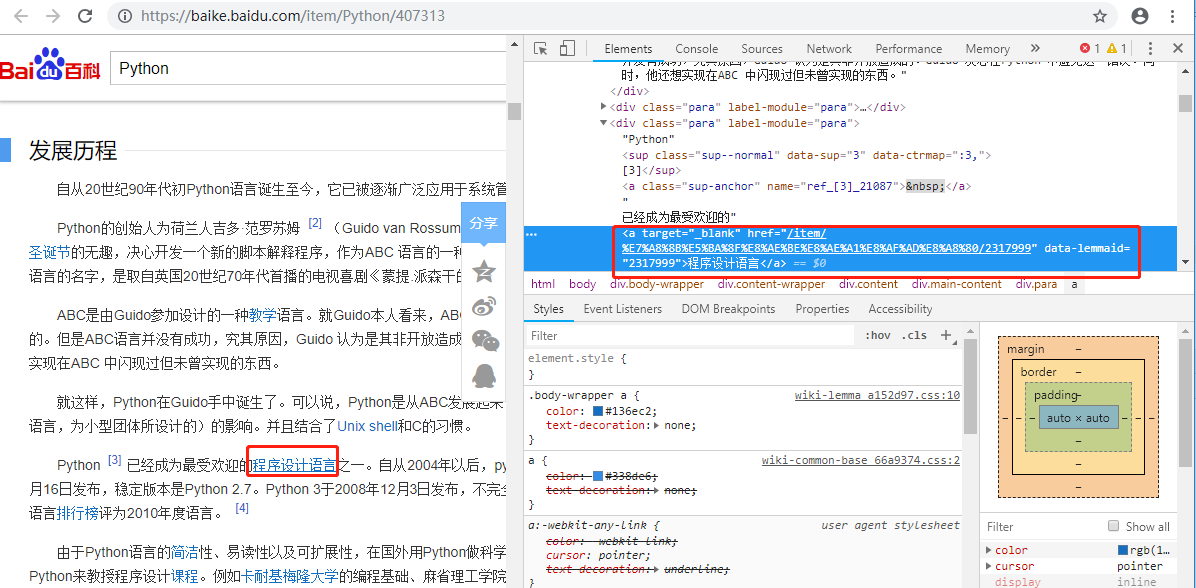
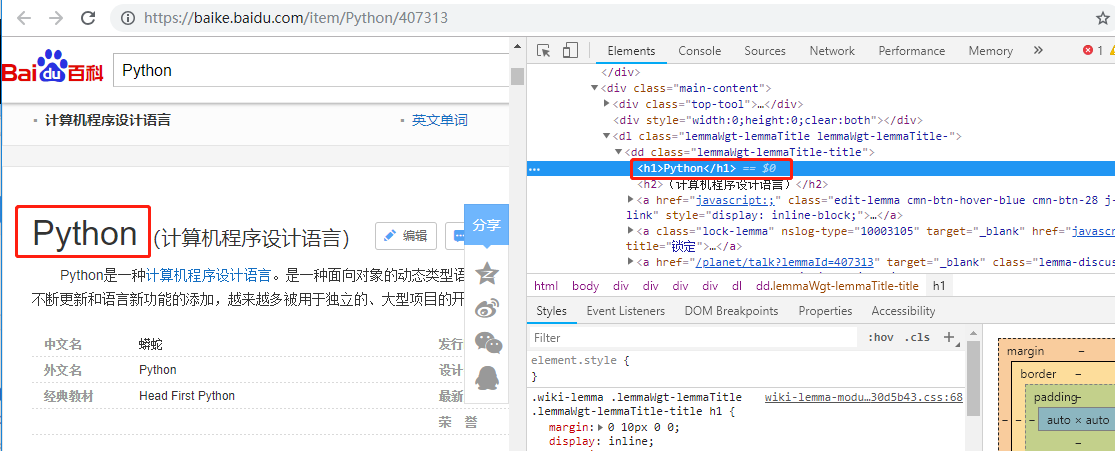
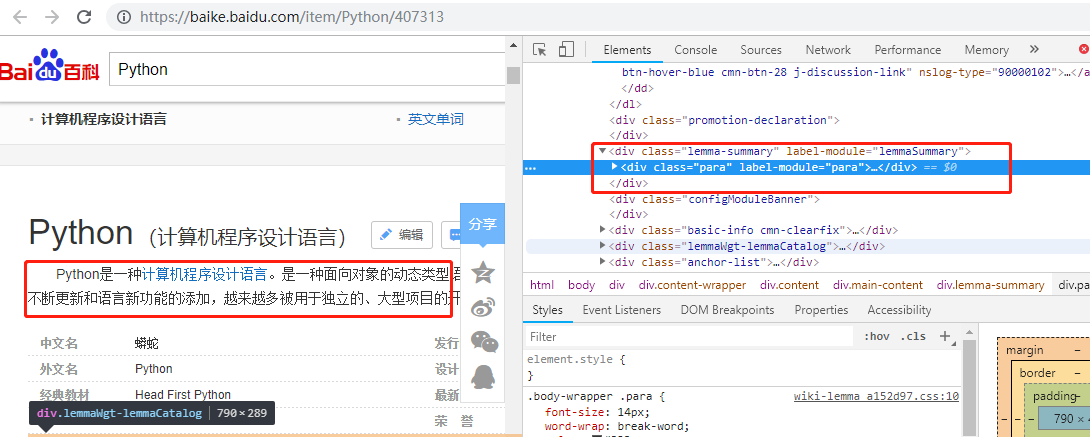
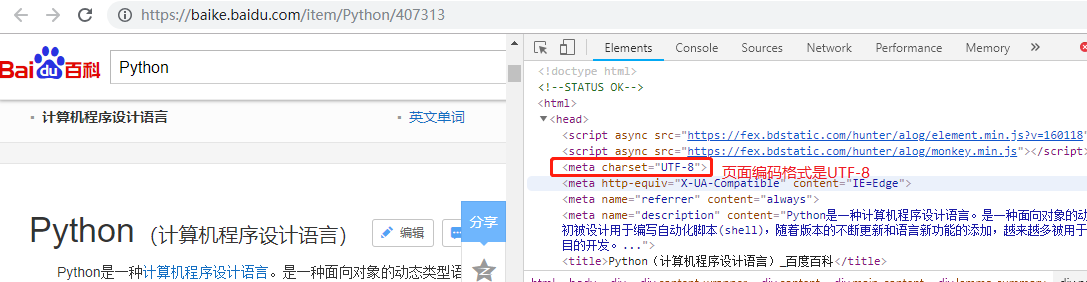
目标:百度百科Python词条相关词条网页-标题和简介
入口页:https://baike.baidu.com/item/Python/407313
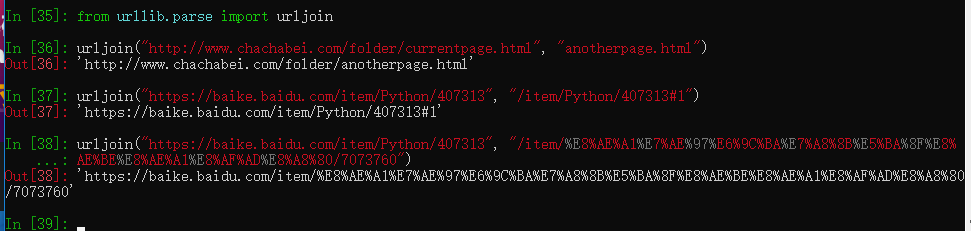
URL格式:词条页面URL:/item/计算机程序设计语言/7073760
数据格式:
标题:
<dd class="lemmaWgt-lemmaTitle-title"><h1>***</h1></dd>
简介:
<div class="lemma-summary">***</div>
页面编码:UTF-8
需提醒的是:每个网站都会不停地升级它的格式,做为一个定向爬虫来说,如果目标网站的格式发生了升级,抓取策略也要随之升级。
2.调度程序
项目结构如下:
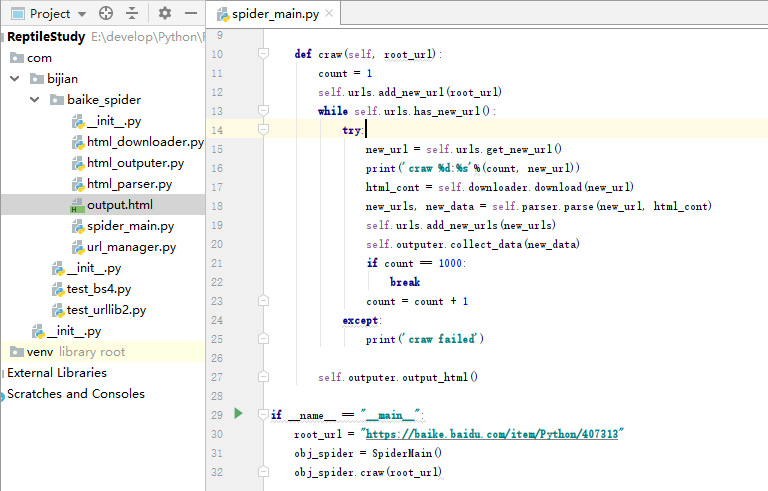
spider_main.py
from com.bijian.baike_spider import url_manager, html_downloader, html_parser, html_outputer

class SpiderMain(object):
    def __init__(self):
        self.urls = url_manager.UrlManager()
        self.downloader = html_downloader.HtmlDownloader()
        self.parser = html_parser.HtmlParser()
        self.outputer = html_outputer.HtmlOutputer()

    def craw(self, root_url):
        count = 1
        self.urls.add_new_url(root_url)
        while self.urls.has_new_url():
            try:
                new_url = self.urls.get_new_url()
                print('craw %d:%s'%(count, new_url))
                html_cont = self.downloader.download(new_url)
                new_urls, new_data = self.parser.parse(new_url, html_cont)
                self.urls.add_new_urls(new_urls)
                self.outputer.collect_data(new_data)
                if count == 1000:
                    break
                count = count + 1
            except:
                print('craw failed')

        self.outputer.output_html()

if __name__ == "__main__":
    root_url = "https://baike.baidu.com/item/Python/407313"
    obj_spider = SpiderMain()
    obj_spider.craw(root_url)
3.URL管理器
url_manager.py
class UrlManager(object):
    def __init__(self):
        self.new_urls = set()
        self.old_urls = set()

    def add_new_url(self, url):
        if url is None:
            return
        if url not in self.new_urls and url not in self.old_urls:
            self.new_urls.add(url)

    def add_new_urls(self, urls):
        if urls is None or len(urls) == 0:
            return
        for url in urls:
            self.add_new_url(url)

    def has_new_url(self):
        return len(self.new_urls) != 0

    def get_new_url(self):
        new_url = self.new_urls.pop()
        self.old_urls.add(new_url)
        return new_url
4.HTML下载器html_downloader
html_downloader.py
import urllib.request

class HtmlDownloader(object):

    def download(self, url):
        if url is None:
            return None
        response = urllib.request.urlopen(url)
        if response.getcode() != 200:
            return None
        return response.read()
5.HTML解析器html_parser
html_parser.py
from bs4 import BeautifulSoup
import re
from urllib.parse import urljoin

class HtmlParser(object):

    def _get_new_urls(self, page_url, soup):
        new_urls = set()
        # /item/计算机程序设计语言/7073760
        links = soup.find_all('a', href=re.compile(r"/item/.+/\d+$"))
        for link in links:
            new_url = link['href']
            new_full_url = urljoin(page_url, new_url)
            new_urls.add(new_full_url)
        return new_urls

    def _get_new_data(self, page_url, soup):
        res_data = {}
        #url
        res_data['url'] = page_url

        # <dd class="lemmaWgt-lemmaTitle-title"><h1>Python</h1>
        title_node = soup.find('dd', class_="lemmaWgt-lemmaTitle-title").find('h1')
        res_data['title'] = title_node.get_text()

        #<div class="lemma-summary">
        summary_node = soup.find('div',class_="lemma-summary")
        res_data['summary'] = summary_node.get_text()

        return res_data

    def parse(self, page_url, html_cont):
        if page_url is None or html_cont is None:
            return
        soup = BeautifulSoup(html_cont, 'html.parser', from_encoding="utf-8")
        new_urls = self._get_new_urls(page_url, soup)
        new_data = self._get_new_data(page_url, soup)
        return new_urls, new_data
6.HTML输出器
html_outputer.py
class HtmlOutputer(object):
    def __init__(self):
        self.datas = []

    def collect_data(self, data):
        if data is None:
            return
        self.datas.append(data)

    def output_html(self):
        #fout = open('output.html','w') #这里要加上encoding='utf-8',不然会报:UnicodeEncodeError: 'gbk' codec can't encode character '\xa0' in position 75: illegal multibyte sequence,也不能简单直接在%data['summary']后面加上.encode('utf-8'),因为这样虽然运行不报错,但打开output.html中文全是转义的字符
        fout = open('output.html', 'w', encoding='utf-8')
        fout.write("<html>")
        fout.write("<body>")
        fout.write("<table>")

        #ascii
        for data in self.datas:
            fout.write("<tr>")
            fout.write("<td>%s</td>" %data['url'])
            fout.write("<td>%s</td>" %data['title'])
            fout.write("<td>%s</td>" %data['summary'])
            fout.write("</tr>")

        fout.write("</table>")
        fout.write("</body>")
        fout.write("</html>")

        fout.close()
7.开始运行爬虫和爬取结果展示
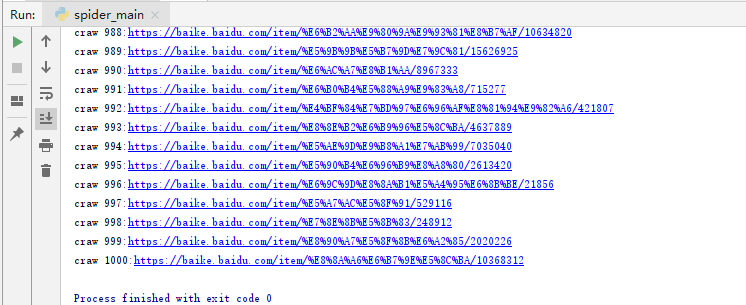
运行spider_main.py结束后

这只是最简单的爬虫,正常爬虫需登录、验证码、Ajax、服务器防爬虫、多线程、分布式。
posted on 2019-04-21 20:13 bijian1013 阅读(249) 评论(0) 收藏 举报


 浙公网安备 33010602011771号