小程序上传图片
小程序上传图片官方文档:https://developers.weixin.qq.com/miniprogram/dev/api/network/upload/wx.uploadFile.html
将本地资源上传到服务器。客户端发起一个HTTPS POST请求,其中content-type为 multipart/form-data。
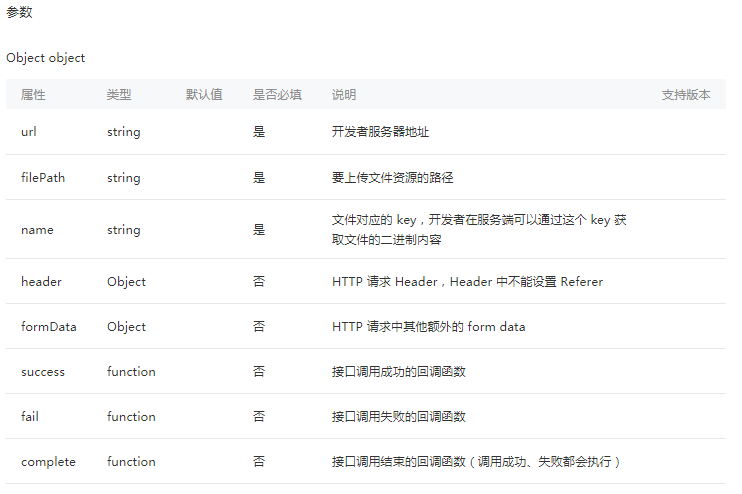
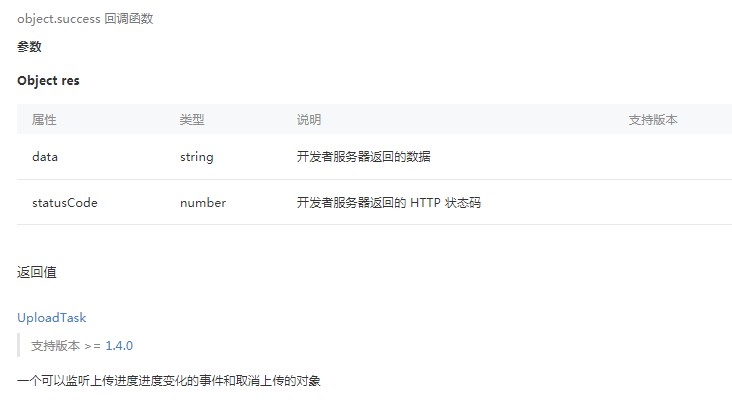
示例代码:
wx.chooseImage({
  success (res) {
    const tempFilePaths = res.tempFilePaths
    wx.uploadFile({
      url: 'https://example.weixin.qq.com/upload', //仅为示例,非真实的接口地址
      filePath: tempFilePaths[0],
      name: 'file',
      formData: {
        'user': 'test'
      },
      success (res){
        const data = res.data
        //do something
      }
    })
  }
})
如我们在实际应用中的小程序请求:
wx.chooseImage({
  success (res) {
    const tempFilePaths = res.tempFilePaths
    wx.uploadFile({
      url: 'https://example.weixin.qq.com/upload', //仅为示例,非真实的接口地址
      filePath: tempFilePaths[0],
      name: 'file',
      header: {
        'content-type': 'multipart/form-data'
      },
      formData: {
        'fileSide':this.fileSide,
        'requestType":this.requestType
      },
      success (res){
        const data = res.data
        //do something
      }
    })
  }
})
我们这里formData中的请求参数有fileSide和requestType两个,下面我们继续看一下后台的代码:
@RestController
public class FileUploadController {

    private final static Logger logger = LoggerFactory.getLogger(FileUploadController.class);

    @RequestMapping(value = "/fileUpload.do", method = RequestMethod.POST)
    public BaseResponseEntity fileUpload(@RequestParam("file") MultipartFile file, @RequestParam("fileSide") String fileSide, @RequestParam("requestType") String requestType, HttpServletRequest request, HttpServletResponse response) {

        logger.info("文件上传,request params,fileSide:{}, requestType:{}", fileSide, requestType);
        String absoluteFileName = Constants.LOCAL_PATH + File.separator + file.getOriginalFilename();
        File uploadFile = new File(absoluteFileName);
        file.transferTo(uploadFile);
        ...

 }
}
特别注意:
1.@RequestParm("file")中间的“file"和小程序中的name的值是一样的
2.小程序formData中的参数,即HTTP请求中其他额外的form data,在后台需额外通过@RequestParam方式一个一个接收
3.这里用的是Apache Commons FileUpload技术,Spring MVC为文件上传提供了直接的支持,这种支持是用即插即用的MultipartResolver实现,它的实现类是:CommonsMultipartResolver。因此,SpringMVC的文件上传还需要依赖Apache Commons FileUpload的组件。 在dispatcher-servlet.xml增加类似如下的配置:
<!-- 文件上传配置 -->
<bean id="multipartResolver" class="org.springframework.web.multipart.commons.CommonsMultipartResolver">
   <!-- 默认编码 -->
   <property name="defaultEncoding" value="UTF-8"/>
   <!-- 内存中的最大值 -->
   <property name="maxInMemorySize" value="4096"/>
   <property name="maxUploadSize" value="104857600"/>
</bean>
参考资料:https://developers.weixin.qq.com/miniprogram/dev/api/network/upload/wx.uploadFile.html、Spring MVC实现文件的上传和下载
posted on 2018-12-23 19:13 bijian1013 阅读(1583) 评论(0) 收藏 举报


 浙公网安备 33010602011771号