
6、Scanner对象的两个方法,next() 和 nextLine()的使用区别
next():
1、一定要读取到有效字符后才可以结束输入
2、对输入有效字符之前遇到的空白,next()方法会自动将其去掉
3、只有输入有效字符后才将其后面输入的空白作为分隔符或者结束符
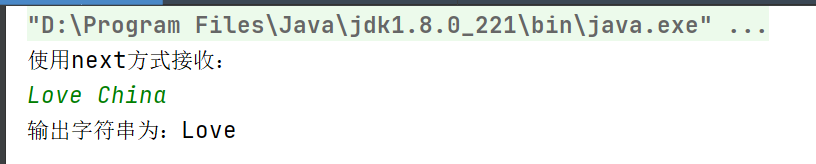
4、next()不能得到带有空格的字符串
`
public static void main(String[] args) {
//创建一个扫描器对象,用于接收键盘数据
Scanner scanner = new Scanner(System.in);
System.out.println("使用next方式接收:");
//判断用户有没有输入字符串
if (scanner.hasNext()){
//使用next方式接收
String str = scanner.next();
System.out.println("输出字符串为:"+str);
}
//凡是属于IO流的类如果不关闭会一直占用资源,要养成好习惯,用完就关掉
scanner.close();
}
`
nextLine():
1、以Enter为结束符,也就是说nextLine()方法返回的是输入回车之前的所有字符
2、可以获得空白
`
public static void main(String[] args) {
/* create a scanner object, to receive the data that user entered via keyboard */
Scanner scanner = new Scanner(System.in);
System.out.println("使用nextLine方式接收:");
/* 判断用户是否输入字符串
*
* */
if (scanner.hasNextLine()){
String str = scanner.nextLine();
System.out.println("输出字符串为:"+str);
}
/* 对于IO流的类,使用完毕一定不要忘记关闭,养成良好的编码习惯 */
scanner.close();
}
`

 浙公网安备 33010602011771号