
尚医通 04
9. 预约挂号功能
- 选择医院, 科室后, 显示可预约的挂号信息
- 接口分析
- 根据预约周期,展示可预约日期数据,按分页展示
- 选择日期展示当天可预约列表(该接口后台已经实现过)
- 代码实现, 前端逻辑, 点击科室后,首先请求http://localhost/api/hosp/hospital/auth/getBookingScheduleRule/1/7/1000_0/200040878 获得可预约排版数据, 再默认显示第一个日期对应的排班数据http://localhost/api/hosp/hospital/auth/findScheduleList/1000_0/200040878/2022-08-24
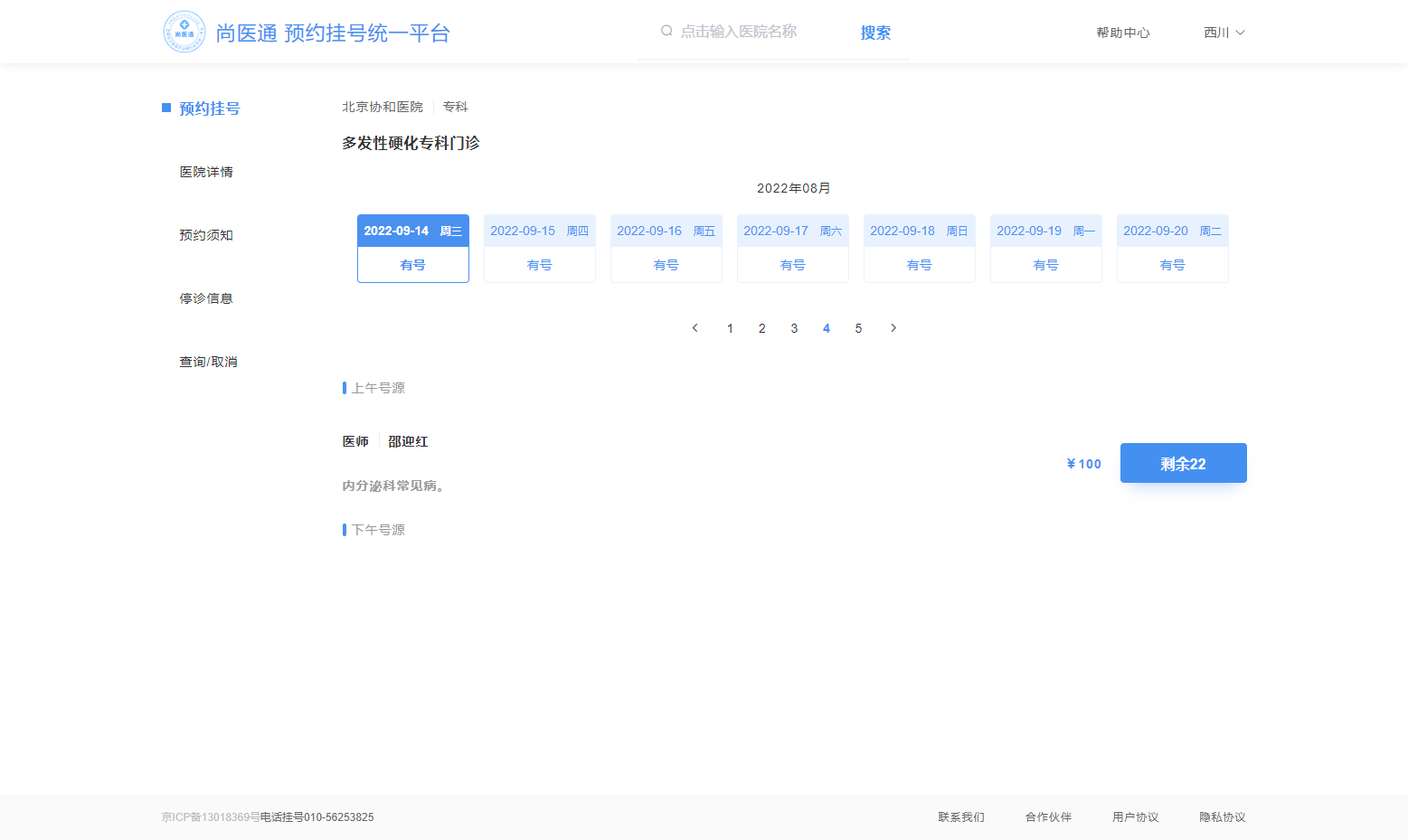
- 在serviceImpl中需要分页展示七天内的排版信息, 可预约天数保存在Hospital.bookingRule.cycle 中, 若当天无排班信息或无号, 均显示无号
	    //获取可预约排班数据
    @ApiOperation(value = "获取可预约排班数据")
    @GetMapping("auth/getBookingScheduleRule/{page}/{limit}/{hoscode}/{depcode}")
    public Result getBookingSchedule(
            @ApiParam(name = "page", value = "当前页码", required = true)
            @PathVariable Integer page,
            @ApiParam(name = "limit", value = "每页记录数", required = true)
            @PathVariable Integer limit,
            @ApiParam(name = "hoscode", value = "医院code", required = true)
            @PathVariable String hoscode,
            @ApiParam(name = "depcode", value = "科室code", required = true)
            @PathVariable String depcode) {
        return Result.ok(scheduleService.getBookingScheduleRule(page, limit, hoscode, depcode));
    }
	@ApiOperation(value = "获取排班数据")
    @GetMapping("auth/findScheduleList/{hoscode}/{depcode}/{workDate}")
    public Result findScheduleList(
            @ApiParam(name = "hoscode", value = "医院code", required = true)
            @PathVariable String hoscode,
            @ApiParam(name = "depcode", value = "科室code", required = true)
            @PathVariable String depcode,
            @ApiParam(name = "workDate", value = "排班日期", required = true)
            @PathVariable String workDate) {
        return Result.ok(scheduleService.getDetailSchedule(hoscode, depcode, workDate));
    }
10. 预约下单功能
10.1 需求分析
下单参数:就诊人id与排班id
1、下单我们要获取就诊人信息
2、获取排班下单信息与规则信息
3、获取医院签名信息,然后通过接口去医院(localhost:9998)预约下单
4、下单成功更新排班信息与发送短信
10.2 搭建service-order模块
10.3 封装Feign调取接口
10.3.1 获取就诊人信息api接口
@FeignClient(value = "service-user")
@Repository
public interface PatientFeignClient {
    //获取就诊人
    @GetMapping("/api/user/patient/inner/get/{id}")
    Patient getPatient(@PathVariable("id") Long id);
}
10.3.2 获取排班下单信息api接口
@FeignClient(value = "service-hosp")
@Repository
public interface HospitalFeignClient {
    /**
     * 根据排班id获取预约下单数据
     */
    @GetMapping("/api/hosp/hospital/inner/getScheduleOrderVo/{scheduleId}")
    ScheduleOrderVo getScheduleOrderVo(@PathVariable("scheduleId") String scheduleId);
    /**
     * 获取医院签名信息  在hospitalSet表中
     */
    @GetMapping("/api/hosp/hospital/inner/getSignInfoVo/{hoscode}")
    SignInfoVo getSignInfoVo(@PathVariable("hoscode") String hoscode);
}
10.4 订单实现
order (生产者) -----》携带路由和交换机到hosp(消费者1)里进行库存 hosp里携带短信的交换机和路由到msm(消费者2)模块进行短信发送
10.4.1 引入rabbitMq
- 新建模块rabbit-util
- 在该模块中配置生产者
@Service
public class RabbitService {
    @Autowired
    private RabbitTemplate rabbitTemplate;
    /**
     *  发送消息
     * @param exchange 交换机
     * @param routingKey 路由键
     * @param message 消息
     */
    public boolean sendMessage(String exchange, String routingKey, Object message) {
        rabbitTemplate.convertAndSend(exchange, routingKey, message);
        return true;
    }
}
- Service 中添加接口
	@Override
    public boolean sendEmail(MsmVo msmVo) {
        if(!StringUtils.isEmpty(msmVo.getEmail())) {
            String code = (String)msmVo.getParam().get("code");
            return this.sendEmail(msmVo.getEmail(),code);
        }
        return false;
    }
- 封装mq监听器
@Component("rabbitConsumer")
public class MsmReceiver {
    @Autowired
    private MsmService msmService;

    @RabbitListener(bindings = @QueueBinding(
            value = @Queue(value = MqConst.QUEUE_MSM_ITEM, durable = "true"),
            exchange = @Exchange(value = MqConst.EXCHANGE_DIRECT_MSM),
            key = {MqConst.ROUTING_MSM_ITEM}
    ))
    public void sendEmail(MsmVo msmVo) {
        msmService.sendEmail(msmVo);
    }
}
- OrderServiceImpl 发送消息给rabbitmq
//保存订单
    @Override
    public Long saveOrder(String scheduleId, Long patientId) {
    // ....
    // ....
    //发送mq消息,号源更新和邮箱通知
            //发送mq信息更新号源
            OrderMqVo orderMqVo = new OrderMqVo();
            orderMqVo.setScheduleId(scheduleId);
            orderMqVo.setReservedNumber(reservedNumber);
            orderMqVo.setAvailableNumber(availableNumber);
	//            短信提示
            MsmVo msmVo = new MsmVo();
            msmVo.setEmail(orderInfo.getPatientemail());
            String reserveDate = new DateTime(orderInfo.getReserveDate()).toString("yyyy-MM-dd") + (orderInfo.getReserveTime()==0 ? "上午" : "下午");
            Map<String,Object> param = new HashMap<String,Object>(){{
                put("title", orderInfo.getHosname()+"|"+orderInfo.getDepname()+"|"+orderInfo.getTitle());
                put("amount", orderInfo.getAmount());
                put("reserveDate", reserveDate);
                put("name", orderInfo.getPatientName());
                put("quitTime", new DateTime(orderInfo.getQuitTime()).toString("yyyy-MM-dd HH:mm"));
            }};
            msmVo.setParam(param);
            orderMqVo.setMsmVo(msmVo);

            rabbitService.sendMessage(MqConst.EXCHANGE_DIRECT_ORDER, MqConst.ROUTING_ORDER, orderMqVo);
        } else {
            throw new HospitalException(result.getString("message"), ResultCodeEnum.FAIL.getCode());
        }
        return orderInfo.getId();
}
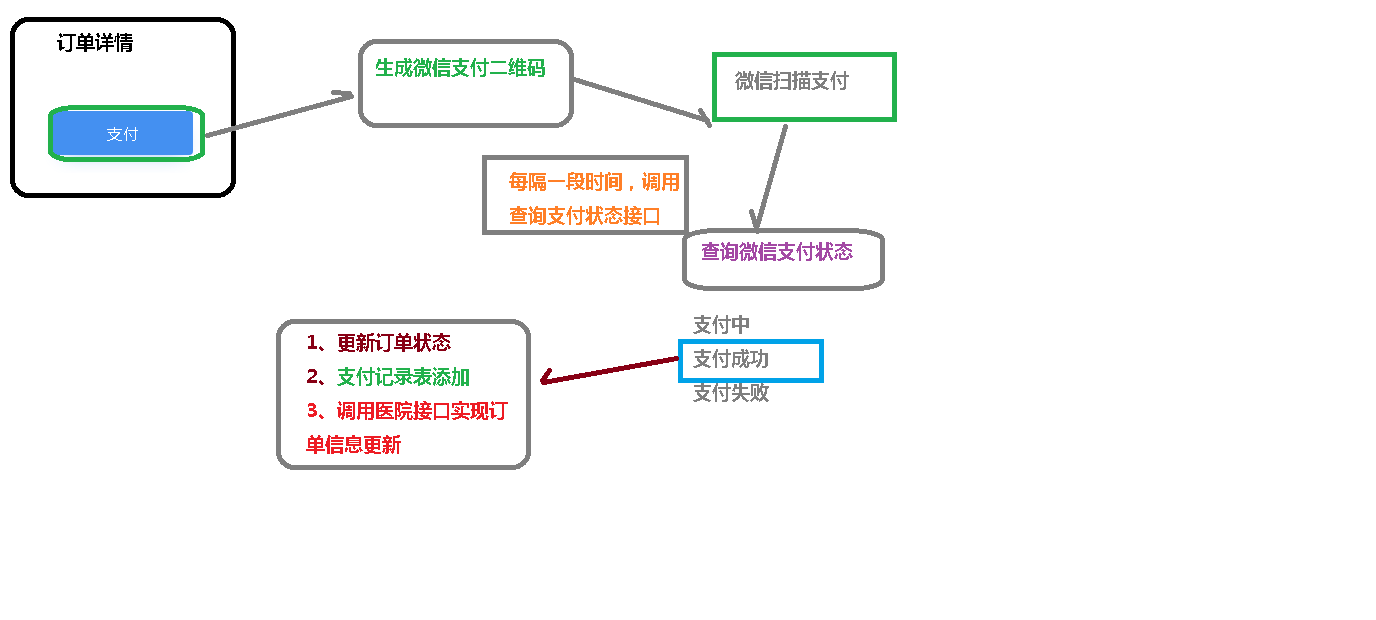
10.5 微信支付功能
10.6 订单取消功能
点击取消预约按钮-------> service-order模块 /api/order/orderInfo/auth/cancelOrder/{orderId} -------->得到订单信息,判断是否已过可取消时间 ---------> 调用医院接口(hospital-manage)实现预约取消 -----------> 调用微信退款方法

 浙公网安备 33010602011771号