

Appium移动端自动化测试之滑动封装实战(八)
desired_caps = {
    'platformName': 'Android',
    'platformVersion': '5.0.0.0',
    'deviceName': '127.0.0.1:62001',
    'appPackage': 'com.shanjian.originaldesign',
    'appActivity':'.activity.other.Activity_In'
}

driver = webdriver.Remote('http://127.0.0.1:4723/wd/hub',desired_caps)
#登录
sleep(5)
driver.find_element_by_id("com.shanjian.originaldesign:id/edit_Tel").clear()
driver.find_element_by_android_uiautomator('new UiSelector().text("输入手机号码")').send_keys("15817252876")
driver.find_element_by_id("com.shanjian.originaldesign:id/edit_Pwd").send_keys("123456")
driver.find_element_by_android_uiautomator('new UiSelector().text("登录")').click()
sleep(5)

driver.find_element_by_name("我的").click()
sleep(5)

print('开始向上滑动....')
def  swipeUp(t=1000,n=1):
    '''封装向上滑动方法'''
    l = driver.get_window_size()
    print(l)     #dict{'width': 720, 'height': 1280}
    x1 = l['width'] *  0.5  #获取宽度x1
    y1 = l['height'] * 0.75 #起始值y1
    y2 = l['height'] * 0.25 #结束值y2
    for  i  in range(n):
        driver.swipe(x1,y1,x1,y2,t)
swipeUp(3000)

sleep(3)
print('开始向下滑动...')
def swipeDown(t=None,n=1):
    '''向下滑动方法'''
    l = driver.get_window_size()
    print(l)  # dict{'width': 720, 'height': 1280}
    x1 = l['width'] *  0.5   # 获取宽度x1
    y1 = l['height'] * 0.25  # 起始值y1
    y2 = l['height'] * 0.75  # 结束值y2
    for i in range(n):
        driver.swipe(x1, y1, x1, y2,t)
swipeUp(3000)

def swipeLeft(t=None,n=1):
    '''向左滑动方法'''
    l = driver.get_window_size()
    print(l)  # dict{'width': 720, 'height': 1280}
    x1 = l['width'] *  0.75  # 获取宽度x1
    y1 = l['height'] * 0.5  # 起始值y1
    x2 = l['height'] * 0.25  # 结束值y2
    for i in range(n):
        driver.swipe(x1, y1, x2, y1,t)


def swipeDown(t=None,n=1):
    '''向右滑动方法'''
    l = driver.get_window_size()
    print(l)  # dict{'width': 720, 'height': 1280}
    x1 = l['width']  * 0.25  # 获取宽度x1
    y1 = l['height'] * 0.5  # 起始值y1
    x2 = l['height'] * 0.75  # 结束值y2
    for i in range(n):
        driver.swipe(x1, y1, x2, y1,t)
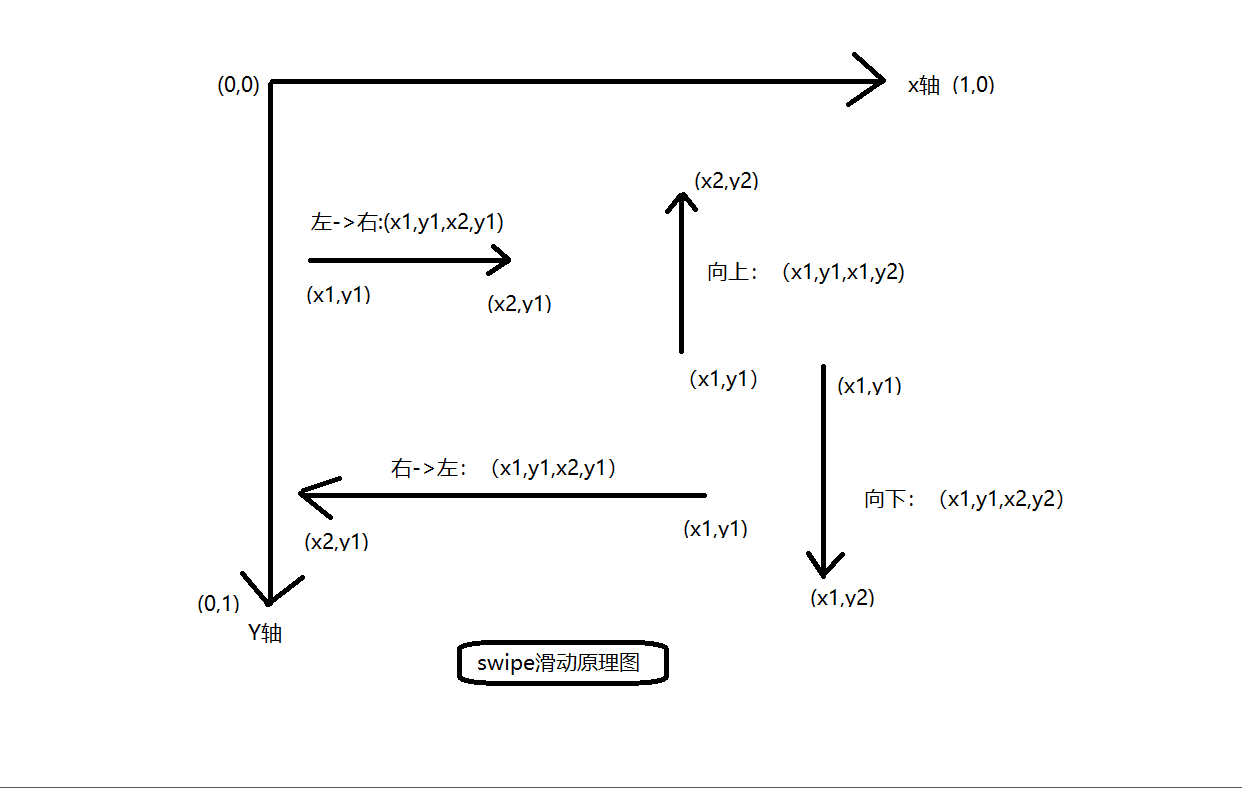
完整源码:
'''
:Args:
- start_x - 开始滑动的 x 坐标
- start_y - 开始滑动的 y 坐标
- end_x  - 结束点 x 坐标
- end_y - 结束点 y 坐标
- duration - 持续时间,单位毫秒

:Usage:
driver.swipe(100, 100, 100, 400)

'''

from appium.webdriver.support import expected_conditions as EC
from appium.webdriver.support.ui import WebDriverWait
from time import sleep
from appium import webdriver


desired_caps = {
                'platformName': 'Android',
                'deviceName': '30d4e606',
                'platformVersion': '4.4.2',
                'appPackage': 'com.taobao.taobao',
                'appActivity': 'com.taobao.tao.welcome.Welcome'
                }
'''
参数 1:driver
参数 2:t 是持续时间
参数 3:滑动次数
'''

driver = webdriver.Remote('http://127.0.0.1:4723/wd/hub',desired_caps)
sleep(8)

def swipeUp(driver, t=500, n=1):
    '''向上滑动屏幕'''
    l = driver.get_window_size()
    x1 = l['width'] *  0.5  # x 坐标
    y1 = l['height'] * 0.75 # 起始 y 坐标
    y2 = l['height'] * 0.25 # 终点 y 坐标
    for i in range(n):
        driver.swipe(x1, y1, x1, y2, t)

def swipeDown(driver, t=500, n=1):
    '''向下滑动屏幕'''
    l = driver.get_window_size()
    x1 = l['width']  * 0.5 # x 坐标
    y1 = l['height'] * 0.25 # 起始 y 坐标
    y2 = l['height'] * 0.75 # 终点 y 坐标
    for i in range(n):
        driver.swipe(x1, y1, x1, y2, 1)


def swipLeft(driver, t=500, n=1):
    '''向左滑动屏幕'''
    l = driver.get_window_size()
    x1 = l['width']  * 0.75
    y1 = l['height'] * 0.5
    x2 = l['width']  * 0.05
    for i in range(n):
        driver.swipe(x1, y1, x2, y1, t)


def swipRight(driver, t=500, n=1):
    '''向右滑动屏幕'''
    l = driver.get_window_size()
    x1 = l['width']  * 0.05
    y1 = l['height'] * 0.5
    x2 = l['width']  * 0.75
    for i in range(n):
        driver.swipe(x1, y1, x2, y1, t)

if __name__ == "__main__":
    print(driver.get_window_size())
    sleep(8)
    swipeUp(driver,n=1)
    sleep(8)
    swipeDown(driver,n=1)

将喜欢的一切留在身边,这便是努力的意义。

 浙公网安备 33010602011771号