
stringr包——使用stringr处理字符串
10.1 简介
stringr包中的函数名称更加直观,并且都是str_开头
library(stringr)
10.2 字符串基础
注意,字符串的打印形式与其本身的内容不是相同的,因为打印形式中会显示出转义字符。
如果想要查看字符串的初始内容,可以使用writelines()函数:
> x <- c("\"","\\")
> x
[1] "\"" "\\"
> writeLines(x)
"
\
还有些特殊字符。
以及所有平台都有效的非英文字符写法"\u00b5"
> x <- "\u00b5"
> x
[1] "µ"
10.2.1 字符串长度
> str_length(c("a","R for data science", NA))
[1]  1 18 NA
10.2.2 字符串组合
# 组合两个或多个的字符串
> str_c("x","y","z")
[1] "xyz"

# 使用sep参数来控制字符串间的分隔方式
> str_c("x","y",sep = ",")
[1] "x,y"

# 使用collapse参数将字符串向量进行向量化组合后将每一项组合在一起
> str_c("a",letters, collapse = ", ")
[1] "aa, ab, ac, ad, ae, af, ag, ah, ai, aj, ak, al, am, an, ao, ap, aq, ar, as, at, au, av, aw, ax, ay, az"

# 缺失值可传染的。如果想要将它们输出为“NA”,可以使用str_replace_na()
> x <- c("abc", NA)
> str_c("|-", x, "-|")
[1] "|-abc-|" NA
> str_c("|-", str_replace_na(x), "-|")
[1] "|-abc-|" "|-NA-|"

# str_c()函数是向量化
> str_c("prefix-", c("a", "b", "c"), "-suffix")
[1] "prefix-a-suffix" "prefix-b-suffix" "prefix-c-suffix"

# 长度为0的对象会 被无声无息地丢弃。这与if结合起来特别游泳:
> name <- "Hadley"
> birthday <- FALSE
> time_of_day <- "morning"
> str_c(
+   "Good ", time_of_day, " ", name,
+   if (birthday) " and HAPPY BIRTHDAY",
+   "."
+ )
[1] "Good morning Hadley."
10.2.3 字符串取子集
可以使用str_sub()函数来提取字符串的一部分。还包括start和end参数,它们给出字符串的位置(包括start和end在内)
> x <- c("Apple", "Banana", "Pear")
> str_sub(x, 1, 3)
[1] "App" "Ban" "Pea"

# 复数表示从后往前数
> str_sub(x, -3, -1)
[1] "ple" "ana" "ear"

# 字符串过短,str_sub()函数也不会出错
> str_sub("a", 1, 5)
[1] "a"

还可以使用str_sub()函数的赋值形式来修改字符串
> str_sub(x, 1, 1) <- str_to_lower(str_sub(x, 1, 1))
> x
[1] "apple"  "banana" "pear"
10.2.4 区域设置
文本进行大小写转换函数有str_to_lower()、str_to_upper()和str_to_title(),但是,大小写转换更复杂,因为不同的语言转换规则不同,可以通过locale设置选择使用哪些规则。如果没有设置会使用操作系统提供的当前区域设置。
#区域设置可以参考ISO 639语言编码标准
# 土耳其语中的转换
> str_to_upper(c("i"))
[1] "I"
> str_to_upper(c("i"),locale = "tr")
[1] "İ"
受区域影响的另一种重要操作是排序。R基础包中的order()和sort()函数
> x <- c("apple", "eggplant", "banana")
> str_sort(x, locale = "en") #英语
[1] "apple"    "banana"   "eggplant"
> str_sort(x, locale = "haw") #夏威夷语
[1] "apple"    "eggplant" "banana"
10.2.5 练习
(1) 在没有使用 stringr 的那些代码中,你会经常看到 paste() 和 paste0() 函数,这两个函
数的区别是什么? stringr 中的哪两个函数与它们是对应的?这些函数处理 NA 的方式有
什么不同?
paste("foo", "bar")
#> [1] "foo bar"
paste0("foo", "bar")
#> [1] "foobar"

str_c("foo", "bar")
#> [1] "foobar"
str_c("foo", NA)
#> [1] NA
paste("foo", NA)
#> [1] "foo NA"
paste0("foo", NA)
#> [1] "fooNA"
(3) 使用 str_length() 和 str_sub() 函数提取出一个字符串最中间的字符。如果字符串中的
字符数是偶数,你应该怎么做?
扩展
• floor:向下取整,即不大于该数字的最大整数
• ceiling:向上取整,即不小于该数字的最小整数
• trunc:取整数部分
• round:保留几位小数
• signif:保留几位有效数字,常用于科学技术
参考:https://www.jianshu.com/p/c808c8cdf504
#第一种
x <- c("a", "abc", "abcd", "abcde", "abcdef")
L <- str_length(x)
m <- ceiling(L / 2)
str_sub(x, m, m)
#> [1] "a" "b" "b" "c" "c"

#第二种
median(seq_len(str_length(test)))
(4) str_wrap() 函数的功能是什么?应该在何时使用这个函数?
可以看到 str_wrap() 函数就是指定插入字符的位置,比如 width = 10,将会每十个字符(包括空格)加一个换行符 \n。
• width:每一行的宽度,正整数
• indent:每个段落第一行的非负整数缩进,即首行缩进
• exdent:非负整数,在每个段落中给下行作缩进,非首行缩进
> ?str_wrap
> test <- "R would not be what it is today without the invaluable help of these\npeople outside of the R core team"
> cat(str_wrap(test, width = 30), "\n")
R would not be what it is
today without the invaluable
help of these people outside
of the R core team
> cat(str_wrap(test, width = 30, indent = 2), "\n")
  R would not be what it is
today without the invaluable
help of these people outside
of the R core team
> cat(str_wrap(test, width = 30, exdent = 2), "\n")
R would not be what it is
  today without the invaluable
  help of these people outside
  of the R core team
用处:当我们在做 GO、KEGG 等情况下,文本内容过长,需要换行展示,这时候就可以配合 str_wrap() 函数。详情可参考 Y 叔的公众号推文:ggplot2画图,文本太长了怎么办?
p +
  scale_x_discrete(labels=function(x) str_wrap(x, width=10))

5 str_trim() 函数的功能是什么?其逆操作是哪个函数?
用来去除空白的函数:
• str_trim() removes whitespace from start and end of string; 移除首尾
• str_squish() also reduces repeated whitespace inside a string;中间的也移除
都有一参数 side:删除空白的边(left, right or both)
?str_trim()

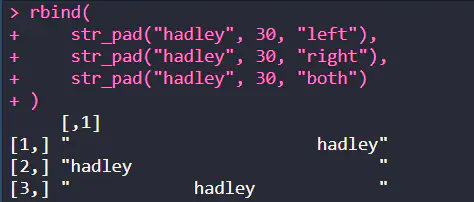
逆操作函数为 str_pad() 加上空白
• width:加上字符后的字符长度,当指定长度小于本身字符长度时候不会改变
• side:加在哪边
• pad:填充字符,默认为空白
> str_pad("a", 10, pad = c("-", "_", " "))
[1] "---------a" "_________a" "         a"
> str_length(str_pad("hadley", 30, "left"))
[1] 30
当指定长度小于本身字符长度时候不会改变
> str_pad("hadley", 3)
[1] "hadley"
参考:https://www.jianshu.com/p/c808c8cdf504
6 编写一个函数将字符向量转换为字符串,例如,将字符向量 c("a", "b", "c") 转换为字符串 "a, b and c"。仔细思考一下,如果给定一个长度为 0、1 或 2 的向量,那么这个函数应该怎么做?
+   n <- length(x)
+   if (n == 0) {
+     NA
+   }else if (n == 1){
+     x
+   }else if(n == 2){
+     str_c(x[[1]], " and ", x[[2]])
+   }else{
+     not_last <- str_c(x[1:n-1], collapse = ", ")
+     str_c(not_last, x[n], sep = " and ")
+   }
+ }
> str_trans(c("a", "b", "c"))
[1] "a, b and c"
10.3 使用正则表达式进行模式匹配 (区分大小写)
10.3.1 基础匹配
> x <- c("apple", "banana", "pear")
> str_view(x, "an")

更复杂的一些模式是使用.,它可以匹配任意字符(除了换行符):
> str_view(x, ".a.")

使用字符串来表示正则表达式,而且\在字符串中也用作转义字符,所以正则表达式\.的字符串形式应是\\.
> str_view(c("abc","a.c","bef"),"a\\.c")

建立\\的正则表达式,字符串写作"\\\\"
> x <- "a\\b"  # 字符串输入与匹配时所用字符串字符相同
> writeLines(x)
a\b
> str_view(x, "\\\\")

10.3.2 练习
1 解释一下为什么这些字符串不能匹配一个反斜杠 \ :""、""、""。
"":转义符号 \ 后的一个字符
"\":这将解析到正则表达式中的 \,它将转义正则表达式中的下一个字符。
"\":前两个反斜杠将解析为正则表达式中的文字反斜杠,第三个将转义下一个字符。在正则表达式中,它会转义一些转义的字符。
2 如何匹配字符序列 "'\ ?
> writeLines("\"\'\\\\")
"'\\
> str_view("\"'\\", "\"\'\\\\")
3 正则表达式 ...... 会匹配哪种模式?如何用字符串来表示这个正则表达式?
\..\..\.. 表示匹配 .任意字符.任意字符.任意字符,比如 .x.y.z。
> str_view(c(".a.b.c", ".a.b", "....."), c("\\..\\..\\.."), match = TRUE)

10.3.3 锚点
- ^从字符串开头进行匹配
- \(从字符串末尾进行匹配 始于权利,终于金钱 匹配^,使用\\^字符串匹配 匹配\),使用\字符串匹配
10.3.4
1 如何匹配字符串 "\(^\)" ?
> str_view(c("$^$", "ab$^$c"), "^\\$\\^\\$$")
2 给定stringr::words 中的常用单词语料库,创建正则表达式以找出满足下列条件的所有单词。
因为这个列表非常长,所以你可以设置 str_view() 函数的 match 参数,只显示匹配的
单词(match = TRUE)或未匹配的单词(match = FALSE)。
a. 以 y 开头的单词。
以 y 开头的单词
> test <- stringr::words
> str_view(test, "^y", match = TRUE)

b. 以 x 结尾的单词。
以 x 结尾的单词
> str_view(test, "x$", match = TRUE)
image
c. 长度正好为 3 个字符的单词。(不要使用str_length() 函数,这是作弊!)
长度正好为 3 个字符的单词,太多,截取部分图
> str_view(test, "^...$", match = TRUE)

d. 具有 7 个或更多字符的单词。

具有 7 个或更多字符的单词
> str_view(test, ".......", match = TRUE)
或者
> reg1 <- str_c(rep(".", 7), collapse = "")
> str_view(test, reg1, match = TRUE)
或者
{7} 表示重复七次
> str_view(test, ".{7}", match = TRUE)
{7,} 表示重复七次及其以上
> str_view(test, ".{7,}", match = TRUE)
{7,9} 表示重复七次到九次
10.3.5 字符串与字符选项
- \d可以匹配任意数字
- \s可以匹配任意空白字符(如空格、制表符和换行符)
- [abc]可以匹配a、b、c
- [^abc]可以匹配除a、b、c外的任意字符
- 字符选项创建多个可选模式。 |的优先级最低
abc|xyz匹配的是abc或xyz
ab(c|x)yz匹配的是abcyz或abxyz ( 和 |不用转义
10.3.6 练习
10.3.7 重复
- ?:0次或1次
- +:1次或多次
- *:0次或多次
精确设置匹配次数
- {n}:匹配n次
- {n,}:匹配n次或更多次
- {,m}:最多匹配m次
- {n, m}:匹配到m次
10.3.8 练习
^.*$ 匹配所有字符
10.3.9 分组与回溯引用
括号可以定义分组,可以的通过\1和\2等回溯引用
str_view("abcbcddd","(bc)\\1")

10.4 工具
10.4.1匹配检测
str_detect()
> x <- c("apple", "banana", "pear")
> str_detect(x, "e")
[1]  TRUE FALSE  TRUE
与mean()和sum()联用有很大用处
> # 有多少个以t开头常用的单词
> sum(str_detect(words, "^t"))
[1] 65
> #以元音字母结尾的常用单词的比例是多少
> mean(str_detect(words, "[aeiou]$"))
[1] 0.2765306
找出不含元音字母所有单词的两种方法
identical判断两者是否相同
> #找出至少包含一个元音字母的所有单词,然后取反
> no_vowels_1 <- !str_detect(words, "[aeiou]")
> #找出仅包含辅音字母的所有单词
> no_vowels_2 <- str_detect(words, "^[^aeiou]+$")
> #判断两者是否相同
> identical(no_vowels_1,no_vowels_2)
[1] TRUE
选区匹配元素
> words[str_detect(words, "x$")]
[1] "box" "sex" "six" "tax"
> str_subset(words, "x$")
[1] "box" "sex" "six" "tax"
结合filter处理数据框
seq_along根据元素次序依次生成1,2,3,4……
> df <- tibble(word = words,
+              i = seq_along(words))
> df
# A tibble: 980 x 2
   word         i
   <chr>    <int>
 1 a            1
 2 able         2
 3 about        3
 4 absolute     4
 5 accept       5
 6 account      6
 7 achieve      7
 8 across       8
 9 act          9
10 active      10
# … with 970 more rows
> df %>%
+ filter(str_detect(words, "x$"))
# A tibble: 4 x 2
  word      i
  <chr> <int>
1 box     108
2 sex     747
3 six     772
4 tax     841
str_detect()是str_count()的变体,后者不是简单的返回是或否,而是返回字符串中匹配的数量。
注意匹配不会重叠
> x <- c("apple", "banana", "pear")
> str_count(x, "a")
[1] 1 3 1
> #平均来看每个单词中有多少个元音字母
> mean(str_count(words, "[aeiou]"))
[1] 1.991837

> #同mutate()函数一同使用
> df %>%
+   mutate(
+     vowels = str_count(words, "[aeiou]"),
+     consonants = str_count(words, "[^aeiou]")
+   )
# A tibble: 980 x 4
   word         i vowels consonants
   <chr>    <int>  <int>      <int>
 1 a            1      1          0
 2 able         2      2          2
 3 about        3      3          2
 4 absolute     4      4          4
 5 accept       5      2          4
stringr中的许多函数都是成对出现的
- 一个用于单个匹配
- 一个用于全部匹配 _all()
> str_view("abababa", "aba")

> str_view_all("abababa", "aba")

10.4.3 练习
#找出以x开头或结尾的所有单词
str_subset(words, "^x|x$")
#找出以元音字母开头并以辅音字母结尾的单词
str_subset(words, "^[aeiou].*[^aeiou]$")
words[str_detect(words, "a") &
        str_detect(words, "e") &
        str_detect(words, "i") &
        str_detect(words, "o") &
        str_detect(words, "u")]
#哪个单词包括最多的元音字母?哪个单词包含最大比例的元音字母
d_num <- str_count(words, "[aeiou]")
max_num <- max(d_num)
words[which(d_num == max_num)]
max_num

ratio <- str_count(words, "[aeiou]") / str_length(words)
words[ratio == max(ratio)]
10.4.3 提取匹配内容
找出包含一种颜色的句子
str_extract()只提取第一个匹配
colors <- c("red", "orange", "green", "blue", "purple")
color_match <- str_c(colors, collapse = "|")
has_color <- str_subset(sentences, color_match)
matches <- str_extract(has_color, color_match)
> head(matches)
[1] "blue" "blue" "red"  "red"  "red"  "blue"
可以先提取出多于一种的匹配
str_extract()返回一个列表
simpify = TRUE参数返回矩阵
> more <- sentences[str_count(sentences, color_match) > 1]
> str_extract(more, color_match)
[1] "blue"   "green"  "orange"
> str_extract_all(more, color_match)
[[1]]
[1] "blue" "red"

[[2]]
[1] "green" "red"

[[3]]
[1] "orange" "red"

> str_extract_all(more, color_match, simplify = T)
     [,1]     [,2]
[1,] "blue"   "red"
[2,] "green"  "red"
[3,] "orange" "red"

> x <- c("a", "ab", "abc")
> str_extract_all(x,"[a-z]", simplify = T)
     [,1] [,2] [,3]
[1,] "a"  ""   ""
[2,] "a"  "b"  ""
[3,] "a"  "b"  "c"

 浙公网安备 33010602011771号